
Apache Spark WTF??? — All I Have To Do Is Stream
As 2024 comes to a close, I’ve come to realize just how much I enjoy teaching — even if it’s just sharing the little I know. I may not be…

“When I want you in my charts
When I want you and all your datamarts
Whenever I want you, all I have to do is
Stream, stream, stream, stream”
(adapted from All I Have To Do Is Dream’ by The Everly Brothers)
Streaming in a Nutshell
Introduction
Streaming data has become a key driver of innovation, shifting from a niche practice to a mainstream trend embraced by companies worldwide. Today, businesses of all sizes rely on real-time data to stay competitive and responsive in a fast-paced, data-driven economy. It’s no longer just about being “cool” — streaming has become essential for modern data processing.
My first encounter with real-time data streaming was over 20 years ago while working on a project for a major tour operator and an airline system. The goal was to ensure the availability of flight information, and we used IBM MQ for seamless, real-time message communication. Although streaming was not as widespread then, this early use of message queues showed me the power and necessity of handling live data.
Today, with messaging platforms like Apache Kafka on the server side and powerful processing engines like Apache Spark and Apache Flink on the client side, streaming data is more accessible than ever. As the tech landscape rapidly evolves, adopting real-time data solutions has moved beyond being just a symbol of innovation — it has become a critical necessity for companies that want to stay relevant and ahead of the competition.
Alright, all of that sounds great, but…
What Exactly is Streaming?
In the magical realm of data, we can classify data into two primary categories:
- Bounded Data: This data has a fixed, unchanging structure at the time of processing, with a predetermined order. It’s typically processed in batch applications. Analogy: Vehicles parked in a lot, all in a fixed position.
- Unbounded Data: This data is dynamic, continuously evolving, and doesn’t follow a set order during processing. It’s processed in real-time streaming applications. Analogy: Vehicles on a highway, constantly moving and unpredictable.
Streaming then is a continuous, real-time flow of data processed as it’s generated (unbounded data), rather than in batches. It’s event-driven, handling events like user actions, IoT sensor data, or system logs. Designed for low latency, it provides near-instant insights or triggers actions. Streaming systems must also be highly scalable to efficiently manage fluctuating data volumes and speeds.
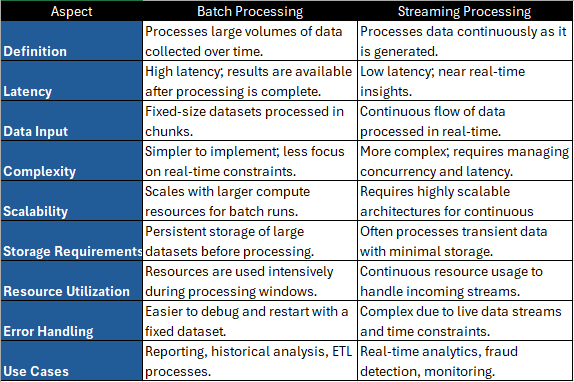
Main differences between batch and streaming processing
Streaming Systems
Open-source streaming systems are essential for building scalable, real-time data processing architectures. The following OS Apache popular platforms offer distinct features for handling high-throughput, fault-tolerant messaging and event-driven communication.
- Apache Kafkais a high-throughput, fault-tolerant distributed streaming platform ideal for building real-time data pipelines and handling large-scale data streams with low latency.
- Apache Pulsaris a distributed messaging system supporting pub-sub and queue-based patterns, with built-in multi-tenancy and geo-replication for high availability and scalability.
- Apache ActiveMQis a reliable message broker for enterprise integration, supporting various messaging protocols and enabling communication between distributed systems.
Also, commercial streaming platforms offer managed solutions for real-time data processing, providing enhanced reliability, scalability, and ease of integration for enterprises.
- Confluent Cloud is a fully managed Kafka service that provides seamless scaling and integrations in the cloud, simplifying the deployment and management of real-time data streaming pipelines.
- Redpanda is a Kafka-compatible streaming platform designed for low-latency, cloud-native data processing, optimized for minimal resource usage while maintaining high performance.
- IBM MQis a reliable message queuing system that ensures secure, persistent communication between distributed applications, supporting various messaging protocols for enterprise environments.
Last but not least, major cloud providers offer its own robust managed services for real-time data streaming and event processing, each tailored to their respective ecosystems:
- Amazon Kinesis (AWS)is afully managed service that enables real-time data ingestion and analytics at scale, suitable for processing large volumes of streaming data.
- Azure Event Hubs (Azure) is acloud-native event ingestion service designed for high-throughput and low-latency data streaming, seamlessly integrating with Azure’s ecosystem.
- Google Cloud Pub/Sub (GCP) is a managed messaging service that facilitates real-time event streaming, offering scalable and reliable messaging for event-driven architectures.
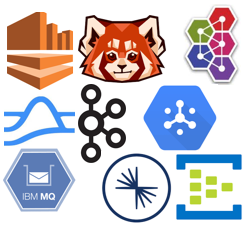
Some well-known streaming systems
Kafka Communication Model
Apache Kafka has become the standard for messaging systems due to its high-throughput, fault-tolerant, and scalable architecture for real-time data streams. Designed by LinkedIn, Kafka’s distributed model and ecosystem are key to modern data pipelines. Streaming systems like Apache Pulsar, Redpanda, and Confluent Cloud have adopted Kafka’s communication model with topics, producers, and consumers.
At the heart of Kafka’s communication model is its publish-subscribe pattern in which messages are organized into topics where producers publish and consumers subscribe.
Main components of this pattern:
- Producers: Send messages to topics without worrying about how they are stored or consumed.
- Topics: Logical channels that organize messages.
- Partitions: Topics are divided into partitions for scalability, enabling parallel processing. A partition is essentially a sequence of messages.
- Consumers: Subscribe to topics, read messages sequentially, and track progress using offsets.
- Consumer Groups: Allow parallelism by ensuring each message in a partition is processed by only one consumer in the group.
- Brokers: Manage topics, partitions, and message replication for fault tolerance.
- Replication: Ensures durability and availability by replicating partitions across multiple brokers.
- Offsets: Track the position of consumed messages, enabling consumers to resume processing seamlessly.
Most important takeaways from Kafka’s Communication Pattern:
- Multiple consumers can read from the same topic, either independently or as part of consumer groups.
- In a consumer group, only one consumer can consume from a given partition, ensuring no overlap in message processing.
- Different consumer groups can independently consume from the same partition, enabling multiple use cases for the same data.
- Consumers read messages in the order they were produced within each partition.
Streaming Like A Newbie
Spark Structured Streaming
Enables real-time or near-real-time data processing using incremental execution, offering a unified approach for both batch and streaming workloads with the same DataFrame/Dataset API. It supports event-time processing to handle out-of-order or late data with watermarks and guarantees exactly-once processing, ensuring no duplicates or missed data.
Key points include:
- Unified Batch and Streaming: Same API for both batch and streaming workloads.
- Event-Time Support: Handles out-of-order data using watermarks.
- Exactly-Once Processing: Guarantees reliable, consistent results with no data duplication or loss.
- Fault Tolerance: Ensured through checkpointing and write-ahead logs for recovery.
- Declarative API: Simplifies stream processing with SQL-like queries.
- Flexible Output Modes: Supports append, update, and complete for different data-writing needs.
- Integration: Native support for Kafka, Kinesis, HDFS, and more.
- Performance Optimization: Uses Catalyst optimizer and Tungsten execution engine for low latency and scalability.
How Structured Streaming Works?
In Structured Streaming, a data stream is seamlessly treated as an unbounded table that continuously updates as new data arrives. As data is processed, new rows are appended to the table, allowing it to grow incrementally with each event. The execution can occur in two modes: micro-batch, where data is processed in small batches at regular intervals, and continuous (experimental), where data is processed record by record for lower latency.
Fault tolerance is achieved through checkpointing and write-ahead logs, allowing data recovery in case of failures:
- Checkpointing: Saves the intermediate state of a streaming query to reliable storage, allowing the system to recover from failures by reprocessing only the data that was not yet processed, ensuring fault tolerance and exactly-once processing guarantees.
- Write-ahead logs: Ensure fault tolerance by saving incoming data to reliable storage (such as HDFS) before processing, allowing the system to recover and replay lost data in case of failure, maintaining consistency and reliability. Disabled by default, it is enabled via
spark.streaming.receiver.writeAheadLog.enableSpark parameter and requires checkpointing for recovery.
The process begins by configuring a streaming read from a data source to define an input table. A query is then applied to this input table, and the results are stored in a results table, reflecting the processed data. The streaming pipeline persists updates to an external sink, ensuring data is continuously written to an external system. With each trigger interval, new rows are appended to the input table, allowing the data stream to grow and evolve in real-time.
In-Depth Look at a Streaming Query
The following code shows the example of a streaming query that reads data from a Kafka topic, applies some transformations and finally appends the results to a Delta table.
from pyspark.sql import SparkSession

# 1. Create a SparkSession
spark = SparkSession.builder \
    .appName("KafkaToDeltaStreamingTest") \
    .getOrCreate()

# 2. Configure the reading of streaming data from Kafka
query = spark.readStream \
    .format("kafka") \
    .option("kafka.bootstrap.servers", "host1:port1,host2:port2") \
    .option("subscribe", "topic") \
    .option("startingOffsets", "earliest")\
    .load()

# 3. Apply transformations to the streaming data
query = query \
    .selectExpr("CAST(key AS STRING)", "CAST(value AS STRING)") \
    .select("key", "value")

# 4. Configure the writing of the streaming data to Delta Lake
query = query.writeStream \
    .format("delta") \
    .outputMode("append") \
    .queryName("my_streaming_query") \
    .trigger(processingTime="1 minute") \
    .option("path", "/path/to/targetDeltaFolder/") \
    .option("checkpointLocation", "/path/to/checkpointingFolder/") \
    .start()

# 5. Keep the query running
query.awaitTermination()
In the first step, we create the SparkSession as always, there is no difference at all in getting the session with a batch Spark application.
Secondly, we define the source of our data, what we want to read in an streaming fashion. Have into account that even though we’re using the Spark Structured Streaming API, our source data doesn’t necessarily has to be a streaming source. Other interesting formats are:
- csv/json/parquet/delta: Creates a stream from a static file or table. This is super useful for testing purposes.
- rate: Simulates a continuous stream of data. Useful not only for testing and benchmarking purposes, but also to convert batch into streaming applications — for example, imagine you want to create a streaming process that calls some API every x seconds to get some data — . It generates rows at a specified rate, with each row containing a timestamp and an incremental value. You can control the number of rows per second using the
rowsPerSecondoption.
It’s important to note that the DataFrame returned by the load() method is a special type, with its .isStreaming attribute set to True. If you try to apply actions like show() or count() on this DataFrame, you will encounter the following error: Queries with streaming sources must be executed with writeStream.start().
The third step is optional, but unless your pipeline is just loading and writing raw data, you’ll likely want to apply transformations or validations to the source data. In Spark Structured Streaming, some operations are not supported or recommended, such as shuffling operations (e.g., distinct(), groupBy() without windows, and certain join()), non-deterministic functions (e.g., rand(), uuid()), and operations like collect() or show() that require materializing the entire DataFrame. Union operations require compatible schemas, and random or unbounded operations (e.g., sample(), randomSplit()) are avoided due to continuous data flow. Additionally, foreach() has limitations for complex operations, as it must be designed for distributed processing.
Once we have applied all the transformations to our DataFrame, we’ll have to do something with that data, for that we use the method writeStream(). We can set the output format can be a file, a table or another streaming target like another Kafka topic, for example. We can also configure the console format that is quite similar to apply a show() method in an static DataFrame.
Streaming queries in Spark process data continuously, and the method outputMode() specifies how the data is written to the sink, similar to the “save” mode for static DataFrames. The available output modes vary based on the transformations and sinks used in the streaming query, and may be among the following:
- append (default): Only the new rows added to the result table since the last trigger are written to the sink.
- complete: The entire updated result table is written to the sink, with handling defined by the sink implementation.
- update: Only the new rows and any rows in the result table that have been updated since the last trigger are written to the sink.
The trigger() method determines when new data should be processed, controlling the frequency of data processing in streaming applications. It supports three main types:
- ProcessingTime Trigger (default): Processes data at fixed intervals (e.g.,
.trigger(processingTime="1 minute")). In Databricks, the default interval is 500ms, while in Apache Spark, each microbatch is processed immediately after the previous one completes. - Once Trigger: Processes data once and then exits, similar to a batch query (e.g.,
.trigger(once=True)). - Continuous Trigger (Experimental): Processes data as it arrives, offering low-latency processing(e.g.,
.trigger(continuous="2 seconds")).
Finally, when a streaming query is started, Spark runs it in a separate thread, so the main thread must account for this. If no other tasks are running, the main thread should wait indefinitely or until a specified exit event. Without this, the main thread will terminate, stopping the streaming query. For a single query, use query.awaitTermination(), but for multiple queries, use spark.streams.awaitTermination() to block until all queries finish or are stopped.
Streaming Like a PRO
Structured Streaming offers advanced capabilities for real-time data processing, allowing developers to handle complex workflows, integrate dynamic data sources, and deliver near-instant insights, pushing the limits of modern streaming analytics. Among those capabilitiese are:
- Event Time Processing: Processes data based on event timestamps, not arrival time, ensuring accurate time-based operations and windowing.
- Watermarking: Discards events that arrive later than a specified threshold, ensuring that only timely data is processed while preventing unnecessary delays.
- Stateful Processing: Supports operations that retain and update state across multiple batches (e.g., aggregations, joins), enabling tasks like running totals and sessionization.
- Event Windows: Facilitates time-based processing using fixed or sliding windows for operations like 5-minute aggregations.
- Backpressure Handling: Automatically adjusts processing speed to prevent system overload during high data influx, maintaining stability.
- Schema Evolution: Automatically detects and manages schema changes in streaming data, easing integration with evolving data sources.
- Integration with Delta Lake: Ensures ACID transactions, schema enforcement, and strong consistency for both batch and streaming data, supporting operations like upserts and deletes.
- Custom Sources and Sinks: Enables the creation of custom sources and sinks for flexible integration with various systems, such as REST APIs or custom databases.
- Built-in Monitoring and Metrics: Provides detailed insights into stream progress, throughput, and resource usage to manage long-running streaming applications.
Common Pitfalls
Misconfiguring Checkpointing
Pitfall: Not enabling checkpointing or placing checkpoints on unreliable storage.
Impact: No fault recovery; job restarts result in data loss or duplicates.
Solution: Always use reliable storage (e.g., HDFS, S3) for checkpointing.
Overlooking Event-Time Handling
Pitfall: Using processing time instead of event time for operations like windowing.
Impact: Incorrect results due to late-arriving or out-of-order events.
Solution: Use withWatermark()to handle late data and ensure event-time is used.
Poorly Configured Watermarks
Pitfall: Setting watermarks too small or too large.
Impact: Small watermarks could imply dropping valid late-arriving data, while large watermarks may delay processing and increase state size.
Solution: Analyze data latency and define a reasonable watermark based on SLAs.
Data Skew
Pitfall: Poor partitioning in shuffle operations like groupBy, leading to data skew.
Impact: Some tasks process significantly more data, causing delays.
Solution: Use a good partitioning key. Repartition or coalesce the data strategically.
Underestimating Resource Requirements
Pitfall: Allocating insufficient memory or CPU resources for high-throughput streams.
Impact: OutOfMemoryError, executor failures, or poor performance.
Solution: Perform capacity planning based on input data size. Enable dynamic resource allocation. WRONG Use backpressure! (OK)
Misusing Output Modes
Pitfall: Choosing an inappropriate output mode (append, update, complete).
Impact: Large volumes of redundant data written to sinks.
Solution: Use append for new data only. Use update for incremental changes in aggregations. Avoid complete for large datasets.
Kafka Offset Mismanagement
Pitfall: Failing to properly configure Kafka offsets or checkpoint offsets.
Impact: Re-reading data (duplicates) or skipping data.
Solution: Use startingOffsetscarefully (e.g., “latest” vs. “earliest”). Enable automatic offset management (enable.auto.commit).
Overcomplicating Streaming Queries
Pitfall: Combining too many transformations or joins in a single query.
Impact: Complex jobs are harder to debug and optimize, leading to poor performance.
Solution: Break down complex queries into multiple simpler pipelines. Cache intermediate results if reused.
Caching/Persisting DataFrames Without Unpersisting
Pitfall: Performing cache() or persist() on a DataFrame without cleaning it up using unpersist().
Impact: Failing to unpersist cached DataFrames or unregister temporary tables can cause memory leaks and degrade performance in long-running streaming applications. More on this topic in upcoming articles.
Solution: Always unpersist and unregister DataFrames once they are no longer needed.
Pitfall:
Performing cache() or persist() on a DataFrame without cleaning it up using unpersist().
Spark makes streaming easy but, as we’ve seen, streaming is not that easy. When designing a streaming architecture for an application, there are lots of things to have in mind that you than have to care about when developing a batch process (e.g. watermarking, backpressure, …).
Cloud-based data platforms always try to make our life easier, that’s the reason Databricks has released Delta Live Tables, a feature that pretends to abstract us from having to learn deep dive about streaming, so we don’t have to worry all the finer details about our streaming process.
Sounds to good to be true, as the saying goes, you don’t have to be a chef to enjoy the meal but, still, I always prefer to know how things work underhood. Because when problems and errors arise — and in my 24 years of working experience, I can tell you sooner or later problems and errors arise — you at least have an idea what investigate and don’t get there openmouthed and shocked.
So, if you want to develop streaming application, my advice is to learn the basics, even if some high API like Delta Live Tables does most part for you.
Impact:
Each time a DataFrame is cached or persisted, a new SparkContext is created. In a streaming application, failing to unpersist the DataFrame can gradually lead to a memory leak, causing performance degradation or application failure. Similarly, registering DataFrames as temporary tables without unregistering them can also lead to resource retention issues.
Solution:
Always unpersist and unregister DataFrames once they are no longer needed. This ensures efficient memory usage and avoids potential memory leaks in long-running applications.
Final Thoughts
“I can stream the flow, watch the data grow
Anytime, night or day
Only trouble is, gee whiz
Streaming or Delta Live — which way?”
(adapted from All I Have To Do Is Dream’ by The Everly Brothers)