Apache Spark WTF??? — 😠 Don’t Be K-Mean 😡
“Divide et impera” — this phrase comes from the ancient Roman Empire and, not surprisingly, it’s still relevant today. Although nowadays…
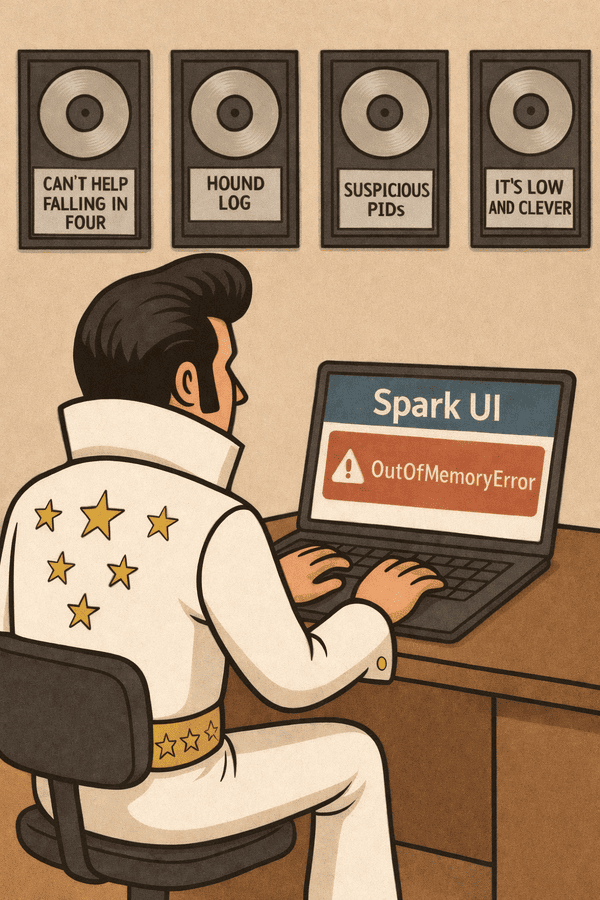
“You know it can be found
K-Means spinning cluster-bound
If memory’s running out
At least give me the error now”
(adapted from “Don’t be cruel” by Elvis Presley)
🎸 K-Means in Spark: Rock ’n’ Roll with Big Data
Alright, baby, imagine your dataset as a stadium full of wild rockers — millions of them, all trying to jam together. You can’t just tell them, “Hey, go find your spot” — the crowd is too massive. Enter Spark, your tour manager, coordinating every move so the show doesn’t blow up. And the headliner? K-Means, the King of Clustering, making sure every rocker finds their rhythm.
Two Ways to Play the Gig
Spark gives us two instruments to rock K-Means:
- MLlib (RDD-based KMeans) — the classic Stratocaster. You can see all the strings, tweak every note, and feel the raw power.
- ML (DataFrame-based KMeans) — the modern synth. Cleaner, pipeline-ready, integrates smoothly with other tracks, and makes your workflow sound polished.
Parallelism: Keep the Band Tight
In a tiny venue, K-Means just loops through the crowd. But here, we’ve got a stadium-sized jam session. Spark divides our rockers into partitions, each handled by a node (executor). Each node:
- Assigns its local fans to the nearest centroid (their favorite stage spot).
- Counts votes and calculates averages.
- Sends results back to the driver (the tour manager).
The driver then moves the centroids slightly to keep the band in harmony. Broadcast the updates, repeat … and before you know it, the stadium is grooving in sync.
Sparse vs. Dense Vectors: Understanding the Data
Before diving into K-Means, it’s important to understand what Spark MLlib means by vectors, features, and data points.
1. Data Points. Each row in our dataset is a data point (or example). In K-Means, a data point represents an observation we want to cluster.
Example: in a text dataset, each document could be a data point.
2. Features. Each data point has one or more features, which are measurable attributes. Features are numeric and describe the data in a way the algorithm can work with.
Example: in text data features might be word counts or some scores, image data features might be pixel intensities. Features together form a vector, representing the data point in a multidimensional space.
3. Vectors. A vector is just an ordered list of numbers corresponding to the features of a data point. Spark MLlib uses vectors to represent all inputs for algorithms like K-Means.
from pyspark.ml.linalg import Vectors

# Dense vector: stores all features explicitly
dense_vec = Vectors.dense([0.0, 1.0, 0.0, 3.5])

# Sparse vector: stores only non-zero features
sparse_vec = Vectors.sparse(4, {1: 1.0, 3: 3.5})- Dense vector: stores every value, including zeros.
- Sparse vector: stores only non-zero values and their positions (indices).
4. Why Sparse vs. Dense Matters for K-Means. MLlib always stores centroids as dense vectors internally, even if our input is sparse. If our vectors have thousands of features, each centroid uses memory = num_features × 8 bytes. With many clusters (k) and high-dimensional data, memory can spike ➜ OOM errors 😱.
Initialization: Setting the First Stage
Where we place the initial centroids has a big impact on K-Means performance and convergence. Spark offers two main options:
1. Random Initialization. Centroids are placed randomly in the feature space.
- Pros: simple, easy to use.
- Cons: can be chaotic — sometimes centroids start too close together, causing slow convergence or poor final clusters.
2. K-Means|| Initialization. A smarter, parallelized method for choosing starting points.
- Pros: spreads centroids more evenly across the data, reduces the chance of unlucky starting positions, often converges faster and produces better clusters.
- Cons: slightly more computation at the beginning, but worth it for large datasets.
Why it matters:
- The initial positions affect how quickly K-Means converges.
- Minimizes the risk of local optima — situations where the algorithm stops improving even though a better overall clustering exists.
- For large Spark jobs, K-Means|| helps control memory usage and computation time by avoiding unnecessary iterations from poor starting points.
Iteration: How K-Means Updates Centroids
After the initial centroids are set (randomly or with K-Means||), K-Means iterates to improve the clustering. Each iteration involves a few coordinated steps across the cluster:
- Assign Each Data Point to Its Nearest Centroid. For each data point, compute the distance to every centroid and assign the point to the cluster of the closest centroid. In Spark, this is done in parallel across nodes, so each executor handles a partition of data points.
- Compute Local Sums and Counts on Each Node. Each node calculates the sum of all feature vectors assigned to each centroid (local sum) and the number of points assigned to each centroid (local count). These are partial results that will be sent to the driver.
- Aggregate Results and Update Centroids on the Driver. The driver gathers each executor’s partial sums and counts, combines them, and computes new centroids by taking the arithmetic mean of all points assigned to each cluster. This update ensures each centroid reflects the true balance point of its assigned data before the next iteration begins.
🤔 Wait — does the driver do any computation?
Yes, but just a tiny, aggregated slice. Executors do the heavy lifting — distance checks, assignments, and local sums/counts. The driver only receives these compact summaries to update centroids, keeping its workload minimal and never touching the full dataset. - Broadcast Updated Centroids Back to the Nodes. The driver sends the new centroids to all nodes using Spark broadcast variables. Nodes now have the updated centroids and are ready for the next iteration.
- Repeat Until Convergence. Steps 1–4 repeat for maxIter times or until the centroids stop moving significantly. At convergence, each point is assigned to its final cluster, and the centroids represent the cluster centers.
How it works
- Explicit Cleanup: Calling
broadcastVar.unpersist()removes the broadcast data from executor caches, andbroadcastVar.destroy()removes it entirely (both executor blocks and driver metadata). - Executor Eviction: Executors may evict broadcast blocks on their own if memory is tight or newer broadcasts arrive. Spark’s block manager uses an LRU-style policy, so old or unused broadcasts get pushed out when space is needed.
- End-of-Job Housekeeping: When a job ends and no references remain, Spark schedules the broadcast data for cleanup. Removal isn’t immediate — it depends on GC cycles and executor housekeeping — but it will eventually vanish.
For iterative algorithms like K-Means, Spark re-broadcasts centroids on every iteration. Old broadcast blocks are dropped once they’re unreferenced, but explicit cleanup helps avoid lingering data buildup — especially when centroids are large or iteration counts are high.

🎶 Greatest Hits
Now that we’ve covered the basics of K-Means and its implementation in MLlib, let’s try a hands-on exercise to reinforce our understanding and explore a bit further.
Our K-Means test in utils.py generates a very large synthetic dataset of sparse feature vectors and runs a K-Means clustering job on it. This process exercises the full Spark pipeline: data generation, distributed processing, shuffling, caching, and model fitting. The goal isn’t the output itself or the quality of the model, but rather to confirm that Spark can execute this end-to-end workflow reliably—without running out of memory, stalling, or failing under heavy load.
Since each partition uses its own random number generator — seeded with a constant SEED and the partition index—the dataset is reproducible: the same numbers are generated consistently for each partition.
💿 Hit #1 — Can’t Help Falling in Four
When we ran our first test, test__hit_1.py, we noticed that Spark kept “complaining” about not having enough space to cache despite increasing the memory considerably in each try.
    [
        {"spark.driver.memory": "4g"},
        {"spark.driver.memory": "8g"},
        {"spark.driver.memory": "14g"},
    ],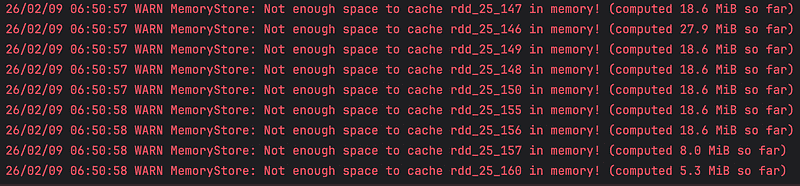
Not enough space to cache
Not Enough Space
This happens because Spark caches data to avoid recomputing it during iterative algorithms like K-Means. An iterative algorithm repeatedly executes actions on the same data to compute partial results and refine outcomes — like K-Means assigning points to clusters and updating centroids until they stabilize
- Without caching, each iteration would recompute the dataset from scratch, which is slow.
- Caching keeps the data in memory so subsequent iterations can reuse it efficiently, and K-Means automatically caches the DataFrame if it isn’t already cached.
Why Is 4GiB Not Enough
At first glance, this dataset doesn’t seem huge — but when Spark materializes the DataFrame, the memory footprint grows quickly. Each sparse vector is stored as a Python object with overhead, and Spark adds JVM and bookkeeping overhead for each row and partition. Multiplying this by 10 million rows across 200 partitions, plus extra memory for shuffles, intermediate computations, and caching, easily pushes the dataset well beyond 4 GB.
By default, Spark stores data in deserialized memory (MEMORY_ONLY) for fast access during each iteration. If the dataset is too large, it automatically spills to disk (MEMORY_AND_DISK), so the algorithm can still run without failing. Deserialized caching means the data is kept as full in-memory objects (ready to use), rather than a compact binary format — which speeds access but consumes more memory.
Increasing the maximum heap (-Xmx) to 8, or 14 GB and Spark still complains—how is that possible? Because Spark is being a little “naughty.” Each test, when we politely tell Spark to stop, it obeys … but only partially. The Spark session is effectively closed, yet the internal JVM remains running.
PySpark, You Naughty Boy
PySpark doesn’t fully close the JVM because the Python process communicates with it via the Py4J gateway, which stays alive to handle pending calls, cleanup, and garbage collection. This allows Python and Spark to safely coordinate even after the session ends.
In our first test, Spark creates the JVM with 4 GB and then reuses that same JVM for all subsequent tests, silently ignoring any increase in the spark.driver.memory setting. This happens because some Spark settings, like memory, are fixed when the JVM starts and cannot be changed afterward. By default, pytest runs all tests in the same Python process, so the existing JVM persists across tests. Using pytest-forked allows each test to run in a fresh Python process, which spawns a new JVM and lets you apply updated memory settings cleanly.
💿 Hit #2 — Hound Log
By enabling debug logging in our second test, test__hit_2.py, we can examine the inner workings of K-Means and observe exactly how each step is executed.
        {
            "spark.driver.memory": "14g",
            "spark.driver.extraJavaOptions": "-Xlog:gc*:stdout:time,level,tags",
            "logLevel": "DEBUG"
        }
Code Generation & Optimization
Project Tungsten: Custom-Built Efficiency. To maximize efficiency, Spark acts like a high-speed architect, writing custom software on the fly rather than using generic programs. Through Project Tungsten, Spark “fuses” multiple mathematical steps into a single, massive loop called WholeStageCodegen, which keeps the CPU working at full speed without interruption. It also uses GenerateUnsafeProjection to point directly to raw memory addresses, bypassing the slow process of creating standard Java objects.
Janino and Guava: The Compilation Infrastructure. To turn this custom code into action, Spark uses a high-speed embedded compiler called Janino. It takes the code strings Spark just wrote and transforms them into executable instructions (bytecode) instantly. To ensure it doesn’t waste time repeating this work — especially during the repeating loops of a K-Means algorithm — Spark utilizes a Guava-based cache to store and retrieve these compiled results.
Log Analysis: Performance through Caching. While the logs show thousands of “code generated” messages, the timing data proves Spark is being highly efficient rather than repetitive. The evidence shows initial compilations taking approximately 50ms, but every subsequent iteration finishes in less than 5ms. This confirms that Spark is merely retrieving pre-compiled “shortcuts” from its internal cache, saving significant time by skipping the heavy lifting of re-compilation for every task in the stage.
Iterative Memory Management
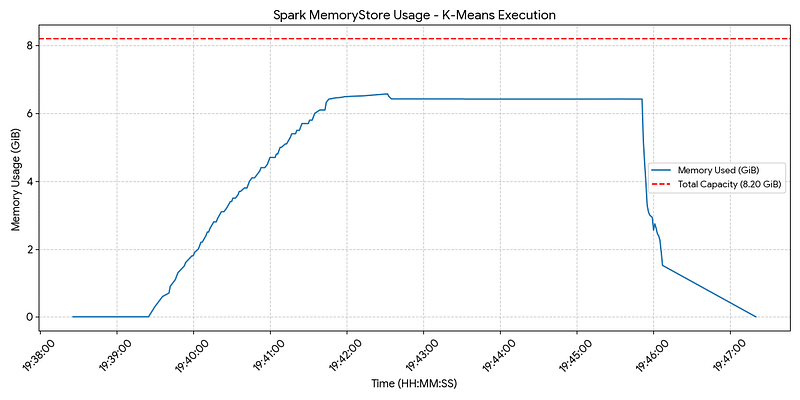
The Global Allocation (14 GiB). This is the total memory “container” for our Spark executor. It is divided into two main categories:
- The Spark Unified Memory Pool (8.2 GiB): The portion Spark manages for data processing and caching.
- User Memory & Overhead (~5.8 GiB): The remaining space used for everything else, such as our application code, Spark’s internal metadata, and the Metaspace (which stores the class information generated by Tungsten).
The Unified Memory Pool (8.2 GiB). This is the heart of the executor where the “Unified Memory Management” happens. It has two parts that grow and shrink against each other:
- The Storage Region: This area is for things we want Spark to “remember,” such as cached RDD partitions and Broadcast variables. In your case, the primary dataset grew to occupy about 6.44 GiB.
- The Execution Region: This is the “workspace” for active computation. It is used for the mathematical heavy lifting of K-Means (like calculating distances) and temporary shuffle data. Because our dataset took up so much room, this workspace was limited to about 1.8 GiB.
Dynamic Conflict & Eviction. Because these two regions share the same 8.2 GiB pool, they often compete for space.
- The “Borrowing” Rule: Execution memory takes priority. If the computation (Execution) needs more room than the 1.8 GiB left over, it can “borrow” space from the Storage region.
- The Result (Eviction): To make that space available, Spark must evict (delete) cached data that hasn’t been used recently. The logs show this clearly when intermediate data was “dropped from memory” to ensure the K-Means math could finish its work.
Garbage Collector Dynamics
- G1 Efficiency: Using the G1 collector on JDK 17 , the system maintains high responsiveness with most “Young” pauses finishing in <2ms.
- Heap Elasticity: The heap dynamically scales between a 256 MiB initial capacity and a 14 GiB maximum. It proactively “shrinks” (reclaims memory) after marking cycles to return resources to the OS.
- Latency Spikes: Rare spikes of 30ms–45ms occur. These are driven by internal “housekeeping” (post-evacuation bookkeeping and cross-region reference updates) rather than data movement. This is common in Spark when new stages launch or iterative metadata piles up.
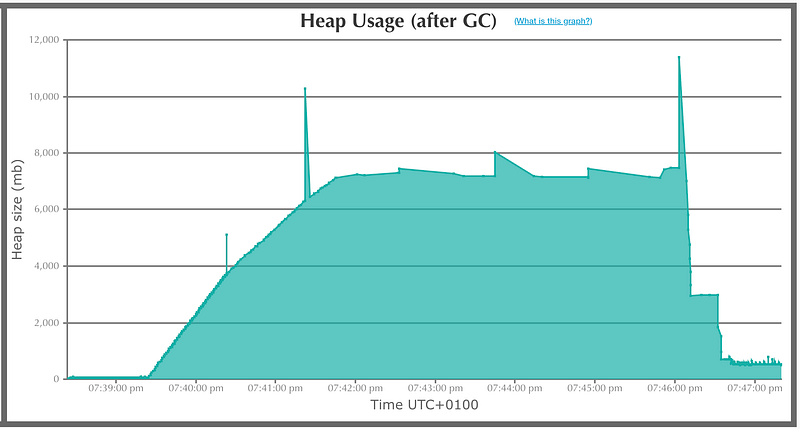
Heap Usage (after GC) — from gceasy.io
💿 Hit #3 — Suspicious PIDs
Fractioned but Unified
Spark uses a unified memory pool for both execution (shuffles, joins, aggregations) and storage (cached RDDs, broadcast variables). This pool is carved out from the executor heap using two settings:
spark.memory.fraction(default: 0.6). This determines how much of the JVM heap Spark is allowed to use for its unified memory region.spark.memory.storageFraction(default: 0.5). Inside the unified pool, this sets an initial soft boundary for storage.
Because Spark uses a unified memory pool, execution can borrow from storage and storage can borrow from execution, right up until the entire pool is filled. Only then do spills or evictions occur. When memory runs out, storage is the one that evicts — dropping old cached blocks to free space — but execution never evicts. If execution needs more room and can’t borrow it, Spark simply spills execution data to disk instead.
Where User Code Consumes Memory
User code primarily consumes memory in the executor JVM heap (and in the Python worker processes for PySpark). This memory sits alongside Spark’s unified memory regions and directly competes with them for heap space.
Tweaking Memory Fractions
Looking at the previous graphs, we see that apart from a few spikes, the heap barely exceeds ~8 GiB, and the storage region stays under ~6.5 GiB. So, why not dial back the memory settings a bit?
In our third test, test__hit_3.py, we used:
        {
            "spark.driver.memory": "8g",
            "spark.memory.fraction": "0.9",
            "spark.memory.storageFraction": "0.9"
        }
This keeps Spark leaner while still giving K-Means the room it needs to groove.
Plotting CPU and Memory Consumption
Now, to get a full view of the memory consumed by our PySpark K-Means job, we collect CPU and memory metrics externally. The get_stats.sh script uses the ps command to record resource usage over time, and then the plot_stats.py script visualizes CPU and memory trends with Plotly.
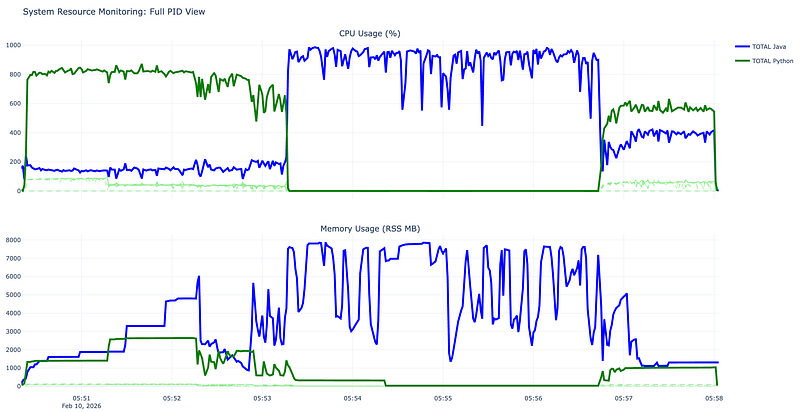
CPU and Memory Consumption
This plot is a perfect visualization of the Driver-Executorarchitecture typical of a PySpark application. Our K-Means code triggers distinct phases of execution that correspond exactly to the spikes and shifts in the resource monitoring.
- The Python Spike. This is the Data Generation phase. We are using
mapPartitionsWithIndexwith a custom Python function to create 10 million synthetic documents. Since this is raw Python logic, Spark has to spin up many Python worker processes (the green dashed lines) to execute yourrng.sampleandSparseVectorcreation. We see high TOTAL Python CPU usage because the heavy lifting of generating random numbers and dictionary-zipping is happening in the Python interpreter. The memory also steps up as these vectors are created and prepared to be passed to the JVM. - The Java Shift. This is the K-Means Fitting phase (
kmeans.fit(df)). Once the data is generated and converted to a DataFrame, PySpark hands the “heavy lifting” of the ML algorithm over to the JVM (Java Virtual Machine). Spark’s MLlib uses highly optimized Scala/Java code for the iterative distance calculations of K-Means. Python activity drops to near zero, and TOTAL Java CPU usage (the blue solid line) skyrockets and stays pinned near 1000% (utilizing ~10 cores). The “sawtooth” pattern in the Java CPU is typical of K-Means iterations: The parallel computation of distances between 10 million points and 200 centroids (K=200). The synchronization point at the end of each iteration where the Driver calculates the new centroids before starting the nextMAX_ITER. - The Memory Profile. Notice the Java memory usage grows steadily and then plateaus. This is the Spark Block Manager at work. Even if we don’t explicitly call
.persist(), Spark needs to manage the memory for the millions ofSparseVectorobjects within the JVM heap during the fit. Stays relatively low and flat after the initial generation. This confirms that Python is just the “interface” here; the actual data resides in the JVM during the training. - The Final Merge. Completion of the fit and likely result collection. We see a final small burst of Python activity. This is the Spark Driver (running in Python) receiving the final model metadata and cluster centers back from the Java executors to finish the script execution.
💿 Hit #4 — It’s Low And Clever
In Spark, the Garbage Collector can quietly throttle your performance. Iterative algorithms like K-Means are especially vulnerable because they touch the same dataset over and over. If that data lives on-heap, the JVM spends more time cleaning memory than calculating centroids.
The Iteration Trap
K-Means isn’t a one-pass algorithm — it scans the dataset dozens or hundreds of times. On-heap caching forces the GC to constantly sift through millions of objects to distinguish permanent cached data from temporary ones. The result? Long “Stop-the-World” pauses that slow our clustering to a crawl.
Off-Heap to the Rescue
Moving the data off-heap keeps it out of the JVM’s jurisdiction:
- GC stays out: Only tiny, short-lived objects from centroid calculations get scanned.
- Smaller footprint: Serialized, compact storage reduces memory pressure.
- More stability: No more old-generation memory explosions or
OutOfMemoryErrors.
Yes, there’s a cost: accessing off-heap data means a bit of serialization overhead. Serialization is needed to convert JVM objects into raw bytes so they can live off-heap, letting Spark access the data without involving the Garbage Collector. But in iterative workloads like K-Means, skipping massive GC cycles usually wins big.
Our Final Test
Time for the grand finale! Let’s fire up test__hit_4.py and watch how, with far less heap memory, Spark zooms through the job faster than ever.
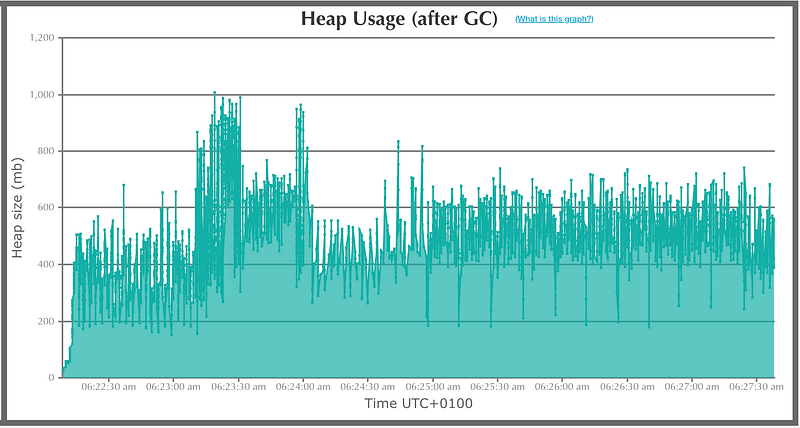
Heap Usage (after GC) — from gceasy.io
🎸 Rock Your K-Means Like the King of Clustering
Best Practices to Keep Your Clusters Cool
- Scale Your Features, Honey. K-Means groves to Euclidean distance, so don’t let a giant “Annual Income” (0–200,000) drown out the delicate “Age” (0–100).
✅Hit it withStandardScalerorMinMaxScaler—otherwise your clusters will wobble like a badly tuned guitar string. - Go With “K-Means||” Initialization. Spark’s got a parallelized version of K-Means++ called K-Means||, and baby, it’s the way to go. Random initialization is like trying to play “Jailhouse Rock” on a kazoo — it just ain’t gonna sound right.
✅SetinitMode='k-means||'and reduce the chance of converging on a sad little local minimum. - Fight the Curse of Dimensionality. As your feature count climbs, all points start looking alike — like a sea of Elvis wigs.
✅ Slice it down with PCA before clustering. Keep the variance, lose the noise.
Implementation Tips That’ll Make You Swing
- Elbow Method: Run K-Means for a range of
kand plot the Within Set Sum of Squared Errors. Look for that “elbow” where the improvement slows—just like spotting the perfect hair flip. - Silhouette Score: For more confidence, check cluster separation with
ClusteringEvaluator. A score close to 1? That’s a high note, baby. - Persistence: K-Means iterates like a drummer on caffeine. Cache your DataFrame (
df.cache()) to avoid Spark rereading the data every single time.
Pitfalls to Dodge Like a Flying Guitar Pick
- Categorical Data Blues. K-Means loves continuous numbers, not one-hot encoded spaghetti. Tossing in too many categories creates a high-dimensional nightmare where Euclidean distance forgets how to dance.
⚒️ Stick to numeric features or consider Bisecting K-Means for categorical-heavy sets. - Outliers — Don’t Let ’Em Steal the Show. Centroids are basically averages — so a single wild outlier can pull your cluster off-key.
⚒️ Filter out statistical outliers before the big performance. - Spherical Bias. K-Means thinks clusters are like perfect circles, all roughly the same size. If your data is shaped like two interlocking crescents or elongated ellipses, it’ll flub the routine.
⚒️ Consider Gaussian Mixtures or other clustering methods when your data isn’t feeling the circular vibe.
🎤 All Shook Up… in Spark!
So there you have it, baby — you’ve rocked through K-Means like the King himself: centroids hittin’ the right notes, clusters jivin’ in sync, and Spark keepin’ the band tight. Remember, it’s all about timing, memory, and pickin’ the right initialization — treat your JVM right, cache your data, and let those off-heap moves slide.
Keep your clusters smooth, your vectors groovy, and never let a stray outlier steal your spotlight. Now crank the volume, hit fit(), and let your big data dance floor swing.
Because in the world of Spark, K-Means isn’t just math — it’s rock ’n’ roll, baby. 🕺
🤘 Howdy, Rockin’ Readers!
This article is dedicated to pure rock ’n’ roll fun — not that “fun” math stuff — and to my bro’n’law Fernando. Keep on rockin’, brother! 🎸
Shoutout to my Olympic colleagues, sweating it out like champions — special cheers to Luis! 🏅💪
And just to be clear: this one’s NOT for the ungrateful folks who treat you like a minion despite your best efforts. You know who you are … blaming everyone else for your own incompetence — yes, Emojiman, we see you 😆.
“Don’t be K-Mean to my machine
Don’t be K-Mean to my machine
I just want my clusters tight
Baby, keep my centroids right”
(adapted from “Don’t be cruel” by Elvis Presley)