
Apache Spark WTF???🧑🌾Growing Onions 🧅
Spark was already a layered vegetable of questionable emotional stability — a chaotic mix of Python, JVM, and that one AnalysisException…

“Push me
And then just lock me
’Til I can get my
Dissatisfaction”
(adapted from “Satisfaction” by Benny Benassi)
🧅 Peeling the Onion: What is Spark Connect?
Spark Connect is a decoupled, client-server architecture designed for remote Spark execution.
Instead of the classic setup — where our local application must embed a heavy, resource-hungry JVM driver that sits right next to the engine — Connect introduces a strict network boundary. The local client becomes completely lightweight, acting as a thin proxy that merely captures our intentions. Rather than executing code locally, the client builds a structural, declarative blueprint of our query, packs it up, and ships it across the wire to a remote cluster that handles the heavy lifting.
This architecture functions through a sequence of distinct client-side and server-side layers. On our local machine, our code interacts with the Spark Connect Client API to generate an Unresolved Logical Plan of what we want to accomplish. This plan is then serialized into language-agnostic Protocol Buffers and transmitted over the network via a gRPC transport tunnel.
Once it reaches the remote cluster, the Spark Connect Server intercepts the payload and hands it to the Catalyst Analyzer and Optimizer. From there, Spark generates a Physical Plan, and the Cluster Manager distributes specific tasks to the Executors where the actual data processing occurs.
Once the computation is complete, the data faces a strict return transport protocol. The results are serialized into highly optimized Apache Arrow batches and streamed back up through the gRPC network tunnel to our client application.
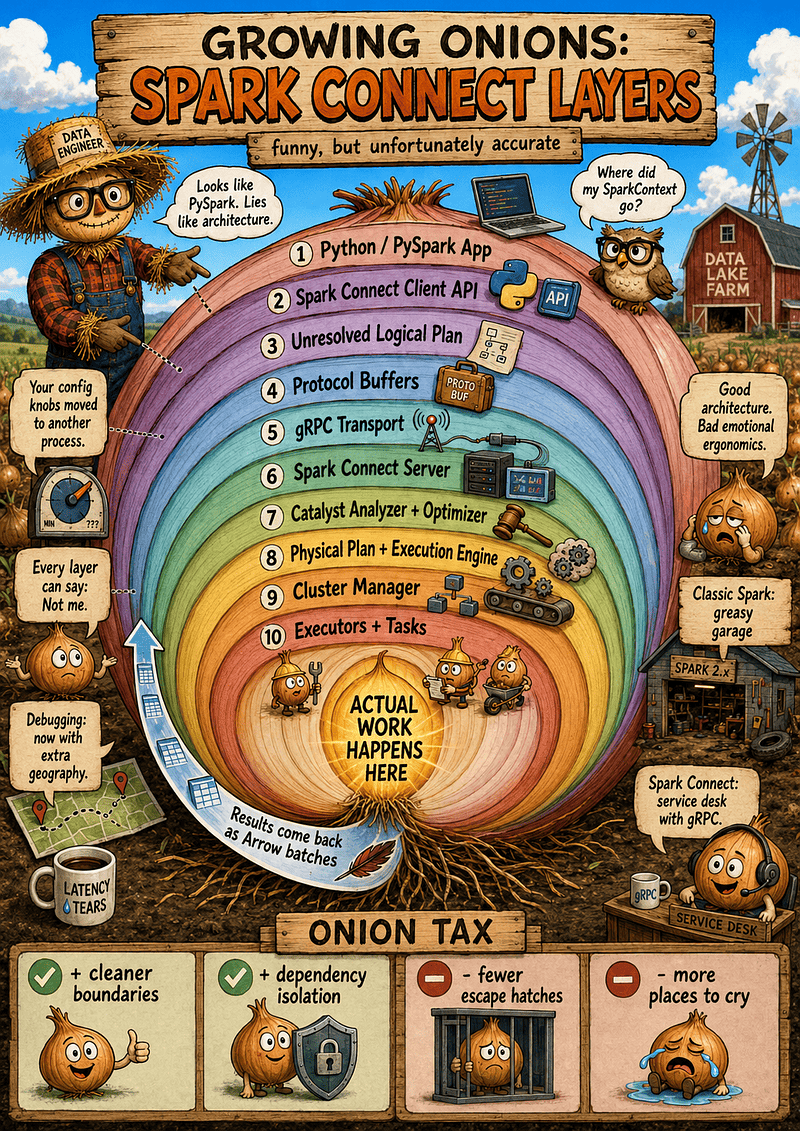
Spark Connect is unmasked as a 10-layer onion of emotional damage, trading classic Spark’s chaotic “greasy garage” for a rigid “gRPC service desk” with zero escape hatches and extra debugging geography.
The Pitch: Why Spark Needed This
Spark Connect wasn’t invented just to add layers. Classic Spark has major architectural flaws, and Connect fixes them by providing:
- True Remote Development: Connect to Spark from IDEs, notebooks, or lightweight applications without dragging the entire JVM driver relationship into the room.
- Dependency Isolation: Python users can install packages with the chaotic energy of a raccoon in a trash bin without crashing the cluster’s driver.
- Spark-as-a-Service: Platform teams can expose Spark through a clean, secure API gateway instead of handing every user a wrench and praying the cluster survives.
- Language Neutrality: A standardized protocol means thinner clients that don’t have to marry the JVM.
The Catch: Distance and Dirt
Cleaner architecture means fewer dirty tricks — and dirty tricks are how real production systems survive until Friday.
Every single win from Spark Connect comes from separation. But separation means distance, and distance means layers. When a pipeline breaks, the bug could be in our code, the client API, the gRPC protocol, Arrow serialization, the server, Catalyst, or the moon.
The Weird Twist: The Spark-Shaped Mask
Here is where the onion gets fascinatingly weird: once we turn an API into a protocol, anyone can implement it. Spark Connect is transforming from a Spark feature into a universal compatibility layer. Other engines are now wearing it as a mask:
- Sail (by LakeSail): Accepts PySpark code via the Spark Connect protocol but executes it on a backend built with Rust, Arrow, and DataFusion.
- Snowflake: Leverages similar Spark Connect infrastructure to let users run Spark-style DataFrame code directly on Snowflake’s native engine.
This unlocks incredible engine choice and JVM-free experimentation. However, it introduces a dangerous psychological trap:
“It runs Spark code” does not mean “It’s Spark”
Same syntax does not guarantee the same optimization, UDF behavior, or obscure catalog quirks discovered by a finance pipeline in 2018 that is now considered core business logic.
🚚 Classic Spark vs. Spark Connect: Who Moved My Driver?
In the old world, our application and the Spark driver were spiritually, physically, and sometimes illegally close. Spark Connect completely disrupts this relationship.
Classic Spark: Dangerous Intimacy
In Classic PySpark, our Python code talks directly to the JVM driver via Py4J — an architectural bridge troll. It’s a messy setup, but it gives us ultimate access.
Need to execute a heroic workaround at 2 a.m.? We can reach straight into the JVM and grab df._jdf or spark.sparkContext.
Classic Spark is a chaotic garage: the tools are sharp and rusty, but when the engine starts smoking, we can open the hood and splice the wires ourselves.
Spark Connect: The Driver Moved Out
Spark Connect completely evicts the driver from our local environment; it now lives across a gRPC protocol. Our client simply builds a logical plan and ships it over the wire.
This distance brings wonderful gifts — dependency isolation, lightweight remote development, and a cluster that users can’t easily crash. But distance also means we lose our favorite dirty cool tricks.
Same Code, Different Contract
Swapping .master("local[*]") for .remote("sc://localhost:15002") lets us run the exact same .show() command, lulling our brain into a false sense of security. But the contract underneath has fundamentally changed. The moment we try calling df.rdd or poke a private JVM handle, Spark Connect looks at us blankly and says, “Sir, this is a protocol.”
🔪 Inside the Onion: What Happens When We Run Code?
When we write standard PySpark DataFrame code, our brain assumes it’s running Spark. In the Spark Connect world, however, our local client isn’t executing anything — it’s merely a remote control.
When the TV catches fire, we don’t fix the wiring inside the remote control; we check the TV. Here is how that remote control packages our intent and ships it to the screen.
DataFrame Operations Become Unresolved Logical Plans
Because Spark’s DataFrame API is declarative (we state what we want, not how to get it), the client can easily translate our code into an Unresolved Logical Plan.
The client doesn’t scan tables or know our physical file layout. It just compiles a basic list of demands: “I want the table ‘sales’, filtered where amount > 100.” The client happily seals this request and mails it off. It’s only later that the server opens the envelope and discovers we’ve mailed it a potato. 🥔
Protocol Buffers & gRPC: The Suitcase and the Tunnel
To send this plan over the wire, Spark Connect can’t ship Python objects or raw JVM code. Instead, it serializes the logical plan into Protocol Buffers (protobuf) — a language-neutral, highly structured format.
Once packed into a protobuf message, our query hits gRPC, the network transport layer. At this precise moment, our innocent DataFrame transformation transforms into a networking problem. It suddenly inherits opinions about hostnames, TLS, load balancers, and timeouts.
The Server Translates, Catalyst Optimizes
On the receiving end, the Spark Connect server unpacks the protobuf message and hands it off to the core Spark engine. Now, standard Spark behavior resumes:
- Analysis & Resolution: The server checks if our columns exist and if we actually have permissions to read them.
- Catalyst Optimization: Catalyst enters the room, judges our query design, and heavily optimizes what it can.
- Distributed Execution: Shuffles shuffle, tasks are scheduled, and executors get to work.
Spark Connect doesn’t replace Spark SQL internals; it just wraps access to them. The engine is still Spark, and the skew still waits in the corner with a knife.
Actions are Where the Onion Bites
Transformations just build plans locally, but actions force the conversation. When we call .show(), .count(), or .collect(), the client is finally forced to ask the server to do actual work.
This splits our debugging into a clean chronological line: did it fail before the action (a client-side API issue) or during execution (congratulations, we are back in classic Spark pain)?
Results Return via Apache Arrow
When Spark Connect returns tabular data to the client, Apache Arrow enters the chat. This columnar in-memory format is incredibly fast and efficient for moving batches of data back over the wire.
But please do not confuse efficient with infinite. Running .toPandas() on a 10-billion-row dataset will still instantly vaporize our client machine.
Errors Now Have Travel Stories
In Classic Spark, errors had layers. In Spark Connect, they have passports. An exception can now originate in the client, during protobuf serialization, inside the gRPC tunnel, during server-side Catalyst optimization, or deep within a remote executor.
By the time the stack trace reaches our terminal, it’s wearing a completely different jacket. Debugging without a geographical map of our infrastructure becomes pure onion astrology.
🙋♂️ Hey, Why Can’t I Execute RDD Code?
You try to run df.rdd in Spark Connect, and the client immediately slaps your hand away.
The reason is simple: RDDs are imperatively intimate. They rely on shipping raw Java/Python bytecode and executing arbitrary user functions directly through a tightly coupled driver-to-executor relationship. That requires the exact JVM room-sharing agreement that Spark Connect’s client-server protocol was built to destroy. DataFrames are declarative blueprints that fit nicely inside a gRPC suitcase; RDDs are a chaotic box of local machine memories shipped over a wire.
🤔Will SPARK-55278— the fancy Language-agnostic UDF Protocol— fix this? Short answer: No.
While this protocol is a brilliant upgrade, it solves a completely different problem. It’s designed to let languages outside the standard Scala/Python ecosystem (like Rust, Go, or Swift) write row-by-row User-Defined Functions (UDFs) that communicate with Spark via standard Inter-Process Communication (IPC).
It gives Spark Connect a wider multi-language passport for custom functions, but it still forces those functions to play inside the strict, declarative DataFrame sandbox. RDDs demand raw, low-level, imperative driver control over the cluster. SPARK-55278 allows you to write custom logic in cooler languages, but the RDD garage remains permanently locked.
If you absolutely need raw RDD manipulation, you aren’t ready for the remote service lifestyle. You belong back in the messy, JVM-adjacent garage of Classic Spark.
🎛️ What Happened to My Knobs?
Every Spark engineer is a reluctant knob collector. Nobody wakes up thrilled to tune spark.sql.shuffle.partitions. We do it because Spark teaches us, through pure trauma, that everything is a configuration.
Spark has always felt less like a framework and more like an airplane cockpit designed by people who believed pilots should also understand JVM garbage collection. Then Spark Connect arrives, and suddenly, the controls aren’t where our hands expect them to be.
Classic Spark: A Messy but Local Cockpit
In the old world, our application was right next to the driver. We could configure everything directly in our code:
spark = (
    SparkSession.builder
    .appName("knob-party")
    .config("spark.sql.shuffle.partitions", "8")
    .config("spark.sql.adaptive.enabled", "true")
    .getOrCreate()
)
Emotionally, this felt like control. It might have been partial or imaginary control but it was OUR cockpit.
Spark Connect: The Controls Moved Server-Side
With Spark Connect, our client does not own the server process. We no longer automatically control driver memory, classpaths, Hadoop configs, or security policies. Instead, the tuning universe is cleaved in two:
- The Client-Side World: This contains our local Python process, client packages, connection strings, and a few basic session-level runtime settings.
- The Server-Side World: This contains the actual Spark driver, JVM classpath, cluster resources, executors, global catalogs, plugins, and core security policies.
The rule of thumb is simple: If a config alters the server, cluster, JVM, or network startup behavior, it belongs server-side. If it changes session-level SQL behavior, the client might be allowed to change it.
The Protocol Boundary Brings Luggage
Spark Connect isn’t just Spark with a remote string; it brings an entire family of new, network-heavy configuration knobs:
spark.remoteandspark.api.modespark.connect.grpc.maxInboundMessageSizespark.connect.grpc.arrow.maxBatchSizespark.sql.connect.enrichError.enabled
We added an architectural boundary, and that boundary brought its own luggage. If you’re wondering, “Did I set this config in the right universe?” — congratulations, you’ve found another layer of the onion.
🤔 Wait, Isn’t This Supposed to Be a High-Level API?
You are completely right to call foul here — this is the exact definition of a leaky abstraction.
On paper, Spark Connect promises a clean, high-level, purely declarative DataFrame interface. But because our code now lives across a network boundary from the engine, the underlying transport layers — gRPC and Apache Arrow — refuse to stay hidden.
When our workloads scale, we are violently forced to care about network infrastructure:
- The Straw Width (
maxInboundMessageSize): If a.collect()or.toPandas()payload is too big, gRPC won’t gracefully split it. It will instantly snap the connection and throw aResourceExhaustederror. We have to manually widen the pipe. - The Shipping Container (
arrow.maxBatchSize): This dictates how many rows are packed into a single Arrow memory block before traveling over the wire. Set it too high and we OOM our local client; set it too low and network overhead destroys our performance.
This is the ultimate irony of the new architecture: we came here to write high-level analytics code, but because of the protocol boundary, we now have to moon-light as a network transit engineer just to get our data home.
From Architecture to Sociology
In managed platform environments, the architectural separation becomes a governance tax. It turns technical tuning into a bureaucratic conversation:
Me: I need to change this Spark config. It’s causing a bottleneck.
Platform Team: That config is server-side. Users can’t mutate it.
Me: But the pipeline is literally on fire.
Platform Team: Please open a ticket and use the fire emoji in the title. 🔥
🐍☕📦 Where the Hell is This Code Running?
Configs are only part of the pain. Spark Connect forces us to ask a question that Classic Spark let us ignore for a dangerously long time: Where does this code actually exist?
In Classic Spark, it was easy to pretend the application, driver, and environment were one big, messy creature. In Spark Connect, that creature has been surgically separated into independent organs.
The Three-Location Reality Split
Our code no longer runs in a unified playground. It’s now split across three distinct worlds that might not even share the same operating system:
- The Client Environment (Our Laptop/Notebook): Homes our local Python version, the PySpark client package, pandas, PyArrow, and whatever we
pip-installed. - The Server Environment (The Spark Driver): Runs the core Spark Connect server, the JVM, Scala internals, Hadoop libraries, data source connectors (like Delta or Iceberg), and catalog plugins.
- The Worker Environment (The Executors): Handles the raw data processing and hosts the isolated Python environments required to execute Python UDFs.
Python: Local Coping Mechanisms
Our local client can import a package perfectly fine. But if a Python UDF needs that same package on the executor side, our local import means absolutely nothing. The executor does not care about our laptop’s emotional support virtual environment.
In Spark Connect,
pip installis not a deployment strategy. It’s a local coping mechanism.
Java: The Hidden JVM
Spark Connect makes Python users feel like the JVM has vanished. It hasn’t. The server is still Spark, and Spark still lives on the JVM.
Spark Connect didn’t kill the JVM monster. It just put the monster in another room and gave us a phone.
The Missing Gremlin: Local Driver Exploits
In Classic Spark, developers frequently reached straight into the driver’s JVM to pull off questionable engineering miracles:
# Classic PySpark witchcraft
jvm = spark._jvm
internal_plan = df._jdf.queryExecution()
In Spark Connect, the server-side driver is completely remote. Any code that assumes it can poke around the driver JVM from the client process will instantly crash. Spark Connect is where our “harmless driver-side helper” discovers it was actually a private API dependency wearing a fake mustache.
🕵️♂️ How the Hell Do I Debug This Onion?
Spark Connect doesn’t introduce failure; it just gives failure more real estate. Classic Spark debugging was already an onion. Spark Connect looked at it and said: Cute. What if it had a network protocol, serialized payloads, and strict boundaries?
To survive, we have to stop interpreting smoke and start tracing layers.
1. Locate the Crime Scene
Before we dig into log files, we must figure out which layer of the architecture is lying to us.
- Client-Side Failures: Occur before the server is even contacted. Syntax errors, missing local packages, or attempting classic JVM exploits (
df._jdf,spark.sparkContext). - Protocol & Transport Failures: The connection itself breaks. Look for gRPC errors like
UNAVAILABLE,DEADLINE_EXCEEDED, orRESOURCE_EXHAUSTED. - Server-Side Analysis Failures: The request hits the server, but Catalyst rejects the plan before running it. Think missing columns, unresolved tables, or catalog mismatches.
- Execution Failures: The plan is valid, but runtime reality hits. Executor OOMs, shuffle failures, skew, or crashing UDFs.
- Result Transport Failures: The query succeeds on the cluster, but sending the data back to your client fails. Massive
.collect()or.toPandas()calls hitting Arrow conversion limits or gRPC message thresholds.
Sometimes Spark did the work perfectly. The problem is that we tried to download a lakehouse through a cocktail straw.
2. The Golden Diagnostic Checklist
Stop guessing and run these fast checks to ground your mental model:
- Print the Basics: Confirm your environment isn’t hallucinating. Verify
sys.version,pyspark.__version__, andspark.version. If you don’t know your exact client-to-server version match, you are practicing onion astrology. - Flashlight the Plan: Use
df.explain("formatted"). If you aren’t reading the resolved logical plan, you aren’t debugging—you’re just reading smoke. - Check the Spark UI: Did a job actually appear?
- No Job: The issue is client-side, transport, or server-side analysis.
- Failed Job: You are in execution territory (memory, data sources, UDF execution).
- Succeeded Job but Client Crashed: You hit a result transport or client memory bottleneck.
3. Debugging Python UDFs and Custom Traps
Python UDFs are where environmental confusion goes to multiply. In Spark Connect, a UDF crash often drops a serialized apology into your logs from a worker miles away from your local notebook. Always ask: Is the package actually installed on the remote executors, or just in my local virtual environment?
If you are debugging unexpected errors on legacy pipelines, check your error configurations. Turning on these developer knobs gives you clear X-rays instead of vague network warnings:
spark.sql.connect.enrichError.enabledspark.sql.connect.serverStacktrace.enabled
⚠️ Warning: Server stack traces expose internal class names and paths. Use them to fix code, don’t print them on company mugs.
4. Stop Creating Hostage Situations
When filing a bug or asking for help, isolate a minimal reproducible example.
import sys, pyspark
from pyspark.sql import SparkSession

# Minimum viable setup
spark = SparkSession.builder.remote("sc://localhost:15002").getOrCreate()
df = spark.range(10).selectExpr("id", "id * 2 as double_id")
df.show() # Add your single failing line here
If your reproduction requires your entire corporate environment, three orchestrators, a feature store, and someone from DevOps, it’s not a reproduction. It’s a hostage situation.
5. The Spark Connect Debugging Decision Tree
Follow this logical path to find your root cause:
Did Python fail before an action?
 ├─ YES ➔ Client-side API / local dependency issue
 └─ NO
    Did the request reach the server?
     ├─ NO ➔ gRPC / TLS / network / authentication issue
     └─ YES
        Did a Spark UI job appear?
         ├─ NO
         │  Did analysis fail?
         │   ├─ YES ➔ SQL / catalog / schema configuration issue
         │   └─ NO  ➔ Connect server session / protocol failure
         └─ YES
            Did the job fail?
             ├─ YES ➔ Cluster execution / Executor OOM / UDF crash
             └─ NO
                Did result collection fail?
                 ├─ YES ➔ Arrow serialization / Client memory / Boba straw limit
                 └─ NO  ➔ Congratulations, find a weirder bug.
🚀 Spark 4.x: The Onion Gets Promoted
Spark Connect didn’t arrive, sit quietly in a corner, and politely remain optional. That would have been too emotionally manageable. Introduced in Spark 3.4 and matured in 3.5, the Spark 4.x era turns Connect from a quirky side quest into the main storyline. It is no longer a tool just for notebooks or platform teams acting behind glass — it’s officially moving the furniture.
The Evolution: From Concept to Strategy
- Spark 3.4 (The Debut): Established the baseline remote client-server separation, building unresolved logical plans shipped via protobuf and gRPC. A fresh, crisp onion.
- Spark 3.5 (The Parity Push): Filled the gaps with aggressive API coverage and bug fixes. It successfully transitioned the narrative from “look, it exists” to “look, it actually works for most things.”
- Spark 4.x (The Takeover): Connect becomes a strategic centerpiece. This era brings streamlined packaging, broader language neutrality (non-Python clients), and native ML framework support.
spark.api.mode and the Lightweight Client
Spark 4.x introduces spark.api.mode, a literal identity setting for a framework undergoing an existential crisis, essentially asking: Which version of myself would you like to experience today?
This explicitly splits our universe into Classic or Connect mode. If we choose Connect, we unlock a genuinely Lightweight Python Client. Our local laptop no longer needs to cosplay as a miniature distributed Spark runtime. Setup is thin and beautiful.
Just remember: the lightweight client removes weight from our laptop, not from reality. The JVM monster hasn’t died; it just stopped eating our local memory in plain sight.
ML on Connect: The Onion Learns Statistics
Bringing Machine Learning pipelines into Spark Connect is a massive architectural hurdle. Unlike standard relational select and filter operations, ML workloads rely on stateful, parameter-heavy estimators and transformers historically welded to JVM-Python wrappers.
By forcing ML through the protocol layer, Spark 4.x forces a massive expansion of the Connect contract. Every time Spark Connect supports a new API family, somewhere a protobuf file hears footsteps.
🪤 Pros, Cons, and Onion Traps
Let’s admit something uncomfortable: Spark Connect is not stupid. I wanted it to be stupid. If it were obviously bad, we could throw it into the architectural trash bin, make three jokes about gRPC, and go back to poking _jdf like civilized degenerates.
But it’s genuinely useful. It solves massive architectural problems — it just introduces entirely new, highly sophisticated headaches in exchange. Let’s look at the ledger.
The Good Stuff: The Structural Payoff
- Cleaner Dependency Isolation: Our client application is no longer glued to the Spark driver runtime. It doesn’t entirely delete dependency problems, but it separates them. Separation is the first step toward not crying.
- Better Remote Development: Local IDEs and lightweight app containers can easily talk to remote clusters without launching a massive local JVM instance. Local development no longer feels like assembling furniture from a box labeled “distributed systems.”
- Bulletproof Platform Boundaries: Platform teams love governance; users love power. Connect provides a clean API gateway. Platform teams own the infrastructure server, while users get an isolated client. Chaos decreases, but ticket counts increase. Everything has a price.
- Engine Interchangeability: Because Connect is an open protocol, non-Spark backends (like LakeSail or Snowflake) can wear Spark Connect as a mask. This breaks vendor lock-in and opens up fascinating, JVM-free backend options.
The Bad Stuff: The Architectural Cost
- The Layer Tax: Client, protocol, network, server, Catalyst, executors, result transport. When a pipeline fails, debugging becomes a high-stakes group project where every participant is an independent process pointing fingers at the others.
- Zero Escape Hatches: Connect intentionally locks us out of the engine. No cozy driver intimacy, no private JVM object grabbing, and no
SparkContextto use as an emotional support object. - Network Infrastructure Nightmares: Our innocent DataFrame transformation now inherits classic client-server distributed systems problems. We must suddenly care about firewalls, TLS, load balancers, proxies, and gRPC message limits.
- The Deceptive Handle: Because Connect looks exactly like classic PySpark, we bring our old habits along. It lulls us into a false sense of security.
Spark Connect doesn’t stab you with a new knife. It hands you your old knife with a different handle.
Survival Guide: How Not to Cry Immediately
If you want to keep your sanity when moving to Spark Connect, adopt these reflexes immediately:
- Know Your Mode: Never guess your runtime environment. Print
type(spark)andspark.versionearly in your scripts to confirm whether you are in Classic or Connect mode. - Stay Declarative: Spark Connect is happiest when your code uses dataframes, pure SQL, and built-in functions. Be highly suspicious of RDDs, driver-side hooks, and custom JVM extensions.
- Enforce the Three-Location Rule: Before blaming the engine for a missing dependency or UDF failure, ask: Does this package need to live on the client, the server driver, or the executors?
- Watch Your Collections: Arrow is an incredibly fast transport truck, but it isn’t a black hole. Avoid running
.toPandas()or.collect()on massive data sets unless you want your laptop to explode.
Cursed Pitfalls: The Classic Traps
- The Local Import Illusion: Successfully running
import my_packageon your laptop does not mean the remote executors have access to it. The cluster does not care about your laptop’s virtual environment. - The Config Mirage: Changing a configuration in your client session doesn’t mean the server will honor it. If a config alters the JVM, network, or server startup behavior, your local client settings will be silently ignored.
- The Performance Delusion: Spark Connect is an access architecture, not a magical query optimizer. Your terrible, unindexed joins are still terrible. Your data skew is still skewed. The onion does not fix the soup.
The Ultimate Fit Test
- Spark Connect is a good fit when the boundary is the feature. It shines when you have multi-tenant platforms, heavily managed infrastructure, lightweight remote environments, and strictly declarative SQL/DataFrame workloads.
- Spark Connect is a terrible fit when the boundary is the obstacle. It will make your life miserable if your pipelines are built on legacy RDD code, custom driver-side telemetry libraries, deep private JVM hacks, or continuous 2 a.m. infrastructure troubleshooting.
The Pre-Adoption Checklist
Before migrating a production pipeline to Spark Connect, run through this final litmus test:
- Is the workload entirely composed of DataFrame, SQL, or modern Spark 4.x ML APIs?
- Have we verified that we do not depend on
SparkContextor RDDs? - Are all custom UDF dependencies properly packaged and accessible on remote executors?
- Do we have full visibility and access to the remote server logs for debugging?
- Have we explicitly tested our workflows against the Boba Straw Limit using large datasets?
If you answered “what?” to more than two of these, grab a helmet and proceed directly to the onion cellar.
🪞 The Direct Truth
We peeled the onion. Spark Connect is a brilliant architecture with brutal emotional ergonomics. It trades the immediate power of closeness for the sterile safety of clean boundaries.
We build for clean deployment, but we debug with a dirty screwdriver. Connect doesn’t delete complexity; it relocates it. Tuning knobs move behind protective glass, dependencies require passports, and our 2 a.m. private _jdf hacks are dead.
Stop asking if it’s “good.” Ask if it fits your workload and your tolerance for onion tears.
It is mature, responsible, and the future. The onion wins. Go open a ticket with your platform team. 🔥
🌱 Dedication
This article is dedicated to everyone who falls in love with shiny new tech before asking the hard questions:
- What does it cost?
- What does it hide?
- What breaks?
- Who gets the Slack alert?
New features always look flawless in pitch slides. But they smell entirely different at 2 a.m. when the logs are crying and our configuration knobs have moved to a completely different process in another universe.
So, by all means, celebrate innovation. But cut the onion open first.
People who only talk about the positives of an architecture are usually selling something, defending something, or they simply haven’t debugged it enough yet.
Good luck out there, and happy peeling. 🧅
“I can’t get no satisfaction
Gonna try (RDDs)
and I try (SparkContext)
and I try (_jdf / JVM hacks)
and I try (Server-side config/env control)”
(adapted from “(I Can’t Get No) Satisfaction” by The Rolling Stones)

Spark Connect: An architectural crop that’s 100% remote-friendly, but best grown with plenty of logs, extreme patience, and a heavy dose of mild suspicion.