Apache Spark WTF??? — 🧊 Kubefusional 🕋
Kubernetes (K8s). The system that swallowed the world. And yet, after twelve years of wrestling Apache Spark, I’ve somehow avoided Spark…

“No sabes donde estás pero tu mismo entraste
Ya no puedes saber lo que es el contraste.
No son negocios es algo personal.
Estás en un cubo de variante dimensional.”
“You don’t know where you are, but you went in yourself.
You can no longer know what contrast is.
It’s not business, it’s personal.
You are in a cube of dimensional variants.”
(from “El cubo de variante dimensional” by Frank T)
🧊 Kubernetes: Brains, Muscle, and Minions
Think of Kubernetes as a well-organized, slightly bossy orchestra. It has a control plane that’s basically the brain, a set of worker nodes that do all the heavy lifting, and a bunch of Pods running your apps, happily — sometimes, grudgingly.
The control plane is the mastermind behind the scenes:
- API Server: The front desk receptionist. Everything passes through here, and it keeps track of who’s allowed in.
- Scheduler: The matchmaker. It decides which node gets which Pod, trying to balance resources, labels, and all the quirks of our cluster.
- Controller Manager: The hall monitor. It makes sure the cluster behaves, correcting any mistakes or deviations from the desired state.
- etcd: The memory vault. It stores the configuration data, state data, and metadata in Kubernetes. The name “etcd” comes from a naming convention within the Linux directory structure: In UNIX, all system configuration files for a single system are contained in a folder called “/etc;” “d” stands for “distributed.”
Worker nodes are the muscle of the operation. Each node runs:
- Kubelet: The conscientious minion on every node, making sure the Pods assigned there actually start, run, and stay healthy.
- Kube-proxy: The traffic cop, directing network traffic so Pods can talk to each other and the outside world.
- Container runtime: The engine room that actually spins up our containers (Docker, containerd, etc.).
Pods are the smallest deployable units — our tiny worker minions that contain one or more containers. They live on nodes, follow the scheduler’s orders, and report back to the driver (or anyone who’s paying attention).
Communication is like a well-choreographed dance: our API client tells the API server what we want, the scheduler assigns Pods to nodes, kubelets launch them, and etcd keeps the memory intact. Kubernetes constantly monitors the whole scene, making sure the reality matches the plan. When it works, it’s smooth orchestration; when it doesn’t… well, at least the minions tried.
⭐ Spark on K8s: Under the Hood, Inside the Pods
So, what’s Spark on Kubernetes, really? At a high level, it’s simply Spark using Kubernetes as its cluster manager instead of YARN, Mesos, or Standalone mode. No magic, no fairy dust — Spark still does Spark things: DAGs, stages, tasks, retries, and existential crises. Kubernetes, on the other hand, just runs Pods, enforces CPU and memory limits, and occasionally teaches us humility through misconfigured YAML. 😅
The Architecture We Already Know… But Containerized
The familiar Spark architecture doesn’t fundamentally change. We still have the driver as the brain, executors as the workhorses, and the scheduler yelling at everyone to do their job. The big difference is who’s handing out the resources. Instead of politely asking YARN for containers, the driver now talks directly to the Kubernetes API, saying something like:
“I need N executor Pods, each with X CPUs and Y memory — please and thank you, optionally.”
Kubernetes responds with a mix of “Sure,” “Later,” or “Absolutely not, you fool,” depending on how well our cluster is configured. And yes, a misconfigured nodeSelector — which tells Kubernetes, “Run this Pod only on these nodes” — or a badly sized resource request can ruin our whole day faster than a surprise cluster eviction.
Spark also gives us client mode and cluster mode to choose where the driver lives and how our application talks to the cluster.
- Client mode is like testing out a new recipe in our own kitchen: the driver runs on our local machine, we get easy access to logs, and debugging feels like stirring the pot ourselves.
- Cluster mode, by contrast, is full-on restaurant service: the driver lives inside the Kubernetes cluster alongside the executors, making the application self-contained, scalable, and resilient — no need to babysit from outside.
How Client Mode Works
When we submit a Spark application in client mode, here’s the backstage drama that unfolds:
- Submit the app. We run
spark-submit, which whispers to Spark: “Driver runs locally, executors, you go be Pods in Kubernetes.” And just like that, the show begins. - Driver initializes. The local driver JVM starts, SparkContext wakes up, the DAG gets parsed, and task scheduling is set up. Basically, the driver rolls up its sleeves and gets ready to boss around some executors.
- Driver ➜ Kubernetes API Server. The driver doesn’t talk directly to the scheduler — it goes through the API server, the polite front desk of the Kubernetes control plane. It submits Pod specs (CPU, memory, labels, images, volumes, networking info). The Pods appear in Pending state in Kubernetes’ etcd database. They exist, but they’re still waiting for someone to assign them a node.
- API Server ➜ Scheduler. The scheduler isn’t nagged with a push notification. It’s more like a curious cat, continuously watching the API server for unscheduled Pods. When it sees a Pod without a
nodeName, it picks a node based on resources, node selectors, affinities, taints, tolerations, and whatever other policies Kubernetes threw at it that week. - Scheduler Updates the Pod. Once the perfect node is found, the scheduler scribbles the
nodeNameinto the Pod object in the API server. The Pod now officially knows where it’s going to live. - Kubelet Launches the Pod. The kubelet on the chosen node notices a new Pod assigned to it. It pulls the Docker image, starts the executor JVM, mounts volumes, and reports the Pod’s status back to the API server. The executor is now alive, caffeinated, and ready to work.
- Executor ➜ Driver. The executor registers with the driver, announcing: “I’m here, I’m ready, let’s do some computation!” From this moment on, Spark behaves exactly as it always does. DAGs are scheduled, tasks are assigned, shuffles happen, retries happen, and results get written.
Client Mode vs Cluster Mode
- Driver location: In client mode, the driver runs on our local machine or wherever we submit the job. It’s like we’re conducting the orchestra from our kitchen while the executors perform in the cluster. In cluster mode, the driver moves inside Kubernetes as a Pod, joining the executors on the cluster stage, making the whole application self-contained.
- Security: In client mode, our driver must have the proper credentials, tokens and certificates to talk to the Kubernetes API remotely, which can be tricky to manage securely. Cluster mode handles this more gracefully: the driver Pod uses in-cluster service accounts and mounted secrets to authenticate, so we don’t have to expose credentials outside the cluster.
- Networking: Client mode requires the driver to maintain a reliable network connection to the executor Pods. Drop the connection, and the job could fail. Cluster mode simplifies networking because the driver and executors are already inside the cluster, chatting over the internal network without worrying about firewalls or VPNs.
- Resiliency: In client mode, if the driver dies, the job dies with it. In cluster mode, Kubernetes can restart the driver Pod, but the executors from the previous driver also die. The job restarts from scratch — executors can’t continue without the driver that launched them.
- Use case: Client mode shines during development, testing, or interactive debugging. We can poke around the driver, see logs directly, and experiment freely. Cluster mode is designed for production workloads where we want scalability, reliability, and a self-contained application running fully in the cluster.
- Log access: With client mode, we get logs directly from our local driver — instant feedback at our fingertips. Cluster mode requires fetching logs from the driver Pod inside Kubernetes, but the upside is everything is centralized and managed in-cluster.
- Dynamic allocation: Both modes support dynamic allocation of executor Pods, but client mode depends on the driver’s external reachability, while cluster mode handles scaling natively within the cluster.
🏠 It Works on my Machine
The Test
Enough theory — time to get hands-on. We’ll run the job using spark-submit and observe how Spark executes this code in practice:
import org.apache.spark.sql.{SparkSession, Row}
import org.apache.spark.sql.types._
import java.net.InetAddress
import scala.sys.process._

object Konfusional {

  private def executeCommand(command: String): String = {
    try {
      command.!!.trim
    } catch {
      case e: Exception => s"ERROR: ${e.getMessage}"
    }
  }

  def main(args: Array[String]): Unit = {

    if (args.length != 2 || args(0) != "--command") {
      System.err.println("Usage: Konfusional --command <shell-command>")
      System.exit(1)
    }

    val command = args(1)

    val spark = SparkSession
      .builder()
      .appName("Konfusional")
      .getOrCreate()

    val sc = spark.sparkContext
    val parallelism = sc.defaultParallelism

    println(s"Creating RDD with $parallelism records")

    // Create initial RDD
    val rdd = sc.parallelize(0 until parallelism, parallelism)

    // mapPartitionsWithIndex to print partition info
    val resultRDD = rdd.mapPartitionsWithIndex { (partitionIndex, iter) =>
      iter.map { idx =>
        val hostname = InetAddress.getLocalHost.getHostName
        val threadName = Thread.currentThread().getName
        val output = executeCommand(command)
        Row(idx, partitionIndex, hostname, threadName, output)
      }
    }

    val schema = StructType(Seq(
      StructField("id", IntegerType, nullable = false),
      StructField("partition", IntegerType, nullable = false),
      StructField("hostname", StringType, nullable = false),
      StructField("thread", StringType, nullable = false),
      StructField("command_output", StringType, nullable = true)
    ))

    val df = spark.createDataFrame(resultRDD, schema)

    df.show(truncate = false)

    spark.stop()
  }
}
When the application starts, it creates a SparkSession and retrieves the Spark context—note that there is no explicit reference to Kubernetes anywhere in the code. The application then reads the cluster’s default level of parallelism (defaultParallelism) and creates an RDD with exactly that many records, ensuring a one-to-one mapping between records and partitions.
Each record is processed by a Spark task. Inside the task, the code gathers these pieces of information:
- the id of the row,
- the number of the partition,
- the hostname of the machine where the task is running,
- the name of the thread executing the task,
- the standard output of a shell command provided at runtime.
The resulting RDD is converted into a DataFrame with an explicit schema, and calling df.show() triggers the execution and prints a tabular view of the results.
The Local Cluster with Minikube
Think of Minikube as our personal, pocket-sized Kubernetes playground. It’s like having a tiny, local Kubernetes cluster living right on our laptop. At its core, Minikube spins up a single-node Kubernetes cluster (or multi-node if we’re feeling fancy) inside a VM or Docker container, running all the core components — kube-apiserver, etcd, kubelet and friends.
Minikube really shines when we want to learn Kubernetes by tinkering with Deployments, Services, ConfigMaps, and CronJobs, test our app’s YAMLs and see how Pods get scheduled, or quickly spin up a cluster to demo features and debug tricky behaviors.
The easiest way to install Minikube on our laptops is with Homebrew, because it handles dependencies, keeps our /usr/local/bin tidy, and makes updates painless. All we have to do is run these commands:
brew install minikube
minikube start -p konfusional-cluster --nodes=2 --cpus=3 --memory=3072
The first installs Minikube on our laptop, and the second spins up a local Kubernetes cluster named konfusional-cluster with 2 nodes, each with 3 CPU cores and 3GB of RAM—ready to experiment, deploy pods, and play around with Kubernetes locally.
Wait… only two nodes? Where’s the master?
In Minikube, when we run --nodes=2, we get exactly two Kubernetes nodes: one control plane and one worker. The twist is that the control plane also acts as a worker—it’s schedulable and can run our pods. So --nodes=2 really means one brain that also works, plus one extra pair of hands.
Each Minikube cluster is also fully self-contained. There’s no shared master, no background Kubernetes hive mind. Every cluster gets its own control plane, its own etcd, and its own little personality. Spin up multiple clusters on the same laptop and they’ll completely ignore each other. The only things they share are the tools (minikube, kubectl, Docker).
Submitting our Spark App
When running Spark on Kubernetes, the key difference is that each job runs inside pods. This means we need to tell Spark which Docker image to use and how much CPU and memory to allocate for the driver and executor pods. Without this, our job might fail to start or be starved for resources.
In spark-submit, spark.kubernetes.container.image specifies the Docker image that will be used for both the driver and executor pods. This image must include the Spark runtime and any necessary environment for our job to run.
For example, we can use apache/spark:4.1.0-java17. This image includes Spark and Java, but it does not contain the code for our application. When we submit a job, Spark relies on the paths we provide in spark-submit to locate the code it needs to run.:
local://➜ Spark expects the file inside the container image. If it’s not there, the job will fail immediately. Spark does not upload anything forlocal://paths.file://➜ Spark can upload files from our local machine to the driver pod. if you don’t specify a URI, Spark treats a local path asfile://by default, automatically staging and distributing it to executor pods.- Remote URLs (
s3://,hdfs://,http://) ➜ Spark downloads the code at runtime.
So, Spark only uploads the code if it’s a local file and the path is not local://. If we don’t specify a URI, Spark treats a local path as file:// by default, automatically staging and distributing it to executor pods.
In our case, we’re going to submit our app from the IDE, not from command line, so we have to create a Run/Debug Configuration (in IntelliJ) with the following settings:
- Main class:
org.apache.spark.deploy.SparkSubmit. Thespark-submitscript is simply a launcher; its Java entry point,SparkSubmit, parses the command-line arguments, configures the Spark environment, and submits our application to either a cluster or local Spark instance. - Environment variables:
SPARK_CONF_DIR=src/main/resources. This tells Spark where to find configuration files (e.g.,spark-defaults.conf). By default, Spark looks in$SPARK_HOME/conf, but since we are running from the IDE withoutSPARK_HOMEset, we override it to point to our project’s resources. - Program arguments:
--class Konfusional target/scala-2.13/konfusional_2.13-0.1.0.jar --command "openssl rand -hex 8. Here, we instruct Spark to run theKonfusionalclass from the local JAR and pass it the argument--command "openssl rand -hex 8", which simply generates an 8-character random hexadecimal string in the shell.
All Spark properties are defined in spark-defaults.conf, where the spark.master endpoint should be replaced with your own. To determine the correct value for our Minikube cluster, we should check the server attribute in our local Kubernetes configuration file, usually located at ~/.kube/config. This file is used by kubectl and other clients (including Spark) to connect to one or more clusters. Alternatively, we can simply run kubectl cluster-info to retrieve the master endpoint.
Tracing is enabled via the log4j2.properties file placed in resources. Spark automatically loads it from the classpath, so it doesn’t need to be located in SPARK_CONF_DIR.
Now we can run our application once, twice, and … surprise, surprise …
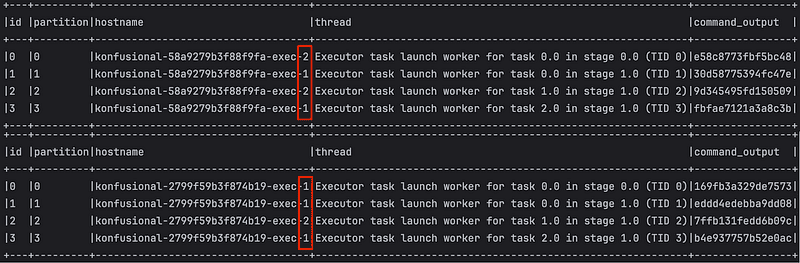
Row tasks may be executed unevenly across hosts, depending on how Spark schedules them during execution.
🤔 Hmmm… why do rows sometimes spread evenly across nodes and sometimes not?
Spark doesn’t guarantee an even distribution of tasks across executors. Each executor can run up to its configured number of cores in parallel, but task assignment happens dynamically. With a small number of partitions or rows, it’s common for one executor to handle multiple tasks while another handles fewer — Spark only ensures that all tasks get executed, not that they’re perfectly balanced across nodes.
Deleting the Cluster
Once we’re done experimenting and our cluster has served its purpose, it’s time to clean up. Simply run:
minikube delete -p konfusional-clusterThis command not only shuts down all the container nodes but also removes the cluster settings from your ~/.kube/config, effectively making it as if the cluster never existed. Say goodbye to clutter! 🧹
… but hold on — don’t hit enter just yet. We still have a bit more digging to do …
🔍 Inside the Spark-Kubernetes Magic
Spark submit — The Grand Entrance
When we execute spark-submit (or the SparkSubmit class), Spark first checks the master URL using SparkMasterRegex.isK8s(masterURL). If it detects Kubernetes, our job officially enters Kubernetes territory, and KubernetesClusterManager springs into action orchestrating a pod-powered symphony.
TaskScheduler — The Brain
Next up, Spark creates a TaskSchedulerImpl. Think of this as the brain of Spark: it knows how many tasks to try, how many times to retry them, and which executors are lucky enough to get work. If something goes horribly wrong, it shrugs and says: “Well, let’s retry… again.”
SchedulerBackend — The Body
Now, KubernetesClusterSchedulerBackend is constructed. It’s like Spark’s body: it makes actual moves. It talks to Kubernetes via:
SparkKubernetesClientFactory.createKubernetesClient(...)…and does some magic:
- Decides how many executor pods we need.
- Watches them like a hawk using
ExecutorPodsWatchSnapshotSource. - Polls them occasionally with
ExecutorPodsPollingSnapshotSourcejust to make sure they haven’t gone AWOL (Hello, hello, anybody home?). - Keeps a snapshot store of executor pod states because, in Kubernetes, pods can be unpredictable little creatures.
Executors — The Workers
Each executor pod runs:
org.apache.spark.executor.CoarseGrainedExecutorBackend- Executors register with the driver.
- Receive tasks.
- Run tasks.
- Report results back to the driver.
In other words, they’re like very obedient interns who never complain … except sometimes they get OOMKilled, which is their way of saying: “I can’t handle this much memory, human!”
Daemons Everywhere — Am I in Hell?
When Spark runs on Kubernetes, it’s not just launching pods and hoping for the best. There are background threads/daemons that keep everything running smoothly. Three important ones are:
1. schedulerExecutorService – The Executor Boss. Think of this as the manager that keeps our executors in check. It decides how many executor pods we need, launches new ones if needed, and removes extras if the workload drops. Without it, our job could either starve (not enough executors) or waste resources (too many idle executors).
2. subscribersExecutor – The Gossip Hub. This daemon notifies subscribers about pod snapshots. Whenever the state of a pod changes (e.g., Pending ➜ Running ➜ Succeeded), it informs all interested components. Components like the Spark driver UI, metrics system, or custom listeners need to know pod status updates to react or display information.
3. eventsPollingExecutor – The Pod Stalker. This one actively polls the Kubernetes API to see if pods are alive. It regularly checks the status of driver and executor pods by calling the Kubernetes API. Updates internal state based on what it finds. It ensures Spark knows in near-real-time whether a pod is running, failed, or completed, so it can restart pods if needed.
Polling — Stalking our Pods Like a Pro
Polling is basically Spark asking Kubernetes, over and over:
“Hey, is my executor awake yet? Are you done with that task? Did you crash again?!”
Spark polls the Kubernetes API every few seconds, checking pod statuses: Pending, Running, Succeeded, or Failed. Based on what it sees, it either keeps chilling, restarts a failing pod, or declares “Scene wrapped!” when the job finishes.
spark.kubernetes.scheduler.pod.pollingInterval **(**Default: 3s). How often Spark asks Kubernetes for pod updates. Faster intervals means quicker reactions, but more chatter with the API; slower means less overhead, but delays in detecting failures.
Cleanup — The Silent Goodbye
When our job is done:
ExecutorPodsAllocatorandExecutorPodsLifecycleManagerclean up executor pods.- Driver pod in cluster mode self-destructs.
- Snapshots are deleted.
- And if we’re lucky, no OOMKilled pods were harmed during the process.
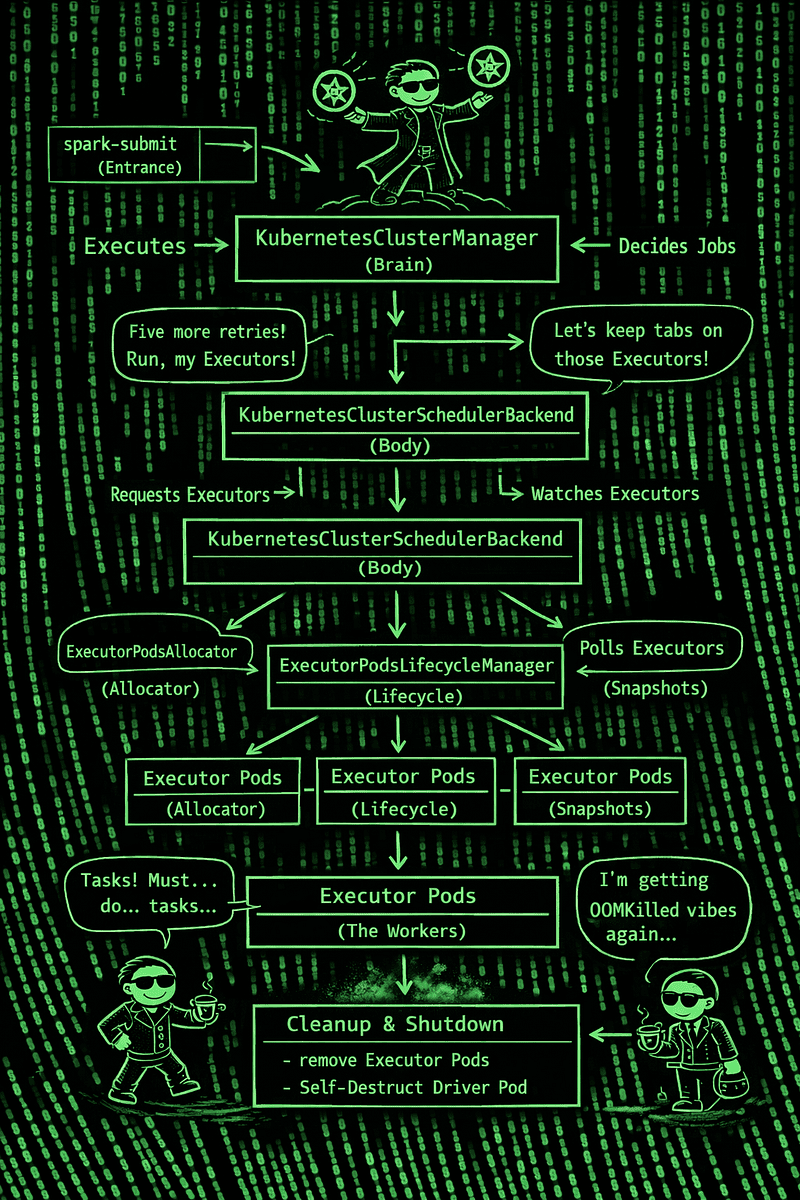
This diagram hasn’t been exhaustively reviewed (hey, perfection is overrated 😅), but ChatGPT did such a fantastic job that I couldn’t resist dropping it into the article.
🤷♂️ What Can Go Wrong?
Running Apache Spark on Kubernetes sounds glamorous — elastic scaling, cloud-native vibes, pods everywhere. But behind the scenes, it’s a jungle of pods, configs, and mysterious failures. Let’s peek at what can go wrong — and how to survive it.
1. Configuration / Kubernetes API Mishaps
❌ Image not accessible or misconfigured — Kubernetes can’t fetch our Spark image, throwing an ImagePullBackOff error. This usually happens before our Driver or Executor pods even start and often comes from wrong image names, missing credentials, or misconfigured secrets. Check with kubectl describe pod and pod events, and triple-check those image names and secrets before blaming Spark.
❌ ConfigMap or permission problems — A ConfigMap is Kubernetes’ way of storing configuration in key-value format, but if Spark can’t create it (usually due to missing service account permissions), pods fail at startup and never register. A common scenario: the driver starts, but executors crash with missing volume errors. Always make sure your service account has proper RBAC (Role-Based Access Control) access.
❌ RBAC / authentication misconfigurations — In client mode, the driver uses the default token to create resources. If permissions are missing, pods may spawn as system and fail silently. Before hitting spark-submit, validate your RBAC rules—otherwise, we’ll be debugging in the dark.
2. Pod Failures / Lifecycle Chaos
⚠️ Executor Pods killed by OOM — Kubernetes will terminate pods that exceed memory limits (overhead + configured memory). Memory spikes or misconfigured spark.kubernetes.memoryOverhead / spark.executor.memory are the usual suspects. Keep an eye on your memory settings, or your pods will get an abrupt “nope” from K8s.
⚠️ Executors Pending / Not Registering — Sometimes pods are created but never register with the driver, especially in client mode or when the cluster scales slowly. Network timeouts, scheduling latency, or autoscaler delays are common culprits. Patience, young padawan… or tune your cluster.
⚠️ Driver or Pods stuck in Pending — Pods that never start usually hit insufficient CPU/memory or scheduling constraints. Check node status and events with kubectl describe pod. If our pod is “Pending forever,” the cluster might just be saying, “Sorry, not today.”
3. Connectivity / Networking Headaches
❌ Driver-Executor connection failures — Blocked intra-cluster traffic due to network policies, firewalls, or internal DNS can prevent executors from talking to the driver. Make sure the driver is reachable by IP or hostname inside the cluster, or your executors will be lonely and confused.
❌ DNS or external access woes — Spark UI might be inaccessible outside the cluster without port-forwarding or ingress. While this doesn’t break jobs, debugging without UI access quickly becomes a painful guessing game (trust me, I’ve been there).
4. External Services Integration
❌ S3 or external storage access errors — Pods trying to read objects without proper IAM/S3 permissions will fail with 403 Forbidden. Always configure roles, OIDC tokens, or credentials correctly. Cloud storage is great… until you forget the keys.
5. Other Documented Gotchas
🚫 Version-specific bugs — Some older Spark/Kubernetes combos fail with particular configs or custom Hadoop builds. Always check version compatibility before upgrading anything — you don’t want surprises mid-job.
⚠️ Lost logs after pods terminate — Without a centralized logging system, executor logs vanish when pods die, making debugging feel like searching for Bigfoot. Set up persistent logging before your pods ghost you.
🚀 Leveling Up, One Pod at a Time
Spark on Kubernetes is messy, chaotic, and full of surprises — like stepping into the Matrix without the manual. Every failed executor, every pending pod, is a glitch in the system, a lesson coded into the cluster itself. Slowly, pod by pod, I’m learning the rules, seeing the patterns, bending the system to my will.
The journey isn’t over — there’s always another bug, another RBAC quirk, another OOMKilled executor waiting to test you. But now, I move with a little more awareness, a little more control, and a growing sense that maybe… just maybe… I can hack this reality.
Check out the repo for this article on GitHub.
“Esto algún día para ti será normal.
Y la sabiduría en tu mente será total.
No son negocios es algo personal.
Estás en un cubo de variante dimensional.
Por eso lo que ves es kubefusional.”
“One day, this will be normal for you.
And the wisdom in your mind will be complete.
It’s not business, it’s personal.
You are in a cube of dimensional variants.
That’s why what you see is kubefusional.”
(adapted from “El cubo de variante dimensional” by Frank T)