
Apache Spark WTF??? — Living Without You
January 1, 2025. The first day of a new year always feels like a good time to look back and reflect, especially on what went down in the…
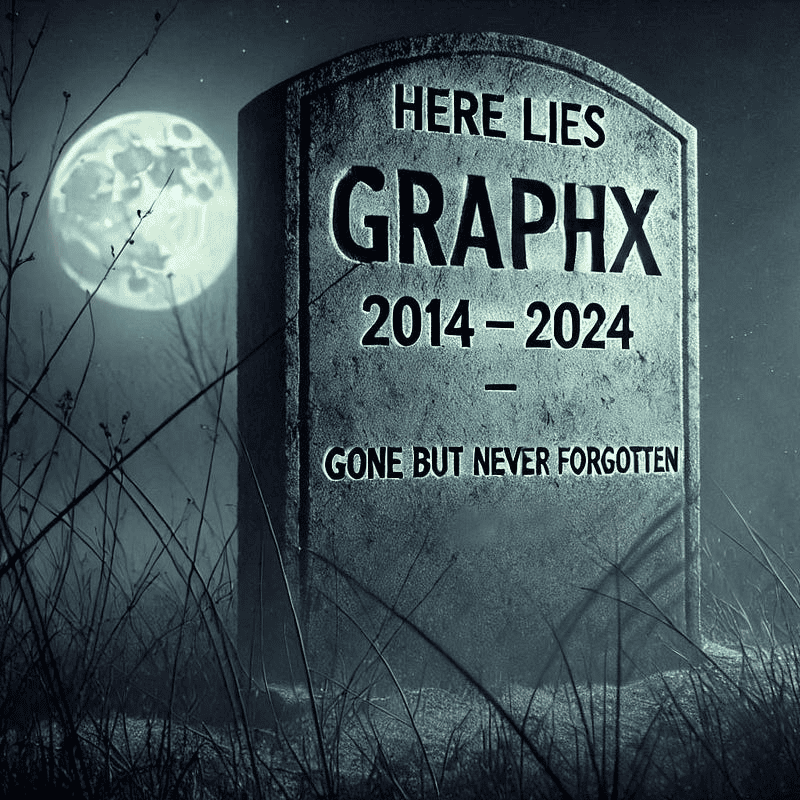
I could hardly believe it, when I heard the news that day.
I had to come and get it straight from you.
They said you were deprecatin’, someone’s swept your algorithms away.
From the look upon your code, I see it’s true
(adapted from ‘How Am I Supposed to Live Without You’ by Michael Bolton)
GraphX In A Nutshell
So, What Exactly Is Spark GraphX?
GraphX is (or was, I guess) Spark’s distributed graph processing library — a tool designed to tackle massive graph analytics and computations. Think of it as the go-to library for crunching massive graphs within the Apache Spark ecosystem.
Whether you’re working with millions — or even billions — of vertices and edges, GraphX had you covered. Built on Spark’s in-memory processing and distributed computing wizardry, it made handling complex graph data a breeze. From mapping social networks to analyzing transportation routes or uncovering hidden patterns in massive datasets, GraphX was the ultimate tool for large-scale graph analytics.
Evolution from Bagel
Before GraphX, there was Bagel— Spark’s first shot at graph processing. Inspired by Google’s Pregel, Bagel used a vertex-centric model but came with its fair share of issues. Its low-level API, poor scalability, and lack of integration with Spark’s broader ecosystem made it a tough fit for large-scale graph processing.
These shortcomings eventually led to Bagel’s deprecation in favor of GraphX. GraphX was designed as a more advanced successor, offering richer abstractions, improved scalability, and “seamless” integration with Spark’s data-parallel and graph-parallel processing capabilities. It wasn’t just a replacement — it was an evolution. GraphX took the lessons learned from Bagel and built a framework that truly harnessed the full power of Spark, making it the go-to solution for graph analytics in the Spark ecosystem.
Key Features
- Graph Representation: GraphX uses a property graph model, where both vertices (nodes) and edges can have attributes. This makes it possible to represent richer data, such as storing details about vertices (e.g., a user’s profile) or edges (e.g., the strength of a relationship).
- Graph Computation: GraphX comes with a suite of powerful graph algorithms, including PageRank, connected components, triangle counting, and shortest path. These algorithms run in parallel across a distributed cluster, making GraphX ideal for analyzing massive graphs efficiently.
- Integration with Spark: GraphX is tightly integrated with Apache Spark, leveraging Spark’s Resilient Distributed Datasets (RDDs) for distributed computation. This “seamless” integration allows users to combine graph processing with other Spark tools, like MLlib for machine learning or Spark SQL for structured data queries and analysis.
- Efficient Partitioning: GraphX supports several graph partitioning strategies to distribute data efficiently across a cluster. Techniques like vertex-cut partitioning evenly distribute edges among machines, preventing load imbalances and ensuring smooth performance on large-scale graphs.
- Batch Processing: GraphX is designed for batch processing, excelling at running complex, parallelized computations over static datasets. While it’s not built for real-time or incremental updates like graph databases (e.g., Neo4j), it shines when tackling big, heavy-duty graph analysis tasks.
When To Use Spark GraphX?
GraphX shines when it comes to solving problems that involve relationships. Here are some common use cases:
- Social Network Analysis: Uncover connections between users, identify communities, or pinpoint key influencers.
- Recommendation Systems: Suggest products, movies, or even new friends by analyzing relationships between users and items.
- Network Optimization: Find the most efficient paths in complex systems like transportation routes or communication networks.
- Fraud Detection: Spot unusual patterns or suspicious activities by analyzing relationships in transactions or user behavior.
Key Components of GraphX
GraphX is built around a set of core components that make working with graph data both powerful and intuitive:
- Vertices: These are the building blocks of your graph, representing individual entities like users, products, or websites.
- Edges: These connect the vertices, representing relationships such as friendships, links, or transactions.
- RDDs (Resilient Distributed Datasets): GraphX relies on Spark’s core data structure, RDDs, to store and process vertices and edges.
- Pregel API: This is GraphX’s tool for running iterative graph computations, making it perfect for tasks like finding shortest paths, identifying clusters, or running PageRank algorithms.
How Does GraphX Work?
GraphX processes massive graphs by breaking them into smaller chunks and distributing the work across a cluster of machines. Here’s how it all comes together:
1. Graph Representation: The graph is represented as two key components:
- Vertices: The nodes of the graph, representing entities (e.g., users, products, or locations).
- Edges: The relationships or connections between vertices (e.g., friendships, links, or transactions).
2. Distributed Processing: Each machine (or node) in the Spark cluster works on a subset of the graph’s vertices and edges. Nodes process their assigned chunks independently and communicate with other nodes as needed to exchange data or synchronize results.
3. Iterative Computations: GraphX supports iterative algorithms, like PageRank or connected components, which repeatedly update vertex and edge attributes until the computation converges to a final result.
4. Optimization: After the computations are done, GraphX can help optimize the results — whether it’s identifying the most influential users, finding the shortest path between nodes, or uncovering hidden patterns in the data.
Credit Card Fraud Detection: A Real-World Example
NOTE: The following example has been taken from the Credit Card Fraud Detection problem in the neo4j-examples repo.
Credit card fraud is a massive issue, costing banks, merchants, and processors billions every year. Criminals deploy various tactics, like Bluetooth skimming devices, mass data breaches, and even enlisting insiders like store clerks to steal card information.
A notable case occurred in December 2013 in Abington, Pennsylvania. Two Post Office employees stole credit card data and used it to purchase over $50,000 worth of goods. They even intercepted deliveries at victims’ homes to complete their scheme. The fraudsters were eventually caught when one victim reported a suspicious package interception, exposing their operation.
Graph processing engines can play a critical role in detecting fraud. By representing transactions as graphs, we can model:
- Vertices: Representing entities like customers and merchants.
- Edges: Representing transactions that connect customers to merchants.
Each transaction in the graph is marked accordingly — fraudulent transactions are flagged as "Disputed". By analyzing these transaction graphs, we can quickly identify patterns, trace the origins of fraudulent activity, and pinpoint connections between suspicious entities.
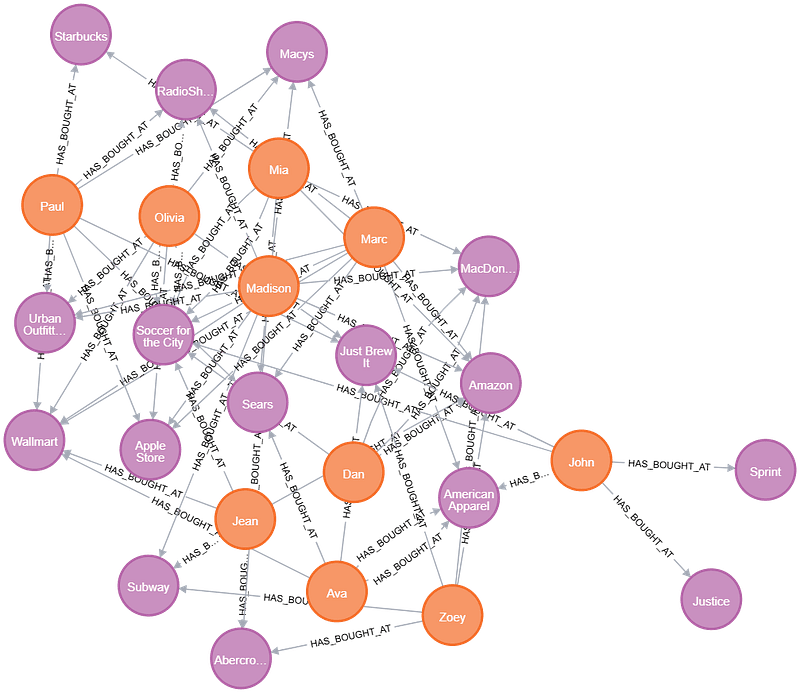
Vertices (orange for customers, purple for merchants) and edges (transactions)
If we want to identify all the fraudulent transactions using a graph database like Neo4j, we can leverage its powerful — yet remarkably simple — query language, Cypher. The query to detect fraudulent transactions could be as straightforward as this:
MATCH (victim:Person)-[r:HAS_BOUGHT_AT]->(merchant)
WHERE r.status = "Disputed"
RETURN victim.name AS `Customer Name`, merchant.name AS `Store Name`, r.amount AS Amount, r.time AS `Transaction Time`
ORDER BY `Transaction Time` DESC
Doing the same thing in Spark GraphX isn’t quite as straightforward as in Neo4j, but the code is still relatively simple. Here’s an example of how you could identify fraudulent transactions in GraphX:
import org.apache.spark.sql.SparkSession
import org.apache.spark.sql.functions.col
import org.apache.spark.graphx._
import org.apache.spark.rdd.RDD

object GraphXTest{

  // Define the vertex properties as a case class to store vertex-related information
  private case class VertexProperty(name: String)

  // Define the edge properties as a case class to store edge-related information
  private case class EdgeProperty(amount: Double, time: String, status: String)

  def main(args: Array[String]): Unit = {
    // Initialize a Spark session to execute Spark operations
    val spark = SparkSession.builder
      .master("local[*]")
      .getOrCreate()


    // Load vertices (customers and merchants) from CSV files
    val customers = getVertices(spark, "customer")
    val merchants = getVertices(spark, "merchant")
    val vertices = customers.union(merchants)

    // Load edges (transactions) from a CSV file
    val edges = getEdges(spark)

    // Create a graph using the vertices and edges
    val graph = Graph(vertices, edges)

    // Step 1: Filter edges with the status "Disputed"
    val disputedEdges = graph.triplets.filter(triplet => triplet.attr.status == "Disputed")

    // Step 2: Extract relevant information from the disputed edges
    val result = disputedEdges.map {
      triplet => (triplet.srcAttr.name, triplet.dstAttr.name, triplet.attr.amount, triplet.attr.time)
    }

    // Step 3: Sort the extracted information by transaction time in descending order
    val sortedResult = result.sortBy(_._4, ascending = false)

    // Print or process the sorted result
    sortedResult.collect().foreach { case (customerName, storeName, amount, transactionTime) =>
      println(s"Customer Name: $customerName, Store Name: $storeName, Amount: $amount, Transaction Time: $transactionTime")
    }

    // Stop the Spark session to free resources
    spark.stop()
  }

  // Helper function to load vertices (customers or merchants) from a CSV file
  private def getVertices(spark: SparkSession, entity: String): RDD[(VertexId, VertexProperty)] = {
    spark.read
      .option("header", "true")
      .csv(s"data/${entity}s.csv")
      .select(col("id"), col("name"))
      .rdd.map(row => (row.getAs[String]("id").toLong, VertexProperty(row.getAs[String]("name"))))
  }

  // Helper function to load edges (transactions) from a CSV file
  private def getEdges(spark: SparkSession): RDD[Edge[EdgeProperty]] = {
    spark.read.option("header", "true")
      .csv("data/transactions.csv")
      .rdd.map(
        row => Edge(
          row.getAs[String]("customer_id").toLong, row.getAs[String]("merchant_id").toLong,
          EdgeProperty(row.getAs[String]("amount").toDouble, row.getAs[String]("time"), row.getAs[String]("status"))
        )
      )
  }
}
Basically, we follow the steps:
- Loading Data: First, load the customer, merchant, and transaction data from their respective CSV files. Convert the DataFrames into RDDs, selecting only the relevant columns. Then, union the customer and merchant RDDs since both will serve as vertices in the graph..
- Creating the Graph: Create a Graph object using the customer and merchant RDDs as vertices and the transaction RDD as edges, setting up the graph structure for processing.
- Querying the Graph: Retrieve the disputed triplets — an RDD containing all edges (transactions) marked with a
"Disputed"status, along with the associated customers and merchants. - Selecting Attributes: Extract key attributes from each customer-transaction-merchant triplet in the RDD, such as the customer’s name, transaction amount, merchant name, and transaction time..
- Sorting the Result:Finally, sort the resulting RDD by transaction time in descending order to display the most recent disputed transactions first.
Key Points to Highlight:
- No Python Bindings: GraphX doesn’t support Python bindings, so if you want to use GraphX, your only options are Javaor Scala.
- RDD Operations: All operations within the GraphX API are based on RDDs, so working with the API requires familiarity with Spark’s RDD-based operations.
- All IDs Are Long: In GraphX, vertices must be uniquely identified using long numbers. For example, customer and merchant IDs are unique, which allows for a straightforward union of their RDDs. However, if both entities have overlapping IDs, you’ll need to generate a new column with a UUID (Unique Identifier) to ensure uniqueness.
GraphFrames as the Designated Replacement?
GraphFrameswas frequently mentioned during the discussion on deprecating GraphX as its replacement. But …
What Exactly Is GraphFrames?
GraphFrames is a graph processing library for Apache Spark, developed by Databricks in collaboration with UC Berkeley and MIT. Unlike GraphX, which operates on RDDs, GraphFrames leverages DataFrames for graph processing. This provides better scalability, performance, and a unified API across Python, Java, and Scala. Vertices and edges in GraphFrames are represented as DataFrames, which allows for storing arbitrary attributes. Additionally, it integrates smoothly with Spark SQL and MLlib, enabling powerful queries and easy graph data management in formats like Parquet, JSON, and CSV.
Key Differences Between GraphX and GraphFrames
- API and Data Structures: GraphX uses RDDs for graph processing, offering fine-grained control. In contrast, GraphFrames operates on DataFrames, providing an easier-to-use API and better integration with Spark SQL.
- Performance: GraphX may perform better for large-scale computations that require low-level optimizations, thanks to its use of RDDs. However, GraphFrames benefits from DataFrame optimizations, especially when working with SQL-like operations, making it more efficient for certain tasks.
- Algorithms: GraphX supports a wider range of algorithms and offers more customization. Meanwhile, GraphFrames focuses on simplicity and ease of use, offering essential graph algorithms while simplifying the overall development experience.
- Interoperability: GraphX is more tied to the RDD model, making SQL operations harder to implement. GraphFrames, however, works seamlessly with Spark SQL and DataFrames, enhancing interoperability with other Spark tasks. Additionally, GraphFrames provides Python bindings, making it accessible for Python users, unlike GraphX, which only supports Java and Scala.
Credit Card Fraud Detection … Now With GraphFrames!
Let’s refactor the previous example to use GraphFrames instead of GraphX.
import org.apache.spark.sql.{DataFrame, SparkSession}
import org.apache.spark.sql.functions._
import org.graphframes.GraphFrame

object GraphframesTest{

  def main(args: Array[String]): Unit = {
    // Initialize a Spark session to execute Spark operations
    val spark = SparkSession.builder
      .master("local[*]")
      .getOrCreate()

    // Load vertices (customers and merchants) from CSV files
    val customers = getVertices(spark, "customer")
    val merchants = getVertices(spark, "merchant")
    val vertices = customers.union(merchants)

    // Load edges (transactions) from a CSV file
    val edges = getEdges(spark)

    // Create a graph using the vertices and edges
    val graph = GraphFrame(vertices, edges)

    // Filter edges with the status "Disputed" using Motif API
    val result = graph.find("(c)-[t]->(m)")
      .filter("t.status = 'Disputed'")
      .select(col("c.name"), expr("m.name as dstName"), col("t.amount"), col("t.time"))
      .orderBy(desc("t.time"))

    // Print or process the sorted result
    result.collect().foreach { row =>
      println(s"Customer Name: ${row.getAs[String]("name")}, Store Name: ${row.getAs[String]("dstName")}, Amount: ${row.getAs[Double]("amount")}, Transaction Time: ${row.getAs[String]("time")}")
    }

    // Stop the Spark session to free resources
    spark.stop()
  }

  // Helper function to load vertices (customers or merchants) from a CSV file
  private def getVertices(spark: SparkSession, entity: String): DataFrame = {
    spark.read
      .option("header", "true")
      .csv(s"data/${entity}s.csv")
      .select(col("id"), col("name"))
  }

  // Helper function to load edges (transactions) from a CSV file
  private def getEdges(spark: SparkSession): DataFrame = {
    spark.read.option("header", "true")
      .csv("data/transactions.csv")
      .withColumn("amount", col("amount").cast("double"))
      .select(col("customer_id").alias("src"), col("merchant_id").alias("dst"), col("amount"), col("time"),col("status"))
  }
}
As we can see, the GraphFrames code is entirely DataFrame-oriented. Thanks to the Motif API, we can also perform graph pattern matching in a simple and intuitive way, using a syntax that closely resembles Neo4j’s Cypher. Here’s the step-by-step process in this example:
- Loading Data: Create DataFrames for customers, merchants, and transactions by loading data from their respective CSV files and selecting only the required columns. The customers and merchants DataFrames are then unioned to form the vertices.
- Creating the Graph: A GraphFrame is created using two DataFrames: one for vertices (node data) and the other for edges (relationships between nodes).
- Graph Pattern Matching: Using the Motif API, we find all the transactions between customers and merchants in the graph.
- Filtering: The graph is filtered to keep only those transactions that have a status of
"Disputed". - Selecting Columns: The relevant fields — customer name, merchant name, transaction amount, and transaction time — are selected from the filtered transactions.
- Sorting: The results are then sorted by transaction time in descending order, ensuring that the most recent disputed transactions are displayed first.
Key Considerations for GraphFrames:
- Vertex DataFrame: A vertex DataFrame should contain a special column called
id, which specifies unique identifiers for each vertex in the graph. This column is essential for defining the vertices of the graph. - Edge DataFrame: An edge DataFrame should include two special columns:
src(the source vertex ID of the edge) anddst(the destination vertex ID of the edge). These columns define the relationships between the vertices. - IDs Aren’t Long: Unlike GraphX, which requires vertex IDs to be of type
Longdue to its reliance on RDDs and the need for efficient serialization of large data, GraphFrames is built on Spark DataFrames. This means that vertex IDs can be of any data type supported by DataFrames (such asInt,String,Long, etc.). This flexibility allows GraphFrames to accommodate a wider variety of data types for vertex IDs compared to GraphX.
Chronicle Of A Death Foretold
In late August 2015, a Spark user openedJira ticket SPARK-3789, requesting Python bindings for GraphX. After about seven months, a Spark committer closed the issue with the following message:
“No concrete plan at this time since the GraphFrames package is still in active development. But since supporting Python directly on top of GraphX would be quite painful (which we did in spark.mllib package) and it is not worth the time, I closed this JIRA.”
Fast forward to February 2018, the O’Reilly book “Spark: The Definitive Guide” was released. Chapter 30, titled “Graph Analytics”, was entirely dedicated to GraphFrames, not GraphX. Instead of explaining how GraphX works and offering examples, the chapter focused solely on GraphFrames. The chapter also mentioned:
“GraphFrames is currently available as a Spark package, an external package that you need to load when you start up your Spark application, but may be merged into the core of Spark in the future.”
Yet, more than six years later, the anticipated merge of GraphFrames into the core of Spark hasn’t happened.
Then, on September 29, 2024, a well-known Spark committer raised a discussion on the Spark user mailing list with the subject:
[DISCUSS] Deprecate GraphX OR Find new maintainers interested in GraphX OR leave it as is?
The very next day, on September 30, 2024, the same committer, without allowing enough time for further discussions or to search for new maintainers, opened a vote to deprecate GraphX:
By October 8, 2024, less than two weeks later, the vote was closed, and the proposal was passed, despite the discussion thread still being active. Despite me and another contributor stepping forward to offer our help in maintaining GraphX, the decision was made.
On November 13, 2024, Matei Zaharia, one of the co-founders of Spark, officially announced the deprecation of GraphX in Spark 4 during the ASF Board Report. However, a few days later, he amended his statement, stating:
“The community is discussing how to manage the graph components of Spark going forward, e.g., deprecating GraphX, or bringing the external
GraphFrames project into Apache Spark.”
Since then, there have been no further developments. To be continued?
Final Thoughts
At the beginning of this article, I mentioned that the deprecation of GraphX was the most surprising event for me in 2024. But why did the deprecation of a library that had seen little-to-none active maintenance or development in recent years shock me so much? Well, it’s because I didn’t expect an API that, although not widely used, had been around for 10 years, to be deprecated in less than two weeks. This decision came after a very short voting process, with only a small group of people (most of whom, I believe, weren’t even committers).
Typically, when a discussion is opened, it signals a genuine interest in dialogue and collaboration. However, in this case, the quick transition to a vote the very next day gave the impression that the decision had already been made. It made me feel that the purpose of the discussion wasn’t to gather input, but rather to finalize a pre-determined outcome.
I can totally understand that if there are no active maintainers, there might be a need to eventually phase out GraphX. But when a few of us do step forward in response to the call for maintainers, why not explore the possibility of keeping it alive and evolving, rather than rushing to deprecate it?
Moreover, while GraphFrames was mentioned as a potential replacement during the discussion, no clear steps were defined for merging it with GraphX. Since GraphFrames relies on GraphX internally, simply replacing one with the other isn’t feasible without a clear plan for integration. Yet, no concrete plan or roadmap has emerged, leaving a lot of uncertainty.
What caught me off guard was the speed at which this decision was made and the apparent lack of consideration for potential GraphX users . In such a mature open-source project like Spark, I didn’t expect to see such a swift deprecation of a core component without a thorough impact analysis or a more inclusive conversation. Some mentioned that deprecating GraphX didn’t mean it was going to be immediately removed from Spark, but still, who would want to build production systems on a deprecated API? Not me, that’s for sure!
NOTE: This is the repo for the GraphX and GraphFrames examples.
Tell me, how am I supposed to cluster nodes without you,
Now that I’ve been relying on you so long?
How am I supposed to find the shortest path without you?
And how am I supposed to PageRank on,
When all your algorithms I’ve counted on are gone?
(adapted from ‘How Am I Supposed to Live Without You’ by Michael Bolton)