
Apache Spark WTF??? 📈 Nothing Breaks Like A Chart 📉
Data engineering at scale is a surrealist act: we manipulate variables that don’t exist yet across a cloud of invisible computers. But for…

“It feels like art, but nothing breaks like a chart”
(adapted from “Nothing breaks like a heart” by Mark Ronson feat.Miley Cyrus)
🎨The PySpark 4.0 Plotting Revolution
Before Spark 4.0, plotting felt like a medieval tax form, forcing a stressful local ritual:
df.groupBy("category").count().toPandas().plot.bar()This infamous visualization tax created severe driver memory pressure and constant dread before running .toPandas() on unchecked datasets, stalling visual intuition.
The core problem was the execution boundary: a Spark DataFrame is a lazy blueprint, but a chart demands immediate pixels, shattering that laziness.
In this legacy era, a chart was merely a full-table-scan query wearing mascara, always threatening to trigger fatal driver node OOM crashes.
The Origin Story and the Remote Client Era
For a decade, data professionals had to break their distributed workflows just to visually inspect their data. To bridge this ergonomic gap, the open-source community introduced native plotting in Apache Spark 4.0 (via JIRA SPARK-49530), landing alongside Databricks Runtime 17.0 to prioritize Python usability.
# The new reality:
df.plot(kind="line", x="time", y="value")
Powered natively by Plotly, the accessor returns a crisp, interactive browser figure rather than a static chart. This architecture integrates seamlessly with Spark Connect’s decoupled framework, ensuring the local client remains lightweight while distributed executors handle the heavy data transformations remotely.
How Spark Avoids a Driver Funeral
Plotting a lazy Spark DataFrame is surreal because a chart demands exact, literal coordinates. To bridge this execution gap without triggering a driver node funeral, Spark 4.0 acts as a defensive translator, deploying three distinct cluster-side strategies:
- Bounded Top-N Approach (Bar, Barh, Pie): Spark caps the visual payload to the leading categorical rows.
- Smart Sampling (Line, Area, Scatter): It downsamples the dataset across partitions to keep the local point cloud sane.
- Cluster-Side Metrics (Hist, Box, KDE): It calculates global statistical summaries across executors first, returning a featherweight metadata payload for local rendering.
The visualization feels local, but the heavy mathematical lifting happens entirely backstage across the distributed cluster.
Why Python Got the Paintbrush
PySpark received native plotting because visualization is an exploratory, human-centric notebook task dominated by Python. While Scala and Java excel at rigid enterprise pipelines, deploying that much heavyweight architecture for a quick chart is overkill.
The only danger of the .plot API is psychological: its casual, Pandas-like syntax elegantly masks the massive distributed machinery running backstage, hiding the cluster behind a deceptively simple interface.
📊 What PySpark 4 Actually Shipped
PySpark 4 introduced the native df.plot accessor, embedding an interactive plotting interface directly into core DataFrames. This completely removes the traditional detour out of the Spark ecosystem just to visualize data trends.
The API Surface: Choose Your Style
The native plotting engine is exposed via the .plot property on any PySpark DataFrame, returning a PySparkPlotAccessor instance. Formally labeled as experimental, this feature provides instant pandas-style ergonomics inside your interactive notebook sessions without requiring you to drop out of the PySpark ecosystem.
Visualizations can be summoned using two distinctive calling patterns:
- The Chaining Style: Invoke the target plot type directly as a sub-method on the accessor (e.g.,
df.plot.scatter(...)). - The Explicit Kind Style: Call the property as a method and pass the chart type string directly to the
kindparameter (e.g.,df.plot(kind="scatter", ...)).
The Chart Catalog and the Memory Spectrum
The new API supports the core family of visualizations modern data teams rely on daily:
- Trends & Composition: Line, area, and pie charts.
- Comparisons & Correlations: Bar, horizontal bar, and scatter plots.
- Statistical Distributions: Box, histogram, and KDE plots.
Each geometry maintains a distinct relationship with distributed cluster memory — a bar chart thrives on a bounded subset of categorical rows, whereas a KDE plot demands global statistical passes.
Syntactic Sugar vs. Execution Reality
On tiny data, charting is instant and risk-free. However, API simplicity must not blind you to execution reality.
⚠️ The Architecture Reality Check: Calling
.plotis an explicit Spark action. It evaluates the lazy lineage graph, triggers a distributed job, forces network shuffles for aggregations, and materializes data locally on your driver node.
Plotly Enters Wearing Sunglasses
By default, PySpark plotting returns a fully interactive, client-side Plotly Figure object instead of a static image.
This creates an ideal architectural division of labor: Spark handles the massive data processing, filtering, and multi-node statistical crunching cluster-side, then passes a condensed payload to Plotly for smooth browser rendering.
Because it is a standard Plotly instance, you can immediately use native Plotly methods to update layouts, tweak color scales, or append custom titles.
The Anti-Features: What It Is NOT
The native API eliminates developer friction, but it does not suspend the laws of systems engineering:
- Active Sampling: Plots do not use 100% of your raw data; safety limits and row thresholds are actively enforced via cluster-side downsampling.
- Cardinality Risks: It cannot insulate your notebook from high-cardinality columns that choke local browser rendering performance.
- Design Choices: It will not magically transform pie charts into an effective way to communicate multi-class variables to leadership.
The accessor automates data transfer logistics, but data engineering discipline and accurate statistical filtering remain entirely your responsibility.
The Plotly Paradox: Why PySpark Leaves the Canvas Blank
Running a native plot command in a fresh PySpark environment will immediately trigger a stack trace demanding missing packages like plotly, nbformat, pandas, and pyarrow. This isn’t an oversight—it is a pragmatic architectural boundary designed to save your cloud budget from your own environment configurations.
🤔 Why Visual Packages are Opt-In?
- Zero Waste on Headless Clusters: Forcing hundreds of remote worker nodes to waste bandwidth downloading frontend rendering engines they will never use is infrastructure treason.
- Python’s Opt-In Philosophy: PySpark handles the core distributed muscle out of the box, leaving situational client-side luxuries up to your local environment.
- The High-Speed Serialization Highway (
pyarrow): Moving data across the JVM-to-Python language barrier row-by-row is a notorious performance bottleneck. PyArrow acts as a zero-copy columnar highway, converting sluggish serialization into high-speed data transit. - The Mental Model Bridge (
pandas): Plotly natively consumes Python structures, not Spark DataFrames. Under the hood, PySpark shapes condensed cluster metrics into a familiar pandas DataFrame format right before handing it off to the graphing engine. - The Notebook Translator Tax (
nbformat): Plotly designs interactive charts but relies onnbformatas a middleman to translate its rich JavaScript and HTML structures into browser-friendly Jupyter MIME types. - Decoupled Lifecycles: Keeping these libraries independent means you can upgrade your frontend layouts to get the latest charting features without needing to upgrade or re-architect your entire enterprise big data backend.
🧪 PySpark Notebook Lab: The New Tooling in Action
The first notebook, lab_01__the_new_tooling_in_action.ipynb, uses a synthetic e-commerce dataset to prove the ergonomics of both the Chaining and Explicit Kind plotting styles for seamless exploration. It validates the client-side Plotly handshake through on-the-fly theme tweaking and pushes automated sampling thresholds to their limit, proving the engine can map thousands of raw points without triggering a catastrophic driver memory funeral.
⚙️ The Engine Under the Hood
PySpark doesn’t blindly dump millions of distributed rows into your local rendering engine. Instead, Spark automatically selects one of three distinct data reduction strategies based entirely on the specific chart geometry you request.
Strategy 1: The Top-N Cap and the Slicing Trap
For categorical plots (bars and pie charts), Spark enforces an adjustable, default 1,000-row ceiling to protect the rendering canvas. However, this creates a dangerous operational trap: the engine’s native limitation simply fetches the first available records in partition order, completely detached from their mathematical or business weight.
If you run a bar chart on an unaggregated billion-row dataset, you aren’t viewing your top-performing categories; you are looking at a random, unordered slice of infrastructure reality. To bypass this illusion, you must explicitly aggregate, calculate, and sort your metrics cluster-side before passing them down to the local plotting canvas.
Strategy 2: Single-Pass Reservoir Sampling
For trend and correlation charts (line, area, and scatter plots), a rigid row cap fails to capture data variance, while rendering millions of coordinates turns your canvas into unreadable digital gravel. Spark resolves this by deploying random statistical sampling.
Replacing legacy approaches that required two expensive cluster passes — one to calculate the row ratio and another to extract the sample — Spark utilizes optimized single-pass reservoir sampling. This structural shift cuts network and disk I/O costs precisely in half.
⚠️ The Disclaimer: While excellent for instantly exposing macro trends and density clusters, rare events, extreme outliers, and tiny localized categories can easily vanish from the canvas. Reservoir sampling provides an elegant sketch of reality, not a flawless census.
Strategy 3: Cluster-Side Global Metrics
Statistical distribution charts (box plots, histograms, and KDE curves) demand absolute mathematical accuracy; sampling can fundamentally warp data skewness or miscalculate critical medians. To preserve structural integrity, PySpark executes an engine-side aggregation strategy, using its optimized SQL engine to run heavy statistical calculations directly across distributed executors.
The driver node never sees raw records. Instead, it receives a lightweight payload of pre-calculated bin counts, exact quartile markers, and smoothed density coordinates. This cluster-side processing makes profile modeling over billions of rows incredibly fast, lightweight, and infinitely scalable.
The Golden Rules of Distributed Plotting
To keep your processing pipelines fast and your cloud infrastructure bills entirely predictable, you should adopt three core operational habits:
- Bar & Pie Charts: Never run them raw. Always pair them with explicit group-by and order-by steps to ensure your visualization represents actual business meaning.
- Line Charts: Ensure your time dimensions are thoroughly pre-aggregated and sequentially sorted across the cluster before asking for a visual trend.
- Histograms: Trust the cluster’s global math, but always back up visual anomalies or long-tail outliers with a quick, explicit numeric confirmation query using approximate percentiles.
💡 The Ultimate Takeaway: Use the native chart to quickly notice the structural shape of your data, use Spark SQL to confirm the exact numbers, and never let a local client-side rendering library do a distributed cluster’s job.
🧪 PySpark Notebook Lab: Turning the Gears
The second notebook, lab_02__turning_the_gears.ipynb, serves as a direct technical verification of Spark’s internal data reduction engines. By evaluating a high-volume, skewed synthetic dataset, the lab explicitly demonstrates the “Top-N Trap” by contrasting raw un-sorted plots against pre-aggregated cluster data. It further showcases the performance efficiency of single-pass reservoir sampling on massive coordinate spreads, and highlights the low-overhead memory profile of distributed histogram calculations backed up by approximate cluster percentiles.
🏛️ The Source-Code Museum
Step past the shiny marketing galleries into the source-code basement, where casual notebook calls turn into distributed jobs with aggressive opinions. Behind the seemingly harmless df.plot accessor lives a strict routing system whose primary directive is not visual beauty, but infrastructure survival.
PySparkPlotAccessor: The Curator with the Clipboard
The hidden engine behind native plotting is the PySparkPlotAccessor class, tucked away inside pyspark.sql.plot.core.
When you access the .plot property, Spark doesn’t open a magical graphic canvas. It hands your DataFrame to a defensive curator with a clipboard who checks exactly what kind of chart you are trying to build and maps it to a specific internal corridor:
- The Sampled Corridor (
PySparkSampledPlotBase): Handlesline,area, andscattercharts. - The Bounded Corridor (
PySparkTopNPlotBase): Handlesbar,barh, andpiecharts.
Two Galleries, One Exclusive Brushstroke
Inside the Apache Spark source tree live two parallel plotting universes:
python/pyspark/pandas/plot/core.py(Legacy pandas-on-Spark)python/pyspark/sql/plot/core.py(Native PySpark SQL DataFrame engine)
Spark 4.0 adapted the choreography of the pandas-on-Spark engine for the stricter, index-free world of core SQL DataFrames. However, the native version enforces an uncompromising architectural rigidity: it strictly supports Plotly alone.
This single-backend constraint is vintage Spark infrastructure design — fewer configuration choices mean fewer ways for a developer to accidentally crash a production cluster.
The Anatomy of the Two Main Paths
1. The Sampled Path (Line, Area, Scatter): Captures macroscopic trends without dragging billions of rows into the browser. Spark builds a randomized, sorted sample by appending random floats (F.rand()) paired with row identifiers (F.monotonically_increasing_id()), then sorting by that random fraction. Crucially, it utilizes a max_rows + 1ghost row trick: it fetches exactly one row beyond your limit. If that extra row appears, the engine flags the truncation, estimates the sample fraction, and clips the payload back to your safe maximum before Plotly ever handles it.
2. The Top-N Path (Bar, Barh, Pie): A blunt, fast cluster-side limit(max_rows + 1) collection designed to keep categorical shapes readable. The analytical catch is that a raw limit() command is entirely arbitrary, grabbing whatever data blocks it encounters first in partition order. If you don’t explicitly chain groupBy, agg, and orderBy blocks upstream, Spark won’t know what your “top” entities actually are—it will simply serve up a beautifully styled slice of random infrastructure reality.
The Heavy Industrial Factories: Histograms, Box Plots, and KDE
Specialized statistical charts bypass standard routing entirely, deploying heavy engine-side SQL machinery to run calculations directly inside distributed executors before shipping anything to the driver.
- Histograms (Bucket Factories): To map value distributions, Spark’s internal plan uses a
posexplodemodel to pair columns, maps coordinates to calculated interval boundaries, and runs counts cluster-side. It then executes a critical step: outer-joining the active counts against an empty grid to fill missing intervals with zeros. A histogram without zero-filling is just a melted staircase pretending to be data science. - Box Plots (Percentile Negotiators): To extract exact quartiles, medians, and whiskers without transferring raw records, Spark executes global statistical passes using
percentile_approxacross executor nodes. True outliers are isolated using high-speed, internal top-k collection logic, delivering only a featherweight summary payload to the driver. - KDE (Gaussian Fog Machines): As the heaviest workload in the catalog, Kernel Density Estimation selects explicit evaluation points across a calculated min-to-max range, computes a distributed Gaussian density contribution for each point, averages them across data nodes, and returns a lean, distilled array of final curve coordinates.
The Local Boundary: The Espresso Tray Metaphor
The ultimate architectural irony of PySpark 4.0 is that Pandas didn’t actually disappear — it just stopped being your manual problem.
The Internal Exchange: For sampled plots, Spark silently creates a micro Pandas DataFrame right before Plotly draws the canvas. For histograms and box plots, it packages its cluster-side statistical payloads into compact Pandas series for local rendering.
The Division of Labor: Spark handles the distributed heavy lifting (scanning, filtering, shuffling), Plotly converts the resulting matrices into interactive browser objects, and Pandas acts as the tray carrying data between them.
🏆 The massive victory of Spark 4.0 is automation: you no longer have to personally carry that hot espresso across the execution border via manual
.toPandas()blocks—Spark now manages the customs checkpoint itself.
🧪 PySpark Notebook Lab: Inspecting the Basements of Routine
The accompanying notebook, lab_03__the_source_code_museum.ipynb, serves as a practical testing ground for the internal routing mechanics of the plotting engine. By interacting with a synthetic dataset, the lab programmatically simulates and demonstrates how Spark manages the max_rows + 1 overflow detection boundary, visualizes the performance variance between sampled and globally aggregated tracks, and unmasks the internal “espresso tray” pandas conversions happening right under the hood.
🧌 Taming the Configuration Goblin
Every powerful distributed engine eventually exposes a configuration control knob. Enter the physical throttle for PySpark plotting:
spark.conf.set("spark.sql.pyspark.plotting.max_rows", 5000)This structural knob is immensely useful yet highly dangerous. While it gives you direct control over data transfer boundaries, adjusting it carelessly can instantly turn a quick exploratory notebook session into a browser-freezing fresco of suffering.
What the Goblin Controls
The configuration parameter spark.sql.pyspark.plotting.max_rows dictates the visual row ceiling for native PySpark plotting (default: 1,000 records). Its exact behavior shifts depending on the chart type:
- Bounded Categories (Bar, Barh, Pie): Acts as a hard, top-N style truncation boundary.
- Trends and Correlations (Line, Area, Scatter): Dictates the target pool size for the random reservoir sampling engine.
Backstage, both processing paths pull a max_rows + 1 ghost row payload. If that single extra record materializes, it trips a silent internal alarm, forcing Spark to flag the chart canvas as truncated or sampled.
📝 The Takeaway: This is a defensive client-side rendering boundary designed to protect browser responsiveness, not a data correctness setting.
Why 1,000 Rows Is Sane, Not Offensive
To a big data engineer managing multi-terabyte Parquet lakes and massive compute clusters, a 1,000-row limit can feel like an insult. However, data visualization obeys entirely different physical laws than data engineering:
- Bar charts with 10,000 categories are not analysis; they are just a barcode experiencing an existential crisis.
- Pie charts with 1,000 slices are not communication; they are a cursed pizza designed by an aggressive committee.
- Scatter plots with 800,000 interactive coordinates may preserve raw fidelity, but your local browser will experience them as a coordinated infrastructure attack.
💡 Apache Spark can easily distribute massive computational workloads across hundreds of remote executors. Your local notebook canvas, however, cannot distribute human eyesight.
The Domino Effect of Ambitious Overplotting
You have the authority to raise the row limit whenever you want, but doing so radically shifts the mechanical pressure points of your architecture. Raising this threshold triggers a destructive system domino effect:
- Backend Strain: Larger row counts inflate local data footprints, spike serialization overhead, and trigger driver node memory inflation.
- Frontend Lag: Forcing Plotly to track an exponential number of canvas objects slows down cluster-to-driver network transfers.
- The Crash: The browser receives a bloated, heavyweight figure payload, instantly freezing your notebook tab and leaving you staring at a spinning loading wheel.
💡 More rows rarely equate to more insight; past a certain point, your plot stops becoming clearer and simply turns into a thick, expensive fog.
Best Practices: Sharpening the Question
Instead of feeding the configuration goblin and blindly increasing row thresholds, sharpen your queries before invoking the canvas by adopting three core architectural habits:
- For Categorical Charts: Explicitly group, aggregate, and sort your records cluster-side first. This guarantees your 1,000-row visualization window captures top-performing corporate assets rather than a random slice of whatever partition data happened to walk past the driver node first.
- For Time-Series Trends: Explicitly define your analytical window and time grain. Do not hand Spark a decade of raw, microsecond-level timestamps and expect Plotly to find a narrative through sheer vibes; pre-aggregate your metrics to a daily, weekly, or hourly grain across the executors first.
- For Global Distributions: Lean heavily on chart types that execute distributed statistical calculations natively (histograms, box plots, and KDEs). These leverage Spark’s distributed muscle to return featherweight numerical summaries to your browser instead of millions of raw coordinates.
🧪 PySpark Notebook Lab: Confronting the Goblin
The accompanying notebook, lab_04__the_configuration_goblin.ipynb, serves as a direct technical testing ground for the limits of client-side overplotting. By synthesizing a high-volume transactional user dataset, the lab contrasts the performance of raw un-aggregated line plotting against structured time-grain alignment. It explicitly demonstrates the rendering strain of expanding configuration ceilings, and showcases how choosing cluster-backed statistical summaries preserves both browser health and analytical clarity.
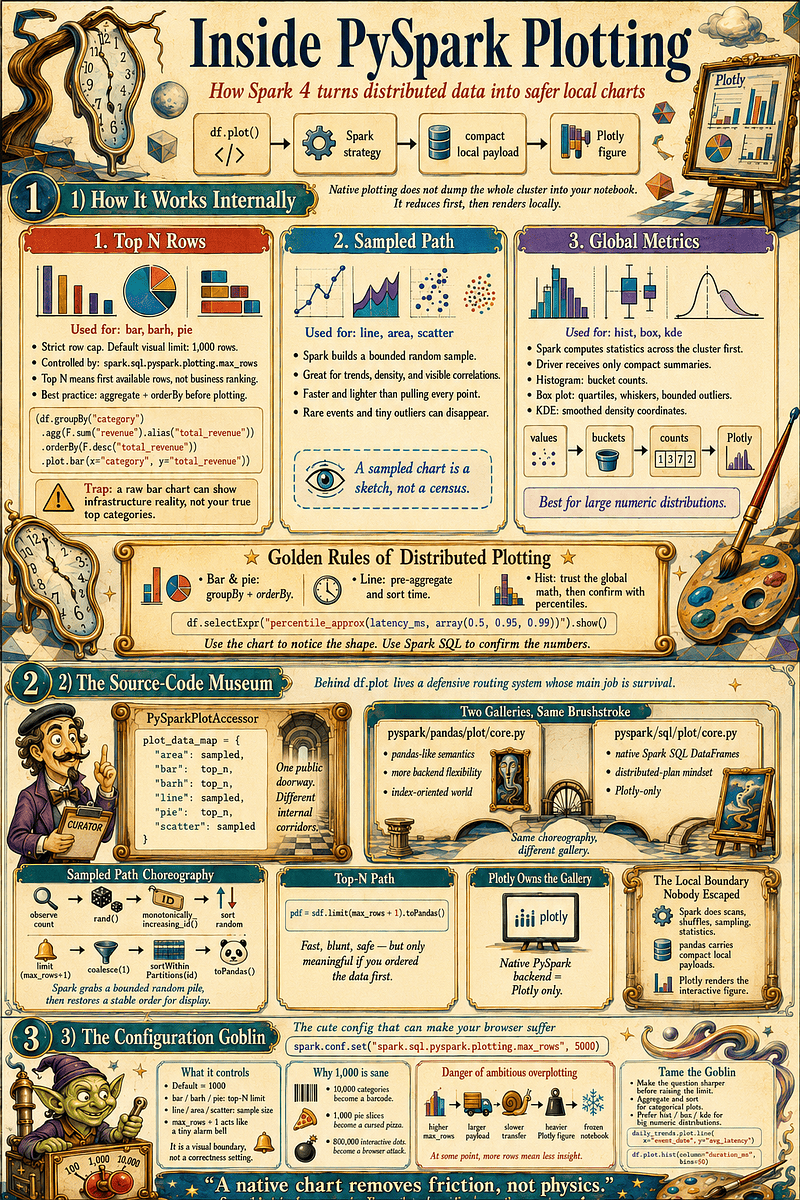
Inside df.plot(): Spark reduces first, Plotly paints later, and the Driver survives because the goblin called max_rows keeps counting the guests at the door.
🐉 Which Beast Should You Summon?
Choosing a chart type in PySpark 4.0 is not merely an aesthetic choice — it is a direct execution-path decision that dictates how data travels across cluster memory.
📈 Line Plots: The Chronological Divas
- Internal Path: Sampled path.
- Engineering Reality: Line charts imply continuous narrative and sequence. However, Spark’s sampled path cannot invent chronological order if you never sorted the data. Handing raw, multi-partitioned event logs to
.plot.line()results in vector spaghetti painted by a sleep-deprived cubist. - Verdict: Excellent for macro trends, but explicit
groupBy()andorderBy()operations are mandatory before touching the brush.
📊 Bar Plots: The Rectangles of Corporate Destiny
- Internal Path: Top-N rows (capped by
max_rows). - Engineering Reality: A raw
limit()block is not business wisdom. If you pass an unaggregated DataFrame directly to a bar chart, you aren’t viewing your highest-earning categories; you are viewing an arbitrary slice of whatever rows wandered past the partition easel first. - Verdict: Aggregate first, sort second, plot third. Never ask a raw event log to become a bar chart without adult supervision.
↔️ Horizontal Bar Plots: The Readable Cousin
- Internal Path: Top-N rows.
- Engineering Reality: Operates under the exact same structural bounds as the vertical bar chart. It remains bounded by infrastructure thresholds, not magically ranked by business value.
- Verdict: Highly superior to vertical bars for clean readability when category labels are long or escaped directly from a dense logging framework.
🐜 Scatter Plots: Chaos and Macro Correlations
- Internal Path: Sampled path.
- Engineering Reality: Provides a rapid visual sketch of massive point clouds. However, because Spark deploys cluster-side reservoir sampling to safeguard memory, rare edge-case anomalies will politely excuse themselves from the canvas.
- Verdict: Phenomenal for gaining quick visual intuition. A scatter plot can start an investigation, but it should never close the case — always cross-examine suspicious clouds with
df.stat.corr().
🧘 Histograms: Structural Distribution Therapy
- Internal Path: Dedicated cluster-side binning engine.
- Engineering Reality: This is not a dangerous data dump that causes local Python panic. Executors natively compute bin boundaries, bucket assignments, and frequencies across partitions, passing a highly compressed count payload to the driver.
- Verdict: One of the safest and most insightful tools for auditing large numeric columns. Averages lie beautifully; histograms honestly expose the cliffs, gaps, and fat tails hiding behind the mean.
⚖️ Box Plots: The Outlier Courtroom
- Internal Path: Dedicated percentile calculation loops.
- Engineering Reality: Executors compute approximate quartiles, interquartile ranges, and whiskers natively across partitions. It bypasses the driver entirely during sorting, ensuring your node doesn’t become a frozen museum installation.
- Verdict: Unmatched for comparing distribution shapes, skew, and operational drift across multiple continuous metrics simultaneously.
🎷 KDE / Density Plots: Smooth Jazz for Data
- Internal Path: Dedicated KDE computation corridor.
- Engineering Reality: Seductive but dangerous. The required
bw_method(bandwidth) controls the smoothing factor; set it too high, and critical data structures are hidden under a velvet blanket of statistical abstraction. - Verdict: Beautiful for qualitative profiling, but always force elegant curves to testify alongside blockier histograms or explicit
df.approxQuantile()checks.
🥧 Pie Charts: The Forbidden Dessert
- Internal Path: Top-N rows.
- Engineering Reality: Collapses instantly under cardinality pressure. Five categories are cleanly readable; 50 become a circular apology, and 500 transform into a cursed pizza designed by a committee that hates human eyes.
- Verdict: Use exclusively for small, distinct wholes (e.g., success vs. failure, paid vs. free). If your data has more than a handful of categories, use
barhto keep civilization intact.
🧱 Area Plots: The Dramatic Line Chart
- Internal Path: Sampled path.
- Engineering Reality: A line chart with the emotional volume turned up. Because it fills the geometric space beneath the curve, it visually exaggerates volumetric shifts, meaning tiny data movements can look theater-scale.
- Verdict: Great for showcasing capacity, consumption volume, and cumulative trends. Ensure data is pre-aggregated and explicitly sorted first.
The Quick Selection Rulebook
- Tracking ordered trends over time: Use
lineorareaplots. This requires an upstream pipeline of an explicitgroupBy()followed by anorderBy(). - Comparing distinct categories: Use
barorbarhplots. This requires an upstreamgroupBy()aggregation followed by a descending sort before plotting. - Mapping two-variable correlations: Use
scatterplots. Treat this as a sampled sketch and always verify important claims separately usingdf.stat.corr(). - Auditing the shape of a large numeric column: Use
hist,box, orkdeplots. These are your distribution beasts and represent the most secure, Spark-native computational choice. - Communicating proportional splits: Use
piecharts, but restrict their use strictly to clean data profiles where the total category count is less than or equal to 5.
🧪 PySpark Notebook Lab: Confronting the Goblin
The notebook, lab_05__which_beast_should_you_summon.ipynb, stress-tests PySpark 4.0 plotting corridors by pitting raw infrastructure traps against defensive queries over a 50,005-row ledger. It demonstrates how unaggregated data warps timelines into vector spaghetti, how partition slicing skews bar charts, and how high cardinality collapses pie graphs. The workspace proves that reservoir sampling erases critical fraud outliers from scatter plots, while validating secure cluster-side histograms, box plots, and an upstream 5% KDE downsample patched to protect the Py4J language bridge. Finally, it enforces production compliance via explain("formatted") plan confessions, remote context tracking with spark.addTag(), and mathematical verification using a high-speed percentile_approx loop.
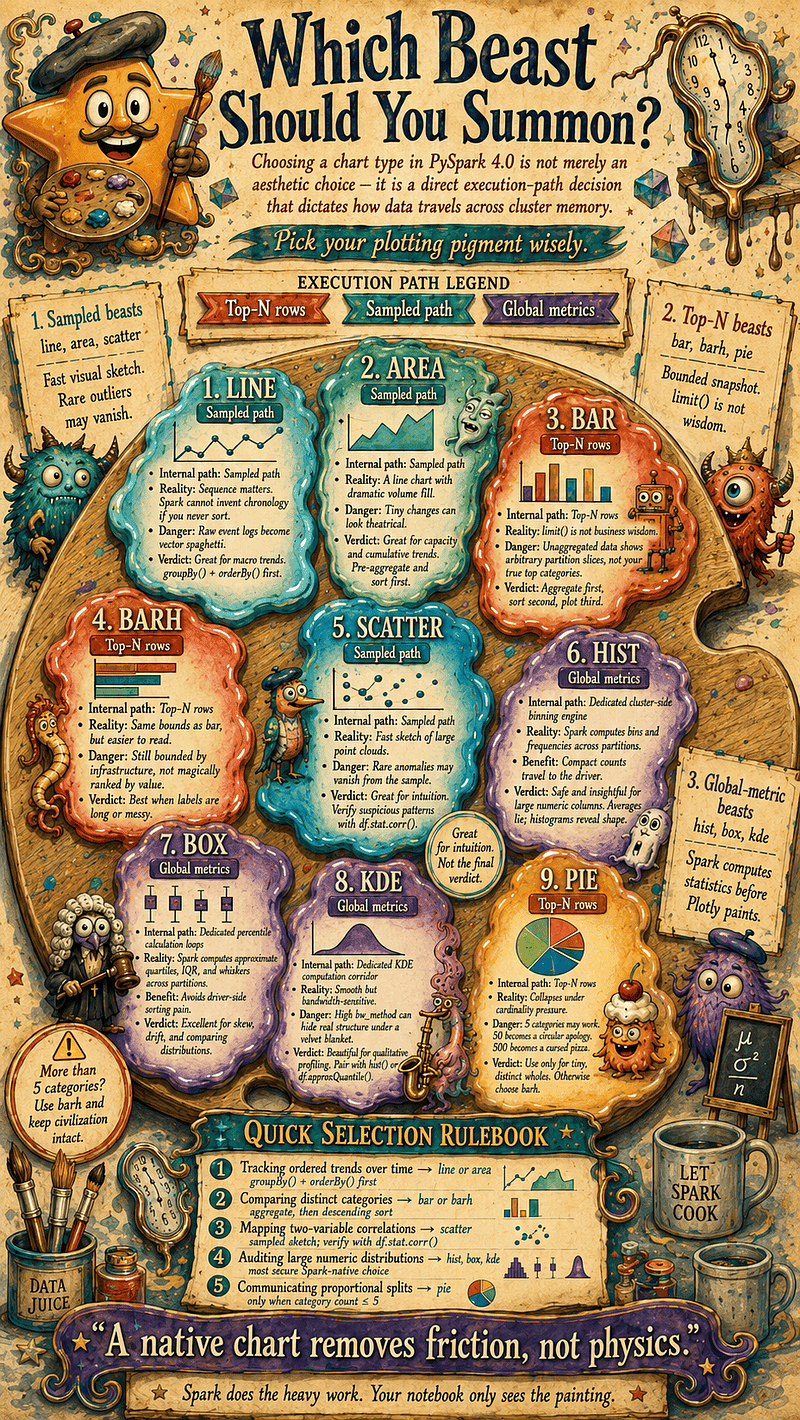
Pick your plotting pigment wisely: in Spark, every chart is a different beast, and choosing one is not just visual taste — it is an execution-path decision.
💄 The Performance Truth: A Chart Is an Action with Lipstick
In Apache Spark, a chart is hard infrastructure labor, not passive UI design. The plotting API’s sleek, interactive notebook facade creates a dangerous psychological illusion, masking cluster stress. Beneath that elegant exterior, calling a plot accessor pulls a massive distributed lever.
Lazy Until It Paints
Core Spark DataFrames are fundamentally lazy — chaining complex filters, joins, and expressions merely builds an optimized logical blueprint in milliseconds without executing physical labor.
The moment you invoke a plotting method, this lazy continuum shatters. Because rendering engines and browsers demand concrete mathematical matrices and exact coordinate pixels, Spark is forced to immediately materialize the dataset. Calling .plot acts as an explicit Spark action—it is, for all practical purposes, a distributed collection statement wearing a beret.
The Action in a Beret
Plotting belongs in the exact same operational bucket as invoking .count(), .show(), or .collect(). If your DataFrame is a lean projection over a cached table, your chart will materialize instantly. However, if it hides a complex, twelve-stage lineage of uncached shuffles, intricate window functions, and scans over unpartitioned data lakes, your chart inherits every ounce of that accumulated architectural debt. Spark never lowers physical computation costs simply because the final destination is a beautiful graphic representation.
The Spark Connect Twist: Labeling Your Plot Jobs
In shared corporate clusters, tracking anonymous plotting jobs in the Spark UI is notoriously difficult. Historically, developers used the local SparkContext to set job descriptions, but Spark 4.0’s decoupled, gRPC-backed Spark Connect architecture completely blocks this client-side access.
To leave a clear audit trail in the Connect era, you must switch to native, remote-safe execution tags. Appending a tracking tag right before launching your chart ensures your workload surfaces in the management dashboard with an identifiable name rather than an anonymous execution ID.
# 1. Tag the remote context thread before launching the chart
spark.addTag("production_audit_visual_revenue_pipeline_run_01")[cite: 2]

# 2. Execute the chart action
final_production_df.plot.barh(x="net_profit", y="merchant_group")[cite: 2]

# 3. Clear tags immediately after to keep the thread clean
spark.clearTags()[cite: 2]
The Three-Layered Cost Model
Visualizing distributed data moves bytes through a three-layered bottleneck system:
- Layer 1: Cluster Compute Cost: Executor nodes run heavy row scans, network shuffles, and partition filters to generate either summarized statistical coordinates or random reservoir samples.
- Layer 2: Network Transfer Cost: Minimized data matrices are marshaled into compressed Apache Arrow blocks and streamed over gRPC sockets down to your local driver client.
- Layer 3: Local Frontend Rendering Strain: The client-side browser engine compiles and tracks interactive vectors. Dumping too many records rarely crashes a hardened cloud cluster, but it will quickly freeze your browser tab.
Cache with Intention, Not Romance
If you run multiple visual analyses over the same heavy downstream pipeline, you must aggressively defend your executors against the recomputation trap. Because of lazy evaluation, triggering a histogram followed immediately by a scatter plot forces Spark to blindly rebuild the entire upstream lineage graph from scratch for each independent chart.
- The Strategy: Explicitly
.cache()your base data state in memory before you paint to break this recomputation loop. - The Eviction Boundary: Once your visual exploration is complete, immediately call
.unpersist()to free up distributed storage blocks.
💡 Caching is an intentional lifecycle strategy with a hard-coded eviction boundary, never a romantic hope for general performance gains.
🧪 PySpark Notebook Lab: The Performance Truth
The notebook, lab_06__the_performance_truth.ipynb, serves as a direct technical verification of visual query materialization and lineage recomputation traps. Running on top of a heavy, synthetically generated logging timeline, the lab explicitly measures the performance degradation of plotting from un-cached lines, demonstrates how to safeguard execution graphs via intentional in-memory caching, and introduces Spark 4.0 Connect-compatible execution tags to map clean audit signatures straight to the active UI tracking logs.
🔍 Verifying Correctness and Visual Truth
Visual polish cannot answer the critical question data engineers face: What truth is this chart actually allowed to tell? Because PySpark 4.0 routes different chart types down entirely separate backend execution paths, they lack a uniform architectural correctness contract. They may look harmless on a notebook canvas, but they do not all represent the same class of verified data evidence.
The Sampled Path: Visual Sketches and White Lies
Scatter, line, and area plots rely on Spark’s automated reservoir sampling. While ideal for capturing macroscopic trends, this path fails microscopic compliance audits because rare anomalies — like fraud or latency spikes — vanish during the cluster-side sampling pass.
Line charts carry an additional trap: they imply strict sequential order, but raw, unaggregated data forces the engine to connect points exactly as they sit across random partition memory, creating a chaotic web of vector spaghetti. To render a true timeline trend, you must explicitly aggregate and sort the data cluster-side via groupBy and orderBy blocks.
💡 Reservoir sampling is an elegant sketch of reality, not a sworn deposition.
The Top-N Illusion: The Arbitrary Partition Slices
Bar, horizontal bar, and pie charts utilize a cluster-side top-N execution path, fueling a pervasive misunderstanding: top-N rows in storage partitions are not automatically top-N business entities. Calling a bar plot directly off an unaggregated event log will never expose your highest-earning customers; it simply renders a bounded slice of whatever arbitrary rows Spark’s physical layout encountered first during its data lake scan.
To bridge this gap, you must explicitly engineer your rankings upstream:
- Execute a categorical
groupByaggregation. - Sum or count your metric targets cluster-side.
- Apply a descending
orderByacross the executors.
By pre-aggregating, the framework’s internal row limit still protects the driver node from a memory crisis, but it now caps a legitimately ranked business matrix rather than a random slice of infrastructure reality.
The Distribution Matrix: Stronger Evidence, Not Free Truth
Histograms, box plots, and KDE curves leverage cluster-side statistical machinery to extract pre-summarized population metadata, making them far more reliable for numeric audits than raw point clouds. Yet, they remain bound by distinct architectural limits:
- Histograms rely entirely on bin boundaries; too few intervals flatten internal data structures, while too many create unreadable statistical gravel.
- Box plots use approximate percentiles to expose macroscopic population skew and operational drift, meaning they cannot serve as exact accounting arithmetic.
- KDE curves are mathematically smoothed by a bandwidth parameter that can easily mask raw infrastructure chaos under ambient statistical abstraction.
To maintain total data integrity, always cross-examine these seductive, elegant curves with blockier cluster-backed histograms and strict numeric SQL validation blocks.
💡 The PySpark Chart Truth Scale
- Scatter, Line, & Area = Exploratory Truth. Excellent for macro shapes, movements, and directional suspicion; treat them as sketches, never as a complete census.
- Bar, Barh, & Pie = Bounded Display Truth. Useful for pre-summarized, explicitly sorted categories; meaningless without upstream business logic.
- Hist, Box, & KDE = Distributional Truth. The ultimate tools for identifying population skew, drift, and long-tail anomalies; highly reliable, but still bound by bins, approximate quantiles, and real cluster compute.
*👑*The Ultimate Golden Rule: Use the native chart to notice, but use Spark SQL to verify. Never convert a client-side visual approximation into an un-audited corporate prophecy.
🧪 PySpark Notebook Lab: Correctness and Visual Truth
Let’s use the notebook lab_07__correctness_and_visual_truth.ipynb to programmatically expose the visual boundaries of native plotting. We will synthesize a high-volume dataset injected with explicit timestamp disorder, un-aggregated business records, and a hidden cluster of high-stakes fraud anomalies to observe exactly how different execution paths manipulate visual evidence.
🧑🎨 The Practical Paintbook
This is a survival paintbook — not an aesthetics guide — for generating useful visual insights without triggering driver node Out-of-Memory (OOM) crashes or rendering bloated Plotly figures that freeze your notebook tab.
The Standard Paintbook Architecture
To guarantee cluster security and absolute data integrity, every production visualization query must follow a strict defensive pipeline:
Slice
 ⤷ Aggregate
    ⤷ Order
       ⤷ Guardrail
          ⤷ Inspect
⤷ Paint- Slice: Filter rows and project target columns to minimize the data footprint early.
- Aggregate: Run cluster-side math and summaries rather than collecting raw event logs.
- Order: Enforce a strict chronological or ranked sort sequence across the executors.
- Guardrail: Bind the final output dataset with explicit
max_rowslimits. - Inspect: Audit your data structure using
.explain()plans or quick preview outputs. - Paint: Dispatch the minimized, lightweight metadata payload to your frontend rendering engine.
💡 Beautifully interactive charts make computationally expensive operations look entirely harmless. A great PySpark plot requires the cluster executors to handle the heavy mixing long before Plotly ever touches a local brush segment.
🧪 PySpark Notebook Lab: The Final Canvas
The accompanying notebook, lab_08__the_practical_paintbook.ipynb, serves as your ultimate practical framework to solidify these defensive design principles. Utilizing a comprehensive, high-volume synthetic event ledger, the lab guides you step-by-step through engineering categorical destines, unmasking latency tails, rendering feature-engineered scatter relations, and charting post-deployment distribution fingerprints.
📋 Production Notebook Guardrails
Production notebooks look deceptively casual, but beneath their tidy markdown headers run critical automated schedules, business SLA checks, and fragile caching lineages. Before letting Spark 4.0’s native plotting layer loose in a production environment, look beyond whether the interactive chart rendered — you must audit exactly what the distributed engine had to do to paint those local pixels.
Make Spark Confess with explain("formatted")
Before committing any plotting step to a production pipeline, isolate your visualization DataFrame and explicitly audit its physical footprint:
plot_df = (
    df.where("event_date >= '2026-01-01'")
      .groupBy("category")
      .agg(F.sum("sales").alias("total_sales"))
      .orderBy(F.desc("total_sales"))
      .limit(20)
)

plot_df.explain("formatted")
plot_df.plot.bar(x="category", y="total_sales")
When scanning the generated physical plan, actively watch out for these performance killers:
- Storage Traps: Full table scans over unindexed fields or missing partition pruning flags.
- Shuffle Strain: Massive wide network shuffles, redundant sort gates, or accidental Cartesian joins.
- Compute Bottlenecks: Unoptimized row-by-row Python UDFs.
💡 An interactive chart may look harmless on a canvas, but its hidden execution plan might be a tax audit with axes.
Label Your Footprints in the Spark UI
Plotting is a heavy distributed action that shouldn’t run anonymously. Label your workflows so an on-call engineer at 3:00 AM knows exactly why a notebook is scanning the data lake:
Spark Classic: Configure the spark context directly to append a descriptive string signature.
spark.sparkContext.setJobDescription("plot_latency_distribution_for_production_audit")
df.plot.hist(column="latency_ms", bins=50)
spark.sparkContext.setJobDescription(None)
Spark Connect: Traditional context modifications are disabled; inject native execution tracking tags into your thread instead.
spark.addTag("plot_latency_distribution_for_production_audit")
df.plot.hist(column="latency_ms", bins=50)
spark.clearTags()
Cross-Examine the Canvas with Numbers
A visualization is a useful, charming witness — but it remains only a single witness. For any metric carrying operational weight or corporate consequence, always force your charts to testify alongside exact numerical verification queries.
df.plot.hist(column="latency_ms", bins=50)

df.selectExpr(
    "percentile_approx(latency_ms, array(0.5, 0.95, 0.99), 10000) as latency_percentiles"
).show(truncate=False)
The interactive chart highlights where to look, but the explicit SQL query defines what to believe.
The Production-Notebook Smell Test
Before checking in a native plotting block, run your code through this diagnostic checklist:
- Scope Guardrails: Is the source dataframe explicitly sliced to the correct date range, tenant scope, environment flag, or storage partition?
- Categorical Integrity: Did you fully group and aggregate your metrics cluster-side before asking for a vertical or horizontal bar chart?
- Sequential Logic: Did you explicitly call an
orderBy()step across the cluster blocks before rendering an ordered timeline path? - Cardinality Caps: Did you manually apply a clear
limit()block to high-cardinality categorical results, instead of blindly trusting the defaultmax_rowsguardrail to save civilization? - Pigment Auditing: Have you actively checked the column inputs for missing nulls, strings pretending to be floating points, impossible negative bounds, and surprise category tags named
UNKNOWN_FINAL_v2? - Driver Protections: Have you confirmed via plan auditing that the driver node is receiving a compact statistical summary or a lean sample payload, rather than writing a memory out-of-memory goodbye letter?
The canvas may be painted locally inside your browser, but the execution consequences remain fully distributed.
🧪 PySpark Notebook Lab: The Production Guardrails
The last notebook, lab_09__production_notebook_guardrails.ipynb, acts as your operational testing ground for establishing robust, enterprise-grade auditing patterns. Running over a messy, synthetic corporate accounting ledger, the lab guides you through programmatically enforcing formatted plan inspections, binding Connect-safe tracking tags to active visualization tasks, and implementing numerical cross-examinations to secure your automated environments against performance drift.
🪄 The Design Trade-Off: A Frame, Not a Miracle
PySpark native plotting removes friction and renders the legacy Pandas ritual obsolete — but it isn’t magic. It does not eliminate the realities of sampling, row limits, local rendering overhead, or the driver node’s fragile ecosystem.
The true victory is that Spark now directly understands user intent: when you run a plotting command, you are simply asking to see the shape of a column, not offering to manually negotiate the Spark-to-Pandas-to-Plotly border crossing. PySpark answers this call usefully, if not perfectly. The execution plan remains lazy and the driver remains sensitive, but you now have a golden frame around the distributed madness.
Beautiful. Helpful. Dangerous. Exactly how Spark likes it.
“This code can hurt you
It spikes your driver, leaves a scar
Plans fall apart, but nothing breaks like a chart”
(adapted from “Nothing breaks like a heart” by Mark Ronson feat.Miley Cyrus)
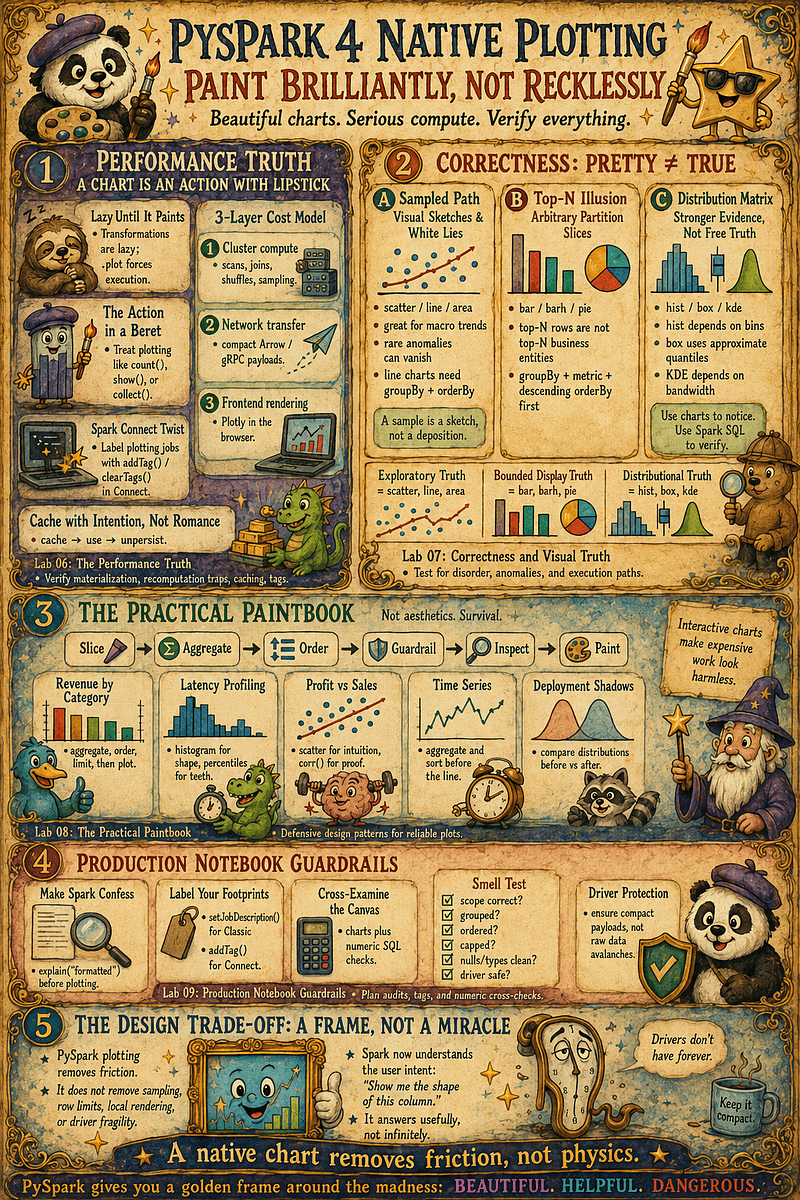
Paint like an artist, query like an engineer, verify like a skeptic — because in PySpark, every pretty chart is still a cluster job wearing lipstick.