
Apache Spark WTF??? 🥊 Scuffle With My Shuffle (Part I)🤕
🎙️ Ladies and gentlemen — and distributed‑systems nerds of all ages — welcome to the Spark Processing Arena.

“Alright guys, I want a nice, clean fight. Nothing below the belt.
Keep those hands up, and break when I say break. Let’s do it!”
(from “Head 2 Head” by DJ Revolution)
🥊 First Round
We’ll base our experiment on the example showcased in this interesting GraphFrames discussion. Although we won’t be using the that library in this article, both the example Pokec social networkdataset and the logic behind what we want to achieve are very useful for exploring how shuffles work internally in Spark.
We’ll start with a dataset of user profiles from a social network and another dataset containing the relationships between the profiles. Our goal is quite straightforward: generate a complete list of all relationships. In other words, for every user A who is connected to user B, we want to produce a record that includes all the fields from both A and B. Simple, isn’t it?
Not Quite … Data Overload Hits Hard
As soon as we ran test_round_1.py, we got our first punch. This is when we realize … Spark isn’t going to make things easy — or painless.
Read 'vertices' with 59 columns and 1,632,803 rows into 1 partitions.
Read 'edges' with 2 columns and 30,622,564 rows into 1 partitions.
The first thing we notice is that, while the edges dataset has only 2 columns (basically “Profile A is connected to Profile B”), the vertices dataset, which contains all the profile data, has 59 columns. That’s a lot of information to manage if we want to produce a dataset containing all the fields for both profiles.
The best strategy would usually be to remove redundant or unnecessary information. But in this case:
- There are no duplicate records.
- We cannot filter rows, because we need every pair of connected profiles.
- We cannot drop columns or select a subset, because we want all fields from both profiles in our final dataset.
📝 NOTE: Contrary to what was stated in the discussion thread, Spark can prune fields inside structs, but whether pruning actually happens depends on the data source, the optimizer, and the query pattern. Catalyst supports nested field pruning, but some file formats, connectors, and certain operations (e.g., arrays of structs, explode, UDFs) prevent Spark from pushing down only the required nested fields, causing the entire struct to be read anyway. So while structs aren’t the issue in our simplified test, it’s still useful to remember that nested pruning doesn’t always work in practice due to data-source and optimizer limitations — not because Spark treats a struct as an indivisible unit.
One Partition Isn’t Enough
If we take a second look at those log lines, we also notice something else: both datasets are being loaded into a single partition each.
Wait … how can that be? 🤔
- Linear Decompression: To decompress a Gzip file, the reader (not you, the Spark reader 😅) must start at the very first byte and work its way to the end sequentially. There is no way to “jump” to the middle of the file because the state of the decompression depends on everything that came before it.
- The “Boundary” Problem: Spark (and Hadoop, which Spark relies on for file input) typically splits large files by assigning workers to process different byte ranges — for example, Worker A reads bytes 0–128 MB while Worker B reads 128–256 MB. However, a Gzip file is a single continuous compression stream, which cannot be decompressed starting from an arbitrary byte offset.
- Result: As a consequence, Spark cannot split a
.gzfile into parallel chunks, so the entire file must be read and decompressed by a single executor. Even with a 10 GB Gzip file and a cluster of 100 nodes, only one executor can process the file from start to finish, creating a severe performance bottleneck.
📝 NOTE: Beyond Gzip, formats like ZIP, LZ4, and standalone Snappy are non-splittable because they lack internal sync markers — special points in the compressed stream where decompression can safely start. Without them, Spark must read these files sequentially from the beginning. LZO also defaults to a single partition unless an external index is provided, and Zstandard is generally non-splittable in its standard frame. Since these files cannot be “cut” into chunks, a single executor must process the entire file, regardless of cluster size.
How Not to Fix It
spark.sql.files.maxPartitionBytes and spark.sql.files.openCostInBytes won’t help with a single large .gz file because they only affect how Spark handles splittable formats. maxPartitionBytes defines how to chunk files that support random reads, and openCostInBytes helps balance partitions when dealing with many small files. But Gzip is not splittable—it’s one continuous compressed stream—so Spark is forced to read it as a single partition no matter how we tweak those configs.
How to Actually Fix It
- Change the Format: Convert the data to Parquet or Avro with Snappy compression. These formats are block-based and fully splittable.
- Repartition After Read: Call
df.repartition(n)right after loading the file. The read still runs on one core, but downstream processing becomes parallel.
The Problems
- Preprocessing into a new format costs extra time, disk, and effort.
- Repartitioning after the read triggers additional shuffles.
Heavyweight Shuffle
If we thought our problems ended here, we were dead wrong — this was just the opening bell. Glancing at the Spark UI after running the script, and checking the Executors tab … we get hit with a right hook to the face: gigabytes of shuffle read and write.

Input: 1.1 GiB — Shuffle Read: 32.8 GiB — Shuffle Write: 31.7 GiB
WTF??? How can the shuffle data be far larger than the original input? 🙀
The jaw-dropping truth: every map task throws punches by writing intermediate results for every reduce partition, even if the dataset is tiny. Reduce tasks dodge and weave through all those files just to merge the data. Now throw in a wide join between two massive vertex datasets, multiple shuffles, and extra sorting… suddenly, 1.1 GiB of source data is taking body blows across tens of gigabytes of shuffle traffic. Spark is swinging wildly in every direction — moving, copying, and merging data across partitions and executors — long before the final bell even rings. 🥊😵
In the Ring
In the blue corner, weighing in with 1.6M rows, we have the Vertices! In the red corner, a heavyweight monster with 30.6M rows, the Edges!
df = (
 vertices.alias("a")
         .join(edges.alias("follows"), col("a.id") == col("follows.src"))
         .join(vertices.alias("b"), col("follows.dst") == col("b.id"))
)
df.write.format("noop").mode("overwrite").save()
The ref signals for the noop write, and the fight begins!
- Strike 1: The Jab. Spark opens with a double-jab! It scans the
vertices(“a”) and theedges(“follows”), throwing out any nulls. Then comes the footwork: a Hash Partitioning shuffle. Spark smashes both datasets into the default 200 shuffle partitions—vertices hashed byidand edges hashed bysrc. They line up, sort themselves out, and BOOM: the first SortMergeJoin connects! - Strike 2: The Cross. The first join is barely over, but there’s no time to breathe! The result of that scuffle — the “a-follows” combo — is immediately thrown back into the ropes. Since the next target is vertex “b” (connected by
dst), Spark throws a heavy Exchange shuffle to re-partition that entire intermediate result by thedstcolumn. - Strike 3: The Hook. While the intermediate data is reeling, Spark brings in a fresh version of the Vertices (“b”). It tags them in with another 200-partition shuffle, this time hashing them by
idto prepare for the final collision. - Strike 4: The Uppercut. The climax! Both sides are partitioned and sorted. Spark delivers a massive second SortMergeJoin, slamming the
dstfrom our first combo into theidof Vertex “b”. The relationship is complete: A follows B, and the logic is fully resolved. - The Decision: A “No-Op” Knockout. The bell rings! Because of the
.format("noop")call, no data actually hits the floor (the disk). But don’t be fooled—the referee’s scorecard shows four massive shuffles and two heavy joins.
In the Corner: What Really Happened
To understand why Spark chooses the “heavyweight” path in this execution, we need to peek under the hood at the physical plan.
Physical Plan (abridged)
AdaptiveSparkPlan isFinalPlan=false
+- SortMergeJoin [dst#182], [id#193], Inner
   :- Sort [dst#182 ASC NULLS FIRST]
   :  +- Exchange hashpartitioning(dst#182, 200)
   :     +- SortMergeJoin [id#0], [src#181], Inner
   :        :- Sort [id#0 ASC NULLS FIRST]
   :        :  +- Exchange hashpartitioning(id#0, 200)
   :        :     +- Filter isnotnull(id#0)
   :        :        +- FileScan csv [id#0, ... 34 more fields]
   :        +- Sort [src#181 ASC NULLS FIRST]
   :           +- Exchange hashpartitioning(src#181, 200)
   :              +- Filter isnotnull(src#181) AND isnotnull(dst#182)
   :                 +- FileScan csv [src#181,dst#182]
   +- Sort [id#193 ASC NULLS FIRST]
      +- Exchange hashpartitioning(id#193, 200)
         +- Filter isnotnull(id#193)
            +- FileScan csv [id#193, ... 34 more fields]
Even though our code looks simple, Spark’s engine is making careful, calculated decisions based on data size, join types, and operator requirements.
Vertices Are Read Twice?
Yep — the vertices are being read twice. Here’s why:
- Spark treats each call in a join chain as a separate branch in the physical plan.
- Without an explicit
.cache()or.persist(), the engine has no memory of previous reads. - Calling
.join(vertices, …)twice doesn’t reuse the same data; it duplicates the instructions into two branches.
Even if we reuse the same alias or variable name for vertices, Spark still reads the source CSV twice. In Spark’s lazy evaluation model, a DataFrame isn’t actual data — it’s just a set of instructions to fetch data. Without caching, Spark runs the FileScan from scratch each time.
No Broadcast or Exchange Reuse?
Spark could avoid heavy shuffles in two ways, but neither works here.
Broadcast join avoids shuffling by sending the smaller table to all executors. Each executor then joins locally with its partition of the large table. No shuffles needed — the small table is “broadcast” everywhere.
- In our case, broadcast never happens because vertices (1.6M rows) and edges (30.6M rows) exceed the 10MB threshold, and the intermediate result from the first join is already too large to safely broadcast.
Exchange reuse lets Spark reuse the results of a shuffle instead of recomputing it. Normally, this would prevent the second join from reshuffling the same vertices.
- Here, reuse fails because the join keys differ (first by
id, second bydst), aliases make Spark treat them as separate nodes, and there’s no.cache()to preserve the shuffled data.
Is Sorting Mandatory?
Sort-Merge Joins require total order:
- Memory efficiency: Sorting reduces memory footprint during matching.
- Linear scan advantage: Sorted keys allow Spark to walk through tables like a zipper, avoiding nested loops.
💾 No Space Left on Device
If you run into this error, don’t panic — it’s actually quite common. Spark generates a lot of temporary files during execution, and while it generally does a decent job with housekeeping, sometimes the temporary directory fills up faster than Spark can clean it. This is especially true if your Spark job ends abruptly or you manually interrupt it — the cleanup routines might not get a chance to run, leaving a pile of leftover files behind.
During a job, Spark creates several kinds of temporary files:
- Shuffle files: data and index files written by map tasks and consumed by reduce tasks.
- Broadcast files: serialized broadcast variables stored on executors.
- Block files: cached RDD/DataFrame partitions managed by the BlockManager.
- Spill files: overflow files written when Spark can’t keep all data in memory during sorts, shuffles, or aggregations.
All this temporary filesystem activity is normal — it’s how Spark manages data exchange, caching, and memory overflow. But if enough of these files accumulate, we’ll eventually hit the dreaded No space left on device error.
To inspect where these files are being created on macOS:
find /private/var -type d \
    \( -name "*spark*" -o -name "*blockmgr*" -o -name "*spill*" \) \
    2>/dev/null
🛡️ How to Manage This Error
If Spark keeps filling up your temporary disk, here are the most effective ways to handle the “No space left on device” problem:
1. Set a Custom Temp Directory (SPARK_LOCAL_DIRS or spark.local.dir). By default, Spark uses the OS temp folder, which is often small. Point it to a larger, dedicated directory.
2. Clean Temp Folders Regularly. If a job crashes or is interrupted, leftover temp files may accumulate. Automating periodic cleanup helps prevent disk overflow.
On macOS:
find /private/var/folders -type d \
    \( -name "spark-*" -o -name "blockmgr-*" -o -name "shuffle-*" \) \
    -exec rm -rf {} +
⚠️ ***Warning:***Make sure no Spark jobs are running before deleting temp folders — removing files in use can cause failures.
3. Reduce Shuffle Volume. Less shuffle means fewer temporary files.
4. Use Splittable Formats and Avoid Large Gzip Files. Splittable formats, like Parquet or Avro, are block-based, allowing Spark to distribute the workload across multiple executors and significantly reduce spill and shuffle pressure. In contrast, a single large .gz file isn’t splittable — Spark must assign the entire file to one executor, producing massive temporary files in a single location and slowing the job down.
📝 ️ NOTE: Even in standalone mode, Spark always generates shuffle, spill, and block files — but splittable inputs distribute temp files across tasks, while non-splittable inputs concentrate them, increasing disk pressure.
5. Increase Executor Memory. More memory reduces the need to spill data to disk: It’s not a complete solution, but it helps limit the size and number of temporary spill files.
Ladies and gentlemen! Round one is over, and what a thriller it’s been! Shuffle came out swinging, landing some heavy hits, but the Data Engineer weathered the storm, ducked the worst, and kept their morale sky-high. The crowd is on its feet … Can the engineer turn the tables and strike back in round two? Stay tuned — this fight is far from over!
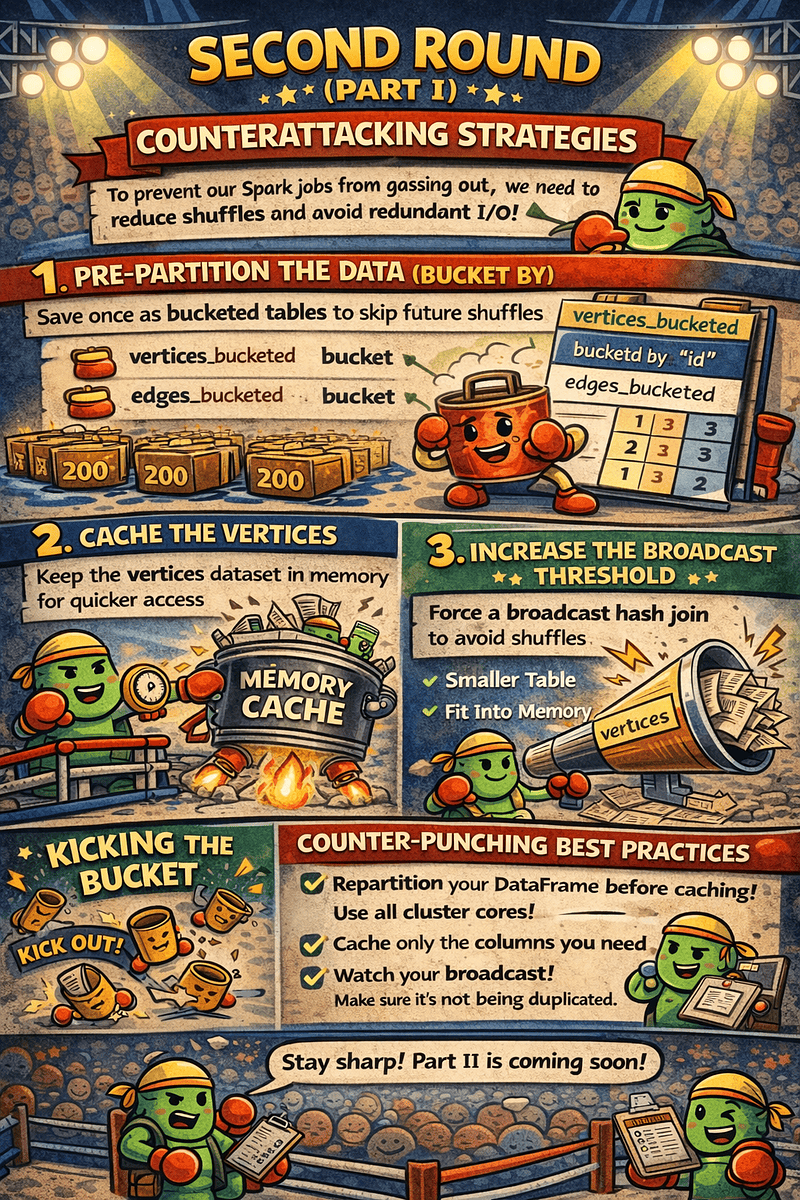
🥊 Second Round (Part I)
Counterattacking Strategies
To keep Spark from gassing out, we need to cut down on shuffles and avoid redundant I/O — essentially, work smarter, not harder.
So, how do we strike back?
1. Pre-Partition the Data (Bucket By). The biggest bottleneck in our job is the constant re-shuffling Exchanges. If we know we will frequently join on id, src, and dst, we can store these tables as Bucketed Tables. By pre-sorting and partitioning the data on disk, Spark can perform a “Bucket Join,” which eliminates the Shuffle and Sort phases entirely.
# Save once as bucketed tables
vertices.write.bucketBy(200, "id").sortBy("id").saveAsTable("vertices_bucketed")
edges.write.bucketBy(200, "src").sortBy("src").saveAsTable("edges_bucketed")
2. Cache the Vertices. Since the vertices dataset is accessed twice (once as “a” and once as “b”), we should persist it in memory. This forces Spark to perform the File Scan and the initial Shuffle only once. Subsequent joins will pull the data directly from the cache, saving significant time.
3. Increase the Broadcast Threshold. If our vertices table can fit into the memory of a single executor (usually up to a few GBs), we should force a Broadcast Hash Join. This is the ultimate “counter-punch”—it deletes the Shuffle and Sort phases for that side of the join and executes much faster than a Sort-Merge Join.
from pyspark.sql.functions import broadcast

df = (
    vertices.alias("a")
            .join(edges.alias("follows"), col("a.id") == col("follows.src"))
            .join(broadcast(vertices.alias("b")), col("follows.dst") == col("b.id"))
)
🪣 Kicking the Bucket
✅ Writing Bucketed Tables Does Shuffle. When we write bucketed tables, Spark must shuffle. bucketBy + sortBy forces Spark to:
- Redistribute rows so that the same bucket key lands in the same bucket
- Sort the data inside each bucket
🚫 Reading Bucketed Tables May Avoid Future Shuffles. Once the data is bucketed:
- Spark already knows how rows are distributed
- Joins on the bucket column can skip the shuffle entirely
The promise of bucketing: pay the shuffle cost once, and enjoy cheaper joins later.
🤨 So Why Does Databricks Discourage Bucketing?
Databricks often discourages bucketing not because it’s useless, but because in modern Spark workloads it’s usually more trouble than it’s worth.
1. Bucketing is static and hard to maintain. Bucket counts are fixed forever. If our data volume grows or shrinks, we’re stuck with the original number of buckets unless we rewrite the entire table. Modern lakehouse workloads are dynamic — bucketing is not.
2. Writers must match the original bucketing exactly. For Spark to avoid shuffles:
- same bucket column
- same number of buckets
- same sort order
- same metastore information
If anything changes, Spark ignores bucketing and shuffles anyway, turning the whole setup into wasted work.
3. Many engines don’t respect bucketing. Bucketing is mostly a Spark-specific optimization. Other query engines (Databricks SQL, Trino, Presto, DuckDB, etc.) often ignore bucket metadata, making the benefit disappear in multi-engine lakehouse environments. Databricks wants storage formats that work everywhere (Delta Lake), not Spark-only tricks.
4. Modern optimizations outperform bucketing. Databricks has features that make bucketing less useful or even obsolete:
- Adaptive Query Execution (AQE)
- Dynamic Partition Pruning
- Z-Ordering (discouraged now in favor of Liquid Clustering)
- Photon engine optimizations
- Delta Lake data skipping and clustering
These often provide equal or better performance without rigid bucket constraints.
5. Bucketing can be slower to write and more expensive. Writing bucketed tables requires:
- a full shuffle
- per-bucket sorting
- lots of small files if bucket count is high
The cost is paid on every write, even small incremental updates.
6. Limited benefit for many workloads. Bucketing mainly speeds up:
- large joins on the bucketed column
- specific aggregation patterns
If our workload rarely hits those patterns, the cost/benefit ratio just isn’t worth it. I ran some tests with bucketing and … there was no noticeable improvement. So … LET’S KICK IT OUT! 😝
The Cache-Shuffle Paradox
We’ve all been there: you add .cache() and broadcast() to a sluggish join, hoping for a speedup, only to watch your shuffle metrics explode and the Driver crash. If your shuffle write jumped from 31 GiB to 35 GiB after “optimizing,” congratulations — you’ve just hit the Cache-Shuffle Paradox.
The Pitfalls of “Lazy” Caching
- The Expansion Tax: Spark caches data as deserialized Java objects. That means your compressed CSV or Gzip file can balloon multiple times in RAM. When Spark shuffles a cached table, it moves that inflated data — not the lean on-disk version.
- The Single-Partition Bottleneck: If you cache a file before repartitioning, you’re materializing a multi-gigabyte bottleneck onto a single CPU core, leaving the rest of your cluster idle.
- The Duplicate Broadcast: In self-joins (e.g., joining a table to itself), Spark often fails to reuse the broadcast. It may try to build and ship the same large table twice, requiring massive Driver memory.
Counter-intuitive Tips for Real Spark Optimization
- Repartition first: Always repartition your DataFrame to match your cluster cores before caching. This ensures all cores are actively working and avoids the single-partition bottleneck.
- Disk can be faster than RAM: In memory-constrained environments, using
StorageLevel.DISK_ONLYcan outperform in-memory caching by reducing JVM Garbage Collection pressure. Persisting to disk also helps break the “curse” of nonsplittable gzipped CSVs, since Spark reads and parses the file once, instead of repeatedly decompressing it for every action or join. - Check broadcast reuse: Never trust a broadcast blindly. Always inspect the physical plan. If you don’t see
ReusedExchange, Spark may be duplicating your memory footprint, inflating Driver and executor memory usage unnecessarily.
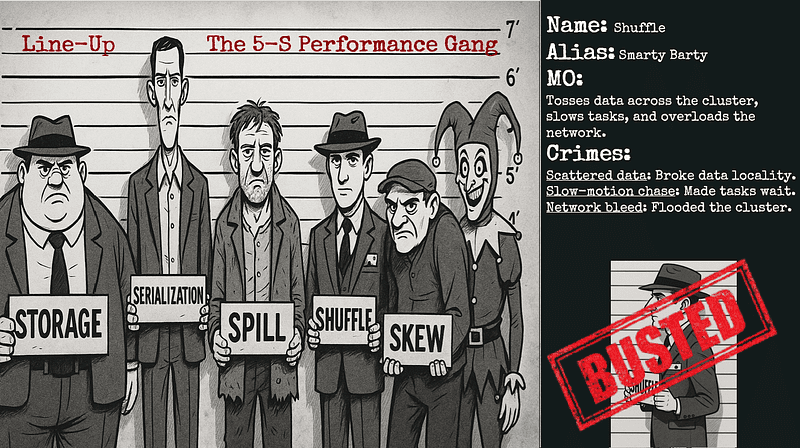
Wow! What a turnaround! Shuffle is staggering, barely on its feet, and the Data Engineer is exhausted, barely standing, yet somehow has found their rhythm and regained just enough energy. Who will land the coup de grâce — Spark’s relentless Shuffle, or the cunning Data Engineer?
In the second part of the battle, we’ll try to smash our Shuffle nemesis with some newly learned tricks — and along the way, I’ll reveal something that shocked me last year when I discovered a surprising truth about Shuffle … and threads.
The crowd is on the edge of their seats… stay tuned! 🥊
“I can’t believe it! Here come the medics.
Holy sh*t! Both fighters are down!”
(from “Head 2 Head” by DJ Revolution)
From my talk “True Crime: Who killed that job?”