Apache Spark WTF??? — 🥊 Scuffle With My Shuffle (Part II)😵
The first round was brutal: single-partition Gzip jabs, multi-gigabyte shuffle hooks, SortMerge uppercuts, and enough spill files to bury…
“Don’t call it a comeback, I been shuffling for years
But good-minded engineers, don’t move data in fear”
(adapted from “Mama Said Knock You Out” by LL Cool J)
🥊 Quick Recap
Before launching our counterattack, let’s regroup and recap exactly what Part I taught us — not just the hits we took, but the insights we earned.
1. Non-Splittable Inputs = Instant Bottleneck
We learned that feeding Spark large Gzip-compressed CSVs is essentially sabotaging parallelism. Because Gzip is non-splittable, Spark was forced to read each file:in a single partition, on one executor, at one CPU’s pace.
Result? A multi-node cluster reduced to a single-threaded warm-up jog.
2. Wide Joins = Shuffle Explosion
Our seemingly simple join:
vertices ──(id = src)──▶ edges ──(dst = id)──▶ verticestriggered four shuffles and two SortMergeJoins, because Spark needed to: hash-partition vertices by id, hash-partition edges by src, hash-partition the intermediate result by dst, hash-partition vertices again by id.
Each shuffle required sorting, disk spills, and network movement — the heavyweight punches of any Spark job.
3. Small Inputs ≠ Small Shuffle
Despite only ~1.1 GiB of CSV input, Spark produced:
- 32.8 GiB shuffle read
- 31.7 GiB shuffle write
Why? Because Spark writes intermediate files per map task × per reduce partition, even when the underlying dataset is small. Wide joins multiply these files dramatically.
4. Vertices Were Read Twice
We discovered that Spark won’t reuse scans automatically. Since the vertices DataFrame was referenced twice — once as “a” and once as “b”— Spark executed two independent FileScans.
Without .cache(), Spark treats every branch of the plan as a fresh instruction graph.
5. Broadcast & Exchange Reuse Didn’t Save Us
Spark refused to broadcast because the vertices exceeded the broadcast threshold, and the first join’s output was already too large.
Exchange reuse also failed because join keys differed (id, src, dst), aliases created distinct subplans, and nothing was cached.
6. Temporary Files and Spill Pressure Are Normal — but Painful
During the fight, Spark generated shuffle data and index files, spill files from sort/merge pressure, broadcast blocks, cached block manager files.
This buildup ultimately triggered the dreaded “No space left on device.” Not a bug — just Spark doing heavy I/O under stress.
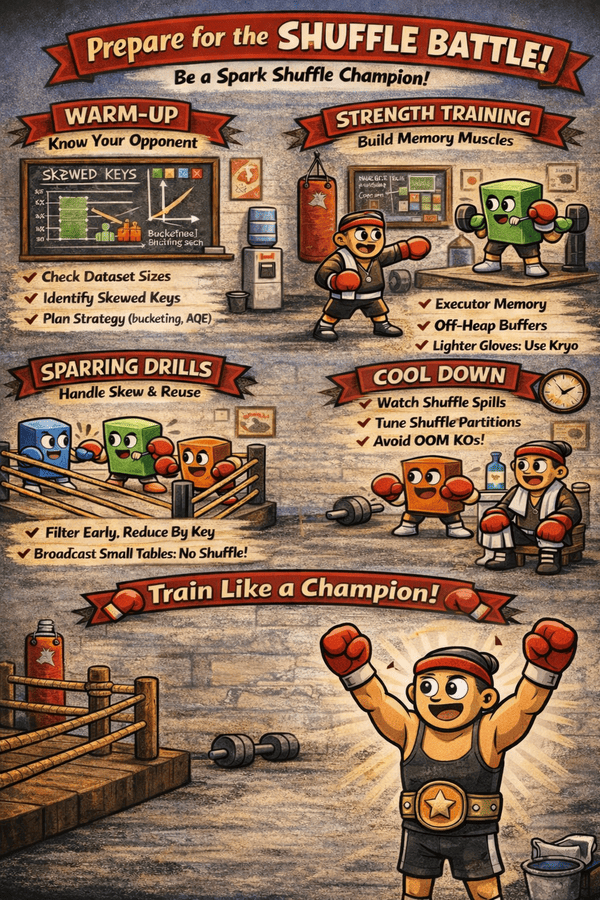
Armed with these insights, it’s time to step back into the ring — not to fight harder, but to fight smarter.
🥊 Second Round (Punch #1)
Many articles on the Internet explain in detail how shuffle in Spark works, but I haven’t found any yet where it’s detailed exactly where and how is decided if apply a shuffle or not. I guess that’s been done in the Catalyst optimizer, so it should be a rule or something. Let’s try to find out.
Because the idea is to win the battle before actually starts fighting …
The Strategy Choice: Why SortMergeJoin?
Spark’s Planner chose the SortMergeJoin algorithm because our datasets—vertices (~1.6M rows) and edges (~30.6M rows)—are too large to fit into a single machine’s memory for a Broadcast Join. This algorithm is the standard choice for massive datasets because it handles data linearly and predictably.
The Requirement Check: Why a Shuffle?
The decision to shuffle is made during the Physical Planning phase by a rule called EnsureRequirements.
- The Join Condition: For a
SortMergeJointo work, all rows sharing the same key (e.g., an ID of101) must reside on the same physical machine. - The Problem: Spark inspects our CSV files and assigns them an
UnknownPartitioningstatus. Since Spark has no record of how the data is distributed on disk, it cannot guarantee that matching keys are already together. - The Conclusion: Because the data distribution is “Unknown,” the join’s requirements are not satisfied.
Implementing the Fix: Exchange & HashPartitioning
To fix this, Spark injects an Exchange (the physical shuffle) into our plan.
ClusteredDistribution: This class represents the “goal state” where data is grouped by keys.HashPartitioning: Spark uses this class to calculate a destination for every row based on a hash of the join keys (id,src, ordst). This ensures that all identical IDs are sent to the same partition (defaulting to 200) across the cluster.
The Final Step: Sorting
Once the data is moved (shuffled), it is grouped but not yet ordered.
- Sort Operands: The
SortMergeJoinrequires the data to be ordered so it can “merge” the two tables by walking through them in a single pass. - The Plan: This is why our plan shows
Sort [id ASC...]orSort [dst ASC...]immediately after theExchange.
Exchange Reuse
Spark reuses an Exchange (a physical shuffle or broadcast) when it determines that a previously planned or executed data redistribution can satisfy the requirements of another part of the query plan.
The breakdown of the circumstances that trigger this reuse:
1. Canonical Equivalence. The most fundamental requirement is that the two Exchange operations must be logically identical. Spark uses the canonicalized version of a physical plan as a unique key.
- Identical Source & Transformations: Every node below the Exchange (filters, projections, joins) must be exactly the same.
- Matching Partitioning: The data must be redistributed using the same number of partitions and the same hash function on the exact same columns.
- Logic Check: If
exchange.canonicalizedmatches an entry already stored in Spark’s internal cache, the new node is replaced with a reference to the existing one.
2. Global Enablement. Reuse is a feature that can be toggled. Spark explicitly checks the configuration exchangeReuseEnabled (controlled by spark.sql.exchange.reuse). If this is false, Spark will ignore identical exchanges and perform redundant shuffles. It’s true by default.
3. Adaptive Execution (AQE) Lifecycle. Under AQE, the reuse logic is integrated into the stage-by-stage materialization process:
- Stage Cache: AQE maintains a
stageCachewithin theAdaptiveExecutionContext. - Bottom-Up Traverse: As Spark builds the plan, it checks the cache before creating a new
QueryStage. - Materialization: A stage becomes eligible for reuse once its child stages have been successfully planned and it has been registered in the cache.
4. Cross-Plan Scope (Subqueries). Spark doesn’t treat subqueries as “separate” jobs; it looks at the entire tree as a whole so that any shuffle performed in a subquery can be “recycled” for the main query (and vice versa), as long as the data and the keys match perfectly.
5. Broadcast Reuse for Partition Dynamic Pruning (DPP).
- Broadcast Sharing: If a
BroadcastHashJoinhas already broadcasted a side of a join (the “build” side), Spark can reuse that existingBroadcastExchangeExecto create dynamic filters for the other side (“probe” side). - Result Verification: Spark confirms the matching results using
left.sameResult(sparkPlan)orright.sameResult(sparkPlan)to ensure the data is safe to recycle.
To Cache or Not To Cache?
We shouldn’t need to cache to get exchange reuse. Spark is designed to be “self-aware” within a single query — it uses a global search to find identical shuffles and recycle them automatically. While caching is a manual tool we use to save data across different jobs, exchange reuse is a built-in optimizer feature that happens behind the scenes to prevent redundant work.
Having AQE enabled matters significantly because it makes this reuse much more reliable.
- Without AQE, Spark has to decide what to reuse before the query even starts, based purely on our code.
- With AQE enabled, Spark manages a dynamic stage cache. As each part of our query finishes, Spark records the result; if another part of the query needs that same data distribution later, Spark can “plug in” the already-completed stage. This is especially powerful for recursive plans where shuffles in a subquery can be recycled for the main plan, ensuring that the engine doesn’t just work hard, but works smart.
Why No Exchange Reuse?
The data in the vertices table is exactly the same, but Spark is failing to reuse the exchange because the context of how that data is used in the plan is different.
Different “Logical Parent”. In our code, we have a three-way join: (vertices_a JOIN edges) JOIN vertices_b. Even though vertices_a and vertices_b come from the same CSV, Spark’s optimizer treats them as two separate branches of a tree.
- Branch A: Spark sees
verticesbeing shuffled to join withedges.src. - Branch B: Spark sees
verticesbeing shuffled to join withedges.dst.
In the ReuseExchangeAndSubquery rule, Spark checks if the canonicalized plan is identical. Because vertices_a is part of a join with src and vertices_b is part of a join with dst, the planner often views their “logical lineage” as different, even if the leaf node (the CSV) is the same.
The Column “Alias” Problem. When we use .alias("a") and .alias("b"), Spark generates unique internal IDs for the columns (e.g., id#10 vs id#20).
- The code in
ReuseExchangeAndSubquerycompares thecanonicalizedplan. - If one exchange is defined as
HashPartitioning(id#10)and the other asHashPartitioning(id#20), Spark’s strict equality check sees them as different requirements.
How to “Force” the Reuse. If we want Spark to treat the vertices dataset as one reusable unit, we generally have to do one of two things:
- Cache it: If we call
val cachedVertices = vertices.cache(), we’re essentially telling Spark: “Stop treating this as a raw CSV source and start treating it as a reusable, materialized dataset”—even though it isn’t actually materialized yet. As a result, both joins will reference the sameInMemoryTableScan, making Spark far more likely to recognize the opportunity to reuse the shuffle. - Remove the Aliasing Conflict: If the joins were identical (e.g., joining two different edge tables on the same vertex
id), Spark would likely reuse the exchange. But since we are joininga -> edgesand thenedges -> b, the twoverticesinstances are processed at different times in the execution flow.
A Jaw-Dropping Blow
Because both branches of our join must be logically identical, we attempt to “hack” Spark into reusing a single shuffle by forcing a self-join–like pattern:
# 1. Manually trigger a shuffle on 'id' to create a single reusable Exchange stage
# Spark's AQE should ideally store this in its stageCache for recycling.
rep_vertices = vertices.repartition("id")

# 2. Define a condition that references the 'id' of the repartitioned DataFrame.
# Problem: Reusing this EXACT variable in the second join creates a logical loop.
on_condition = rep_vertices["id"] == col("src")

# 3. Perform the first join (Vertex A -> Edge.src)
# This works as expected, using the shuffle created in step 1.
df = (
    rep_vertices.join(edges, on_condition)
                .drop("src")
                .withColumnRenamed("dst", "src")
                .join(rep_vertices, on_condition)
)
Then, when we run test_round_2__punch_1.py, Spark throws:

AnalysisException: Column id#0 are ambiguous
This happens because Spark’s Analyzer sees two columns sharing the same internal ExprID, which it cannot safely disambiguate. This is a safety check designed to prevent accidental self-join alias collisions when exchange reuse is on the table.
We can bypass this by setting:
"spark.sql.analyzer.failAmbiguousSelfJoin": "false"With this, we’re basically telling Spark: “Trust me, I’ve handled the column names manually with my aliases and selects.”
Now that the columns are literally identical, Spark should be able to reuse the shuffle, right?
Wait — there’s no exchange reuse at all.
Worse: WHERE THE HIT DID THAT CartesianProduct COME FROM? 😱
By renaming dst ➜ src and blindly reusing the same on_condition variable, we accidentally convinced Spark that our two joins were the same join. Spark then “helpfully” collapsed them… into a giant CartesianProduct.
And here’s where the deception gets nasty:
- The job finished in only a few seconds.
- The shuffle dropped to 118B read and ~2.2GiB write.
- It looked fast, but .. is it actually doing something?
This wasn’t Spark being clever — this was Spark throwing up its hands, saying, “You’re not computing anything!” A quick df.count() confirms the horror: no rows.Our “minor adjustments” — a repartition here, reusing a condition there — turned our logic into something Spark interpreted as an impossible constraint.
Why Everything Collapsed
1. The “ID” Confusion (The # Problem). In Spark, column names are for humans; ExprIDs are for the engine. Every time we read a file or create a DataFrame, Spark assigns a unique internal ID to every column. We see these in our plan as id#0 or dst#182.
The Golden Rule: Every time Spark builds a plan from a file source — even if it’s the exact same file on disk — it assigns fresh internal IDs.
In our code, we use vertices twice. Even though they point to the same CSV, Spark treats the second “read” (or the second reference in the plan) as a totally different entity. To Spark, id#0 from the first instance is not the same as id#194 from the second.
2. The Cartesian Product Trap. Look closely at our physical plan: +- CartesianProduct. Wait, a Cartesian Product? But we wrote a Join!!!
Because we used the condition cond = rep_vertices["id"] == col("src") and then applied that same variable to two different joins involving two different “versions” of the vertices DataFrame, Spark got confused about which id belonged where.
When we joined the second time, Spark looked at our condition: rep_vertices["id"] == col("src"), realized that rep_vertices["id"] (let’s say #0) wasn’t actually part of the right side of the join it was currently processing. And since it couldn’t find a direct link between the left and right sides of that specific join step, it defaulted to a Cartesian Product (Join everything with everything).
3. But … why is the count 0? The final nail in the coffin is this line in our plan: Filter (((dst#182 = src#181) AND isnotnull(dst#182)) AND isnotnull(src#181)).
Spark’s optimizer tried to be smart. It looked at our join logic and the way we renamed and dropped columns. Somewhere in that chain of alias(), drop(), and withColumnRenamed(), the logic looped back on itself.
The optimizer saw a requirement that effectively demanded Column A == Column B while simultaneously knowing (via the metadata) that they originated from sources that could never satisfy that condition in this specific plan structure. It erased the dataset into oblivion … zero … null … nothing … utterly gone.
🥊 Second Round (Punch #2)
Okay, do not give up yet. Let’s go back from where we started — our first test — and rethink a bit.
The “Before” Code: The Intuitive Way
In our first version, we were joining vertices to edges, then joining the result back to vertices to get the “target” user data.
df = (
    vertices.alias("a")
            .join(edges.alias("follows"), col("a.id") == col("follows.src"))
            .join(vertices.alias("b"), col("follows.dst") == col("b.id"))
            .drop("src", "dst")
)
The Problem: Spark treats vertices.alias("a") and vertices.alias("b") as two different entities. Behind the scenes, it’s like Spark is reading the same book twice from scratch. This leads to redundant data movement (shuffles) and high risk of “Ambiguous Column” errors.
The “After” Code: The Engine-Aware Way
At first glance, test_round_2__punch_2.py looks more verbose, but every line is a calculated move to help the Spark Optimizer do less work.
# 1. Shared object for Global Recycling
rep_v = vertices.repartition("id")

# 2. First Join: Vertex A -> Edges
# We select ONLY what we need and rename the ID immediately
step_1 = rep_v.join(edges, rep_v["id"] == edges["src"]) \
    .select(rep_v["id"].alias("id_a"), "dst")

# 3. Second Join: Result -> Vertex B
# Now we join Vertex B to the 'dst' column
# Because we renamed the first ID to 'id_a', there is no overlap
df = step_1.join(rep_v, step_1["dst"] == rep_v["id"])
The “Single Source of Truth” Strategy. In the second version, we define rep_v = vertices.repartition("id"). By doing this before the joins, we are telling Spark: “I know I’m going to use this data multiple times based on the ID. Let’s organize it once and keep it in our back pocket.”
Solving the “Identity Crisis”. Every time Spark scans a file, it gives columns internal IDs (like id#0 vs id#194). In the first version, if we join id#0 to something and then try to join id#194 later, Spark can lose the “lineage.” In the optimized code, we use .select(rep_v["id"].alias("id_a"), "dst"). By renaming the column immediately, we tell Spark exactly which “ID” is which. No more ambiguous column errors, and no more “Zero Count” heartbreaks.
Why Is There Less Shuffle?
This is the “Aha!” moment. In Spark, a Shuffle (or Exchange) is the most expensive thing we can do. It involves writing data to disk and sending it over the network.
- In the first version: Spark shuffles the vertices to join with edges. Then, it sees the second
verticesreference and shuffles the entire dataset again for the second join. - In the optimized version: Spark performs the shuffle for
rep_vexactly once.
Because we used the exact same Python object (rep_v) for both joins, Spark’s Adaptive Query Execution looks at the plan and says: “Hey! I already have the ‘Vertices-shuffled-by-ID’ data sitting in my cache from the first step. I’ll just reuse that instead of doing it again.”
🥊 Third Round
When we hear Shuffle, we usually picture data flying across the cluster, bouncing from node to node like a frantic boxer dodging punches.
But… how does Spark actually pull this off inside the JVM? What’s really happening under the hood?
Last year, while investigating a nasty performance and memory issue on a small cluster, I ran into something shocking: a thread dump showing more than 500 shuffle-related threads.
Yes — over half of the entire JVM’s threads came from Shuffle alone. And the job wasn’t even performing a particularly heavy shuffle operation!
I absolutely did not expect that. So I stepped back into the ring and began digging deeper… 🔍
Before Anything: What Is a Stage and a Map Task?
Spark breaks our job into stages, where each stage is a group of tasks that can run in parallel without needing data from each other.
- A map task is one of those parallel tasks.
- Each map task processes one partition of our input.
- All map tasks in a stage run independently.
A stage ends when all its tasks finish writing their output. If the next stage needs that data grouped or redistributed, Spark performs a shuffle between the two stages.
Shuffle = Redistributing Data Into Buckets
When a stage finishes (the “map stage”), each map task must output data grouped by the keys needed in the next stage (the “reduce stage”). So each map task splits its output into many buckets, one per reduce task.
If we have:
- M map tasks (how many partitions we read)
- R reduce tasks (how many partitions the next stage wants)
Spark produces:
M × R shuffle blocksEach block becomes a piece of data that needs to be stored and later fetched by the reduce tasks. This alone causes a file/bucket explosion.
BlockManager = Spark’s Data Librarian
The BlockManager is responsible for storing and serving these shuffle blocks:
- It writes each block to memory or disk.
- It advertises their locations to other executors.
- It responds to requests for blocks coming from reduce tasks.
You can think of it as a distributed card catalog + file server.
Why Shuffle Spawns So Many Threads
This is where things get wild. Spark uses a highly parallel approach to avoid bottlenecks:
1. Shuffle Write Threads (map side). Each map task writes R buckets. Internally this triggers: compression workers, disk spill threads and sort/merge threads (for sort-based shuffle).
More map tasks ➜ more writer threads.
2. Shuffle Read Threads (reduce side) — the real thread explosion. Reduce tasks must fetch all the blocks created by all map tasks. That means: dozens or hundreds of network connections, asynchronous fetch operations, retries on failures and chunked transfers through Netty.
To handle this efficiently, Spark creates:
- Netty I/O threads
- BlockTransferService threads
- Shuffle fetch dispatcher threads
- One thread per active fetch in some implementations
With many blocks, this easily becomes hundreds of active threads.
3. Why small clusters make it more visible. Even a modest shuffle (few MiBs) can trigger: huge parallelism, many I/O workers and lots of network fetch threads.
On a small cluster, this means shuffle threads dominate the JVM thread count — and each thread carries a meaningful memory price: a typical Spark thread consumes roughly 300 KB of on-heap structures plus 512 KB to 1 MiB of off-heap native stack, so when shuffle creates hundreds of concurrent fetch, transfer and Netty I/O threads, the cluster can easily burn through hundreds of megabytes of memory purely on thread overhead, long before even accounting for the actual shuffled data.
Our Final Knockout
# ThreadMXBean for counting threads
java_import(spark._jvm, "java.lang.management.ManagementFactory")
thread_mx = spark._jvm.ManagementFactory.getThreadMXBean()

# Streaming source: generates rows continuously
df = spark.readStream.format("rate").option("rowsPerSecond", 50_000).load()

# Transformations
df2 = df.withColumn("key", expr("value % 5000000")) \
    .withColumn("noise", sha2(rand().cast("string"), 512)) \
    .withColumn("junk", expr("explode(array_repeat(noise, 3))"))

# Aggregate to trigger shuffle
df3 = df2.groupBy("key").count()

# Write to noop sink
query = df3.writeStream.format("noop").outputMode("complete").start()

# Run for 1 minute, print shuffle threads every 10s
start_time = time.time()
while time.time() - start_time < 60:
    all_threads = thread_mx.getThreadInfo(thread_mx.getAllThreadIds(), 0)

    # Initialize counts
    counts = {
        "ChecksumCheckpointFileManager": 0,
        "block-manager-ask": 0,
        "block-manager-storage": 0,
        "shuffle-exchange": 0,
        "other": 0
    }

    for t in all_threads:
       if t is None:
            continue
        name = t.getThreadName()
        matched = False

        # Check if any key is contained in the thread name
       for key in counts:
            if key in name:
                counts[key] += 1
                matched = True
                break  # only count one match per thread

        if not matched:
           counts["other"] += 1

    print(f"Thread summary: {counts}")
    time.sleep(5)

query.stop()
print("Streaming stress test finished.")
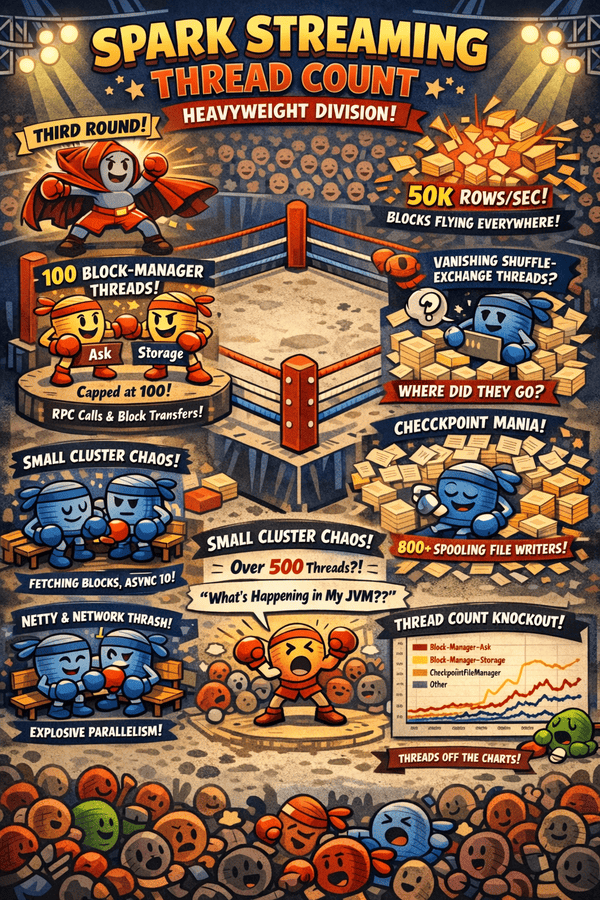
The script test_round_3.py generates a high-volume synthetic stream (50,000 rows/sec) and applies computationally expensive transformations — including SHA-512 hashing and data “explosions”). While writing to a noop sink, it probes the JVM in real time using ThreadMXBean to track and report counts of active threads dedicated to shuffle exchanges, block management, and checkpointing.
At the end of the run, the script also generates a Plotly chart summarizing the evolution of all tracked thread counts over time, giving a clear visual overview of how Spark scales its internal thread pools under heavy streaming load.
Spark Streaming Takes It to the Thread Count Heavyweight Division
So we ran our streaming job with .outputMode("complete"), cranked our rate to 50k rows/sec, threw in some nasty transformations like sha2 and explode(array_repeat(...)), and then peeked at the thread counts via ThreadMXBean.
Next thing we know, the JVM rips off its robe, steps into the ring, and starts spawning threads like a heavyweight unleashing a 20-punch combo.
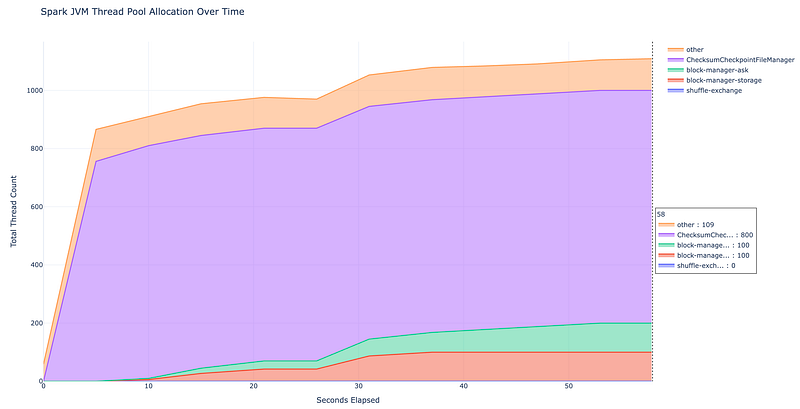
Shuffle Read: 18.6 MiB, Shuffle Write: 19.6 MiB… yet hundreds of threads are throwing punches like it’s fight night in the JVM. And you’re thinking … “What the heck is going on in my JVM?!” 😵💫
The Explosion of block-manager-* Threads
The reason block-manager-ask and block-manager-storage threads sit at around 100 is that our groupBy("key") forces a shuffle, and even in local mode Spark still uses the Block Manager to coordinate and move data blocks.
The ask threads handle the RPC control messages—“where’s my block?”—while the storage threads do the actual reading and writing of shuffle partitions. These thread pools are long-lived and Netty-backed, and hitting exactly 100 usually means you’ve reached Spark’s default cap for block-transfer threads.
Why do both go up to 100? Because Spark hardcodes the maximum thread count in its source code, capping these pools at 100 regardless of workload.
class BlockManagerMasterEndpoint(
  ...
  private val askThreadPool =
    ThreadUtils.newDaemonCachedThreadPool("block-manager-ask-thread-pool", 100)


class BlockManagerStorageEndpoint(
  ...
  private val asyncThreadPool =
    ThreadUtils.newDaemonCachedThreadPool("block-manager-storage-async-thread-pool", 100)
The Case of the Vanishing Shuffle-Exchange Threads
You’d think that after groupBy("key"), the shuffle-exchange threads would be front and center, like heavyweight champions in the ring. However our ThreadMXBean shows … nothing. Zero. Nada.
So where did they go? In local mode, the driver and executor live in the same JVM, but they still play different roles. The boundaries between “Driver coordination” and “Executor work” get blurred.
- Why
shuffle-exchangethreads are invisible? Theshuffle-exchangepool mainly coordinates tasks (triggerFuture). In local mode, the actual shuffling is done by generic executor-local-job-worker threads, not the specialized exchange pool. Our string search for"shuffle-exchange"misses them—they’re ephemeral and buried inside local worker threads. - Why
block-manager-*threads show up? Theblock-manager-askandblock-manager-storagethreads are always visible because they’re the muscle behind Spark’s data movement. Unlike ephemeral shuffle threads, these are long-lived pools that stay active for the duration of the job, so even in local mode or with tiny shuffle sizes,ThreadMXBeancatches them.
Other Shuffle-Related Threads
Spark also includes a block-manager-future thread pool, which handles asynchronous block-transfer operations—future-based tasks for fetching, pushing, or resolving shuffle and storage blocks without blocking the main execution threads. Like most Block Manager internals, this executor exists only on actual workers, so it never appears in local mode.
Both block-manager-decommission-shuffle and block-manager-decommission-rdd are created as single-threaded daemon executors. They only come to life when an executor is being decommissioned:
spark.storage.decommission.shuffleBlocks.enabled: migrates or replicates shuffle blocksspark.storage.decommission.rddBlocks.enabled: does the same for cached RDD blocks.
If no executor is being removed—as is always the case in local mode—these single-thread pools are never spawned.
The Explosion of ChecksumCheckpointFileManager Threads
Despite being noteworthy, ChecksumCheckpointFileManager has nothing to do with shuffle. It’s part of Structured Streaming checkpointing, not data movement. Its job is to safely write metadata logs, offsets, state updates, and commit markers to disk using checksums for durability. Shuffle lives in a completely different subsystem—the BlockManager, shuffle writers/readers, and Netty threads. Checkpointing preserves streaming state; shuffle moves data between partitions—they’re unrelated.
The huge thread spike comes from .outputMode("complete"), which rewrites the entire result table every trigger, hammering the checkpoint directory even with a noop sink. Under heavy load—SHA-512 hashing, row-tripling explode, and ~50k rows/sec—Spark aggressively parallelizes file-system writes. ChecksumCheckpointFileManager becomes the front-line worker, spawning massive thread pools while the JVM swings like a prizefighter to keep up.
In normal batch jobs, this never happens: Spark writes only a small set of outputs and metadata, so this component barely registers. In Structured Streaming, however, Spark writes checkpoint files every trigger — offset logs, commit logs, state updates, metadata markers — and .outputMode("complete") multiplies the load, spawning hundreds of threads for high-throughput workloads.
Why 800 threads? Each partition gets a ChecksumCheckpointFileManagerSuite to handle its checkpoint files, and each suite spawns 4 threads for parallel file operations. With 200 partitions, that’s 200 × 4 = 800 threads.
🥊 The Final Bell: TKO by Thread Count
The JVM just went three rounds with a ghost. We came in expecting a simple shuffle and left realizing Spark doesn’t just “move data” — it launches a full-scale CPU invasion. The BlockManager tosses blocks like a frenzied fighter, while CheckpointFileManager unleashes 800 threads to manage state.
The takeaway? Spark is the ringmaster of a massive hidden workforce. Even a “small” shuffle can explode into hundreds of threads. When internal IDs line up, Exchange Reuse keeps the dance smooth; when they don’t, Cartesian Products hit like a sucker punch.
As we hang up the gloves, remember: the Shuffle Monster isn’t invincible, just misunderstood. Keep your DataFrames clean, aliases consistent, and never underestimate a well-placed repartition. The fight for performance never ends — but now, you’re throwing the technical knockouts.
🙏 Acknowledgements
I want to thank Russell Jurney for the comeback of GraphFrames, but the real champ is Sem Sinchenko — he’s kept the momentum going and thrown every punch to drive this open-source project into the ring and keep it fighting strong. 🥊
“I’m gonna knock you out (Huuh)
Mama said knock you out (Huuh)”
(from “Mama Said Knock You Out” by LL Cool J)