
Apache Spark WTF???☠️ Serializer Killa 🔪
Welcome back to Apache Spark WTF???, the place where we poke Spark with a stick and ask why the JVM is sweating.
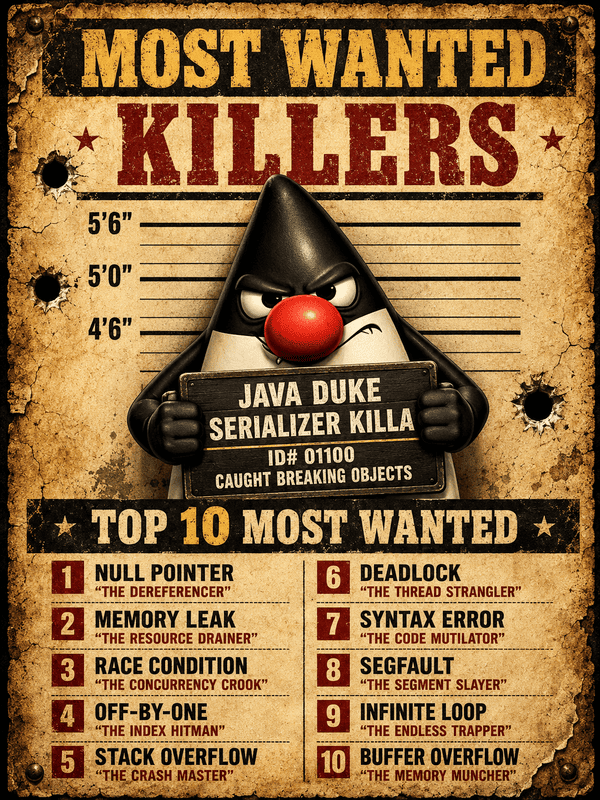
“Sixty million objects to serialize, shows me why”
(adapted from “Serial Killa” by Snoop Doggy Dog)
💀 The Victim: Your Object
Before Spark can move your code or data anywhere, it has to turn your complex JVM object — nested fields, references, and all — into raw bytes.
Distributed systems don’t move living objects; they move bytes. Inside a single JVM, an object is just a local memory reference. That reference is completely useless to an executor running on another node. There is no magic portal into the driver’s heap—if data or closures are going to cross the network, they must be flattened into a byte stream.
What Is Serialization?
Serialization is the process of converting an in-memory object into a sequence of bytes.
For example:
case class Victim(id: Long, name: String, suspicious: Boolean)
val victim = Victim(13, "Mr. Lambda", suspicious = true)
Inside the JVM, victim is an object. It has a class. It has fields. It has values. It may point to other objects. Those objects may point to more objects.
Serialization turns that object graph into a byte stream. Those bytes can now be written to disk, sent across the network, cached, spilled, shuffled, broadcasted, or mailed to an executor like suspicious luggage.
What Is Deserialization?
Deserialization is the reverse process. Spark, Java, or whatever runtime is reading the stream takes bytes and rebuilds objects from them.
That second part is why serialization is not free. It’s not just turn thing into thing. It’s object disassembly and reconstruction with paperwork.
What Serialization Really Means in Java
When Java serializes an object, it does not just dump raw memory. Raw memory would be useless on another JVM, another machine, another process, or even another run of the same program. Instead, Java builds a structured stream.
Roughly, it writes things like:
stream header
class descriptor
serialVersionUID
field descriptions
object data
references to already-written objects
special markers for nulls, arrays, strings, enums, collections...
Then it walks the object graph: If object A points to object B, and B points to object C, Java may need to serialize all of them.
A
├── B
│   └── C
└── D
You thought you serialized A. Java heard: Bring the family.
Spark serializes whatever must leave the current process or execution boundary, but not always with Java object serialization. Task closures, captured variables, broadcasts, task results, and some RDD data may go through Spark’s JVM serialization path. But Spark SQL/DataFrames often use Spark’s own internal binary formats instead of shipping ordinary JVM objects. PySpark boundary data uses Python-specific serialization, not Java serialization.
The Object Graph: Where Small Lies Begin
This looks small:
rdd.map(x => service.score(x))But service.score(x) may secretly mean:
rdd.map(x => this.service.score(x))And this may contain:
PricingEngine
├── hugeRules
├── logger
├── databaseClient
├── config
├── metrics
├── cache
└── your sins
Serialization follows references.
That means the real question is not: Is this object small?
The real question is: What does this object point to?
How Java Deserialization Works Internally
Deserialization is even more suspicious. When Java reads the byte stream, it has to rebuild the object graph.
Conceptually:
read stream header
read class descriptor
resolve class
check serialVersionUID
allocate object
read field values
reconnect references
invoke custom readObject if present
return rebuilt object
That “allocate object” part matters. Deserialization creates objects. Potentially many objects. If the byte stream contains a nested structure like:
List[Order]
  ├── Order
  │   ├── Customer
  │   ├── Address
  │   └── LineItems
  ├── Order
  │   ├── Customer
  │   ├── Address
  │   └── LineItems
Java has to allocate and wire all that back together. That means CPU work. Memory writes. Pointer chasing. Class resolution. Reflection-like machinery. And garbage collection later when those objects die.
This is why deserialization often shows up in stack traces as a deep tunnel of ObjectInputStream.readObject, readOrdinaryObject, readSerialData, arrays, field values, and collection reconstruction.
Why This Hurts Performance
CPU Cost. Serialization has to inspect objects, walk references, encode fields, handle metadata, and sometimes call custom serialization methods. Deserialization has to parse the stream, resolve classes, allocate objects, set fields, and rebuild references. That is real CPU time. Not business logic CPU. Byte paperwork CPU.
Memory Allocation. Deserialization creates objects. Lots of them. In Spark, lots of objects means pressure on the JVM heap. Pressure on the heap means garbage collection. Garbage collection means executor pauses. Executor pauses mean your job starts looking haunted.
Bigger Network Payloads. Verbose serialization can produce large byte streams. This matters during task launch, broadcast, result collection, and some shuffle paths. In Spark SQL/DataFrames, Spark often avoids ordinary JVM object serialization by using compact internal binary formats, but bytes still have to move.
Object Graph Explosion. A tiny function can accidentally capture a huge object. A small record can reference nested structures. A harmless-looking closure can drag in a logger, database client, config tree, model, or service object.
Reflection and Metadata Overhead. Java serialization carries class descriptors and uses general-purpose machinery. That flexibility is convenient. It is also expensive. It has to work for many object shapes, inheritance patterns, arrays, collections, customs writeObject and readObject.
Why Spark Cares So Much
Spark is a multiplier. It takes small overheads and scales them until they become visible from space.
That is the trick. Serialization overhead may look tiny in a unit test. Then Spark applies it to: millions of records, thousands of tasks, many shuffle blocks, large closures, broadcast variables, cached partitions, task results, spilled data and Python/JVM crossings — where PySpark uses Python-side serialization mechanisms rather than Java object serialization.
Suddenly the “tiny cost” is not tiny anymore. That is why Spark exposes related symptoms in places like Task Deserialization Time, Result Serialization Time, Scheduler Delay, shuffle read/write metrics, spill metrics, executor runtime, and GC time.
So when Spark is slow, do not only ask: Is my algorithm bad?
Also ask: What am I forcing Spark to pack, ship, unpack, allocate, rebuild, and eventually garbage collect?
Because in Spark, serialization is not a detail. It’s the tax you pay every time an object crosses a boundary.
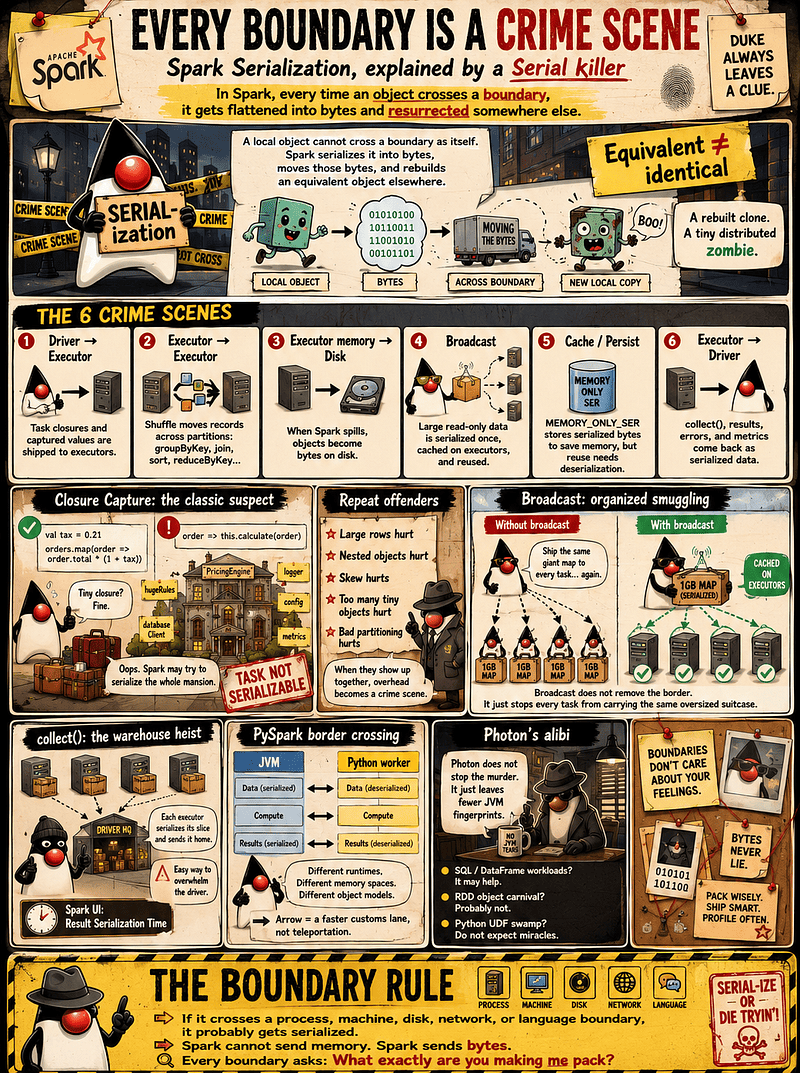
🚧 Every Boundary Is a Crime Scene
Whenever Spark moves something across a boundary, it has to turn local runtime state into a transferable representation.
Sometimes that means Java object serialization. Sometimes it means Spark’s own internal binary format, shuffle blocks, disk bytes, Arrow batches, or another encoding path. The mechanism changes, but the rule stays the same: Spark cannot move live objects, memory references, or runtime state as-is.
It packages the thing, moves the package, and reconstructs something usable on the other side.
When an executor receives it, it doesn’t get the driver’s original object. It doesn’t get a shared reference. It doesn’t get remote memory. It gets an executor-local reconstruction. A rebuilt clone. A tiny distributed zombie.
Boundary #1: Driver ➜ Executor
This is the classic Spark move. The driver creates work. Executors run work. But executors cannot run code that only exists as a driver-local object reference. So Spark has to package the task, the function, and whatever external values the function needs.
Example:
val tax = 0.21
orders.map(order => order.total * (1 + tax))
Here Spark serializes the task closure and sends it to the executor. This is normal. This is fine. This is Spark doing Spark things.
The problem starts when the closure is not tiny.
class PricingEngine {
  val hugeRules = loadEveryPricingRuleSinceTheBronzeAge()
  val logger = createLogger()
  val client = createDatabaseClient()

  def run(orders: RDD[Order]) = orders.map(order => calculate(order))
  def calculate(order: Order): Double = hugeRules.apply(order)
}
You thought Spark was sending:
order => calculate(order)But depending on how the code is structured, Spark may see:
order => this.calculate(order)And now this is standing at the serialization border with seventeen suitcases and a suspicious passport.
PricingEngine
 ├── hugeRules
 ├── logger
 ├── databaseClient
 ├── config
 ├── metrics
 └── your sins
You thought you sent a lambda. Spark tried to ship the whole mansion.
This is where Task not serializable error comes from.
That’s Spark saying: I tried to serialize your object family tree. One of the relatives bit me.
Boundary #2: Executor ➜ Executor / Shuffle
This is the shuffle boundary. Shuffle happens when data has to be redistributed across partitions.
Classic suspects:
groupByKey()
reduceByKey()
join()
distinct()
repartition()
sortBy()
orderBy()
For example:
orders
  .map(order => (order.customerId, order.amount))
  .reduceByKey(_ + _)
All values for the same customerId need to meet on the right reducer side. But records do not teleport between executors. They get encoded into shuffle data, written, fetched, transferred, and decoded or deserialized on the other side.
Large rows hurt. Nested objects hurt. Too many tiny objects hurt. Skew hurts. Bad partitioning hurts. And when they all show up together, serialization stops being overhead and becomes a crime scene.
Boundary #3: Executor Memory ➜ Disk
Spark loves memory. Memory does not always love Spark back.
When Spark runs out of room during shuffle, sort, aggregation, joins, or caching, it may spill to disk. And disk does not store JVM object souls. Disk stores bytes.
So Spark may encode or serialize data before writing it out, then read it back and decode or deserialize it later when the data is needed again.
Spill is Spark admitting: I could not fit this in RAM, so now the disk gets to suffer too.
Sometimes spilling is survival. Sometimes it is a warning flare. And if you see spill plus high GC plus slow shuffle, serialization is probably somewhere in the crime scene wearing gloves.
Boundary #4: Driver ➜ Executors via Broadcast
Broadcast variables are also a boundary. They are Spark’s smarter way to send large, read-only data to executors without stuffing the same object into every task closure.
Example:
val lookupBc = sc.broadcast(lookupMap)
rdd.map { x => lookupBc.value.get(x) }
Without broadcast, Spark may accidentally end up doing the dumb shipping dance:
task 1 gets the giant lookup map
task 2 gets the giant lookup map again
task 3 says hello to the giant lookup map
task 4 discovers the lookup map has returned with a sequel
With broadcast, Spark does something much saner: the driver packages the broadcast value, executors receive and cache it, and tasks reuse the local copy. For ordinary JVM objects, that packaging involves serialization.
Better. Much better. But still not magic.
The broadcast value still has to cross from the driver to the executors, so serialization still happens. Broadcast doesn’t remove the border. It just stops every task from carrying the same oversized suitcase.
Broadcast is not free teleportation. It’s organized smuggling.
Boundary #5: Cache / Persist
Caching is another place where the object/byte boundary matters.
Spark can store cached data in different forms. Some storage levels keep deserialized JVM objects. For DataFrame and SQL workloads, the cached representation may also be Spark’s internal columnar or binary representation rather than a forest of user-created JVM objects.
For example, in MEMORY_ONLY_SER, the _SER means serialized. Spark stores each partition as bytes instead of keeping a forest of live JVM objects in memory.
That can save memory, because serialized bytes are often more compact than full object graphs with headers, references, wrappers, and all the usual JVM furniture. But the tradeoff is resurrection cost. When Spark needs that cached partition again, it must deserialize those bytes back into usable records.
So yes, you saved memory. But every reuse now comes with a small CPU ritual.
Boundary #6: Executor ➜ Driver
Executors also send things back to the driver: task results, accumulator updates, collected data, errors, metrics, and other little souvenirs from the battlefield. And when data travels back, it also has to become bytes.
Take collect(). It looks innocent. It is not. Each executor must serialize its slice of the result, send it over the network, and let the driver deserialize it into local objects. That’s why collect() is dangerous.
It is not just: Give me my data.
It is: Dear executors, please pack the warehouse into tiny boxes and mail everything to my driver process, which definitely has enough memory and is emotionally stable. Spoiler: it often is not.
This is also where Result Serialization Time appears in the Spark UI. That metric is Spark quietly admitting: Yes, I spent time packing the result before sending it home.
Boundary #7: JVM ➜ Python Worker
PySpark adds another border checkpoint.
Spark’s core engine runs on the JVM. Your Python code runs in separate Python worker processes. Different runtimes. Different memory spaces. Different object models. Different planets.
So when JVM-side Spark data needs to enter Python code, it must be converted and transferred to the Python worker, processed there, then converted and transferred back to the JVM. Regular Python UDFs commonly use Python serialization; Arrow-based paths use columnar batches to make that crossing cheaper. That is the PySpark tax.
Not because Python is evil, but because crossing language and runtime boundaries is expensive.
Regular Python UDFs can be especially costly because Spark has to pull data out of the JVM execution path, send it into Python, run your code, and bring the result back.
Native Spark SQL functions usually avoid that border crossing. Arrow and Pandas UDFs can make the crossing more efficient by moving data in columnar batches. But they do not delete the border.
Arrow is a faster customs lane. Still not teleportation.
Boundary #8: Photon — Less JVM Object Drama?
Photon, Databricks’ native vectorized engine, does not remove Spark’s serialization boundaries. It doesn’t make executors share memory, delete shuffle, or merge Python and the JVM into one happy runtime family. Spark still moves bytes across machines, processes, disks, and language boundaries.
What Photon changes is the execution path for supported SQL/DataFrame workloads: fewer JVM row-object tantrums, more native columnar batches, less GC sadness.
And yes, I already wrote theSuspicious Minds article about that crime scene, so we will not reopen the full autopsy here.
The short version is:
- SQL/DataFrame operations? Photon may help.
- RDD object carnival? Python UDF swamp? Do not expect miracles. Photon doesn’t support RDD APIs or UDFs; unsupported operations fall back to the Spark runtime.
collect()disaster? Still your fault.
Photon doesn’t stop the murder. It just leaves fewer JVM fingerprints.
The Boundary Rule
The rule is simple:
If it crosses a process, machine, disk, network, or language boundary, it probably gets serialized, encoded, decoded, copied, or converted somehow.
Sometimes the cargo is tiny: a number, a string, a small case class, a clean closure. Fine.
Other times it is a huge object graph, a captured service class, a database connection, a logger, a giant config tree, a model, a nested collection, or a billion tiny rows pretending to be harmless.
Spark cannot send live memory references. Spark sends bytes, blocks, batches, or internal representations. And every boundary asks the same question: What exactly are you making me pack?
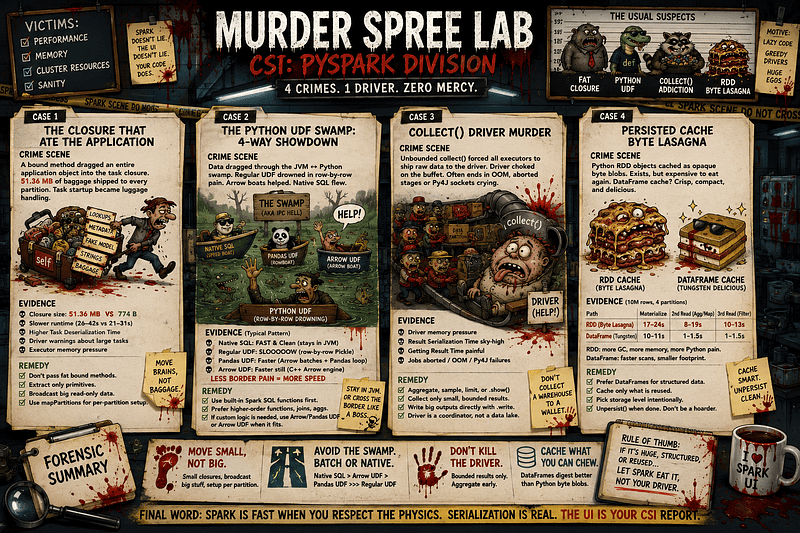
🧪 Murder Spree Lab: PySpark Project Edition
This lab is a PySpark project with one script per serialization crime scene. Most scripts accept simple knobs like rows, partitions, and sometimes scale. rows controls how much data Spark processes, partitions controls how the work is split across tasks, and scale makes the local baggage bigger: larger dictionaries, closures, vectors, or fake model payloads.
Case 1 — The Closure That Ate the Application
In the 1_closure_that_are_application.py test, a bound Python method can quietly capture self. And self is rarely just self.
pipeline.score carries the whole SuspiciousFeaturePipeline instance with it: lookup data, metadata, fake model baggage, strings, thresholds, and whatever else the object is holding.
The test was run with:
--rows 100000 --partitions 20 --scale 5So the heavy object becomes:
lookup_size  = 300,000 * 5  = 1,500,000 entries
baggage_size = 3,000,000 * 5 = 15,000,000 characters
partitions   = 20
rows         = 100,000
The bad version passes the bound method directly:
rdd.map(pipeline.score).sum()That closure pickles to 51.36 MB.
The fixed version broadcasts the large read-only lookup, extracts the tiny primitive value, and uses mapPartitions:
lookup_bc = sc.broadcast(pipeline.lookup)
threshold = pipeline.threshold

def score_partition(iterator):
    lookup = lookup_bc.value
    for x in iterator:
        yield lookup[x % len(lookup)] + threshold
That closure pickles to 774 bytes.
That is the real result: the closure stopped carrying the haunted mansion. It now carries a broadcast handle and a tiny integer.
Across three runs, the fixed version was faster every time, but the gap moved around:
BAD:   42.07s, 26.01s, 30.82s
FIXED: 30.90s, 21.17s, 29.13s
The honest interpretation: this optimization clearly fixes the serialization payload, but runtime improvement depends on the parameters.
A higher --scale makes the captured object larger. More --partitions means more task payloads to ship. Fewer --rows makes startup and closure shipping dominate more.
But with many rows, row-level Python execution may dominate instead. With low scale, few partitions, warm workers, cached data, or local machine noise, the wall-clock gain can shrink, jump around, or even disappear in one run.
That is why wall-clock time can be noisy. Closure size is the smoking gun.
In Spark UI and logs, look for large serialized task warnings, task deserialization time, scheduler delay, Python execution time, and executor memory pressure. In PySpark, the cost can be split across JVM task handling, Python worker communication, Python deserialization, and row processing.
The fix is simple: do not pass fat bound instance methods into Spark transformations. Extract only the small values the task needs. Broadcast large read-only data. Use mapPartitions when reusable per-partition state is needed.
Case 2 — The Python UDF Swamp: The 4-Way Architectural Showdown
In the 2_python_udf_swamp.py test, a regular Python UDF breaks Spark’s optimized execution path.
Instead of keeping the work inside Spark SQL’s JVM engine, Spark has to move data across the JVM/Python boundary, run row-level Python code, and bring the result back. That border crossing is the swamp.
This test was run with:
--rows 100000000 --partitions 4It compares four paths over the same 100 million generated rows:
Native Spark SQL expression
Regular Python UDF
Pandas UDF
Pure Arrow UDF
The native Spark SQL version stays inside Spark’s optimized engine:
df.withColumn('normalized', F.lower(F.trim(F.col('name'))))The regular Python UDF crosses into Python in the most painful way:
@F.udf(StringType())
def normalize_py(s):
    return s.strip().lower() if s is not None else None
The Pandas UDF uses Arrow to move batches, but then works through Pandas Series operations:
@F.pandas_udf(StringType())
def normalize_pandas(s_series):
    return s_series.str.strip().str.lower()
The Arrow UDF also crosses into Python, but it receives Arrow arrays directly and uses Arrow compute functions:
@F.arrow_udf(StringType())
def normalize_arrow_pure(arrow_array: pa.Array) -> pa.Array:
    trimmed = pc.utf8_trim_whitespace(arrow_array)
    return pc.utf8_lower(trimmed)
That distinction matters. Pandas UDFs are executed using Arrow for data transfer and Pandas for processing. Arrow UDFs, introduced in Spark 4.1.0, allow pyarrow.Array operations directly.
Across three runs, the pattern was stable:
Native Spark SQL:     24.29s, 16.51s, 21.21s
Regular Python UDF:   99.49s, 82.16s, 85.80s
Pandas UDF:           49.16s, 49.77s, 42.42s
Pure Arrow UDF:       35.64s, 44.98s, 35.16s
So the lesson is architectural, not just numeric.
Native Spark SQL is the cleanest path because it avoids the Python boundary entirely. Regular Python UDFs are the swamp because they pay Python execution, conversion, serialization, and IPC costs row by row. Pandas UDFs and Arrow UDFs make the crossing cheaper by working in batches, but they still cross the JVM/Python border.
The parameters matter too. With 100,000,000 rows and only 4 partitions, each task processes a large amount of data, so the cost of row-level Python execution becomes very visible. With fewer rows, more partitions, tiny data, warm workers, or noisy local execution, the gap may move around. But the shape usually remains: native SQL first, regular Python UDF last, vectorized paths in the middle. Your three executions show exactly that pattern.
In the Spark UI SQL tab, expect native expressions to stay in optimized Spark SQL execution, often with WholeStageCodegen. Regular Python UDFs usually show Python execution nodes such as BatchEvalPython. Pandas and Arrow UDF paths show Arrow-based Python execution nodes such as ArrowEvalPython, although the UI will not always expose every internal Pandas, Arrow, or Python cost.
The fix is simple: use built-in Spark SQL functions first — lower, trim, regexp_replace, when, arrays, structs, higher-order functions, joins, and aggregations. If custom Python logic is unavoidable, prefer Arrow-friendly or vectorized paths when they actually fit the workload.
Case 3 — collect() Driver Murder
collect() is safe only when the answer is small. The problem starts when it is unbounded. Spark has to take executor-side result partitions, turn them into transferable result data, send them back to the driver, and materialize everything inside one local process. The driver is not a data lake. It is a coordinator with a heap.
The 3_collect_driver_murder.py test was run with:
--rows 20000000 --partitions 4The DataFrame contains 20 million rows and a repeated string payload:
df = spark.range(0, args.rows, numPartitions=args.partitions).withColumn(
    'payload',
    F.repeat(F.concat(F.lit('payload_'), F.col('id').cast('string')), 3)
)
The safe path aggregates first:
df.groupBy((F.col('id') % 100).alias('bucket')).count().count()That keeps the heavy work distributed and sends only a tiny final answer back to the driver.
The bounded path collects only a capped sample:
df.limit(args.collect_limit).collect()With collect_limit = 100000, this completed safely in the test.
The dangerous path pulls everything:
df.collect()That is where the driver gets murdered.
Results:
Safe distributed aggregation: 3.36s, result = 100
Bounded collect of 100000:    0.84s, result = 100000
Unbounded collect:            failed
The failure is the lesson. The unbounded collect() did not merely run slower. It crashed the result path with java.lang.OutOfMemoryError: Java heap space, followed by TaskResultLost, an aborted stage, and a Py4JJavaError from collectToPython.
This is exactly what collect() warns about: it returns all DataFrame records as a local list of Row objects, and Spark’s own docs say it should only be used when the result is expected to be small because all data is loaded into driver memory.
The parameters matter. More --rows means more data pulled into the driver. Larger payload columns make each row heavier. Fewer --partitions can make each task result chunk larger. A higher collect_limit can turn a “bounded” collect into a slow-motion version of the same crime. A larger driver heap may delay the crash, but it does not change the architecture.
In Spark UI, the bad path may not produce a clean completed timeline. Look for aborted stages, failed tasks, TaskResultLost, result-fetch failures, driver memory pressure, Result Serialization Time, Getting Result Time, and final-stage duration.
The fix is simple: do not pull raw massive DataFrames back to the driver. Aggregate, sample, limit carefully, or use show() for inspection. For production-sized outputs, write from executors directly to storage with .write.
Case 4 — Persisting Cache Byte Lasagna: RDD vs DataFrame Showdown
Caching helps only if the cached representation is cheap to reuse.
In the 4_persist_cache_byte_lasagna.py test, the Python RDD path stores object-heavy Python dictionaries:
{
    'id': i,
    'key': i % 100_000,
    'text': f'event_{i % 1000}_' * 5,
    'arr': [i % 100, i % 101, i % 103, i % 107]
}
The test was run with:
--rows 10000000 --partitions 4So Spark cached 10 million structured records across 4 partitions.
The RDD version persists Python objects with:
rdd_cached = sc.range(0, args.rows, numSlices=args.partitions) \
    .map(make_obj) \
    .persist(StorageLevel.MEMORY_AND_DISK)
That cache exists, but it is byte lasagna. PySpark has to serialize Python objects into a form the JVM can store, then later move them back through the Python boundary and rebuild Python dictionaries for Python-side operations. The JVM is holding the food, but it cannot really understand the recipe.
The DataFrame version builds the same logical fields as Spark columns:
df_cached = spark.range(0, args.rows, numPartitions=args.partitions) \
    .withColumn('key', F.col('id') % 100000) \
    .withColumn('text', F.repeat(F.concat(F.lit('event_'), (F.col('id') % 1000).cast('string'), F.lit('_')), 5)) \
    .withColumn('arr', F.array(F.col('id') % 100, F.col('id') % 101, F.col('id') % 103, F.col('id') % 107)) \
    .persist(StorageLevel.MEMORY_AND_DISK)
Now Spark can see the schema, store the cached data in its SQL/DataFrame execution path, and reuse it without sending every operation through Python object reconstruction.
Across three runs, the pattern was brutal:
RDD materialize:       16.94s, 21.22s, 24.25s
RDD cached map/sum:     8.40s, 12.15s, 19.35s
RDD cached filter:     10.07s, 12.05s, 12.63s

DF materialize:        10.92s, 10.62s, 11.22s
DF cached aggregation:  1.23s,  1.52s,  1.35s
DF cached filter:       1.32s,  0.99s,  1.47s
Same row count. Same partitions. Same logical idea. Very different reuse cost.
The lesson is not “cache is always fast.” The lesson is: cache format matters.
The Python RDD cache may avoid recomputing the original records, but later reads still pay Python serialization, Python object access, IPC, and dictionary reconstruction costs. The DataFrame cache is usually cleaner because Spark keeps the data in an optimized structured representation and can run scans, filters, and aggregations inside the engine.
The parameters matter. More --rows increases cache size and reuse cost. Fewer --partitions can make each cached partition heavier. More nested Python objects make the RDD path worse. Wider DataFrames or complex strings can also make the DataFrame cache larger, so it is not magic — just much more optimizable.
In Spark UI, compare the Storage tab while the caches are alive. Then compare later cached reads, not only the first materialization. In the Executors tab, watch memory pressure and GC. In stage details, the RDD path should still look Python-heavy, while the DataFrame path should look more like native Spark SQL execution.
The fix is simple: when the data is structured, prefer DataFrames over Python RDDs. Cache only data that is reused. Choose storage levels intentionally. And call .unpersist() when the cache has done its job.
👮 The Byte Police Always Win
Serialization isn’t the enemy; it’s just how Spark breathes. Distributed systems move bytes because they cannot share JVM souls or hold hands across a network.
The real enemy is accidental serialization — the fat closure, the giant object graph, the Python UDF swamp, the broadcast whale, or the tragic collect() ritual sacrifice. Spark will pack whatever you hand it. If you hand it a single integer, great. If you hand it your entire application wearing a trench coat, Spark will still try to stuff it into a suitcase and act surprised when the zipper screams.
When a job slows to a crawl, don’t just question your algorithm.
Ask: What exactly am I forcing Spark to pack, ship, unpack, allocate, and garbage-collect while I stare at the UI?
Because at every boundary, the byte police are waiting with the exact same question: Are you carrying anything suspicious? (Spoiler: Yes, you are.)
(P.S. You won’t find the word Kryo anywhere in this article. That was done entirely on purpose. I have reserved the Kryo serializer for a follow-up piece, along with some extra interesting mystery unearthed…)
To be continued …
*“(large closures) Suicide, it’s a suicide
(giant shuffles) Suicide, it’s a suicide
(big collects) Suicide, it′s a suicide
(huge toPandas) Suicide, it′s a suicide
Now tell me, what’s my motherfuckin name
Serializer killa, serializer killa, serializer killa”
(adapted from* “Serial Killa” by Snoop Doggy Dog)
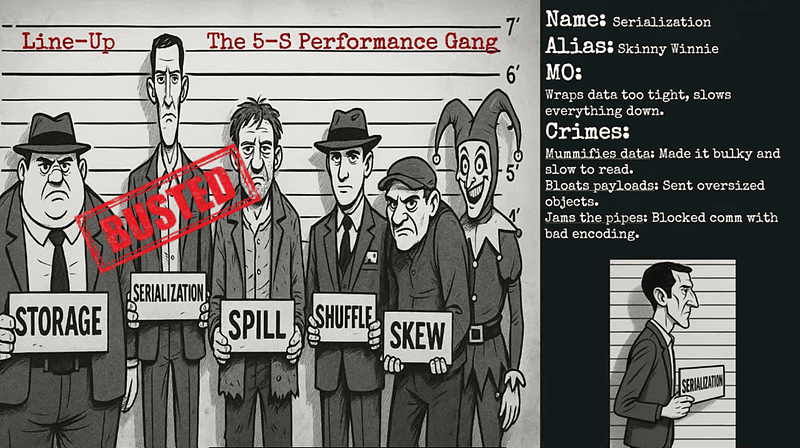
From my talk “True Crime: Who killed that job?”