
🕯️Spark In The Dark 🫣
Serverless hides the machinery. Spark keeps you guessing.

Entering the Dark cave: where young data engineers go to lose innocence and gain stack traces.
“Mein Spark Jobs run
Irgendwie, irgendwo, irgendwann”(adapted from “Irgendwie, irgendwo, irgendwann” by Nena)
The Missing Cluster
You open a Databricks notebook, run spark.range(10).count(), and Spark answers. Nothing unusual—except you never created a cluster, chose a runtime, sized a driver, or picked a machine.
Serverless does not remove infrastructure from reality; it removes much of it from the user’s execution contract. Faster startup, automatic scaling, managed upgrades, fewer knobs. The machines remain. What changes is who is allowed to care about them—and when.
So we’re going underground — not to blame Serverless for every Spark oddity, but to keep only what we can trace to its architecture and documented behavior. Because in distributed systems, the real question is rarely just what happened. It’s when, where, and under which execution contract did it happen? 🙃
Scope of the investigation. After the historical timeline, “Serverless” mostly means Serverless compute for notebooks and jobs, and Lakeflow pipelines where explicitly stated. Serverless SQL warehouses also use serverless infrastructure, but not every limitation or behavior discussed below applies to every serverless product. Release dates are initial documented dates; Databricks rollouts can be staged and region-dependent.
🕸️ The Timeline On The Wall
With Serverless, the dates matter. Not because we’re going to spend the next minutes reading release notes like normal, emotionally stable people. But because if we pin the important dates to the wall, a pattern appears. What looked like independent product announcements starts looking like the same operation repeated over and over.
2021 — The First Door
On August 30, 2021, Databricks introduced Serverless SQL Endpoints in Public Preview. Databricks described it as the initial release of serverless compute: SQL compute that had previously run in the customer’s AWS compute plane could now run on Databricks-managed infrastructure. The pitch was straightforward — faster startup, less management, better cost efficiency.
At that point, Serverless essentially meant:
You write SQL
     ↓
Databricks deals with the machine
In March 2023, Databricks SQL Serverless became generally available. The experiment had survived.
2024 — Spark Follows It Inside
On April 15, 2024, Databricks published the initial Serverless compute version for notebooks and jobs. The release note uses a phrase that will become important later: it roughly corresponds to Databricks Runtime 14.3, with Serverless-specific modifications. It also removed support for manually setting most Spark configurations.
On July 15, 2024, Serverless compute for notebooks and Workflows became generally available. Python and SQL notebook workloads, plus serverless job tasks, could now run without the user configuring and deploying the underlying Spark compute.
The diagram changed:
2021                         2024
SQL                          Python / SQL / Jobs
 │                                │
 ▼                                ▼
Serverless SQL               Serverless Spark
On August 15, 2024, Databricks upgraded the server side of Serverless notebooks and workflows from JDK 8 to JDK 17, documenting associated behavior changes.
Your notebook hadn’t moved. The machine behind it had.
2025 — Remove the Reasons to Say “not in Production”
During 2025, Databricks kept closing gaps: configurable performance modes, high-memory notebook environments, more networking and enterprise controls, richer pipeline behavior, and increasingly mature Environment Versions. Serverless stopped looking like “the convenient option” and started looking like a platform Databricks expected serious workloads to use.
The direction matters more than any one checkbox:
Serverless SQL
      ↓
Serverless Spark
      ↓
Serverless platform
2026 — The Cluster Stops Being Part of the Experience
On January 29, 2026, Databricks made Serverless Workspaces generally available: workspaces preconfigured with Serverless compute and default storage as a fully managed SaaS experience.
On June 10, 2026, Databricks introduced Lakehouse Replay in Beta: sampled read-only Serverless workloads could be replayed against an upcoming runtime before that runtime reached production. The feature is now in Public Preview.
On August 17, 2026, Session Restore for Serverless Jobs entered Beta, allowing eligible notebook job runs to restore Python variables and Spark session state into a new interactive notebook. On September 11, it moved to Public Preview. On September 3, Environment Version 6 had also become available for serverless and standard classic compute.
Read the wall again:
2021
You stop managing SQL compute.
        ↓
2024
You stop managing general Spark compute.
        ↓
2025
More runtime, scaling and environment decisions
move behind the service boundary.
        ↓
2026
Workspace setup, future-runtime testing,
and parts of failure recovery move with them.
🕯️None of this means Spark disappeared. Quite the opposite. Spark is still doing the analysis, optimization, shuffling and execution. What is disappearing from the user experience is ownership of more of the machinery around it.
🌀 Two Worlds, Same API
At first, nothing looks different.
DataFrame. select. filter. groupBy. join.
The familiar objects are still there, wearing the same names and behaving politely enough that you might conclude Serverless is ordinary Spark with somebody else operating the machines. That is close—but it misses the contract boundary.
That conclusion lasts until you look at what happens between your application and Spark.
The Passage
Spark Connect introduced a decoupled client-server architecture in Apache Spark 3.4. The client turns DataFrame operations into unresolved logical plans, serializes them with Protocol Buffers, and sends them over gRPC to a Spark server. The server translates those plans into normal Spark logical operators, then analysis, optimization and execution proceed on the server. Results come back to the client, typically through Arrow.
Conceptually:
SPARK CLASSIC                     SPARK CONNECT
Python                            Python client
   │                                 │
 Py4J                                │ unresolved logical plan
   │                                 │ Protobuf + gRPC
   ▼                                 ▼
Spark Driver JVM                  Spark Server
   │                                 │
   ▼                                 │ analysis + optimization
Executors                            ▼
                                  Execution
The thing crossing the passage is no longer: Let me reach into that Spark process over there. It is closer to: Here is a description of what I eventually want. Work out what it means when you receive it.
A message sent through the cave. Nothing bad has happened yet.
Important: Spark Connect is not Serverless
Spark Connect is also used by Databricks Connect and by modern Standard compute notebooks. Databricks documents Spark Connect for Python notebooks on Standard compute from Databricks Runtime 14.3 onward, and for Scala notebooks from 13.3 onward.
So when we shortly see an error move in time or a temporary view behave differently, the honest conclusion is not: Serverless rewrote Spark.
The correct chain is:
Serverless
    ↓
uses Spark Connect
    ↓
therefore inherits
Spark Connect semantics
Databricks’ Serverless limitations page makes the consequence explicit: because Serverless uses Spark Connect, analysis and name resolution can be deferred until execution, changing observable behavior even when the DataFrame API looks familiar.
⌛ Things Started Happening Later
This is where the temporal theme stops being decoration and becomes architecture. Databricks and Apache Spark both document several places where Spark Connect moves an important event later in the lifecycle.
The Error that Arrived Later
Both Spark Classic and Spark Connect are lazy about executing transformations. They’re not equally eager about analyzing them.
Consider:
df = (
    spark
    .sql("SELECT 1 AS a, 2 AS b")
    .filter("c > 1")
)
There is no column c. Spark Classic analyzes the logical plan eagerly as transformations are constructed, so this example can fail immediately. Spark Connect instead builds an unresolved plan on the client and can defer analysis until an operation requires a resolved plan—such as accessing df.columns or df.schema, explaining the plan, persisting a DataFrame, or executing an action.
The error didn’t disappear. You simply met it later.
That distinction matters if your code expects an AnalysisException inside a particular try block. “Spark is lazy” was always true. It just wasn’t the whole truth.
One tiny detail I particularly like: df.columns is not merely reading local metadata under Spark Connect. On a newly constructed DataFrame it can trigger an analysis RPC to the server, after which the schema is cached client-side. That’s another very concrete consequence of the client/server boundary.
The View that Remembered Tomorrow
Now create a temporary view, obtain a DataFrame from it, replace the view, and only then execute the DataFrame:
spark.range(10).createOrReplaceTempView("victim")
df = spark.table("victim")

spark.range(100).createOrReplaceTempView("victim")
df.count()
Databricks documents the difference explicitly:
Spark Classic ➔ temporary-view plan embedded
Spark Connect ➔ temporary-view name lookup
In Classic, the old DataFrame can retain the plan that represented the ten-row view.
In Spark Connect, the DataFrame can retain the name and resolve it later. By execution time, victim may mean something else. Databricks therefore recommends unique temporary-view names when code may replace them.
Same DataFrame variable. Different reality waiting behind the name.
The Variable from Another Time
Python UDFs provide the third clue.
from pyspark.sql.functions import udf

x = 123

@udf("INT")
def foo():
    return x

df = spark.range(1).select(foo())
x = 456
df.show()
Databricks documents that Python UDF serialization happens at creation in Spark Classic but can be deferred until execution in Spark Connect. In the example above, Classic captures 123; Connect can capture 456.
🕯️ The function didn’t change. The moment at which Spark captured its world did.
Three Clues, One Direction
THE ERROR ➔  was analyzed later.
THE VIEW  ➔  was resolved later.
THE UDF   ➔  was serialized later.
Different symptoms. Same architectural direction.
🕯️More responsibility has moved from “when my local code creates an object” toward “when the remote Spark server finally has to make that object real.”
A Rule of the Cave
When meaning can be deferred across the Spark Connect boundary, the observable moment can move too: analysis, name resolution, serialization, and other server-side work may happen later than Classic-trained intuition expects.
⛓️ The APIs That Never Crossed
Some things don’t happen later. They simply never cross the boundary.
No Private Tunnel into the Driver
Apache Spark’s own Connect documentation makes the separation explicit: the client does not run in the Spark driver process, and PySpark no longer uses Py4J in the traditional way to reach private JVM-backed objects.
That means no casual stroll through things like df._jdf.
Spark Connect also doesn’t expose SparkContext or RDD execution APIs. Serverless only exposes Spark Connect APIs, so RDD APIs are not supported there.
Again, not a Serverless invention. But Serverless permanently lives on that side of the border.
🕯️ The abstraction becomes possible partly because applications are no longer allowed to reach through it.
And Then There Is Cache
On Serverless, Databricks does not expose the traditional Spark DataFrame and SQL cache controls, and several related manual materialization APIs are also outside the supported contract. Internal caching and materialization can still exist; what disappears is your ability to command those physical strategies through the familiar APIs.
Calls such as df.cache(), df.persist(), df.unpersist(), df.checkpoint(), spark.catalog.cacheTable(), and the corresponding SQL cache commands raise exceptions. The important distinction is not that caching or materialization stopped existing; it is that these user-directed controls are no longer part of the Serverless interface.
For years, a perfectly normal Spark conversation went: We calculate this three times. Cache it.
Serverless’ answer is increasingly: Describe the workload. Let the platform manage the execution strategy.
🕯️ That doesn’t mean intermediate materialization stopped mattering. It means explicitly managing that physical cache is no longer part of your contract.
Even Infinity Has an API Boundary
Structured Streaming exposes another version of the same shift.
In traditional Spark, the streaming query itself can be long-lived: ProcessingTime keeps the same application running and processing micro-batches indefinitely. Omitting a trigger behaves similarly, because Spark defaults to ProcessingTime(“0 seconds”)—start the next micro-batch as soon as possible.
Serverless notebooks and Jobs do not support time-based Structured Streaming triggers such as ProcessingTime or Continuous. They support bounded triggers such as AvailableNow: process what is currently available, persist progress in the checkpoint, then terminate. For always-on processing, Databricks recommends a continuous Job that repeatedly runs those bounded executions, or a Serverless Lakeflow pipeline in continuous mode.
So the continuity has moved up a level:
CLASSIC                        SERVERLESS
one long-lived Spark query     short-lived Spark executions
                                   ↑
                               checkpoint preserves progress
                                   ↑
                               Databricks service keeps the workload alive
🕯️ The long-lived thing is increasingly not your Spark process. The long-lived thing is the service managing Spark processes.
🕰️ The Version You Never Chose
There used to be a comforting ritual in Databricks.
Create compute.
Pick a runtime.
Databricks Runtime 14.3 LTS
Databricks Runtime 15.4 LTS
Databricks Runtime 16.4 LTS
...
The number told you roughly which Spark, JVM, libraries and behavior changes you had accepted — and, crucially, when you had chosen to accept them.
Serverless changes that relationship so much that Databricks now uses an official phrase that sounds more philosophical than technical:
Serverless compute is a versionless product.
Databricks automatically upgrades the Serverless runtime; workloads run on the latest Serverless release.
🕯️ The software definitely has versions. You simply don’t own that server version anymore.
Two Clocks
This sounds contradictory because Serverless also has Environment Versions. It is not.
Environment Versions define a stable client compatibility surface: Python, a defined package set, Databricks Connect, and—where applicable—Scala and JDK characteristics. That client-side contract can stay stable while the Serverless Spark runtime behind Spark Connect continues to move independently.
Databricks documents a three-year support lifecycle for each Environment Version. Version 6, released on September 3, 2026, uses Python 3.12.3, Databricks Connect 19, Scala 2.13.18 and JDK 17. Version 5 remains supported through February 2029.
So there are two clocks:
CLOCK A
Environment Version
      │
      │ stable client contract
      ▼
Python + packages
Databricks Connect
Scala / JDK compatibility
      │
      │ Spark Connect
──────┼────────────────────
      │
      ▼
CLOCK B
Serverless Runtime
      │
      │ Databricks moves this
      ▼
Spark server
runtime fixes
optimizations
security changes
Databricks says this directly: “Environment versions provide a stable client API based on Spark Connect to ensure application compatibility. This allows Databricks to upgrade the server independently, delivering performance improvements, security enhancements, and bug fixes without requiring any code changes to workloads.”
🕯️ Your environment can stand still. The server can move.
Environment Version 6 Closes Another Door
Environment Version 6 makes the boundary even more concrete. Databricks disables the Py4J gateway for dbutils and narrows the supported low-level access surface; /databricks/runtime/info.json is no longer available on Serverless environment version 6 and above.
That is not Spark disappearing. It is another private corridor into the managed runtime being bricked up while supported APIs remain on the public side of the wall.
“Roughly Corresponds to”
The Serverless release notes repeatedly say a Serverless runtime roughly corresponds to a Databricks Runtime version.
That roughly is doing heroic amounts of engineering work.
The initial April 2024 release roughly corresponded to DBR 14.3 but contained Serverless-specific modifications and behavior changes. The release note even documents PySpark UDF changes made specifically to match Dedicated compute behavior more exactly, including string-return and timestamp-return handling.
That is unusually strong first-party evidence:
Dedicated        Serverless
    │                │
    └── differed ────┘
             │
             ▼
    Databricks changes
 Serverless to align them
And then came the JDK 8 ➜ 17 server-side migration in August 2024.
Same notebook. Same button. Different JVM generation behind the wall.
In Classic compute, that sentence might generate a migration plan, three Jira subtasks and a meeting called: JDK17 Migration Alignment FINAL v4.
In Serverless, it was a platform rollout. That’s the bargain.
The Idea Is Now Leaking Back into Classic
By September 2026, Environment Versions were no longer purely a Serverless idea. Databricks documented them for Classic compute through Environments dependency mode in Beta; base environments arrived on Classic compute in August, and Environment Version 6 became selectable for both serverless and standard classic compute in September.
The abstraction crossed back through the passage.
Apparently timelines can contaminate each other. And this is the moment where the mystery finally gets a name:
🕯️ We have been asking whether this is still the same Spark. That’s the wrong question. The API barely changed. The contract did.
👁️ The Machine Behind The Wall
Once the contract moves, a lot of small assumptions go with it.
Some are obvious. Others are the sort of thing you only discover when a native dependency decides Tuesday is incident day.
The Machine Has Two Faces
Databricks explicitly says Serverless does not guarantee a specific CPU architecture. Serverless workloads can run on x86_64 or aarch64, and the underlying architecture can change between restarts or runs.
For ordinary PySpark, this can be completely invisible. For a Python wheel with native C extensions, it may be very visible indeed.
Databricks therefore recommends pure-Python wheels where possible, or compatible variants for both architectures.
Six Knobs
Then there is configuration. As of October 2026, Databricks documents exactly six Spark properties that users can set for Serverless notebooks and Jobs:
spark.databricks.execution.timeout
spark.sql.legacy.timeParserPolicy
spark.sql.session.timeZone
spark.sql.shuffle.partitions
spark.sql.ansi.enabled
spark.sql.files.maxPartitionBytes
Everything else is not simply “hidden in a different menu.” Most Spark properties are deliberately outside the supported Serverless contract.
The old instinct:
problem
   ↓
inspect Spark
   ↓
turn a knob
   ↓
retry
becomes:
problem
   ↓
inspect what the service exposes
   ↓
reshape workload / use supported control
   ↓
let Databricks manage the machine
There’s genuine value in this. A managed platform has far more freedom to optimize if every workload is not carrying a suitcase full of Spark settings copied from Stack Overflow in 2017.
There’s also something magnificently cruel about Spark handing you the key to the problem… only to discover that, in this timeline, the door has no keyhole.
This actually happened in a public Classic-to-Serverless migration report: Spark recommended increasing spark.sql.analyzer.maxIterations, while that property was outside Serverless’ supported configuration surface.
Zero Retries Can Have Another Timeline
Serverless Jobs can retry failed tasks through Serverless auto-optimization, even when the task’s configured retry count is zero. The task-level retry policy and the platform’s auto-optimization are separate layers.
So:
Retries = 0
      ≠
guaranteed single execution
For workloads that must run at most once—especially non-idempotent ones—Databricks recommends disabling Serverless auto-optimization for that task. In the Jobs API this is exposed as disable_auto_optimization = true.
In other words, there are two retry layers: your task policy, and the Serverless platform. For an idempotent ETL, that extra recovery is useful. For charge_customer()… slightly less comforting.
🧠 Memory Still Exists
Serverless chooses the machines.
Serverless scales the machines.
Serverless tunes much of Spark for you.
So eventually somebody asks the perfectly reasonable question: How can Serverless run out of memory? 🤔
Because serverless doesn’t mean memoryless. That would be a much more impressive product.
Autoscaling is not Infinite Memory
Horizontal scaling can give Spark more places to work. It cannot always make one indivisible thing smaller.
one giant partition
one skewed key
one oversized join build side
one Python process retaining too much state
one UDF allocating too much memory
Twenty extra machines standing nearby don’t necessarily help one task that must fit its state into one process.
This is not a Serverless defect. It’s physics wearing a Spark T-shirt.
A Real Serverless-specific Wall
There is, however, a Serverless-specific memory wall that Databricks documents directly: user-defined custom code such as UDFs, map and mapPartitions cannot exceed 1 GB of memory usage on Serverless.
🕯️ Same API surface, different resource contract.
“Fine. I’ll Choose High Memory.”
Serverless notebooks currently offer Standard (16 GB) and High (32 GB) memory options; High memory is currently in Public Preview. Databricks explicitly says this setting changes the notebook REPL memory. It does not increase the memory size of the Spark session.
That distinction deserves a wall of its own:
SERVERLESS NOTEBOOK
Python REPL
16 GB ➜ 32 GB
      │
      │ Spark Connect
      ▼
Spark session
managed separately
A Photon operator running out of memory doesn’t care that your notebook REPL now feels very spacious.
The first debugging question should therefore not be: How much memory does Serverless have?
It should be: Which process or execution domain ran out of memory?
A Public Comparative Incident
In September 2025, a Databricks Community user reported a Serverless Jobs & Pipelines workload that could read its JSON input alone and could process the combined CSV + JSON workload on cluster compute, but failed on Serverless with a Photon SparkOutOfMemoryError while reserving memory for simdjson.
A Databricks employee replied that the user could not simply resize the driver or executors on Serverless and described the failure as a Serverless resource constraint for that workload.
That’s useful evidence. It’s not evidence that Serverless has more OOM problems than Classic. One comparative incident is not a population study.
The fair conclusion is narrower:
🕯️ A workload can hit a memory boundary on Serverless that the user cannot solve with the traditional Spark move of selecting a larger executor.
For Serverless Lakeflow pipelines, Databricks goes further and provides vertical autoscaling, automatically selecting instance types and using memory pressure — including OOM failures — to influence later sizing decisions.
The failure can become evidence for the next execution. A tiny bootstrap paradox. And the lesson is wonderfully ordinary:
🕯️ You can hide the machine. You cannot hide the requirement that the bytes eventually fit somewhere.
🔦 The Evidence Room
Everything is wonderful while the job finishes successfully.
No driver sizing. No executor babysitting. No instance-family debates.
Then something takes forty minutes instead of four. And the engineer who was delighted that infrastructure had disappeared develops a very specific requirement: I would now like the infrastructure back, please.
The Old Control Room
Classic Spark trained engineers to descend through:
query
  ↓
job
  ↓
stage
  ↓
task
  ↓
executor
  ↓
machine
The Spark UI, task metrics, executor information, compute metrics and logs became part of the debugging reflex.
Serverless intentionally changes that evidence surface.
Databricks states that the Spark UI is not available on Serverless compute, and Spark logs are not available either; users have client-side application logs instead. The observability surface moves upward with the service boundary.
🕯️ The traditional window went behind the wall with the machine.
So Databricks Built Another Window
Serverless notebooks and Jobs use Query Insights and Query Profile. From notebook and job executions, users can inspect Spark statements, query metrics and operator-level execution information. Queries run on Serverless compute are also recorded in Query History.
The debugging path becomes:
notebook / job
      ↓
See performance
      ↓
query
      ↓
Query Profile
      ↓
operators + metrics
That is not “no observability.” It is a different evidence contract: less executor-and-machine archaeology, more query- and operator-centered evidence.
Classic tends to let you ask: What happened on my machines?
Serverless increasingly asks: What happened to my query?
For many problems, that’s actually a better abstraction. If a join explodes the row count, seeing the expensive operator directly can be more useful than personally meeting Executor 8.
But for platform-level failures, memory topology or runtime internals, some of the deeper machine evidence is no longer yours to inspect directly.
🕯️ The service boundary becomes a debugging boundary too.
Case Files: What Counts as Proof?
A public forum post can be a useful clue. It’s not automatically an RCA.
One strong example appeared in August 2025: a user reported a complex view that consistently worked on SQL Warehouse but failed on Serverless with cannot find column index for attribute. A Databricks employee replied that this corresponded to a known past bug addressed in current Serverless runtimes and recommended Support escalation if it still reproduced.
That supports: A reproducible Serverless-specific failure was publicly reported and a Databricks employee described it as a known past bug.
It does not support: Spark Connect cannot parse complex views.
We don’t have that RCA. Likewise, the maxIterations migration report tells us the failure occurred after moving existing jobs from Classic to Serverless and that the user later said Environment Version 4 no longer had the problem. It doesn’t tell us the exact internal fix.
This distinction sounds pedantic. Good engineering often does.
🌑 The World Without Clusters
There’s one place where Databricks’ direction is easier to read than in any architecture diagram.
The place where beginners enter.
If you want to know what a platform considers essential, look at what it forces a new user to learn.
For years, Databricks Community Edition made compute visible. Historical Community discussions are full of learners creating clusters, waiting for clusters to start, dealing with terminated clusters, and trying to understand why their free cluster was unavailable.
You might not yet understand what a driver was. But you knew you had a cluster. It had a lifecycle. Sometimes, unfortunately, you could watch that lifecycle for quite a while.
Very educational.
Then Databricks Changed the Beginning
Databricks says Free Edition replaced Community Edition, which was retired in 2025.
And Free Edition is explicit about its compute model: Free Edition users only have access to Serverless compute resources; custom compute configurations are not supported.
The learning journey changed:
COMMUNITY EDITION          FREE EDITION
 create cluster            open notebook
       ↓                         ↓
     wait                    run Spark
       ↓
attach notebook
       ↓
   run Spark
Nothing about Spark’s physical need for compute disappeared. The requirement disappeared from the learner’s responsibilities.
That’s a surprisingly profound pedagogical change.
A Serverless-native learner can spend a long time understanding:
DataFrames
Spark SQL
joins
window functions
Delta tables
pipelines
Unity Catalog
without ever answering: How many executors do I have?
Free Edition Is Not an Isolated Toy Universe
Current Databricks documentation says Serverless compute is available by default in most Unity Catalog-enabled workspaces, and a new notebook defaults to Serverless when no other compute resource has been selected.
Serverless Workspaces go further: all workloads in those workspaces are powered by Serverless compute.
This doesn’t prove a secret corporate plan to make every engineer forget clusters existed. It does support a much more modest interpretation:
🕯️ Serverless is becoming a default mental model, not merely another compute type.
An engineer migrating from Classic asks: Where did my cluster go?
A new Free Edition learner may never have had a cluster to lose. At least, not one they were supposed to meet.
🔮 The Machine Tests Its Future
By now, the Serverless bargain is clear: Databricks gets more control over the runtime. Users get less infrastructure to operate.
Then Lakehouse Replay reveals the other side of that bargain in a way that is almost offensively on-theme.
🕯️ Your workload can be tested against the future.
Lakehouse Replay entered Beta on June 10, 2026 and is now in Public Preview. Databricks samples a small subset of eligible read-only Serverless workloads, takes the Spark plans that reached production, and replays them on isolated Databricks-managed shadow compute running an upcoming runtime version.
The timeline looks like this:
TODAY
your query
    │
    ▼
production Serverless runtime
    │
    └────────── ✓ succeeds

                 │
                 │ sampled Spark plan
                 ▼

               THE FUTURE
same Spark plan
    │
    ▼
upcoming runtime
on shadow compute
    │
    ├────────── ✓
    └────────── 💥 regression
If production succeeds and the replay fails on the upcoming runtime, Databricks investigates and, if it confirms a regression, fixes it before that runtime ships.
We spent several sections worrying that the runtime can change behind the contract.
Databricks’ answer is apparently: Correct. So we’ll run some of your Spark plans there before we move you there.
What Replay Does — and Does Not — Mean
Replay doesn’t rerun your arbitrary Python notebook from top to bottom.
For DataFrame workloads, Replay replays the Spark plan submitted to execution, not the arbitrary Python cells that came before it. It focuses on sampled read-only Serverless workloads and does not export or compare result rows. Current regression detection looks for workloads that succeed in production but fail on the upcoming runtime. Replay executions do not appear as ordinary Job runs or Query History entries; the activity is recorded in audit logs.
And it currently samples only Serverless workloads.
That sampling boundary is narrower than the benefit: Databricks says regressions found by Replay improve Databricks Runtime releases for both classic and serverless compute. Serverless is where the shadow test runs; the fix does not have to stay there.
Why? 🤔 Because Databricks controls the managed compute needed to run the shadow copy, and the customer is not billed for that replay compute.
This is the counterweight to every complaint about hidden infrastructure:
YOU LOSE
direct control over
much of the machine
        ↕

DATABRICKS GAINS
the ability to test
real workload plans
against future infrastructure
automatically
Abstraction takes something away. Abstraction also creates leverage.
🕯️ The Session That Came Back
And then 2026 adds one final trick: state can outlive the process that created it.
A Serverless Job fails. The execution ends. The compute that held its state is ephemeral.
Databricks gives you: Debug in new notebook.
Session Restore for Serverless Jobs entered Beta on August 17, 2026 and moved to Public Preview on September 11. It can restore Python variables and Spark session state from eligible Serverless notebook job runs into a new interactive notebook.
Databricks captures state automatically for eligible notebook tasks when a run fails, reaches at least 30 minutes of execution time, is cancelled, or times out, and retains the snapshot for seven days after the run completes. Eligible runs use Serverless compute with Environment Version 5 or later; the 30-minute threshold excludes time spent waiting for compute, and AI Runtime is excluded.
The important word is restore, not resurrect. The original process doesn’t wake up.
Databricks reconstructs state in a new notebook:
FAILED PROCESS
     │
     💀
     │
     └──── state snapshot ───────┐
                                 │
                                 ▼
                           NEW PROCESS
                                 │
                                 ▼
                       reconstructed state
Process-bound resources such as certain I/O objects may not survive. A Python variable or Spark session can be rebuilt; a live socket to a process that no longer exists has a more complicated relationship with mortality.
The Deeper Change
Traditionally, when a Spark process dies, the in-memory state living inside it dies too.
Session Restore separates those two lifetimes. The original Serverless process can disappear, while Databricks preserves enough of its Python and Spark session state to rebuild it later inside a new notebook.
That’s the same Serverless trade appearing again: you lose some low-level access to the machine and process, but the platform can provide higher-level capabilities that would be much harder if you managed that lifecycle yourself.
🕯️ The process is gone. The useful state doesn’t necessarily have to be.
Think of Session Restore as Save Game / Load Game for Spark. The process dies, but Databricks can preserve enough state to let you continue debugging from a new notebook instead of starting again from Level 1. 🎮
♾️ The Beginning Is the End
Go back to August 30, 2021.
Serverless SQL looked like a convenient way to stop managing warehouse compute. Five years later, it reads more like the first move in a broader transfer of responsibility:
SQL compute
    ↓
Spark compute
    ↓
runtime and resources
    ↓
workspace defaults
    ↓
recovery and future-runtime testing
Read individually, these are product features. Read together, they repeat the same move:
take responsibility from the engineer
                 ↓
 move it behind the service boundary
So, is it still Spark? 🤔 Yes. Spark still analyzes, optimizes, shuffles, executes, runs out of memory, and occasionally explodes at 2:13 AM for reasons that make everyone question their career choices.
What changed is not Spark’s existence, but ownership of the execution contract: which decisions remain yours, which events happen on the remote side of Spark Connect, and which evidence the platform lets you inspect directly.
Classic compute exposes more control over runtimes, drivers, executors, configuration and lifecycle. Serverless keeps much of the API familiar while Databricks takes responsibility for more of the machinery behind it.
That is the real shift:
Spark as infrastructure
          ↓
Spark as a managed execution service
At the beginning, we asked: Where did my cluster go? Now we know.
It never vanished. The machine is alive. Spark is still running in the dark. What changed is that more of the room—the runtime, the scaling decisions, parts of recovery, and even some future-runtime testing—now belongs to the service.
And that’s where Season #2 begins: Let’s probe the other side.
The cave did not get simpler. The contract got higher-level.
Everything is connected. Especially the stack traces.
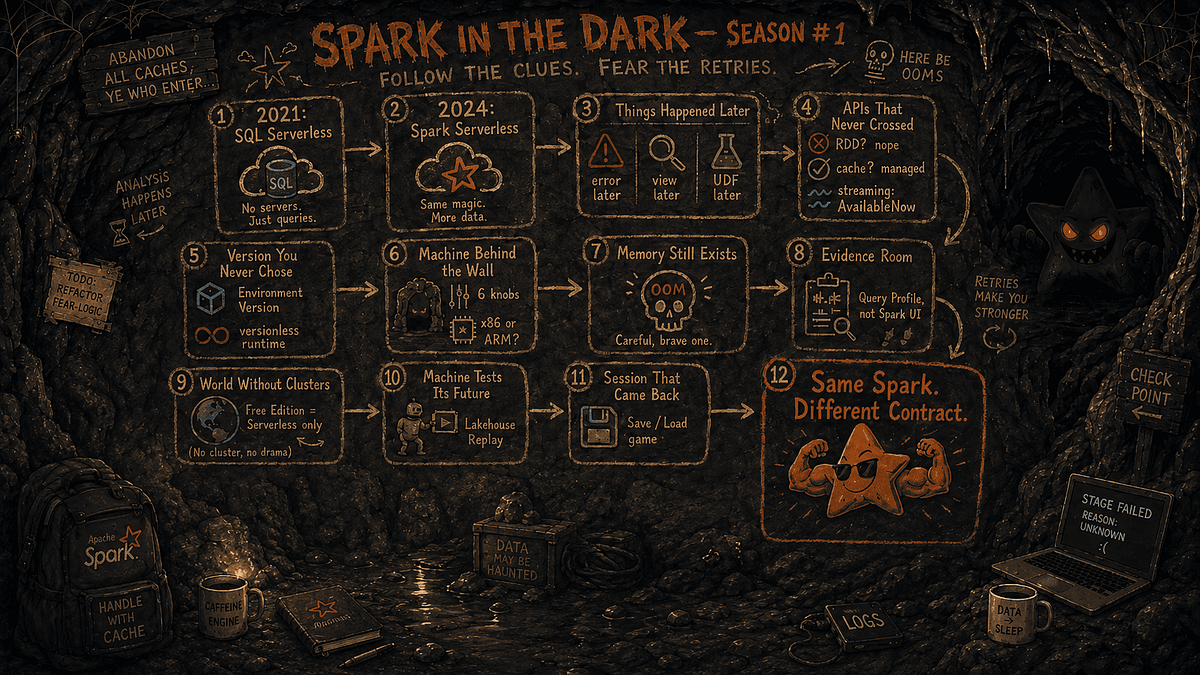
The evidence map: same Spark, a different execution contract.
🗂️ The Evidence Locker
Source trail and fact-check notes · checked 19 October 2026
The narrative above is deliberately playful; the claims below are anchored primarily in Databricks documentation. Community threads are included only as case files, not as root-cause analyses.
Evidence rule: official documentation supports product behavior; community posts support only the existence of the reported incident and the statements made in that thread. They are not treated as proof of an undocumented internal root cause.
INTERACTIVE EXTRA
Enter the Serverless Spark cave
Follow the clues through the cave: recover the architecture evidence, survive the retries, and discover what changed when Spark moved behind the service boundary.
Use the arrow keys or A/D to steer. On mobile, use the touch controls. Press Escape to leave full screen.