
Apache Spark WTF??? — That Thing You Do! (Part I)
Apache Spark is all about speed and scalability, and at the heart of that magic lies partitions. Spark splits your data into partitions —…

“Doing that thing you do
Breakin’ my data into one, two or million pieces
Like you always do
And you
Don’t mean to be cruel
You never even knew about the heartache
I’ve been going through”
(adapted from “That Thing You Do!” by The Wonders)
Generating Data
Our first task is to generate some test data from scratch. We’ll use the following utility functions, located inutils.py:
get_start_end_dates: Returns the first and last dates of the current year.print_num_parts: Caches the DataFrame passed as a parameter and prints its number of partitions and row count.
To generate the data, we’ll start by creating a list of dates ranging from start_date up to (but not including) end_date, adding one day at a time. We’ll then convert this list into a Spark DataFrame with a single column named "date". Next, we’ll enrich the DataFrame by adding two new columns:
"month": The full name of the month."day_of_month": The day of the month.
Finally, we’ll print some details about the DataFrame (e.g., its number of partitions and rows) before returning the updated version.
The code for this step can be found in generating_data.py:
# Get the start and end dates for the current year
start_date, end_date = get_start_end_dates()

# Create a list of all dates within the given range (start_date to end_date)
dates = [(start_date + timedelta(days=i)) for i in range((end_date - start_date).days)]

# Convert the list of dates to a DataFrame
df = spark.createDataFrame([(d,) for d in dates], ["date"])

# Add calculated columns: 'month' and 'day_of_month'
df = print_num_parts(
 "Generated DataFrame with date details",
 df.withColumn("month", date_format(col("date"), "MMMM"))
   .withColumn("day_of_month", date_format(col("date"), "dd"))
)
Essentially, we’re creating a range of dates locally on the driver, and then Spark steps in to parallelize the data, splitting it into partitions. But here’s the key question: into how many partitions? By default, Spark uses the value of the spark.default.parallelism property, which is typically set to match the total number of executor cores.
In this test project, the create_spark_session method initializes a session with .master("local[*]"), meaning Spark will use all the virtual cores available on the local machine. (Fun fact: Spark doesn’t differentiate between physical and virtual cores.) On my setup—8 CPU cores with hyperthreading enabled—that translates to 16 threads, resulting in a default parallelism of 16 for my local Spark session.
The printed output of this step is as follows:

We observe that the generated DataFrame contains 365 rows — one for each day of the current year — and the data has been split into 16 partitions. But hold on a second … how has Spark distributed the data across these partitions? Randomly?
Not quite. When data is parallelized in Apache Spark, its distribution across partitions isn’t left to chance. Instead, Spark relies on specific algorithms to decide how the data is divided. These algorithms take into account several factors, ensuring a systematic and efficient partitioning process.
Here’s a closer look at how the data gets distributed:
1. RoundRobinPartitioning
RoundRobinPartitioning is a straightforward, deterministic strategy for distributing data evenly across partitions. Spark assigns rows to partitions in a circular manner, ensuring a balanced distribution of rows among all partitions.
How It Works: Spark assigns each row a partition index using a round-robin approach. Think of it like dealing a deck of cards to players in a game. For example, if you have three players (or partitions), you deal the first card to Player 1, the second to Player 2, the third to Player 3, and then start over with Player 1. Now imagine we have 7 rows and 3 partitions. Spark distributes the rows as follows:
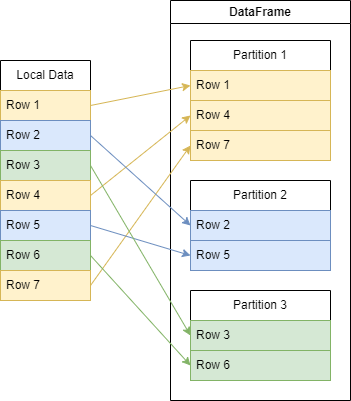
This method ensures rows are spread evenly, though some partitions may have one extra row if the data isn’t perfectly divisible by the number of partitions.
Use Cases: Ideal when there’s no specific key to partition by. Frequently used with operations like repartition() to create balanced partitions.
Advantages: Guarantees evenly sized partitions when the data size is divisible by the number of partitions. Simple and effective for evenly distributing data without requiring a key.
Performance Impact: Minimal overhead, making it a low-cost option for balancing data.
2. HashPartitioning
HashPartitioning distributes rows to partitions based on the hash value of a key. This deterministic strategy is particularly useful for key-value data, ensuring that all rows with the same key are placed in the same partition.
How It Works: A hash function is applied to the key (e.g., key.hashCode() in Java/Scala orhash(key) in Python). The hash function guarantees that the same key always produces the same numeric output, known as the hash value. To determine the target partition, Spark calculates:

For example, consider 7 rows and 3 partitions. The rows are assigned to partitions based on the hash values of their keys, modulo 3. The distribution depends on the hash function, ensuring that rows with the same key always end up in the same partition.
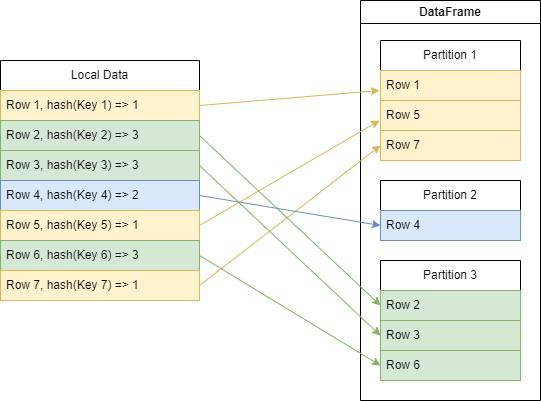
Use Cases: Essential for operations like groupByKey, reduceByKey, or joins, where rows with the same key must be co-located in the same partition. Ideal for scenarios requiring key-based processing or aggregation.
Advantages: Ensures that rows with the same key are in the same partition, a critical requirement for certain operations like joins and aggregations. Provides a deterministic and consistent partitioning strategy.
Performance Impact: If the data contains skewed keys (e.g., one key with a disproportionately high number of rows), some partitions can become much larger than others, leading to uneven load distribution and potential performance bottlenecks.
3. Custom Partitioner
We can also define custom partitioners in Spark, giving us precise control over how data is distributed across partitions.
How it works: A custom partitioner is a user-defined logic that determines which partition each key in a key-value pair should go to. The partitioner function takes the key from each pair and returns the partition index (an integer) where that key should be placed. This partition index must fall between 0 and numPartitions - 1.
Use Cases: Useful for distributing data based on specific criteria, such as region or time. Helps in handling skewed data and ensuring related data stays together, making them ideal for joins or aggregations. Minimizes data movement during operations like reduceByKey, improving efficiency and speeding up processing.
Advantages: Custom partitioners let you fine-tune how data is distributed, reducing skew and enhancing performance for key-based operations like joins and aggregations. By placing related data in the same partition, custom partitioners help reduce shuffling and improve job execution.
Performance Impact: Can introduce complexity, and if not implemented correctly, may lead to uneven distribution or data skew, resulting in increased shuffling and overhead. However, when used effectively, custom partitioners optimize resource utilization and enhance job execution efficiency.
In the case of our generated data, since we haven’t specified a key for partitioning or provided a custom partitioner, Spark has no other choice but to use RoundRobinPartitioning to distribute the data across partitions.
Filtering Data
Now, we’re going to filter the previously generated DataFrame to keep only rows where the "month" column is "January". However, we’ll perform this filtering in three different ways to compare how partitioning affects performance:
- Without changing the partitioning: The first approach filters the data without altering the existing partitioning.
- Repartitioning: In the second approach, we repartition the DataFrame by the
"month"column before filtering. - Coalesce to a single partition: Finally, we reduce the data to a single partition using
coalesce(1)before applying the filter.
The results from these approaches will help us understand how different partitioning strategies impact performance.
The code for this step can be found in filtering_data.py file:
 # Define a filter condition to select rows where the month is "January"
month_filter = df["month"] == lit("January")

# Apply filtering without changing partitioning and print the number of partitions
jan_df = print_num_parts(
 "Filter without changing partitioning",
 df.filter(month_filter)
)

# Apply repartitioning by the "month" column and then filter, printing the number of partitions
jan_rep_df = print_num_parts(
 "Repartition and then filter",
 df.repartition("month").filter(month_filter)
)

# Apply coalescing to a single partition and then filter, printing the number of partitions
jan_coa_df = print_num_parts(
 "Coalesce and then filter",
 df.coalesce(1).filter(month_filter)
)
The output doesn’t come as a surprise:
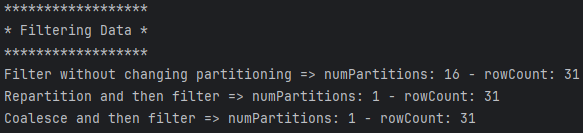
As expected, in all cases, the row count remains consistent — always 31 rows, representing the number of days in January.
Filter Without Changing Partitioning
This scenario unfolds exactly as expected. Since the data was evenly distributed across partitions using RoundRobinPartitioning, all partitions contain dates from January. As a result, the filtered DataFrame has the same number of partitions as the original — 16 — with 31 rows in each partition, matching the days in January.
Repartition By Month And Then Filter
When we apply repartition("month") to a DataFrame, Spark shuffles the data across executors, and this operation inevitably affects performance. In our case, the impact is minimal, given the small dataset we’re working with on a local machine. The data is simulatedly shuffled within the same JVM where PySpark starts, meaning no additional executors besides the driver are involved.
Coalesce And Then Filter
When we use coalesce(1) on a DataFrame, Spark doesn’t shuffle the data. Instead, it unions partitions that are located within the same executor. In this particular scenario, since all the partitions are already in the same JVM, Spark simply has to union all the data from these partitions together.
Grouping Data
In the next step, we’ll apply a groupBy("month") operation and calculate the count aggregate function on the 4 previously calculated DataFrames.
The code for this step can be found ingrouping_data.py, and here’s the resulting output:
print_num_parts("Count grouped by month (all data)",
    df.groupBy("month").count())
print_num_parts("Count grouped by month (filtered data)",
    filtered_df.groupBy("month").count())
print_num_parts("Count grouped by month (filtered data repartitioned)",
    filtered_rep_df.groupBy("month").count())
print_num_parts("Count grouped by month (filtered data coalesced)",
    filtered_coa_df.groupBy("month").count())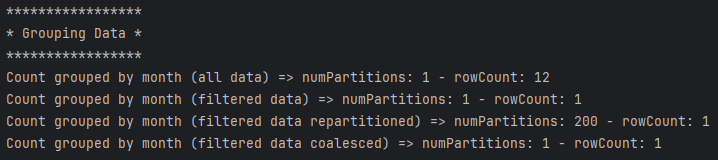
Hmmm … interesting results we have here. Let’s analyze each case:
Count Grouped By Month (All Data)
In first group, we start from a DataFrame with the data distributed in 16 partitions and end with the data grouped by month and splitted into one partition. To find out why only one partition let’s take a closer look to the physical plan that Spark internally generates to perform the group.
Here’s a breakdown of the steps in the Spark execution plan:
HashAggregate(keys=[month#2], functions=[partial_count(1)]): Spark performs a partial aggregation to compute intermediate counts grouped bymonth#2in parallel across the 16 partitions.Exchange hashpartitioning(month#2, 200), ENSURE_REQUIREMENTS: After the partial aggregation, Spark redistributes the data across 200 partitions based on a hash of themonth#2values. This shuffle ensures that all rows for the samemonth#2are grouped into the same partition. TheENSURE_REQUIREMENTSflag indicates that this shuffle is necessary to meet the distribution requirements for the next stage. Why 200 partitions? The 200 partitions come from Spark’s default shuffle partition configuration, controlled by thespark.sql.shuffle.partitionssetting. By default, this value is set to 200 to balance parallelism and task overhead for most workloads. When we’re working on small datasets, lowering this value could have an important improvement on performance (for example, executing unit tests).ShuffleQueryStage 1: Adaptive Query Execution (AQE) detects that the shuffle from the previous stage resulted in many small partitions. To optimize performance, AQE coalesces the 200 shuffled partitions into fewer partitions (often one, depending on the output size).HashAggregate(keys=[month#2], functions=[count(1)]): Once the shuffle is complete, Spark performs a second aggregation step to combine the intermediate counts from the previous stage, producing the final counts for eachmonth#2.
AQE detects that the aggregation output (one row per month) is small and coalesces shuffle partitions into a single partition, reducing tasks and improving efficiency. Since grouping by month#2produces few keys (e.g., 12 months), the result is compact, minimizing shuffle overhead and streamlining subsequent stages.
Count Grouped By Month (Filtered Data)
Despite dealing with only the data from the first month of the year, Spark still is not aware in this case and needs to ensure requirements, performing a shuffle across 200 partitions based also on month#2. The plan in this case is almost identical (except for the filter) to the previous one.
Why does Spark seem unaware that the data has already been filtered by a specific month? Spark doesn’t retain information about prior filters because a shuffle operation (“Exchange hashpartitioning“) effectively resets the dataset, partitioning it based solely on the partitioning key and the number of partitions. This approach ensures flexibility and generality but overlooks prior optimizations like filtering (e.g., by month). As a result, the shuffle ignores earlier operations, requiring explicit optimizations, such as repartitioning or coalescing, to improve efficiency.
Other interesting thing noticed is that when we explain all the previous DataFrames, for example, adding df.explain() before returing the DataFrame in the printNumParts method, Spark changes the plans slightly in this and the previous case, adding the following intermediate step between ShuffleQueryStage and the last HashAggregate:
AQEShuffleRead coalesce: During AQE, Spark dynamically analyzes the shuffle output and coalesces (merges) small partitions into fewer larger ones. This reduces overhead by minimizing the number of tasks, improving performance for operations that do not require many partitions. Still, the resulted number of partitions in both cases remains unchanged.
Count Grouped By Month (Filtered Data Repartitioned)
Here we have the data repartitioned by month, filtered by month January and then, grouped by month. Spark executes the following final physical plan:
Exchange hashpartitioning(month#2, 200), REPARTITION_BY_COL: After filtering, Spark redistributes the data into 200 partitions usinghashpartitioningon themonth#2column. TheREPARTITION_BY_COLflag indicates this redistribution is explicitly requested to achieve a new partitioning layout, likely to optimize parallelism or satisfy a downstream requirement (e.g., for balancing computational workload).HashAggregate(keys=[month#2], functions=[partial_count(1)]): Spark performs a partial aggregation on the data within each of the 200 partitions. Each partition computes intermediate counts of rows grouped by themonth#2column.HashAggregate(keys=[month#2], functions=[count(1)]): After the partial aggregation, Spark combines the intermediate counts from all partitions to compute the final counts for each group (month#2). This step completes the global aggregation.
Notice that, in this case, the resulting DataFrame contains only data from January and this data resides all in one partition, but still, we have 199 empty partitions.
Why doesn’t Spark just get rid of those darn empty partitions already? The number of partitions determines the level of parallelism for subsequent tasks. Even if some partitions are empty, Spark retains the full count to allow future operations (e.g., joins, aggregations) to leverage the specified parallelism. AQE can merge small or empty partitions during runtime optimization. However, this optimization primarily focuses on improving small tasks rather than outright removing empty partitions.
Count Grouped By Month (Filtered Data Coalesced)
Since the data has been previously filtered and coalesced into just one partition, and with no shuffle involved, Spark is able to create the most cost-efficient plan it can:
HashAggregate(keys=[month#2], functions=[partial_count(1)]): Spark performs a partial aggregation within each partition, counting the number of rows for each unique value in themonth#2column independently. This allows Spark to compute counts in parallel across all partitions before any data shuffling.HashAggregate(keys=[month#2], functions=[count(1)]): Combines the partial counts from all partitions to produce the final result. It aggregates the counts from each partition, yielding the total count of rows grouped bymonth#2across the entire dataset.
The coalesced filtered input DataFrame ends up with one partition, and the resulting grouped DataFrame retains that single partition.
The Next Episode
Alright, enough with partitions for now! I don’t want to overwhelm you with too many details, so as I mentioned at the beginning of the article, I’ve decided to split this into two parts.
In the second part, we’ll dive into how Spark handles partitions during joins, writing and reading data from files, and — finally — using JDBC.
You can find the GitHub repos for both articles here:
NOTE: Interestingly enough, when explaining DataFrames in both Spark and PySpark… the execution plans may look similar, but they’re not quite identical.
I’ll be back faster than an AQE-optimized plan shuffles your data!
See you soon!