
Apache Spark WTF??? — That Thing You Do! (Part II)
Here we go again! I warned you it wasn’t going to take long before the second part of this intrepid journey into the inner workings of…

“‘Cause I try and try to forgive you Spark
But it’s just so hard to do
Everytime you do that thing you do”
(adapted from “That Thing You Do!” by The Wonders)
Previously, on Apache Spark WTF …
First, we created a Spark DataFrame from scratch, containing one row for each day of the current year — from January 1st up to (but not including) January 1st of the following year. Each row includes the date, the full name of the corresponding month ("month"), and the day of the month ("day_of_month"). This gave us a DataFrame with 365 rows, partitioned into multiple parts. Since we’re running our tests with .master("local[*]"), Spark uses all the virtual cores available on the local machine .
Next, we filtered the DataFrame to keep only the rows for January, using three different approaches:
- Without changing the partitioning.
- After repartitioning by month.
- After reducing to a single partition using
coalesce(1).
This left us with the following DataFrames:
df: The original DataFrame with 365 rows, evenly distributed across all available partitions (16 partitions, in my case).filtered_df: The result of filteringdfto keep only January rows. This gave us 31 rows, still evenly distributed across 16 partitions.filtered_rep_df: The result of first repartitioningdfby month and then filtering for January. This produced one partition containing 31 rows.filtered_coa_df: The result of applyingcoalesce(1)todf(reducing it to a single partition) and then filtering for January. The result is one partition with 31 rows.
Joining Data
The code for this step can be found in joining_data.py.
Inner Joins
In this part of the test, we’ll perform a series of inner joins on the previously created DataFrames.
def perform_joins(threshold: str, dfs: dict[str, DataFrame]):
 """
 Perform joins between all combinations of input DataFrames based on a specific join condition.

 Args:
  threshold (str): The current value of spark.sql.autoBroadcastJoinThreshold.
  dfs (dict): A dictionary of DataFrames to join, with descriptive keys.

 Returns:
  list: A list of DataFrames resulting from the join operations.
 """

 # Define the join condition: start date must be less than end date
 on_condition = expr("start.date < end.date")

 # Generate all combinations of the input DataFrames for pairwise joins
 combinations = list(product(dfs.items(), repeat=2))

 result_dfs = []
 for (start_key, start_df), (end_key, end_df) in combinations:
  # Log the join operation being performed with the current autoBroadcastJoinThreshold
  text = f"Joining start_df({start_key}) with end_df({end_key}) with autoBroadcastJoinThreshold={threshold}"

  # Perform the join operation with aliases for clarity
  result_df = start_df.alias("start").join(end_df.alias("end"), on_condition)

  # Measure and log the time taken for the join, and append the result to the list
  result_dfs.append(print_time("", lambda: print_num_parts(text, result_df)))

 return result_dfs

# Define input DataFrames with descriptive keys
input_dfs = {
 "all data": df,
 "filtered": filtered_df,
 "filtered + repartitioned": filtered_rep_df,
 "filtered + coalesced": filtered_coa_df
}

# Retrieve the Spark session from one of the DataFrames
spark = df.sparkSession

# Get the current value of the autoBroadcastJoinThreshold
auto_broadcast_join_threshold = spark.conf.get("spark.sql.autoBroadcastJoinThreshold")

# Perform joins using the current autoBroadcastJoinThreshold
join_dfs = perform_joins(auto_broadcast_join_threshold, input_dfs)

# Unpersist all intermediate join results to free up memory
for join_df in join_dfs:
 join_df.unpersist()

# Temporarily set the autoBroadcastJoinThreshold to "-1" (disable autobroadcast)
df.sparkSession.conf.set("spark.sql.autoBroadcastJoinThreshold", "-1")

# Perform joins with the broadcast threshold disabled
perform_joins("-1", input_dfs)

# Restore the original autoBroadcastJoinThreshold value
df.sparkSession.conf.set("spark.sql.autoBroadcastJoinThreshold", auto_broadcast_join_threshold)
The code defines a function, perform_joins, which performs pairwise joins between multiple input DataFrames based on a date condition (start.date < end.date). It accepts two arguments: a threshold value for autoBroadcastJoinThreshold and a dictionary of DataFrames. For each join, it logs the operation, performs the join, and records the time taken. The resulting joined DataFrames are collected in a list. After setting up a collection of DataFrames, the code retrieves the current broadcast threshold, executes joins with the default threshold, and then temporarily disables broadcasting to repeat the process. Finally, it restores the original broadcast threshold.
The following table summarizes the number of partitions in the resulting DataFrames and the time taken for each inner join. Each DataFrame has been joined with itself and with the other three. Joins were executed with autobroadcast both enabled and disabled.
The following matrix shows the number of partitions in the output DataFrame and the time taken for each inner join. Each DataFrame has been joined with itself and with the other three, both with autobroadcast enabled (by default) and disabled (spark.sql.autoBroadcastJoinThreshold set to 1).
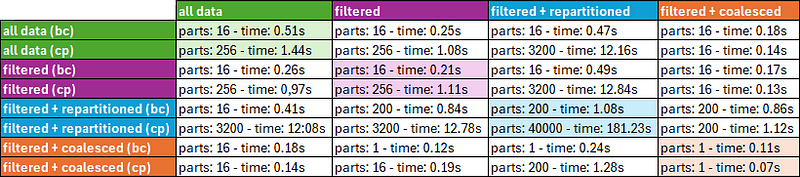
“bc” stands for “broadcast” join, while “cp” for “cartesian product”.
When autobroadcast is enabled, Spark performs a BroadcastNestedLoopJoin, which is well-suited for small datasets. However, disabling autobroadcast forces Spark to rely on standard join algorithms, which can sometimes lead to a Cartesian product in scenarios like these:
- Missing or inefficient join keys: Without a proper join condition, Spark defaults to computing all possible row pairs (cross join), particularly for smaller datasets.
- Disabled broadcast: Turning off autobroadcast prevents Spark from using broadcast join optimizations, causing it to fall back on shuffle-based joins. If the shuffle join is inefficient, it may degrade into a Cartesian product.
- Small single-partition datasets: Even with small datasets that fit into a single partition, Spark applies standard join logic, potentially resulting in unnecessary comparisons.
- Fallback behavior: Spark resorts to Cartesian products when join conditions are missing, or when the optimizer lacks enough information, such as dataset statistics or appropriate hints.
A Cartesian product generates all possible row combinations between two datasets, typically producing large outputs and significantly hurting performance due to high computational and memory overhead. In Spark, this approach is only used as a last resort when no valid join condition is provided or when other join strategies cannot be applied.
In our case, disabling autobroadcast consistently results in Cartesian products during joins.
By examining the matrix, we can uncover a few more interesting insights:
- When autobroadcast is enabled: If the left-side DataFrame is equal to or larger than the right-side DataFrame, Spark broadcasts the right-side DataFrame, and the resulting DataFrame inherits the number of partitions from the left-side DataFrame. If the left-side DataFrame is smaller, it gets broadcasted, and the resulting join inherits the number of partitions from the right-side DataFrame.
- When autobroadcast is disabled: The resulting DataFrame always has a number of partitions equal to the product of the partitions of both the left and right DataFrames.
Another interesting observation is that, in all cases, where autobroadcast is disabled and filtered_rep_df is involved (whether on the left, right, or both sides), the resulting DataFrame always has 200 partitions. Why? As explained in the first part of this article, the default value for spark.sql.shuffle.partitions is 200. Since filtered_rep_df is the outcome of a repartition followed by a filter, it ends up with 200 partitions—199 of which are empty, and only 1 partition contains the 31 rows.
For example, when autobroadcast is disabled, and we join filtered_rep_df with itself, Spark produces a new DataFrame with 200 × 200 = 40,000 partitions—and, believe it or not, 39,999 of those partitions are completely and undeniably empty!
ONE MORE NOTE: If we take a closer look at the code, we’ll notice that all the DataFrames are unpersisted between the sets of joins with autobroadcast enabled and disabled. Is that really necessary? Absolutely! Here’s why:
The DataFrames are cached by the print_num_parts utility function (defined in utils.py) to avoid repeating expensive operations after calling count on them. The catch is that although, functionally speaking, both sets of joins are identical (same left-side DataFrame, same right-side DataFrame, same join condition), the autobroadcast setting dramatically changes the execution plan. However, Spark is completely unaware of this change and assumes both sets of joins share the same execution plan.
Why does this happen? When we attempt to cache an already cached DataFrame, Spark throws the following warning:

If we dig into CacheManager.scala, we find that Spark tracks cached DataFrames using their LogicalPlan—that is, the plan before optimizations. Since the autobroadcast setting only affects the PhysicalPlan (the optimized execution strategy), Spark doesn’t recognize the joins as different. It mistakenly considers both sets of joins equivalent, even though their actual execution plans are quite different.
Had we not unpersisted the DataFrames, Spark would have skipped executing the second set of joins (with autobroadcast disabled), thinking it had already computed the results.
Multiple Broadcast Joins
Now, let’s move on to the second part of our experiment with joins: What happens when we perform multiple broadcast joins consecutively?
# Prepare the first DataFrame to join by coalescing it into a single partition and renaming the 'month' column
first_df = filtered_coa_df.withColumnRenamed("month", "month1").alias("df1")

# Coalesce the original DataFrame into one partition to prepare it for joining
one_partition_df = df.coalesce(1)

# Perform a series of chained joins using a loop to concatenate results based on the 'month' column
multi_join_df = first_df
for index in range(2, 4):
 prev_index = index - 1

 # Log and perform the join operation between the current result and one_partition_df
 multi_join_df = print_num_parts(
  "Multiple broadcast joins",
  multi_join_df.alias("start").join(
   one_partition_df.alias("end"),
   expr(f"start.month{prev_index} <= end.month")  # Join condition on sequential month columns
  ).select(multi_join_df["*"], one_partition_df["month"].alias(f"month{index}"))
  # Add the new month column to the result
 )
This code renames the "month" column in filtered_coa_df to "month1", coalesces the original df into a single partition, and then performs a series of chained joins. In each iteration of the loop, it joins the previous result (multi_join_df) with the coalesced DataFrame (one_partition_df) on the "month" column, updating the column name sequentially (e.g., month2, month3). The following results are produced:

In our test, we only perform two consecutive joins. However, if we had more broadcast joins, we would notice that the number of partitions remains 1 even as the number of rows increases. Wait, what? Does Spark not realize the DataFrame is getting larger? Nope.
Spark keeps the result of consecutive broadcast joins with single-partition DataFrames in just one partition because broadcast joins avoid shuffling and assume that processing within a single partition is efficient. Even though the number of rows grows, Spark doesn’t automatically repartition the result — it tries to minimize unnecessary operations. To increase the number of partitions, manual intervention is required, either through repartition() or coalesce().
So, we could end up with a massive DataFrame containing all the rows in just one partition. If this partition doesn’t fit into memory, Spark has two options:
- Spill the data to disk — but this introduces I/O overhead, significantly slowing down processing since disk operations are much slower than in-memory operations.
- Or, Spark might throw an
OutOfMemoryErrorif it can’t manage the data.
NOTE: For another interesting case about broadcast joins, check out my other article Spark (Broad)Cast A Spell On Me.
Writing & Reading Files
Next, we’ll test how Spark partitions data when writing and reading the final DataFrame generated in the previous section. You can find the code for this step in writing_reading_files.py.
Writing Files
# Get the current Spark session
spark = df.sparkSession

read_files_df = df

# Loop to perform the operations several times
num_joins = 5
for i in range(1, num_joins + 1):
 # Define the folder path where the DataFrame will be written
 folder_path = f"data/df{i}"

 # Perform union with itself and write to the specified folder, overwriting if exists
 read_files_df.union(df).write.mode("overwrite").save(folder_path)

 # Load the written files back into a DataFrame and print the number of partitions
 read_files_df = print_num_parts("Read data from files", spark.read.load(folder_path))

 # Unpersist the cached DataFrame
 read_files_df.unpersist()

 # Count and print the number of Parquet files in the folder
 parquet_files_count = len([f for f in os.listdir(folder_path) if f.endswith(".parquet")])

 # Print the number of Parquet files found in the folder
 print(f"Parquet files count: {parquet_files_count}\n")
The code performs the following steps for a specified number of iterations (num_joins):
- It creates a union of the
dfwith itself and writes the result to disk in a specific folder, overwriting any existing files. - It reads the written files back into a DataFrame, logs the number of partitions, and unpersists the DataFrame from memory.
- It counts and prints the number of Parquet files in the folder.
The input DataFrame for this step is the multi-broadcast join DataFrame from the previous section. As we saw earlier, concatenating broadcast joins of a 1-partition DataFrame always results in another 1-partition DataFrame. Similarly, when we perform a union of two 1-partition DataFrames, the result is a new DataFrame with 2 partitions. Every time we add another 1-partition DataFrame to the mix, the number of partitions increases by 1.
By looking at the printed results and the files written to the data/df1 to data/df5 folders, we observe that for each write/read pair of operations, there’s a 1-to-1 correspondence between a partition of the DataFrame in memory and a file written to disk.
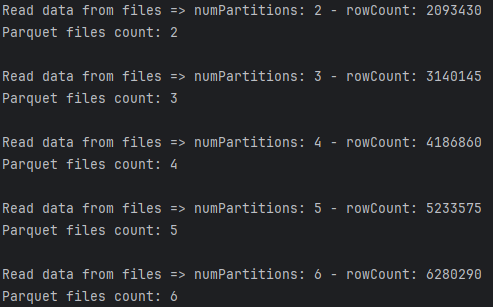
Spark typically writes DataFrames to files by partitioning the data according to the underlying storage format (e.g., Parquet, CSV) and saves each partition as a separate file in a specified directory. The write operation can be configured with options such as the mode (e.g., "overwrite", "append") to handle existing data. When reading files back, Spark scans the directory and creates a new DataFrame by loading the data from all matching files. During this process, Spark automatically determines the schema and can optimize partitioning based on factors like file size, user-defined settings, or configurations such as maxPartitionBytes.
In fact, Spark provides a number of tuning options for fine-tuning how files are read and written, optimizing performance for specific workloads. Here’s what each parameter does:
spark.sql.files.minPartitionNum: Sets the minimum number of partitions Spark uses when reading files. If the calculated number of partitions is fewer than this value, Spark will increase the partition count to meet it, ensuring sufficient parallelism.spark.sql.files.maxPartitionNum: Limits the maximum number of partitions Spark can create when reading files. This prevents the creation of too many small partitions, which can lead to excessive overhead.spark.sql.files.openCostInBytes: Defines the cost (in bytes) of opening a file. Spark uses this to estimate partitioning. Files smaller than this value are more likely to be grouped into fewer partitions, optimizing performance for small-file workloads. Lowering this value increases the partition count, while raising it reduces the partition count.spark.sql.files.maxPartitionBytes: Sets the maximum size (in bytes) of data a single partition can contain when reading files. Smaller values increase the number of partitions, improving parallelism for large files, while larger values reduce the partition count, optimizing memory usage and task efficiency.
Reading Files
Executing the second part of the test for this step will help us understand it better:
# Set a configuration parameter for maximum partition size
spark.conf.set("spark.sql.files.maxPartitionBytes", str(18 * 1024))

# Load the data with the updated configuration and print the number of partitions
print_num_parts(
 "Read data from files with 18 KB maxPartitionBytes",
 spark.read.load(f"data/df{num_joins}")
)
Since the size of each Parquet file is around 36KB, setting the maxPartitionBytes property to 18KB causes Spark to split the data from each file into two partitions in the loaded DataFrame. This means that while the row count of the loaded data remains unchanged, setting maxPartitionBytes to 18KB effectively doubles the number of partitions in the DataFrame.
NOTE: As in the previous step, it’s important to unpersist the cached DataFrame before loading it again. Otherwise, Spark won’t reload the data with the updated configuration.
Hive-like Folder Partitions vs Spark Partitions
Spark supports Hive-like partitions when writing and reading DataFrames using the partitionBy("column1", ...) option. This organizes data into subdirectories based on column values (e.g., country=SP/year=2025/), following a Hive-compatible format. However, it’s important to note that Hive-like partitions are different from Spark’s internal DataFrame partitions.
- Hive-like Folder Partitions organize data physically on disk, storing files in directories based on column values. These partitions are useful for optimizing query performance by enabling Spark to prune unnecessary directories, reducing the amount of data read.
- DataFrame Partitions, on the other hand, are logical partitions of data in memory. They determine how data is distributed across executors during processing, affecting parallelism and task distribution for reading, processing, and writing.
Writing & Reading JDBC
Last but certainly not least, let’s explore how Spark handles partitions when writing to and reading from a JDBC-compatible source. First, we need to set up our database to connect via JDBC. To do this, we’ll install and run a PostgreSQL image in Docker:
docker pull postgres
docker run --name postgres-container -e POSTGRES_PASSWORD=ps -e POSTGRES_USER=ps -e POSTGRES_DB=db -p 5432:5432 -d postgres
You can find the code for this step in writing_reading_jdbc.py.
Writing JDBC
# Repartition the DataFrame by day of month
df_rep_by_dom = print_num_parts("Repartition the DataFrame by day of month",
        df.repartition(col("day_of_month")))

# Different batch sizes
batchsizes = [100, 1_000, 10_000, 25_000]

# Loop to test different batch sizes
for batchsize in batchsizes:

 # JDBC write
 print_time(
  f"JDBC write (batchsize={batchsize})",
  lambda: write_df_to_jdbc(df, "dates",
         options={"batchsize": batchsize})
 )

 # JDBC write after repartitioning the DataFrame by 'day_of_month'
 print_time(
  f"JDBC write repartitioned by day of month (batchsize={batchsize})",
  lambda: write_df_to_jdbc(df_rep_by_dom, "dates",
         options={"batchsize": batchsize})
 )
This snippet takes the last DataFrame generated in the previous step, repartitions it by the "day_of_month" column, and performs a series of JDBC writes with both the input DataFrame and the repartitioned one. During this process, it incrementally increases the batchsize from 100 to 25,000.
When Spark writes to a JDBC source, it processes data partition by partition, treating each partition as a batch. Rows in each partition are inserted in groups, controlled by the batchsize option (default: 1000 rows per batch). Each Spark task, which handles one or more partitions, uses a separate database connection, enabling parallel writes.
The commit behavior depends on the transaction isolation level, set via the isolationLevel option (default: READ_COMMITTED). For stricter isolation levels (e.g., READ_COMMITTED, REPEATABLE_READ, SERIALIZABLE), no rows are visible or inserted until the entire partition is processed and committed, ensuring atomicity. In weaker isolation levels like READ_UNCOMMITTED, partial writes may occur, potentially leaving incomplete data if a batch fails. Isolation levels also impact reads, influencing how queries interact with uncommitted or concurrently modified data.
If we examine the savePartition method in JdbcUtils.scala, where JDBC inserts are executed, we observe that when the isolationLevel is set, auto-commit is disabled at the start of the method, and a commit is performed only after the entire partition is processed. This means that commits occur at the partition level, not the batch level.
For large partitions, setting a very high batch size can introduce significant overhead on Spark executors, while a very low batch size increases database overhead. Additionally, Spark retries failed tasks based on the spark.task.maxFailures setting (default: 4). If a partition fails during processing, it will not be committed, but all previously successfully processed partitions in the same stage will have already been committed, potentially leading to partial writes to the database.
There is actually a warning in the comment of the savePartition method that hints at this issue:

Actually, it’s not just “theoretically possible”; it really happens. I had to deal with this issue two years ago. To fix it, I couldn’t find a better solution than to stop writing the DataFrame directly and create my own custom write method that deleted and inserted rows for each partition.
The results of our tests are these:
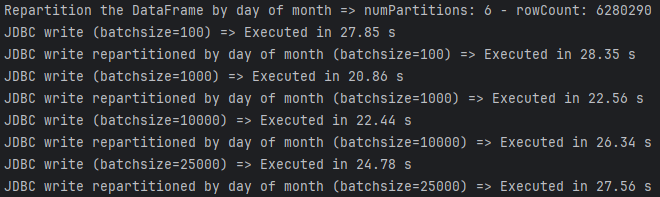
We can observe that execution time varies depending on the batch size. To optimize the batch size, it’s important to strike a balance between the number of columns and the database’s capacity. Larger batch sizes (e.g., 10,000–50,000 rows) are best suited for datasets with fewer columns (<10) or for powerful databases, as they help reduce transaction overhead. For datasets with many columns (>20) or limited resources, smaller batch sizes (e.g., 1,000–10,000 rows) are recommended to manage memory usage and reduce strain on the system.
NOTE: Interestingly, if we look at the first set of results, we notice that the number of partitions in the DataFrame, which was repartitioned by "day_of_month" is 6, instead of the 31 days of January. Why is that?
Repartitioning a DataFrame by a column in Spark distributes the rows based on the hash of the column values, not directly by the unique values. The number of resulting partitions is determined by the numPartitions parameter in the repartition method or Spark’s default parallelism, rather than the number of unique column values. While rows with the same column value are guaranteed to be placed in the same partition, if the number of partitions is fewer than the unique values, multiple values will be grouped into the same partition. If more partitions are specified, some may remain empty if there aren’t enough rows.
Reading JDBC
# Get the start and end dates for the current year
start_date, end_date = get_start_end_dates()

# Different fetch sizes
fetchsizes = [100, 1_000, 10_000, 25_000]

# Loop to test different fetch sizes
for fetchsize in fetchsizes:

 # Options for JDBC read partitioning by 'date'
 jdbc_read_by_date_options = {
  "partitionColumn": "date",
  "lowerBound": str(start_date),
  "upperBound": str(end_date),
  "numPartitions": spark.sparkContext.defaultParallelism,
  "fetchsize": fetchsize
 }

 # Read from JDBC using date-based partitioning
 text = f"JDBC read partitioning by date (fetchsize={fetchsize}"
 print_time(
  text,
  lambda: print_num_parts(
   text,
   read_df_from_jdbc(spark, "dates", options=jdbc_read_by_date_options)
  )
 )

 # Options for JDBC read partitioning by 'day_of_month'
 jdbc_read_by_day_of_month_options = {
  "partitionColumn": "day_of_month",
  "lowerBound": "1",
  "upperBound": "31",
  "numPartitions": spark.sparkContext.defaultParallelism,
  "fetchsize": fetchsize
 }

 # Custom query for reading specific columns and casting types
 query = "(SELECT date, CAST(day_of_month AS INT) FROM dates) AS subq"

 # Read from JDBC using day_of_month-based partitioning
 text = f"JDBC read partitioning by day of month (fetchsize={fetchsize})"
 print_time(
  text,
  lambda: print_num_parts(
   text,
   read_df_from_jdbc(spark, query, options=jdbc_read_by_day_of_month_options)
  )
 )
This code tests various fetch sizes (100, 1,000, 10,000, and 25,000) for reading data via JDBC in Spark, partitioned by either a "date“ or "day_of_month" column. It configures options like the partition column, value ranges, and number of partitions, then measures and prints the read time and partition count for each fetch size.
In Spark, fetchsize controls the number of rows fetched per database round trip, balancing memory usage and network overhead. Smaller fetch sizes reduce memory pressure but increase the number of trips, while larger values improve efficiency when resources allow. Default fetchsize values vary by database—PostgreSQL fetches all rows by default, Oracle uses 10, and systems like SQL Server and Hive typically range from 1,000 to 10,000—making tuning essential for optimal performance.
In Spark, specifying the partitionColumn, lowerBound, upperBound, and numPartitions is crucial for parallelizing JDBC reads. These parameters define how the data is split into partitions for concurrent processing. The partitionColumn determines the column for splitting, while lowerBound and upperBound set the value range to divide the data, and numPartitions specifies the number of splits. Without these settings, Spark reads the data sequentially in a single partition, which severely limits performance by underutilizing cluster resources.
Since we’re partitioning by "day_of_month" (a string column), we had to cast this column in our query. We cannot use the query option to define the query because it doesn’t support partitionColumn; instead, we must use dbtable.
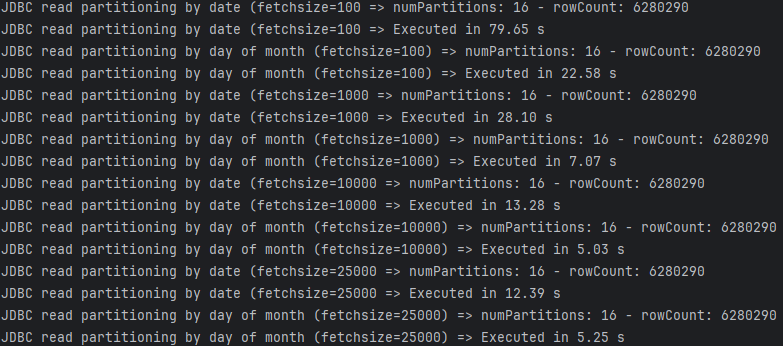
Our final results:
Spark divides the range between lowerBound and upperBound into approximately equal intervals based on the specified numPartitions. Each partition is then processed as a separate query, with a range filter applied to the partitionColumn. For example, if lowerBound = 1, upperBound = 31, and numPartitions = 4, Spark generates 4 queries with ranges like [1, 8), [8, 15), [15, 22), and [22, 31]. Each query retrieves the data for its respective range, and the rows are combined into partitions within Spark. If numPartitions exceeds the range size, some queries may result in empty partitions. On the other hand, if fewer partitions are specified, multiple values will be grouped into a single query.
This is exactly what happens in our case: when partitioning by "date“, the queries use ranges that don’t return any results from the database because the table only contains dates from January. However, when partitioning by "day_of_month", all the queries return results, allowing Spark to effectively parallelize data retrieval from the database.
Regarding the different fetchsize values, it appears that larger fetch sizes result in better performance times. This is because our table has relatively few columns. A larger fetchsize retrieves more rows and columns in each round trip, which can improve performance for larger datasets, provided there’s enough memory and network bandwidth. However, if the table has many columns, a large fetchsize could increase memory usage and potentially slow down performance, particularly for wide tables.
Partition & Conquer?
Throughout these two articles, we’ve explored various scenarios where the number of partitions resulting from a DataFrame operation wasn’t always as expected. We’ve also gained valuable insights — myself included — into how Spark partitions data during filtering, grouping, performing joins, reading, and writing.
While Spark is a powerful data processing engine, its optimizations don’t always work as seamlessly as one might expect. Sometimes, we need to provide explicit guidance or hints to direct Spark to perform tasks the way we intend. Spark is a tool, and we shouldn’t rely on it blindly. To ensure cost-efficiency and optimal performance, it’s essential to deeply understand how data is distributed end-to-end — from initial reads to final writes. While this may sound complex, it’s far more approachable than it seems, and the rewards are well worth the effort.
Ultimately, it’s not just about Spark doing what it does — it’s about Spark doing what we want it to do for us.
You can find the GitHub repos for both articles here: