Apache Spark WTF??? 🪄 The Magic Number 🔮
For years, Spark SQL crushed joins but choked on programming logic, forcing us into a messy maze of Python or Scala glue code.

“Everybody wants to be an ML expert
Everybody wants to be an AI engineer
But being a data engineer is the best
And you don’t even have to guess”
(adapted from “The magic number” by De La Soul)
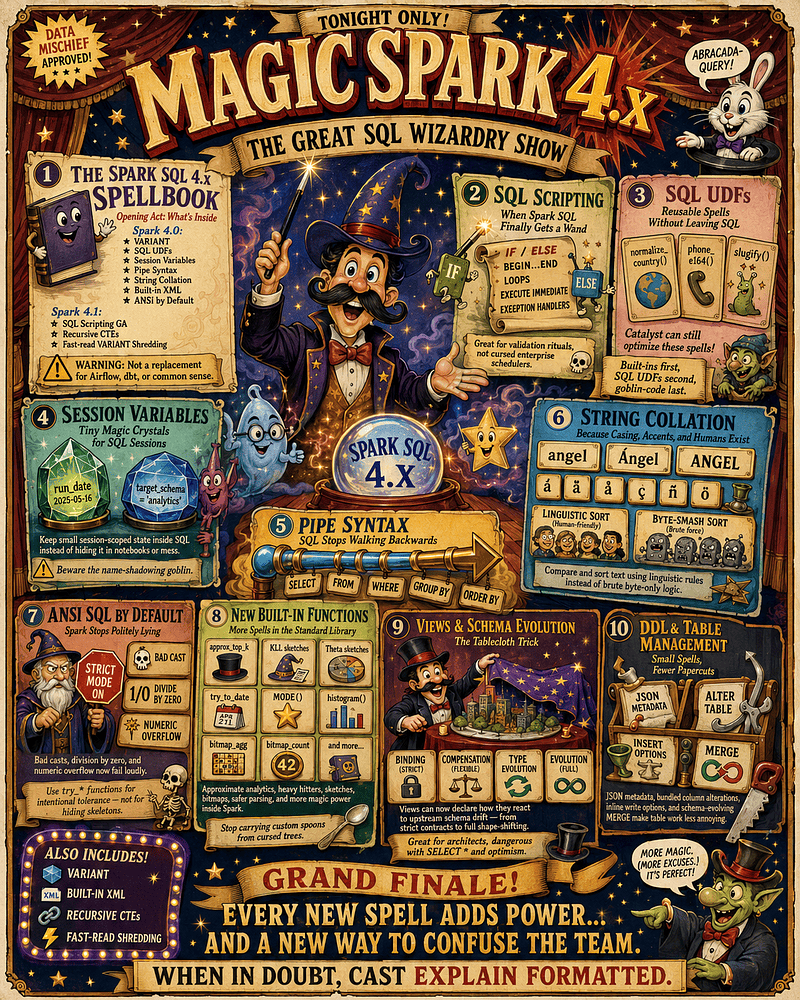
📓 The Spark SQL 4.x Spellbook
Spark SQL is no longer just a distributed query engine — and no, it’s not our new emotional-support Airflow either. It is evolving into a full-fledged SQL platform.
The feature rollout spans two major waves:
- Spark 4.0: Unleashed the
VARIANTtype, SQL UDFs, session variables, Pipe Syntax (|>), string collation, built-in XML, and ANSI mode by default. - Spark 4.1: Graduated SQL Scripting and
VARIANT(now with fast-read “shredding”) to GA, while introducing long-awaited recursive CTEs.
The Death of Notebook Regret
Historically, Spark SQL excelled at processing petabytes but choked on basic procedural logic. The second we needed a variable, conditional branching, or error handling, the magic died.
Spark 4.x fixes this with SQL Scripting (ANSI SQL/PSM). We can now write native procedural logic right inside our SQL files using:
BEGIN ... ENDblocks and nested scopes.- Declared variables and loops (
WHILE,FOR,REPEAT). - Conditional branching (
IF,CASE). - Dynamic execution (
EXECUTE IMMEDIATE). - Robust exception and condition handlers.
⚠️ Architectural Warning: This doesn’t make tools like Airflow, dbt, or Dagster obsolete. Please don’t build a cursed enterprise scheduler inside a single SQL block and call it “architecture.”
From Query Engine to SQL Platform
Spark’s operational paradigm has fundamentally evolved:
- From passive querying to active orchestration: Instead of merely executing static calculations, Spark natively manages localized session state, handles parameter injection, and validates transactional boundaries.
- From fragile structures to controlled chaos: Instead of breaking on messy inputs, the engine seamlessly extracts machine-readable structural metadata without forcing manual schema refactoring.
- From rigid linear paths to dynamic resilience: Instead of failing on logical drift, Spark safely navigates multi-column schema migrations, loops over metadata, and catches native exceptions.
🪄 SQL Scripting: When Spark SQL Finally Gets a Wand
Before Spark 4.x, managing operational logic meant pulling row-level data back to Python or Scala wrappers to make basic branching decisions.
Spark 4.1 fixes this by enabling native SQL Scripting (ANSI SQL/PSM) by default. Developers can now run full procedural logic entirely within native BEGIN ... END blocks, uniting data transformations, branching metrics, and conditional actions inside the same script.
The Core Spellbook
Here is how the wizard’s new powers break down, along with the exact traps to watch out for:
1. Variables: Tiny Jars of Local State. Variables let state survive across statements inside a block. We can now capture a run date or a validation flag right where it’s used.
- Good Energy:
DECLARE failed_quality_checks BIGINT DEFAULT 0;(Clear, intentional parameterization). - Bad Energy:
DECLARE v1 INT; DECLARE thing STRING;(Unmarked potion bottles in a wizard’s basement). - The Trap: Don’t turn these into a secret, sprawling application state hiding inside our data layer.
2. Conditional Logic: Native IF and CASE statements let Spark SQL make localized, runtime branching decisions without escaping back to a host language wrapper.
- The Trap: Avoid building massive, nested decision trees that bury business logic. Use conditionals to expose your pipeline’s operational intent, not obscure it.
3. Loops: Pacing Around the Castle. Spark now supports procedural loops (WHILE, REPEAT, FOR) with controls like LEAVE and ITERATE. This is brilliant for automated metadata tasks:
FOR table_row AS SELECT table_name FROM information_schema.tables WHERE table_schema = 'bronze' DO
  EXECUTE IMMEDIATE 'ANALYZE TABLE bronze.' || table_row.table_name || ' COMPUTE STATISTICS';
END FOR;- The Trap: Spark is a distributed engine, but its scripting loops are sequential. Iterating over a few metadata tables is fine; loop-processing millions of business rows one by one is just a legacy database cursor in disguise. Let executors process data in parallel, and use loops only to coordinate statements.
4. EXECUTE IMMEDIATE: Spells Inside Spells. This allows a script to dynamically construct and run SQL strings on the fly, even parsing results back into variables.
- The Trap: Dynamic SQL is where debugging goes to wear a trench coat. It blinds data lineage tools, defeats static analysis, and introduces quoting nightmares. If a query can stay static, keep it static.
5. Exception Handlers: Spark 4.1 adds robust condition handlers, letting scripts catch expected failures, log them, and keep moving forward.
- The Trap: Handlers are not a mask for broken logic. Catching every error indiscriminately creates pipelines that succeed technically but corrupt data professionally. Use them for known, recoverable edge cases — not to turn data quality disasters into “green” runs.
📜 The Rule of Restraint: SQL Scripting is a local wand, not a macro-orchestrator like Airflow or dbt. Restrict it to data-proximate rituals like validation gates, not a cursed 2,000-line enterprise scheduler. A maintainable script must cleanly reveal in five seconds exactly three things: the state it reads, the decision it makes, and the data it changes.
🧪 Practical Magic: The Scripting Lab
In lab_01__sql_scripting.ipynb, you’ll validate Spark 4.x’s native SQL scripting engine across six cases, testing scoped variables, IF/ELSE routing, metadata loops, and dynamic EXECUTE IMMEDIATE tasks. It demonstrates pipeline defense by trapping an ANSI divide-by-zero crash via an EXIT HANDLER, and concludes with a “cursed orchestration” counter-test that exposes the chaos of abusing local scripts as a hidden monolithic scheduler.
🔮 SQL UDFs: Reusable Spells Without Leaving SQL
A repeated SQL expression is a duplicated decision. And a duplicated decision is a future dashboard argument. Consider the classic country-cleanup code:
CASE
  WHEN country IN ('ES', 'Spain', 'España') THEN 'SPAIN'
  WHEN country IN ('US', 'USA', 'United States') THEN 'UNITED_STATES'
  ELSE 'OTHER'
END
Spark 4.x allows us to encapsulate this into a native SQL function:
CREATE OR REPLACE FUNCTION normalize_country(country STRING)
RETURNS STRING
RETURN UPPER(TRIM(country));
Now, our queries say exactly what they mean. Functions turn raw query text into domain vocabulary.
Defeating UDF Trauma
Traditional Python or JVM UDFs operate as opaque black boxes, forcing Spark to spin up external processes and serialize data across runtime boundaries, completely blinding the Catalyst Optimizer.
Native SQL UDFs eliminate this performance tax. Because they are compiled natively, Spark can inline, type-check, and reason about them just like built-in expressions within Catalyst’s optimization scope.
To keep pipelines fast, follow the Hierarchy of Spells:
- Built-in Functions First: Native, battle-tested, and always fastest. Check the documentation before carving a custom function.
- SQL UDFs Second: Deploy these for reusable domain logic or stable business predicates that Spark can optimize natively.
- External UDFs Last: Reserve Python/JVM wrappers strictly for specialized workloads that absolutely cannot be expressed in native SQL.
The Right Tool for the Ritual
SQL UDFs are a precision tool, not a universal hammer. Choose your architecture wisely:
- Use a SQL UDF when transforming a specific row-level value or naming a stable business predicate.
- Use a View when the reuse is about a dataset’s shape, specific joins, or base filters.
- Use a Reference Table when the logic depends on business-managed mapping data that changes frequently.
📜 The Rule of Clean Magic: A SQL UDF should be stable, meaningful, and cheaper than repeating the underlying expression. If it checks those boxes, name the spell. If it doesn’t, step away from
CREATE FUNCTIONand put the goblin back in the box.
🧪 Practical Magic: The UDF Lab
In lab_02__sql_udfs.ipynb, you’ll validate how native SQL UDFs eliminate legacy “UDF trauma” by inlining logic directly into Catalyst’s optimization layer. The sandbox demonstrates clean zoning by nesting this logic within a temporary view, then adds a Python wrapper counter-test that forces a BatchEvalPython node into the physical plan—exposing the serialization, IPC socket shuffling, and codegen-breaking tax incurred when dropping out of the native JVM.
💎 Session Variables: Tiny Magic Crystals for SQL Sessions
Before Spark 4.x, that value lived outside SQL: in a notebook widget, a YAML file, or inside a messy Python string interpolation template held together by quotes and prayers. Spark 4.0 introduces Session Variables, letting SQL keep small pieces of temporary, session-scoped state natively.
Instead of passing variables from the host language like this:
run_date = "2026-06-07"
spark.sql(f"SELECT * FROM sales WHERE sale_date = '{run_date}'")
We can now keep the parameter entirely inside the SQL engine:
DECLARE VARIABLE run_date DATE DEFAULT current_date();
SELECT * FROM sales WHERE sale_date = session.run_date;
The win here is locality. The value is declared right next to the logic that consumes it, serving as the connective tissue for multi-step SQL scripts.
Configuration Is Not State
In the past, engineers often abused engine configuration (SET) as a junk drawer for runtime values. Spark 4.x draws a much healthier line:
- Engine Configuration tells Spark how to behave:
SET spark.sql.shuffle.partitions = 200; - Session Variables tell our SQL what value to use:
DECLARE VARIABLE target_schema STRING DEFAULT 'silver';
Configuration belongs to the engine; variables belong to the script.
Name Resolution: The Goblin in the Corner
Session variables are incredibly convenient, but they introduce a subtle name-shadowing trap. If we reference an unqualified name, Spark always tries to resolve it as a column first. Consider this dangerous snippet:
DECLARE VARIABLE user_id INT DEFAULT 999;
SELECT * FROM users WHERE user_id = user_id;
If the users table already has a user_id column, Spark reads both sides of the equation as the column. Our filter becomes a useless self-comparison, and our variable sits in the corner wearing an invisibility cloak.
💡 The Fix: Always explicitly qualify your vars using
session.variable_nameor adopt a strict prefix convention likev_user_id. If a variable name can match a column name, it will betray you.
Session Variables vs. Parameter Markers
Don’t confuse session variables with parameter markers — they serve two completely different masters:
- Session Variables are SQL-managed state. Use them when SQL itself needs to declare, compute, modify, and reuse small values across statements.
- Parameter Markers (like
?or:param) are API-supplied inputs. Use them when Python, a notebook widget, or an external orchestrator needs to securely inject values into SQL without building raw strings.
📜 The Rule of Clear Crystals: A session variable should make a script easier to read, not harder. If a workflow depends on six undocumented variables declared three files ago, your crystal ball isn’t providing clarity — it’s just haunted.
🧪 Practical Magic: The Session Variables Lab
In lab_03__session_variables.ipynb, you’ll validate Spark 4.x session-scoped state by auditing persistence, the “name-shadowing trap,” and parameter markers (?). It concludes with a persistent view counter-test that intentionally triggers an INVALID_TEMP_OBJ_REFERENCE exception, proving how Spark’s catalog engine blocks volatile session dependencies from compromising long-lived metastore lineage integrity.
🚰 Pipe Syntax: SQL Stops Walking Backwards
Classic SQL is written out of order, forcing us to state the conclusion (SELECT) before the source (FROM). Because humans naturally think sequentially— data ➜ filter ➜ transform —Spark 4.0 introduces Pipe Syntax (|>).
This doesn’t alter what SQL can compute, but it realigns the cognitive choreography of our queries to match how the brain actually processes logic.
Linear Flow over Russian Dolls
Instead of wrapping queries in subqueries or building temporary CTEs just to force a readable top-to-bottom layout, a pipe query reads like a clean, sequential highway:
FROM orders
|> WHERE order_status = 'PAID'
|> AGGREGATE COUNT(*) AS paid_orders GROUP BY customer_id
|> ORDER BY paid_orders DESC;
This structural shift brings massive benefits to complex pipelines:
- Fewer Scaffold CTEs: We no longer need to build a structural staircase of CTEs just because SQL refuses to walk in a straight line.
- Familiar API Mental Model: The flow mimics the PySpark DataFrame API (
filter().groupBy().orderBy()). If we switch between Python and SQL all day, our brain tax just dropped significantly. - Cleaner Debugging: Need to check an intermediate state? Comment out the bottom pipes. No need to reconstruct a broken web of nested parenthesis.
Catalyst Still Rules
The vital didactic trap to remember:
Pipe syntax alters the writing order, not the physical execution.
Spark does not execute each pipe as an isolated physical stage in the exact order you type it. SQL remains strictly declarative; the Catalyst Optimizer still parses the entire script, pushes down filters, prunes columns, and determines the ultimate physical execution path.
The pipe is just our narrative layout — the physical plan is the reality. If performance gets weird, your diagnostic prescription remains exactly the same.
📜 The Rule of the Pipe: Use it when it turns an unreadable maze into a clear data story. Avoid it when it adds novelty without clarity. Remember,
|>is a readability upgrade—not a performance shortcut, and definitely not a moral victory. It’s just SQL finally learning to walk forward.
🧪 Practical Magic: The Pipe Syntax Lab
In lab_04__pipe_syntax.ipynb, you’ll test Spark 4.0’s Pipe Syntax (|>). This sandbox uses .explain(extended=True) to prove pipes are zero-cost syntactic sugar that compile into identical physical plans as classic SQL, concluding with a counter-test showing why classic syntax still rules for multi-table relational joins.
🔤 String Collation: Because Casing, Accents, and Humans Exist
Strings are where data engineering collides with chaotic human language, making text deduplication a notorious nightmare.
Because comparing human writing is vastly different from matching raw bytes, Spark 4.x introduces native String Collation — finally acknowledging that database engines must evaluate text using linguistic rules rather than pure byte matching.
Text Equality Is an Illusion
Consider four simple variations: angel, Ángel, ANGEL, and ángel. Are they equal?
Historically, Spark users solved this with aggressive expression surgery: UPPER(TRIM(customer_name)). But data normalization and collation are fundamentally different:
- Normalization edits the costume — permanently flattening or altering the stored data into an uppercase ASCII soup.
- Collation changes the judging rules — defining how strings are compared or sorted on the fly while preserving the original text.
Spark 4.0 introduced the COLLATE property along with native functions like collate() and collation(). We can now attach explicit comparison semantics directly to string expressions:
SELECT * FROM customers WHERE name COLLATE UTF8_LCASE = 'angel';Where Collation Helps (And Where It Fails)
Collation is a precision tool for case-insensitive joins, locale-specific sorting, and cleaning up aggregations where erratic casing creates duplicate rows. It stops us from scattering LOWER() and UPPER() across our codebase like holy water.
But it’s not a cape. Collation will not rescue us from deep data quality disasters:
- It can tell us that
ANGELandangelmatch under a case-insensitive rule. - It cannot fix typos, standardize addresses, or figure out if
Ángel AlvarezandA. Alvarezare the same person. That isn’t a collation problem—that’s an entity resolution swamp.
The Performance Bill
Correctness has a physical cost. Binary byte comparison is blindingly fast. Moving to sophisticated, locale-aware string comparison requires extra CPU cycles and can severely impact how expressions hash, sort, group, and push down filters to the storage layer.
Don’t blanket every text column in your lakehouse with complex collations just because the feature looks shiny. Use collation where business semantics explicitly demand it, and always inspect the physical plan:
EXPLAIN FORMATTED
SELECT * FROM customers WHERE name COLLATE UTF8_LCASE = 'angel';
Collation tells Spark what text means. The physical plan tells us what that meaning costs.
📜 The Rule of Text Magic: Use collation when comparison semantics matter. Use normalization when you need a fixed, standardized storage layout. And remember: strings are not simple data points — they are tiny cultural artifacts pretending to be columns.
🧪 Practical Magic: The String Collation Lab
In lab_05__string_collation.ipynb, you’ll test Spark 4.x’s string collation. This sandbox checks physical plans to expose native CollatedEqualTo filter pushdowns, concluding with a counter-test that maps the hard boundary where linguistic matching rules hit a wall against human typos.
🛑 ANSI SQL by Default: Spark Stops Politely Lying
Historically, Spark SQL quietly swallowed errors by returning a silent NULL for invalid arithmetic or integer overflows, hiding broken pipelines behind a mask of health.
Spark 4.0 eliminates this permissive, Hive-style behavior by enabling ANSI SQL mode by default (spark.sql.ansi.enabled = true). Instead of offering a comforting lie, invalid operations will now fail loudly, forcing strict data-modeling correctness across your lakehouse.
The End of Silent Forgiveness
The big shift is the expectation: strictness is now the default. To get the old, permissive behavior, you have to explicitly opt out.
Pipelines can no longer hide data-quality crimes in these three classic hotspots:
- Bad Casts:
CAST('banana' AS INT)now throws a runtime exception instead of quietly sliding aNULLinto your dataset. - Division by Zero:
SELECT 1 / 0;triggers an immediate failure rather than a casual shrug. - Numeric Overflow:
CAST(999999 AS TINYINT)is treated as a real structural problem.
Accidental vs. Intentional Tolerance
A standard cast expects perfection:
CAST(raw_amount AS DECIMAL(10, 2)) -- "If this data is invalid, break the build."If our data is naturally noisy and we expect parsing to fail occasionally, we must upgrade our contract using explicit try_* functions:
try_cast(raw_amount AS DECIMAL(10, 2)) -- "I know this is dirty; safely emit NULL on failure."Using try_cast represents explicit, documented tolerance. It tells future maintainers that the failure was anticipated and handled deliberately.
⚠️ The Migration Trap: Do not use
try_castas structural deodorant. If you wrap every broken expression in atry_function without adding metrics, quarantine flows, or validation alerts, you haven’t fixed the pipeline—you’ve just put a nicer rug over the bones.
Don’t Dismantle the Smoke Alarm
During a Spark 4.x migration, a barrage of ANSI errors can be terrifying. Turning it off via SET spark.sql.ansi.enabled = false; is a valid temporary bridge for legacy workloads, but leaving it disabled permanently preserves your pipeline’s ghosts.
Treat ANSI exceptions as debugging evidence. Search for unsafe arithmetic, audit your timestamp parsing, and switch to explicit try_ alternatives where null-on-failure is genuinely correct.
📜 The Rule of Honest SQL: Use strict casts when data integrity is non-negotiable. Use
try_castwhen bad input is a known business reality. Your old pipeline may have been completely green, but sometimes green just meant nobody had turned on the lights.
🧪 Practical Magic: The ANSI SQL Lab
In lab_06__ansi_sql.ipynb, you’ll test Spark 4.0’s default ANSI SQL strictness. This sandbox triggers explicit runtime failures like [CAST_INVALID_INPUT], simulates silent data corruption when ANSI is disabled, and features a counter-test showing how try_cast protects pipeline availability against volatile raw inputs.
🧰 New Built-in Functions: More Spells in the Standard Library
Lacking native functions, developers often deploy custom Python UDFs, dragging rows through slow serialization tunnels that blindside the Catalyst optimizer.
Built-in functions, however, are expressions Spark understands natively, allowing Catalyst to inline, type-check, and optimize them seamlessly.
Before crafting custom code, check the official library: the best UDF is the one Spark already wrote.
The Spark 4.x Analytical Wave
Spark 4.1 adds dozens of new built-in functions designed to push advanced analytical patterns directly into native execution territory. Instead of pulling raw data out to external runtime systems, Spark keeps common large-scale analytics inside optimizer-visible, distributed engines.
1. Approximate Analytics: Counting the Crowd Fast. Exact analytics at massive scale can be punishingly expensive. When we don’t need a perfect answer, but rather a fast, bounded, operationally useful signal, data sketches shine.
A sketch is a compact probabilistic summary of a dataset. Instead of carrying all raw values across a network, Spark carries a tiny binary state that can be seamlessly merged across executors.
- Where they belong: Telemetry, log stream filtering, clickstream trends, and latency distributions.
- Where they do not belong: Payroll, tax reporting, or anything where an “approximate calculation” causes lawyers to appear.
2. Approximate Top-K: Heavy Hitters Enter the Room. Finding the exact most frequent values in a high-cardinality column traditionally requires a full shuffle, group, and sort. Spark 4.1 introduces native approximate top-k support via approx_top_k, approx_top_k_accumulate, and approx_top_k_combine. This tracks likely heavy hitters using bounded state, giving us instant operational visibility into exploding error codes or spikey API endpoints without materializing the entire frequency universe.
3. KLL and Theta Sketches: Compact Summaries.
- KLL Sketches (
kll_sketch_agg_*): Engineered for approximate quantiles (medians, p95, p99) without caching millions of raw numbers in memory. - Theta Sketches (
theta_sketch_agg): Built for approximate distinct counts and intersection analytics (e.g., estimating cardinality across overlapping groups).
4. Bitmap Aggregates: Sets with Sharper Teeth. The aggregate toolbox expands with features like BITMAP_AND_AGG. Bitmaps are compact bit-level structures that compress set membership. Instead of executing heavy, multi-layered joins to find users belonging to both Segment A and Segment B, bitmap operations combine populations efficiently at the bit level.
⚠️ The Data Warning: If your IDs are unstable or unmapped, converting them into bitmap logic is just a blazing fast way to get the completely wrong answer.
Small Spells That Kill Big Boilerplate
Not every function has to be a mathematical powerhouse to change our codebase. Spark 4.x introduces practical quality-of-life additions:
- Deterministic Mode:
MODE() WITHIN GROUP (ORDER BY col)resolves ties explicitly rather than picking a winner arbitrarily across different runs. - Safer Execution: Functions like
try_to_dateemitNULLcleanly on failure rather than breaking the build. - Developer Conveniences: Seeded
uuidgeneration andTIMEDIFFaliases eliminate verbose workaround blocks.
📜 The Rule of the Standard Library: Use built-ins first. Use SQL UDFs when you need stable, reusable domain logic. Use external language UDFs only when the logic truly cannot be expressed natively. Stop carving custom spoons from cursed trees when Spark already owns the entire cutlery drawer.
🧪 Practical Magic: The New Built-in Functions Lab
In lab_07__builtin_functions.ipynb, you’ll benchmark Spark 4.x’s expanded standard library using native operations like approx_top_k, DataSketches, and deterministic mode(col, true). It concludes with a counter-test that pits native expressions against custom Python UDFs, explicitly exposing the painful BatchEvalPython serialization tax inside the physical plan.
🤹 Views and Schema Evolution: The Tablecloth Trick
Views are merely promises wrapped around queries, leaving them dangerously fragile when underlying production schemas inevitably evolve and break downstream reporting.
Spark 4.0 addresses this instability by introducing the WITH SCHEMA clause. Acting as the data platform’s ultimate tablecloth trick, this feature allows us to safely evolve or swap the underlying table structures without shattering the reporting views sitting on top.
The Four Moods of a Modern View
When building a view in Spark 4.x, we can now explicitly declare how it reacts to upstream schema drift:
CREATE OR REPLACE VIEW open_orders
WITH SCHEMA [ BINDING | COMPENSATION | TYPE EVOLUTION | EVOLUTION ]
AS SELECT * FROM orders;BINDING(The Strict Contract): The view only tolerates safe data type up-casts (likeINTtoBIGINT) and throws a tantrum if anything dangerous shifts. This is our go-to configuration for financial reports, audit trails, and core metrics where surprises are a liability.COMPENSATION(The Pragmatic Buffer): Spark automatically drops explicit runtime casts into the background plan to keep the view’s output schema stable when underlying types drift. This is the default setting in Spark 4.0.TYPE EVOLUTION(The Adaptive Type): The view accepts type shifts automatically. If a source column changes type, the view modifies its own metadata to match, allowing types to drift natively with the source.EVOLUTION(The Full Shape-Shifter): The ultimate flexible mode. If we define a view using a broadSELECT *, this setting allows the view to dynamically add or drop columns as the source table morphs over time.
The Under-the-Hood Traps
While these options offer fantastic architectural flexibility, they introduce new runtime behaviors that can bite us in production:
1. The Backstage Cast Failure. WITH SCHEMA COMPENSATION sounds incredibly cozy, but it isn’t magic fairy dust. Remember that Spark 4.0 is ANSI-by-default. If an upstream table drifts to an incompatible type, Spark will try to insert a compensation cast. If that cast fails under strict ANSI rules, our pipeline will explode at midnight. A compensated view can compile perfectly during deployment and still fail at runtime.
2. The SELECT * Glitter Trap. Setting a view to full EVOLUTION alongside a SELECT * statement creates a mirror, not a data contract:
- A mirror says: Show me exactly what the source looks like today.
- A contract says: I guarantee this exact structure to my downstream consumers.
Never use full EVOLUTION for curated Silver or Gold layer interfaces. If you do, an unvetted upstream column change will eventually wander straight into an executive dashboard wearing muddy boots.
Collation Inheritance
Spark 4.1 deepens the schema framework by allowing downstream views to inherit default string comparison behaviors (collations) directly from their parent schemas. This means our data interfaces carry more than just physical shapes and data types — they natively inherit case-insensitivity and locale semantics.
When an underlying table evolves, the reporting views sitting on top automatically absorb its text comparison rules, eliminating the need to manually redeclare string filters at every single layer of our lakehouse.
📜 The Rule of View Magic: Use
BINDINGfor strict, public-facing contracts. UseCOMPENSATIONfor predictable internal interfaces, but watch out for ANSI casting errors. Use fullEVOLUTIONpurely for raw ingestion mirrors. A view is an abstract promise—Spark 4.x just gives you the legal language to enforce it.
🧪 Practical Magic: The Views and Schema Evolution Lab
In lab_08__view_schema_evolution.ipynb, you’ll validate Spark 4.0’s new WITH SCHEMA view clauses. This sandbox maps out the precise boundaries of BINDING, COMPENSATION, and EVOLUTION modes under database drift, concluding with a counter-test that exposes the ANSI Compensation Trap to show how hidden background casts can crash runtime queries when handling unvetted row noise.
🛠️ DDL and Table Management: Small Spells, Fewer Papercuts
Spark 4.0 introduces a handful of quiet, highly practical upgrades that transform Spark from an engine into a vastly cleaner table-management environment.
DESCRIBE TABLE AS JSON: Metadata Stops Mumbling
Table metadata is an operational map. Historically, that map was printed exclusively as decorative console text — which is fine for humans squinting at a terminal, but terrible for programmatically parsing state.
Spark 4.0 fixes this by outputting metadata into machine-readable JSON structures:
DESCRIBE TABLE EXTENDED catalog.db.orders AS JSON;Automation scripts, schema-drift alerts, and catalog documentation engines can now ingest our table definitions cleanly. We no longer have to build fragile string-regex patterns just to figure out what our schema looks like under the hood.
Multi-Column Alterations: Fewer Tiny Incantations
Schemas are living contracts. Columns get added, comments change, and old data types must widen over time.
Previously, updating multiple columns meant generating an endless confetti of tiny, individual ALTER TABLE statements. Spark 4.0 allows us to bundle multiple column alterations into a single, cohesive command. This keeps related migration steps unified in a single script, making our data schema changes drastically easier to review and roll out safely.
Write Options for INSERT: Statements Carry Their Own Luggage
One of the oldest gaps in Spark pipelines was the forced separation between query logic and physical write mechanics. The beautiful, pure transformation lived in a clean SQL file, but the performance tuning knobs (like write compression or max file sizes) were buried miles away inside a PySpark wrapper or orchestrator config.
Spark 4.0 allows us to attach write options directly to our SQL INSERT statements. The transformation and the specific execution behavior now travel inside the exact same file. This means less hidden state, fewer surprise configurations, and fewer deployment goblins in our orchestration layer.
MERGE Schema Evolution: Upserts Meet Shape-Shifting
MERGE INTO is already one of the sharpest tools in our kit, enabling data synchronization and complex upserts. Spark 4.0 extends this power by natively coupling SQL MERGE syntax with schema evolution capabilities (assuming our target table format, like Iceberg or Delta Lake, supports it).
If a source payload introduces a brand-new column, our automated merge statement can gracefully update matching data while expanding the target table layout simultaneously.
Schema Evolution Is Not Schema Anarchy
While schema evolution sounds exceptionally modern, letting it run completely unchecked will quickly turn your curated lakehouse into a digital landfill with a lineage graph. Protect your boundaries across your architecture layers:
- Bronze can be flexible: Capture source drift, accommodate messy upstream changes, and prioritize raw data preservation.
- Silver must be supervised: Allow safe data type widening or pre-approved schema additions, but explicitly validate schemas before promoting.
- Gold must remain boring: Enforce explicit column lists and stable data contracts. Never allow surprise schema guests to wander onto an executive dashboard wearing muddy boots.
Table Provider Reality Check
SQL syntax can only take you so far. These DDL and DML advancements rely heavily on the capabilities of your underlying V2 table provider. An advanced command can compile flawlessly in Spark, but it will still fail if your targeted catalog or file format does not explicitly support the operation. Always validate these new commands against your exact lakehouse ecosystem — whether you run Delta Lake, Apache Iceberg, or Apache Hudi.
📜 The Rule of Boring Magic: Use JSON metadata for programmatic automation, group your DDL migrations to keep code reviews readable, and keep operational write options tucked neatly inside the SQL scripts that run them. The best upgrades aren’t flashy; they simply keep your pipelines running smoothly during normal office hours.
🧪 Practical Magic: The DDL and Table Management Lab
In lab_09__ddl_table_management.ipynb, you’ll validate Spark 4.0’s DDL upgrades, testing JSON metadata extraction, bundled multi-column additions, and inline write OPTIONS. It concludes with a table provider reality check, proving how advanced SQL syntax hits a wall when compiled against basic, non-transactional Parquet formats.
🎩 The Grand Finale: Off to the Tower
Spark SQL 4.x teaches one lesson clearly:
Expressive systems create expressive failures.
While features like scripting, UDFs, session variables, and view evolution make Spark more powerful and self-contained, every new spell has a shadow. A script can replace notebook glue — or become a 2,000-line dungeon. A UDF can centralize logic — or hide a performance monster. A session variable can clarify intent — or create invisible state. View evolution can absorb drift — or quietly destroy contracts.
When the magic gets confusing, always return to the oldest defensive spell in the book: EXPLAIN FORMATTED. Every illusion eventually answers to Catalyst, the physical plan, and the shuffle gods.
I’ve wanted to write this breakdown for a year, and the timing is perfect. The open-source world moves fast; check the Apache Spark repository today and the pom.xml is already flashing <version>5.0.0-SNAPSHOT</version>.
This overview is Part 1 of a 10-article daily blitz mapping out the new frontier of Spark 4.x. We’re leaving recursive CTEs,VARIANT type, real-time streaming mode and other secrets chilling in the wizard tower for tomorrow.
A good magician never reveals the whole act in the opening scene.
See you tomorrow for Part 2. 🪄🎩🐇
“Now you may try to subtract it
But it just won’t go away
Three plus one?
And that’s a magic number”
(adapted from “The magic number” by De La Soul)