Apache Spark WTF??? — The PolaRS
I don’t like benchmarks. They’re intriguing, but I just … don’t. It is believed that over 70% of researchers fail to reproduce others’…

“It’s a magic package on a wheel, never written before in Rust.
Boosting performance in your (work)flow,
You can install for free and join the fun if you just say yes!
’Cause that’s the way things happen on the PolaRS
You bet!”
(adapted from ‘The Polar Express’ by Tom Hanks)
The PDS-H Benchmark
As is often the case, Polars comes with its own benchmark. This benchmark, called PDS-H (short for Polars Decision Support), is inspired by TPC-H — a widely used benchmark for evaluating database systems on their ability to handle complex queries and large-scale data analysis. PDS-H compares the performance of Polars against Pandas, PySpark, and even other contenders like DuckDB, Dask, and Modin (a multi-threaded, drop-in replacement for Pandas). The results? They’re undeniably impressive…
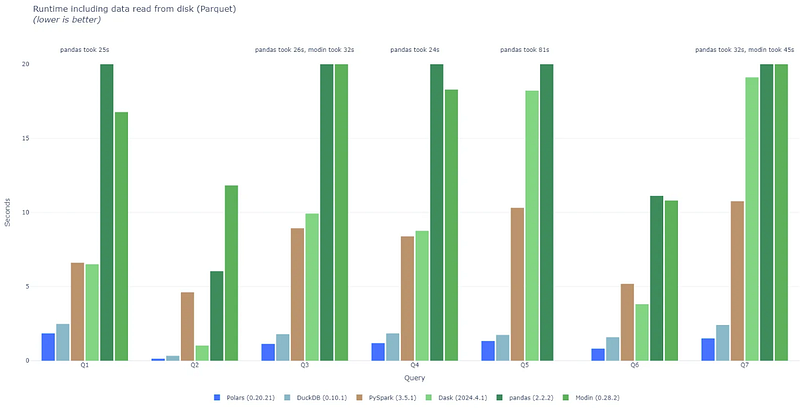
Results including data read from disk (Parquet)
Wow, if these results are to be believed, Polars is really something! But hold on — before we blindly accept Polars’ own claims, let’s take a closer look at the benchmark setup.
The first issue we ran into: we couldn’t use a Python 3.12 image because the Raydependency doesn’t have a compatible wheel for this version. Then, there’s the outdated project setup. The GitHub repository listed in the README.md points to a non-existent repo. And finally, there’s a clear error in the scripts: either the run.sh script or the Makefile is wrong. The run.sh script references a rule called tables to create the test dataset, but the Makefiledefines it as data/tables/. How did they manage to execute the benchmark with this inconsistency? No clue.
On top of all this, the requirements.txtfile hasn’t been updated in over eight months. This means the versions of the engines being tested haven’t been refreshed in a long time. For our analysis, we’ll focus on Polars (version 0.20.21, released April 15, 2024) and PySpark (version 3.5.1, released February 23, 2024). Interestingly, as of today (December 24, 2024), the latest Python Polars package is version 1.18.0, and PySpark’s latest release (3.5.4) came out just days ago, on December 20, 2024.
To me, this suggests the benchmark prioritizes creating glossy, attention-grabbing graphs that make Polars look like an unbeatable champion rather than providing a fair and up-to-date comparison with competitors. Fishy, isn’t it? Anyway, let’s move forward and set up the environment to run the benchmark ourselves.
# Download and execute the Python 3.11 Docker image
docker pull python:3.11
docker run --name polars-benchmark -it python:3.11 bash

# Update the package lists for upgrades and new package installations
apt-get update

# Download the benchmark repo
git clone https://github.com/pola-rs/polars-benchmark.git

# Compile the TPC-H data generation tool
cd polars-benchmark
cd tpch-dbgen
make
cd ../

# Install Java JDK for Pyspark
apt install openjdk-17-jdk
The TPC-H benchmark uses synthetic data to simulate a business environment, featuring tables such as customers, orders, line items, suppliers, and parts. This data models real-world scenarios with interconnected relationships between entities, making it ideal for testing complex queries, large-scale joins, and aggregations. The scale factor (SF) determines the dataset size, scaling up to terabytes to evaluate performance under different workloads.
For our test, we’ll generate synthetic data with SF 1.0 (approximately 1GB) and execute queries using both Polars and PySpark. Let’s dive in and see how they perform!
# Set scale factor to 1.0 and generate TPC-H data tables
export SCALE_FACTOR=1.0
make data/tables/

# Execute Polars queries
.venv/bin/python -m queries.polars

# Execute Pyspark queries
.venv/bin/python -m queries.polars
If we try to execute this benchmark, another error pops up:
AttributeError: module 'polars' has no attribute 'GPUEngine'
Seriously, how on earth did they manage to run their own benchmark? After some digging, I ended up installing vim, editing the utils.pyfile from the Polars test suite, removing all mentions of GPUEngine , and not specifying any engine at all, hoping that would finally let us run the tests.
But no — NO WAY! A new error appeared that wasn’t there just the day before:
LazyFrame.collect() got an unexpected keyword argument 'new_streaming'
I’ve been testing this benchmark for the last three days, and everything worked fine once the GPUEngine issue was resolved. But apparently, as of yesterday, someone introduced yet another bug. This new error stems from a commit with the comment: “Add option to run Polars on the new-streaming engine.”
It seems they’re working on a new streaming engine — exciting, right? Except they forgot to update the Polars dependency in the benchmark project. It’s still referencing a version that’s eight months old!
After yet another round of edits, I removed the new_streaming parameter from the code. Finally, the tests ran successfully. And you know what? The wait was worth it. While PySpark executed the queries in 239.315 seconds, Polars smashed through the same workload in just 8.786 seconds.
Holy cow! That’s blazingly fast, indeed.
Why Is Polars So Fast?
Polars owes its impressive speed to several key design principles and optimizations:
- Columnar Data Structure: Polars uses a columnar memory format based on Apache Arrow, which enhances data locality and reduces CPU cache misses. This structure allows for highly efficient computations and faster processing.
- Rust Implementation: Built in Rust, a low-level, memory-safe programming language, Polars combines speed with safety. Rust’s performance and absence of garbage collection ensure minimal runtime overhead.
- Parallel Execution: Polars is designed for multi-threaded execution, making full use of all available CPU cores. By parallelizing operations, it achieves exceptional scalability and throughput.
- Lazy Evaluation: With support for lazy execution, Polars builds an optimized query plan before execution. This reduces redundant computations and improves overall performance.
- SIMD Optimization: Polars leverages Single Instruction, Multiple Data (SIMD) instructions to perform vectorized operations. This approach accelerates numerical calculations and aggregation tasks significantly.
- Predicate Pushdown: Thanks to lazy execution, Polars applies filters (predicates) as early as possible in the query process. This minimizes the volume of data processed, saving time and resources.
- Efficient I/O: Polars supports high-speed reading and writing for formats like CSV, Parquet, and Arrow. It integrates with optimized libraries to ensure quick and seamless data ingestion and output.
- Zero-Copy Mechanisms: By utilizing Apache Arrow’s zero-copy capabilities, Polars minimizes unnecessary data copying. This allows memory to be shared across processes or systems for faster data handling.
- Memory Efficiency: Rust’s ownership model ensures precise memory management without the need for garbage collection, avoiding runtime delays and maximizing resource utilization.
Okay, fair enough — but let’s not overlook PySpark’s capabilities here. While Polars boasts impressive features, PySpark can also leverage Apache Arrow. By default, Arrow is disabled in PySpark due to concerns around compatibility, stability, and workload-specific performance. Enabling it requires additional dependencies and may not always yield performance improvements, so the feature is kept off by default to ensure backward compatibility and avoid potential issues. If you’d like to enable it, you can use the following configuration:
spark.conf.set("spark.sql.execution.arrow.enabled", "true")PySpark provides DataFrames and Datasets that use a columnar data structure for efficient in-memory processing, especially for analytical queries. These abstractions are built on top of RDDs but leverage a columnar format for data storage and processing. This design enables optimizations like vectorized execution, which can significantly improve performance, particularly when integrated with Apache Arrow.
PySpark also benefits from foundational optimizations like parallelization, lazy evaluation, and predicate pushdown — features that form the backbone of its performance capabilities.
While Polars relies on Rust for execution speed, Spark executes native C++ methods from the JVM. Besides, by leveraging Hadoop’s native libraries, Spark achieves efficient I/O as well, making it competitive for high-performance data processing tasks.
Finally, regarding memory efficiency: the JVM’s Garbage Collector (GC) can impact performance, that’s true, but in short-lived tasks with a properly configured heap, this shouldn’t be a significant issue. The GC overhead is more problematic for long-running applications rather than quick query executions like the ones in this benchmark.
So … Is Polars Really So Fast?
We can’t deny that Polars is incredibly fast, but… why is PySpark so slow? To dig deeper, we enabled tracing by changing the spark_log_level in settings.pyfrom "ERROR" to "ALL". A thorough analysis of the log file revealed three key points worth noting:
1. “Start Jetty” occurs 22 times.
SparkUI relies on Eclipse Jetty, a lightweight web server. This happens each time a new Spark driver instance is created, meaning that for every query in the benchmark, a completely new and independent JVM is initialized.
Spark is designed as a distributed computing engine for executing data processing tasks at scale. Its initialization is significantly more complex than that of a lightweight library like Pandas or Polars. When a new Spark instance is created and the first job is launched, a substantial number of Java/Scala classes are loaded into the JVM— typically between 10,000 and 15,000 classes.
While Polars clearly initializes faster than PySpark, is it fair to include initialization time in every query of the benchmark intended to compare the performance of different engines? To level the playing field, we can initialize PySpark just once and execute an initial query to preload most of its required classes.
By doing this, we reduced the runtime from 239.315 seconds to 36.810 seconds. That’s a massive improvement! However, it’s still far from Polars’ 8.8 seconds.
2. “Unable to load native-hadoop library for your platform”
As mentioned before, Spark leverages the native Hadoop library to perform efficient I/O operations. When this library is unavailable, Spark falls back to plain Java for these operations, which can negatively impact performance.
To address this, we installed the native Hadoop library:
# Download, decompress and extract Hadoop 3.4
wget https://dlcdn.apache.org/hadoop/common/hadoop-3.4.0/hadoop-3.4.0.tar.gz
gunzip hadoop-3.4.0.tar.gz
tar -xf hadoop-3.4.0.tar

# Set the environment variables needed to configure the Hadoop native library
export HADOOP_HOME=hadoop-3.4.0
export PATH=$HADOOP_HOME/bin:$PATH
export LD_LIBRARY_PATH=$HADOOP_HOME/lib/native:$LD_LIBRARY_PATH
After doing so, the warning message no longer appeared when running the PySpark tests. However, the average total runtime remained unaffected. This is likely because we used a scale factor of 1.0, corresponding to a relatively small dataset.
3. Too small dataset + too few operations => too slow?
This might seem counterintuitive, but Spark isn’t well-suited for executing a small number of operations on small datasets — it’s like using a sledgehammer to crack a nut.
Spark processes data by dividing it into chunks (called partitions), based on the input source. In this case, each DataFrame is loaded from a single Parquet file. The Parquet format stores data in blocks along with metadata, enabling Spark to create partitions based on those blocks. If the Parquet file contains enough blocks, Spark will typically create as many partitions as there are compute cores (cores that execute tasks) — in this case, given that there are no executors and Spark is running locally, matching the driver’s core count. However, this can result in numerous partitions with small amounts of data, which is inefficient.
To optimize this, we can adjust partitioning either for a specific DataFrame using the coalesce or repartition operations, or globally by configuring the following property:
.config("spark.default.parallelism", "8")Applying this configuration reduced the average runtime by approximately 11%. While that’s a noticeable improvement, it’s still far from the still impressive times achieved by Polars.
Our Own Benchmark
As we’ve seen, Polars stands out as the clear winner in the PDS-H/TPC-H benchmark. Now, let’s take it a step further and create our own benchmark, following these points:
Using the Latest Versions
- Polars: 1.18.0
- PySpark: 3.5.4
Generating Synthetic Datasets
Starting with a list of products, including their categories, subcategories, prices, and annual purchase frequencies, the test generates synthetic sales data for the entire year of 2024 by:
- Calculating cumulative frequency bounds for each product.
- Randomly generating purchase data, including client IDs, dates, and quantities.
- Filtering the purchases based on each product’s frequency bounds by joining with the product dataset.
- Saving the resulting data as a Parquet file for use in the benchmark.
Benchmarking
The benchmark compares the performance of Polars using its different execution engines (eager, streaming, and the recently introduced new_streaming) with PySpark across various dataset sizes: 1M, 5M, 25M, and 50M rows.
To execute the benchmark, simply follow these steps:
# Change to the root directory of the filesystem
cd /

# Download the benchmark repo
git clone https://github.com/SauronShepherd/the-polar-express.git

# Change to the project folder
cd the-polar-express

# Create a virtual environment
python -m venv .venv

# Install dependencies from requirements.txt
.venv/bin/pip install -r requirements.txt

# Run the application
.venv/bin/python src/main.py
Key Differences And Challenges
While developing these tests, several interesting differences emerged:
Polars Modes
PySpark is strictly lazy, meaning operations are only executed when explicitly triggered by an action like .collect(). This allows for optimization but lacks an eager execution mode. In contrast, Polars supports both eager and lazy execution modes:
- Eager mode: Executes operations immediately, ideal for small tasks.
- Lazy mode: Defers execution for optimized performance on larger datasets.
LazyFrame Limitations
In Polars, a LazyFrame optimizes query processing before execution. However, there are key limitations:
- Type restrictions: Joins require both inputs to be of the same type — either both
DataFrameor bothLazyFrame. - Eager data generation: Data creation is inherently eager; we cannot directly create data in lazy mode. To work around this, we can generate data eagerly and then convert it into a
LazyFrameusing.lazy(). - Mixing modes: Mixing
DataFrameandLazyFrametypes is not allowed for operations like joins or transformations.
Lack of Functionality
Certain operations that are straightforward in PySpark proved challenging or unavailable in Polars:
- Random number columns: Generating a column with random numbers doesn’t appear to be natively supported.
- Rollup/Cube summaries: These common aggregations are missing.
- Non-equi joins: These joins, crucial for some tests, aren’t supported in the
.join()method. The alternative,.join_where(), is marked as experimental in the Polars documentation: “This functionality is experimental. It may be changed at any point without it being considered a breaking change.” - Cross joins: Attempting cross joins for medium-sized datasets led to memory allocation errors.
Spilling to Disk
Polars appears to spill several gigabytes of data to disk when handling medium-to-large datasets. This can significantly impact performance.
High Resource Consumption
Polars required substantially more memory and CPU resources than PySpark. During tests, my laptop often became totally unresponsive while running Polars, a problem I didn’t encounter with PySpark.
From Blazingly Fast To Blatantly Slow?
Here are the results obtained:
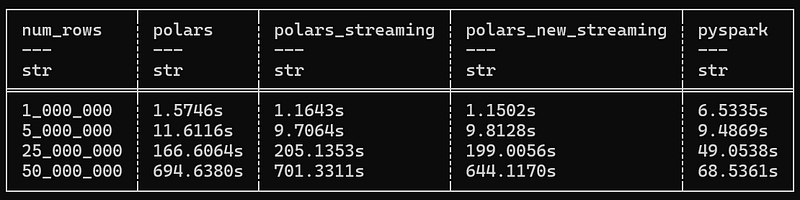
PySpark is the undisputed winner in our custom benchmark
Did we just prove that Polars is as slow as a snail compared to PySpark? Not necessarily — and this highlights why I don’t like benchmarks. There are countless potential reasons why Polars might appear to go from “blazingly fast” to “blatantly slow.” Perhaps I made a mistake, overlooked something, or didn’t account for certain factors. You can never tell for sure.
But even if I did everything right, choosing a framework based solely on flashy comparison graphs is not a wise decision. When deciding between Polars and PySpark, it’s essential to evaluate a range of factors beyond raw performance metrics:
- Ease of Use: Polars is simpler and more intuitive for small tasks, while PySpark’s complexity pays off in large-scale distributed systems.
- Community and Ecosystem: PySpark benefits from a larger, well-established community and ecosystem.
- Deployment: Polars shines in single-node setups, whereas PySpark is built for cloud or cluster environments.
- Performance: Polars outpaces PySpark for smaller datasets, but PySpark excels with some use cases and with massive, distributed workloads.
- Support: PySpark has extensive documentation, community forums, and training resources.
- Cost: Polars can be more cost-effective for smaller-scale operations, while PySpark might justify its costs for enterprise-level tasks.
Ultimately, the choice between Polars and PySpark depends on your project’s scale, infrastructure, and specific requirements. The right tool is the one that aligns best with your goals — not just the one that looks better in a performance test. Because, remember … there are lies, damn lies and benchmarks!!!
FINAL NOTES
For both benchmarks (PDS-H and our custom benchmark), the reported times represent the average of three consecutive executions for each test and dataset size.
All tests were conducted on the same laptop, connected to the electrical grid.
Laptop Specifications:
- Processor: 12th Gen Intel(R) Core(TM) i7–1260P, 2.10 GHz
- Memory: 32.0 GB RAM
- Cores: 12 total cores (4 performance cores + 8 efficiency cores)
- Threads: 16 total threads