
Apache Spark WTF??? 🧟 We Will RocksDB You 🧠
A stateless stream is a highway: rows pass and vanish. Add groupBy() or Spark 4’s transformWithState(), and the road loops into Stateful…

“You got state in your face, you big disgrace
No watermark anywhere in place
We will, we will RocksDB you”
(adapted from “We will rock you” by Queen)
🏚️ Welcome to Stateful Town
A stateless stream is pure tourist energy: rows arrive, transform, and vanish with zero baggage.
Add state, and Spark starts remembering. The road loops. The trees repeat.
Stateless Jobs are Tourists
events.select("user_id", "event_time").filter("amount > 100")Spark evaluates the row and immediately lets it go. It doesn’t care if user_123 appeared yesterday or if a device has been screaming since Tuesday. No mailbox. No basement.
Stateful Jobs are Residents
Stateful operations force Spark to remember data across micro-batches:
- Aggregations keep ledgers:
events.groupBy("user_id").count() - Deduplication tracks guest lists:
events.dropDuplicates(["event_id"]) - Stream-stream joins create waiting rooms where unmatched rows sit hoping their partner shows up.
Once a key enters the state store, it gets a mailbox, a weird neighbor, and a suspiciously long lease.
What “State” Actually Means
State isn’t just arbitrary memory. It is a strict technical lookup:
Stateful Operator + Partition + Version + Key ➔ ValueThis works flawlessly until data skew hits and one cursed user or device owns half your dataset. Spark manages this via the StateStore abstraction. RocksDB is simply a heavy-duty cellar backend where massive state lives off-heap so your JVM heap doesn’t melt into garbage collection soup.
State Has Versions
State is versioned using micro-batch IDs. If an executor dies at 3:00 AM, Spark doesn’t wake up confused in a cornfield; it reverts to the checkpoint directory, restores the last valid version of reality, and carries on.
A stateless stream trips and walks on. A stateful stream trips, checks the paperwork, and asks what year it is.
Watermarks are Eviction Law, Not Magic
Without watermarks, stateful queries become retirement homes for immortal keys. To give your data an enforceable eviction policy, you pair operations with an event-time watermark:
events.withWatermark("event_time", "1 day") \
      .dropDuplicatesWithinWatermark(["event_id"])
The watermark defines when late data is legally dead, allowing Spark to clear the state store and stop tracking old ghosts.
Why State is Hard
State must survive crashes, retries, data skew, and human optimism. When it grows too large for the JVM heap, keeping it there isn’t architecture — it’s denial. That’s when we open the cellar door to RocksDB.
🚗 The Road In: How Keys Enter (and Never Leave)
State doesn’t arrive with thunder, wolves, and a violin solo. It sneaks in through innocent code. Nobody writes create_giant_state_monster(). You just type groupBy(), dropDuplicates(), or join(), and Spark politely opens the gates.
Aggregations: The High-Cardinality Trap
The classic gateway drug is a grouped aggregation:
events.groupBy("user_id").count()Spark isn’t just doing math; it must fetch, update, and rewrite the key’s state for every single micro-batch. The danger here is cardinality.
groupBy("country") is a tiny village. groupBy("user_id") is a metropolis. groupBy("device_id") can easily become an undead census of IoT gadgets—some retired, some broken, all occupying space.
👃 Production smell: Your input rate is perfectly flat, but your state row count climbs linearly, micro-batches slow down, and your checkpoint directory becomes visible from orbit.
Windows Multiply the Rent
Adding a time window changes the state lookup key from user_id to user_id + time_window.
events.groupBy(window("event_time", "5 minutes"), "user_id").count()While windows do eventually close, they multiply the number of active state entries while alive. A million users active across multiple overlapping windows isn’t just an aggregation — it’s a landlord convention.
Deduplication: The Guest List from Hell
This line looks harmless:
events.dropDuplicates(["event_id"])It turns Spark into a nightclub bouncer with infinite clipboard anxiety. To reject duplicates, Spark must remember every single ID it has ever seen. Without an exit rule, that guest list is immortal.
The safer, modern approach enforces a deadline:
events.withWatermark("event_time", "10 minutes") \
      .dropDuplicatesWithinWatermark(["event_id"])
IDs older than the watermark are legally evicted, and your state store stops accumulating a permanent history of the internet.
Stream-Stream Joins: The Waiting Room
A stream-stream join is a two-sided waiting room.
clicks.join(impressions, "ad_id")Spark buffers unmatched rows from both streams. For inner joins, Spark will technically run without watermarks, but it will hold onto unmatched rows forever because a match is always theoretically possible. To clean this state, you must provide watermarks and an event-time boundary:
# click_time must be within 5 minutes after impression_time
click_time >= impression_time AND click_time <= impression_time + interval 5 minutes
Without that interval, Spark assumes the missing partner might arrive in 2037, wearing a mysterious coat and carrying your cloud bill. Outer joins are even stricter: they refuse to compile without a watermark because Spark needs a hard deadline to know when to finally emit a “no match found” null row.
Arbitrary State: Writing the Town Laws
Sometimes business logic is too messy for a standard group-by: like tracking three failed payments in five minutes, unless recovered, unless they are a premium user. That requires arbitrary stateful processing.
Previously, you wrestled with the boilerplate-heavy mapGroupsWithState or flatMapGroupsWithState. Spark 4.0 introduces transformWithState. It provides explicit ValueState, ListState, and MapState engines alongside native TTL (Time-To-Live). It’s incredibly powerful, but it’s also how you accidentally code a small, inefficient government inside your streaming query.
The Checkpoint Remembers
Every stateful operation relies heavily on the checkpoint directory to survive failures and recover from the 3:00 AM executor massacre.
Your state design directly dictates your commit time, recovery speed, checkpoint size, and cloud storage I/O costs. Stateful Spark isn’t dangerous because it forgets; it’s dangerous because it remembers exactly what you told it to, for exactly as long as you forgot to specify.
🏛️ The Old Town Hall: The Default State Store
Before RocksDB enters with its off-heap machinery, Spark provides a default home for streaming state. Like any old town hall in a haunted village, it works perfectly — until the population explodes.
What the Default Store Actually Is
Spark’s built-in engine is the intimidating HDFSBackedStateStoreProvider.
The name is highly deceptive. It sounds like your live state relaxes peacefully in S3 or ADLS while your executors sip tea. In reality, the cloud or HDFS checkpoint location is strictly for durability and recovery. Your live, active state sits directly in the executor’s JVM heap memory.
JVM Heap Map ➔ Micro-Batch Updates ➔ Committed Checkpoint FilesSo while the state is technically “HDFS-backed,” your JVM heap doesn’t get a vacation. It does all the daily heavy lifting.
When the Old Town Hall is Fine
The default store isn’t a villain; it’s fast, built-in, and highly efficient for small-scale operations. It is the right tool when your state fits comfortably in memory and strict watermarks evict keys quickly.
groupBy("country")? Fine. Short windows with aggressive eviction? Perfect. If your keys are manageable and your garbage collection is stable, you don’t need to switch. RocksDB is a tool for when heap-backed state starts hurting, not a maturity badge.
When the Walls Start Cracking
Trouble begins when state scales to millions of keys. Java demands a steep memory tax for every single object, wrapper, and reference living on the heap.
When cardinality explodes, the symptoms are immediate: your input rate stays completely flat, but batch duration crawls from 2 seconds to 20. The source didn’t get louder; the town just got heavier. Worse, if an executor dies, a newly scheduled executor must pull those massive state files over the network to rebuild the heap, destroying your recovery times.
The GC Carousel of Doom
The Java Garbage Collector isn’t evil, just overworked. When you hand it millions of tiny, long-lived state objects and demand low-latency streaming, it struggles to cope.
At first, it triggers minor pauses. Then tasks lag, micro-batches back up, and the subsequent batches get even heavier. Memory pressure spikes, leading to longer and more frequent GC pauses. Long before the final OutOfMemoryError crashes your pipeline, your query gets trapped in a haunted latency loop.
That is the exact moment RocksDB starts looking less like overengineering and more like a fire escape.
🪨 The Basement: What RocksDB Is
When the old town hall can no longer house your data, Spark needs a serious cellar. That cellar is RocksDB.
RocksDB in One Sentence
RocksDB is an embeddable, persistent, high-performance key-value storage engine written in C++.
- Embedded means it runs directly inside the executor process. There is no remote RocksDB cluster, network hop, or database endpoint with a cheerful logo.
- Persistent means it writes straight to local storage. In Spark, local disk is your ultra-fast workshop, while the remote checkpoint is your disaster-recovery bunker.
- Key-Value means the API is brutally basic: put, get, delete, and scan. RocksDB knows nothing about your data schemas, watermarks, or Q4 fraud targets. It only knows bytes.
Embedded Means “Inside the House”
When you enable RocksDB, Spark replaces its heap-based map with local RocksDB instances mapped to your stateful partitions.
Spark Executor
 ⤷ Stateful Task
    ⤷ StateStore API
       ⤷ RocksDBStateStoreProvider
          ⤷ Local Disk Files
If Spark keeps a stateful task on the same executor across batches, it reuses this local state instantly. If the executor dies, a new one must pull the state files down from your remote checkpoint — which is why massive state can make pipeline recovery feel like raising a castle from a swamp.
Why Key-Value Fits Streaming State
Streaming state is ultimately just a never-ending key-value dictionary:
user_id ➔ countevent_id ➔ seen_markersession_id ➔ session_buffer
Spark handles the complex logic; RocksDB just handles the bytes. Spark translates your live UnsafeRow data into raw byte arrays, and RocksDB stores them blindly.
Calming the GC Monster
By moving state to RocksDB, you radically shift your pipeline’s pain profile. Instead of stuffing millions of long-lived Java objects into the JVM heap — inviting the Garbage Collector to grind your application to a halt — Spark serializes data off-heap into native memory and local disk.
The default heap store is a sprint; RocksDB is a marathon. However, the pain doesn’t vanish — it just changes address. With RocksDB, you trade JVM GC worries for native memory allocations, block caches, write buffers, background compaction threads, and local disk space.
What RocksDB Does Not Solve
RocksDB does not fix bad state design. It won’t rescue missing watermarks, infinite deduplication, immortal keys, data skew, or a business rule requiring your pipeline to remember every customer interaction until the sun explodes.
If your code dictates that state must live forever, RocksDB will simply let you store a lot more of it before physics sends you a strongly worded email. It gives you a bigger basement — not permission to become a hoarder.
🌲 The Forest: Why RocksDB Exists
RocksDB didn’t enter Spark because someone wanted more configuration flags to tweak. It exists because state grows. And when state grows, your cute little streaming town gets surrounded by a dark forest of JVM heap pressure, checkpoint latency, and lagging batch durations.
The Real Problem: Large State
Processing rows is cheap. Remembering them is expensive. While a stateless stream runs forever like traffic on a highway, a stateful stream builds a permanent registry.
The rough footprint of your state looks like this:
State Size ≈ Active Keys ✖ Retention/Window Count ✖ Value SizeUpdate frequency doesn’t make your live state size bigger, but it does make RocksDB significantly busier. High throughput means more disk writes, larger changelogs, heavier checkpointing, and aggressive background compaction.
Cardinality is your worst enemy. groupBy("country") builds a village; groupBy("device_id") builds an undead continent of IoT sensors, half of them screaming from a warehouse nobody admits exists. Without watermarks enforcing eviction law, Spark keeps a room ready for late data forever. Spark 4.0’s transformWithState makes these state shapes even richer with native timers, lists, and maps—which is wonderful, but inherently heavier.
The False Belief: “RocksDB Makes State Cheap”
It does not. RocksDB doesn’t delete old keys with positive thinking, nor does it make checkpoints weightless. It simply moves the monster.
- The Heap Monster Becomes the Native-Memory Goblin: Block caches, write buffers, indexes, and bloom filters all live off-heap. If you only monitor your JVM heap, your container will abruptly die while your Java metrics look perfectly innocent.
- The Memory Problem Becomes a Disk Problem: Local SSD speed, IOPS capacity, and storage limits suddenly matter immensely.
- The Compaction Tax Arrives: Because of RocksDB’s LSM-tree design, writes are lightning-fast, but old or deleted data files must be reorganized later. While your stream looks completely calm above ground, RocksDB is downstairs rearranging heavy furniture with a chainsaw.
Batch Forgets; Streaming Remembers
Batch jobs get to end. Streaming jobs run for weeks, months, or until someone rediscovers a forgotten Kubernetes namespace.
Without explicit cleanup rules, a streaming query isn’t highly available — it’s just highly attached. You still need watermarks, TTLs, timeouts, and sane keys. RocksDB gives you a much bigger basement, but it doesn’t give you permission to become a hoarder.
🕳️ The Tunnels: How RocksDB Deeply Works
Above ground, Spark says: “I updated the state store.” Under the floorboards, RocksDB is frantically juggling memory buffers, sorted files, bloom filters, and tombstones while fighting the three database demons: read, write, and space amplification.
The LSM-Tree Architecture
RocksDB uses a Log-Structured Merge-tree (LSM) design. Instead of rewriting records in place, it absorbs updates in memory and flushes them later as sorted, immutable files on disk.
🤔 Is this similar to ClickHouse? Spiritually, yes. Both follow a “write now, reorganize later” philosophy. But they are cousins, not twins. RocksDB is an embedded row-based key-value engine optimized for rapid point lookups; ClickHouse is a columnar analytical engine built for sweeping aggregations. Same forest, different monsters.
Think of RocksDB as a haunted librarian. New books arrive at lightning speed, landing in sorted piles on the desk. At night, the librarian reorganizes the shelves while whispering about data amplification. This fits Spark perfectly: a query like groupBy().count() constantly reads a key, increments it, and writes it back. You get fast foreground writes, but the background cleanup bill always arrives later.
Memtables: The Front Desk
Every write first lands in an in-memory structure called a Memtable.
Spark Task ➔ RocksDB Memtable ➔ Immutable Memtable ➔ Background Flush ➔ Local Disk SST FileLarge memtables reduce file chaos but consume massive native memory. Tiny memtables flush constantly, creating fragmented files that make the background compaction engine angry.
SST Files: The Archives
When a memtable fills up, it is written to local disk as an immutable Sorted String Table (SST) file. Because RocksDB never edits these files in place, updating a key simply writes a newer version elsewhere:
SST File A: user_123 ➔ count = 10SST File B: user_123 ➔ count = 11SST File C: user_123 ➔ count = 12
The newest version always wins. The older records are ghosts waiting to be exorcised. RocksDB organizes these files into levels (L0 to L6). Fresh data starts at the top (L0), while older, merged data sinks downward into larger, colder levels.
Block Cache and Bloom Filters
Because a key’s history might be scattered across memory and multiple disk levels, reads require assistance.
- The Block Cache keeps hot uncompressed blocks in native memory.
- Bloom Filters act as a quick mathematical check. If the filter says a key is “definitely not” in an SST file, RocksDB skips it entirely. If it says “maybe,” RocksDB opens the file.
If your block caches, indexes, and filters grow too large, your container will abruptly get killed by the operating system while your JVM heap metrics look completely peaceful.
Compaction, Tombstones, and Write Stalls
Compaction is the underground cleanup crew. It runs in background threads, merging SST files, discarding overwritten versions, and reclaiming disk space.
When Spark evicts state via a watermark, RocksDB doesn’t immediately delete it. It writes a delete marker called a tombstone. The key is logically dead, but the physical disk space remains occupied until compaction passes through and clears the graveyard.
If Spark writes data faster than RocksDB can flush and compact, RocksDB triggers a Write Stall to protect itself. To a data engineer, this looks like a sudden, mysterious performance cliff: your input rate is stable, but your batch duration suddenly grows fangs.
The Three Amplifications
Tuning RocksDB is the delicate art of deciding which performance monster eats first:
- Write Amplification: One logical update is physically rewritten multiple times as data drops through disk levels.
- Read Amplification: One lookup has to check multiple SST files because the cache is cold or compaction is lagging.
- Space Amplification: Disk usage dramatically exceeds your actual logical state size because old versions and tombstones are waiting for cleanup.
Why Spark Users Should Care
RocksDB is not a magic, hands-off black box.
- When your state rows stay flat but your disk usage grows exponentially, you are looking at lingering tombstones and compaction lag.
- When batch times spike without a corresponding surge in input data, you are dealing with write stalls or cold caches.
- When your JVM heap looks pristine but your Kubernetes pod suddenly restarts, native off-heap memory allocation is the culprit.
Respect the tunnels. They are part of your streaming application now.
🧭 The Map: State Stores, Versions, and Checkpoints
RocksDB is the basement, but Spark still needs a map. Local state is fast, but it isn’t enough. Executors die, tasks retry, and clusters restart. The town must still remember who lived where. That is the job of the StateStore abstraction and the checkpoint directory.
StateStore: Laws vs. Records
Stateful operators do not manipulate RocksDB files directly. They talk to Spark’s StateStore layer to read, update, and commit records. To swap out the default heap engine for RocksDB, you use a specific configuration provider:
spark.conf.set(
    "spark.sql.streaming.stateStore.providerClass",
    "org.apache.spark.sql.execution.streaming.state.RocksDBStateStoreProvider"
)
Do not treat this as a casual toggle. For a checkpointed query, configurations like the provider class and spark.sql.shuffle.partitions are legally locked. Changing them between restarts on the same checkpoint will corrupt your state mapping.
Versions: Preventing Metric Fan Fiction
Each micro-batch operates against a strictly committed state version. Batch $N$ reads version $N-1$, processes incoming records, evicts what the watermarks allow, and commits version $N$. This strict versioning is what keeps retries from inventing alternate realities where your metrics and customer balances become creative data fiction.
Local State vs. Durable Checkpoint
Never confuse fast local storage with actual fault tolerance:
- Local RocksDB files are the working copy sitting directly on the executor’s local disk.
- The checkpoint is the durable, immutable recovery blueprint saved in HDFS or cloud storage (S3/ADLS).
Spark always attempts to schedule a stateful task on the exact same executor across batches to preserve data locality. However, autoscaling, spot-node terminations, or general executor churn will break this locality. When that happens, a new executor must pull down the remote checkpoint files to rebuild the local RocksDB instance from scratch. Your latency budget will suddenly find itself carrying heavy furniture between houses.
Snapshot vs. Changelog Checkpointing
Traditional RocksDB checkpointing uses incremental snapshots. Spark periodically uploads newly generated local SST files to your remote cloud bucket. While better than moving the entire basement every batch, massive state scaling still makes these cloud commits painfully heavy.
Changelog checkpointing changes the bargain entirely:
spark.conf.set(
    "spark.sql.streaming.stateStore.rocksdb.changelogCheckpointing.enabled",
    "true"
)
Traditional snapshotting says: “Save the new basement files.” Changelog checkpointing says: “Just save the exact keys that changed during this batch.” While snapshots are still written periodically in the background to trim old logs, the hot micro-batch commit path becomes incredibly lightweight, dramatically slashing checkpoint latency.
Spark 4.0: The Map Becomes Readable
Historically, streaming state was something you only inferred through indirect metrics, logs, and systemic dread. Spark 4.0 completely changes the game by making state queryable via standard batch DataFrames:
# Read the actual key-value data inside the state store
df = spark.read.format("statestore").load("/path/to/checkpoint")

# Read the structural state metadata
metadata = spark.read.format("state-metadata").load("/path/to/checkpoint")
You can even pass options to read a live change feed across specific micro-batch ranges. For complex transformWithState operations, you can inspect individual state variables (value, list, or map states) one by one.
Checkpoint Survival Rules
- Don’t delete checkpoints unless you actively intend to erase your query’s entire memory.
- Don’t judge a job only by steady-state latency. Always test your restart times and executor-loss recovery speeds.
- Don’t let cloud lifecycle policies automatically “clean up” or archive active checkpoint files.
- Don’t modify state partitioning on a live checkpoint and try to call it standard maintenance.
RocksDB keeps your off-heap basement organized, the StateStore layer keeps the records consistent, and the checkpoint is your map out of the forest. Burn the map, and the monsters can take the rest of the evening off.
🧿 The Talismans: Watermarks, TTL, and State Cleanup
RocksDB is excellent at remembering. That is also the problem. In stateful streaming, storage is only half the job; the other half is knowing when Spark can legally forget without turning correctness into soup.
Watermarks, TTLs, timers, and eviction policies aren’t decorative charms. They are the strict survival rules that stop Stateful Streaming Town from becoming a permanent warehouse for every rogue key that ever winked at your cluster.
Storage Is Not Cleanup
RocksDB relieves JVM heap pressure, but it has no business brain. It does not know when a shopping cart is abandoned, when an IoT heartbeat is dead, or when an event is too old to matter. RocksDB is the basement; watermarks and TTLs decide who is allowed to leave it.
Watermarks: Event-Time Law
A watermark tells Spark how late event-time data is allowed to arrive before historical state is closed and deleted:
windowed_counts = (
    events
    .withWatermark("event_time", "10 minutes")
    .groupBy(window("event_time", "5 minutes"), "user_id")
    .count()
)
Spark tracks the maximum event time seen across your stream’s partitions, subtracts your threshold, and uses that as the watermark line. Once the watermark passes a window’s end time, Spark finalizes the window and flushes it from the state store.
But this talisman has non-negotiable rules:
- It operates strictly on event time, not your server’s system clock.
- You must define the watermark before the aggregation on the exact same event-time column.
- Output mode matters: Append and Update modes actively clean old state. Complete mode disables state cleanup entirely because it promises to keep the entire aggregate history alive.
Deduplication: Evicting the Clipboard
Streaming deduplication is a notorious state leak. To reject duplicates, Spark must remember every key it has ever seen. Without an exit rule, that guest list is immortal.
The watermark-aware version fixes this:
events.withWatermark("event_time", "10 minutes") \
      .dropDuplicatesWithinWatermark(["event_id"])
Now, Spark only stores data within your late-arrival contract, allowing old IDs to finally leave the building.
TTL and Timers
While watermarks manage standard event-time aggregations, arbitrary state requires custom exit rules. Spark 4.0’s transformWithState introduces native Time-To-Live (TTL) and timers for exactly this scenario, allowing you to automatically expire state variables and react when silence itself becomes a system signal.
The Frozen Watermark
One of the creepiest bugs in production is a stuck watermark. Because watermarks advance based on observed data, if data stops flowing, your watermark freezes, and state cleanup stalls.
Common culprits include quiet streams, malformed timestamps, null event times, or a single idle Kafka partition dragging down the global watermark minimum. Suddenly, your row count stays completely flat, your disk consumption grows exponentially, and engineers start blaming RocksDB for simply obeying orders.
To mitigate this, you can configure Spark to run empty micro-batches for proactive cleanup:
spark.conf.set("spark.sql.streaming.noDataMicroBatches.enabled", "true")This configuration tells Spark to run data-less micro-batches to process pending state timeouts. Just remember: it cannot magically advance your event-time watermark if no newer real-world event times have been observed.
The Lateness Budget Rule
Choosing your watermark and TTL settings is a business decision disguised as an infrastructure configuration:
- A short delay keeps your state lean, batches fast, and cloud storage cheap, but it will ruthlessly drop late data from flaky networks.
- A long delay guarantees completeness, but you will pay for it in state size, disk I/O, heavy checkpoints, and high on-call anxiety.
“We can never drop any data” is almost never an actual streaming requirement. It’s a confession that you actually need a nightly batch reconciliation job.
🚀 The New Arrivals: Why Spark 4 Makes RocksDB More Interesting
RocksDB isn’t a stranger arriving in town with a suspicious suitcase; it has been lurking in Spark since version 3.2, muttering about native memory and hoarding bytes.
The Spark 4.0 plot twist is different: stateful streaming becomes more expressive, explicit, and observable. Suddenly, your off-heap cellar isn’t an implementation detail anymore. It’s a core part of the story.
transformWithState: The Next-Gen Stateful Engine
The marquee feature is transformWithState (and transformWithStateInPandas for Python). It completely replaces the boilerplate-heavy mapGroupsWithState era. Instead of stuffing your entire history into one haunted state blob, you define a structured StatefulProcessor with clear lifecycle methods:
init()registers your state variables.handleInputRows()processes incoming data.handleExpiredTimer()reacts when deadlines pass.
Even better, each key can now hold multiple, isolated state variables:
- ValueState: For a single value (e.g., a credit risk score).
- ListState: For ordered collections (e.g., a history of recent click events).
- MapState: For fast point lookups inside a key (e.g., mapping
device_id ➔ status).
The result is beautifully clean business logic — and significantly larger basements.
TTL and Timers: Arbitrary State Gets Exit Doors
Watermarks excel at cleaning up windows and joins, but arbitrary state requires custom eviction laws. With Spark 4.0, state variables can be given an explicit Time-To-Live (TTL), causing user profiles or abandoned sessions to expire automatically.
Timers introduce real engineering witchcraft: Spark can fire handleExpiredTimer() even if no new data arrives for that specific key. This is critical when silence itself is the signal:
- Alerting if an IoT sensor fails to send a heartbeat by midnight.
- Closing a checkout session after 30 minutes of total inactivity.
- Expiring a temporary fraud profile after seven days.
Watermarks protect your event-time timeline; TTL protects your storage; timers knock on the door when absence becomes actionable information.
Why RocksDB Matters More Here
This new API was strategically optimized around the RocksDB state provider. Complex states like MapState or ListState require highly efficient underlying layout orchestration.
RocksDB brings the exact machinery needed: sorted keys, lightning-fast range scans, and native merge operators. When Spark needs to evaluate pending timers or append to a massive event list, RocksDB handles it seamlessly off-heap, saving you from dragging a massive Java object zoo into JVM memory.
Checkpoint V2 and the State Data Source
Spark 4.0 introduces State Store Checkpoint Structure V2. While internal file layouts sound boring, they represent the critical difference between a fast micro-batch restart and your cluster spending twenty minutes digging through cloud storage ruins.
More importantly, Spark 4.0 hands you a flashlight via the statestore data source. You can now inspect your active streaming state with a standard batch query:
# Query the live state records directly
df = spark.read.format("statestore").load("/path/to/checkpoint")

# Inspect the available metadata, operator IDs, and partition ranges
metadata = spark.read.format("state-metadata").load("/path/to/checkpoint")
When your storage usage suddenly spikes, you no longer have to cross your fingers and assume the dashboard is haunted. You can query the cellar directly.
The Catch: Easier State Means Faster Landfills
Spark 4.0 makes sophisticated state machines incredibly elegant to build.
That is wonderful, but it’s also highly dangerous. A deeply nested MapState, an unconstrained ListState, a handful of complex timers, and a vague product requirement to “keep data just in case” will quickly turn your real-time application into a distributed landfill with a checkpoint. Use the tools wisely.
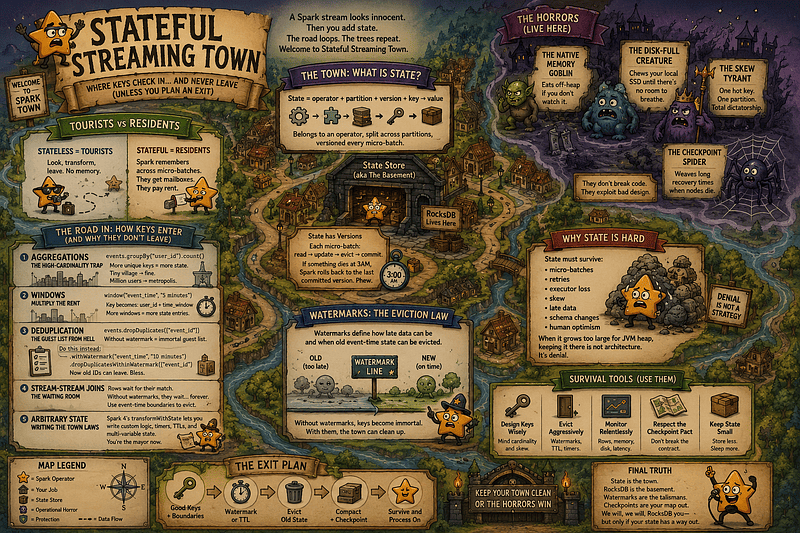
A haunted map of Stateful Streaming Town: where keys move in, watermarks decide who leaves, RocksDB guards the basement, and bad state design becomes the real monster.
📊 The Town Census: Metrics and Observability
If stateful streaming is a haunted town, observability is your census office. The scariest failure mode isn’t a hard crash — it’s state bloat quietly growing for weeks, smiling politely, and completely ruining your weekend.
Query Progress: The Front Door
Spark provides your first flashlight out of the box:
- Use
query.lastProgressfor a quick real-time pulse. - Use
query.recentProgressto spot behavioral drift across historical batches.
In production, you should always wire a StreamingQueryListener into your monitoring stack. Don’t wait until the basement smells strange to start counting your residents.
Core State Metrics
Inside the stateOperators block of your query progress, monitor these metrics first:
numRowsTotalrepresents your active population.numRowsUpdatedshows how many keys changed in the current batch. High total rows paired with low updates indicates a massive, stagnant state that presents a high recovery risk if an executor dies.numRowsRemovedproves your eviction logic is actually working. If watermarks or TTLs are configured but this metric stays flat at zero, your cleanup policies are purely decorative.numRowsDroppedByWatermarktells you how much incoming data arrived too late and was discarded. This isn’t inherently bad; it is your lateness budget becoming visible.memoryUsedBytestracks your storage footprint, but remember: with RocksDB, it doesn’t show the whole truth. Your JVM heap can look perfectly calm while native container memory quietly prepares a coup.
Always track eventTime.watermark alongside these. If the watermark freezes, your entire eviction pipeline clogs.
RocksDB Metrics: Monitoring the Tunnels
When RocksDB is enabled, the real operational gossip lives inside the customMetrics map:
rocksdbWriterStallLatencyMsmeans foreground writes were paused because background flushing or compaction fell behind. Translation: the tunnel crew just parked a heavy truck across your latency budget.rocksdbReadBlockCacheHitCountandMissCounttell you whether reads are serving instantly from memory or being dragged from local disk. High miss ratios mean your cache flashlights are running out of batteries.rocksdbTotalCompactionLatencyMsshows exactly how much time RocksDB spends grinding and reorganizing the basement files.rocksdbCommitCheckpointLatencytracks local state snapshotting work.rocksdbCommitFileSyncLatencyMsmeasures the time spent syncing files to your remote object store. If this number spikes, RocksDB isn’t the villain—your cloud storage provider is wearing the mask.rocksdbSstFileSizetracks the physical disk footprint on the executor. If state rows stay flat but your SST size climbs, suspect lingering tombstones or compaction lag.
The Dashboards You Actually Need
To maintain operational sanity, plot these metrics together on your dashboards:
- The Eviction Balance: Plot input rows,
numRowsUpdated, andnumRowsRemovedtogether. If rows constantly enter but nobody ever leaves, your cleanup policy is broken. - The Weight Versus Speed: Plot batch duration against
numRowsTotaland RocksDB SST size. If processing latency climbs linearly with state weight, your state store is becoming a systemic bottleneck. - The Map Tax: Plot checkpoint duration against total batch duration. If saving the map costs more than processing the actual data, it’s time to enable changelog checkpointing.
Alerts With a Plot
Avoid threshold spam. Great streaming alerts tell a clear story before a pipeline crashes:
- The Ghost Alert:
numRowsTotalclimbs continuously for hours whilenumRowsRemovedstays near zero despite a steady input stream. - The Tunnel Alert: Batch duration spikes while the input rate stays stable, closely matching a surge in
rocksdbWriterStallLatencyMs. - The Map Alert: Processing time is blindingly fast, but
rocksdbCommitFileSyncLatencyMsdominates 90% of your micro-batch time. - The Illusion Alert: JVM heap usage remains perfectly flat, but native container memory keeps climbing toward its cluster limits.
😈 The Monsters: Failure Modes in RocksDB Town
Every stateful streaming job has monsters. RocksDB does not kill them. It relocates them.
If you don’t know which beast you are fighting, you will tune the wrong flag with magnificent confidence, and the post-mortem will become literature.
Welcome to the RocksDB Town bestiary.
👹 The GC Monster: The Upstairs Ghost
This one mostly haunts the default state store.
- The attack: long GC pauses, unstable micro-batch latency, and executor OOMs when millions of state entries live as JVM-managed objects.
- The reality check: the garbage collector is not evil. It is just overworked. You handed it a city of tiny state objects and asked for low-latency streaming.
- The fix: if state is genuinely large, move it out of JVM heap with the RocksDB state store provider.
🧌 The Native Memory Goblin
You switched to RocksDB. JVM heap looks calm. Then Kubernetes kills the container with OOMKilled. Congratulations. You met the off-heap trickster.
- The attack: container memory grows while Java heap graphs look innocent.
- The reality check: “off-heap” doesn’t mean “off-planet.” RocksDB uses native memory for block cache, write buffers, memtables, indexes, filters, and pinned blocks.
- The fix: monitor total container memory, size
spark.executor.memoryOverhead, and use bounded RocksDB memory:
spark.conf.set(
    "spark.sql.streaming.stateStore.rocksdb.boundedMemoryUsage",
    "true"
)
Then set realistic limits with configs such as spark.sql.streaming.stateStore.rocksdb.maxMemoryUsageMB.
💾 The Disk-Full Creature
RocksDB moves pressure from heap to local disk.
- The attack: executor disks fill, writes fail, tasks crash, and recovery becomes a funeral procession.
- The reality check: state deletion is not instant disk freedom. When Spark evicts keys, RocksDB may write tombstones. Space is reclaimed later, when compaction catches up.
- The fix: size local SSDs for active state plus breathing room. Watch physical RocksDB size, not just logical state rows. If disk is always near the cliff, compaction has nowhere to dance.
🧹 The Compaction Thing
Compaction is normal maintenance. Until it blocks the road.
- The attack: sudden batch-latency spikes while input rate stays normal, often with rising
rocksdbWriterStallLatencyMs. - The reality check: if Spark writes faster than RocksDB can flush and compact, RocksDB slows writes deliberately to avoid collapsing into file chaos.
- The fix: use faster local disks, reduce state value size, tune write buffers carefully, or spread state across more partitions.
Don’t just shout “more CPU” at the basement. Sometimes the basement wants I/O.
🕷️ The Checkpoint Spider
This monster lives between local RocksDB files and durable checkpoint storage.
- The attack: processing is fast, but commits crawl. Your batch spends more time saving state than handling data.
- The reality check: checkpoint cost is still real. Traditional RocksDB checkpointing uses incremental snapshots, uploading manifests and new SST files. With huge state and object-store latency, even incremental furniture-moving hurts.
- The fix: consider changelog checkpointing:
spark.conf.set(
    "spark.sql.streaming.stateStore.rocksdb.changelogCheckpointing.enabled",
    "true"
)
It uploads state changes in the commit path and persists snapshots periodically in the background.
🐉 The Skew Monster
RocksDB cannot save you from unfair data.
- The attack: one task runs 10x slower, one executor disk grows like a cursed tower, and the rest of the cluster looks bored.
- The reality check: state stores are partitioned. If one tenant, user, device, or account owns half the traffic, one partition becomes a skyscraper while the others remain cottages.
- The fix: inspect key distribution early. If the logic allows it, salt hot keys or redesign the state model.
- But beware: salting state is not free. You may need a second aggregation or reconciliation step to recover correct semantics.
And do not casually change spark.sql.shuffle.partitions on an existing checkpoint. That is not tuning. That is a migration project.
👻 The Watermark Ghost
This monster appears when state has no exit story.
- The attack:
numRowsTotalclimbs forever,numRowsRemovedstays flat, and storage costs develop a personality. - The reality check: RocksDB is obeying orders. If watermarks are missing, misplaced, stuck, or blocked by Complete output mode, Spark may not be allowed to evict state.
- The fix: audit watermark placement, event-time quality, output mode, and eviction metrics. For deduplication, use watermark-aware cleanup:
events
  .withWatermark("event_time", "10 minutes")
  .dropDuplicatesWithinWatermark(["event_id"])
For arbitrary state in Spark 4, use transformWithState TTLs instead of hoping dead keys feel embarrassed and leave.
🧟 The Recovery Zombie
This one only appears when something fails. Naturally, it appears in production.
- The attack: steady state looks fine, but after restart, autoscaling, or executor loss, the query sits frozen while a new executor reloads massive state from checkpoint storage.
- The reality check: stateful streaming depends heavily on locality. If Spark can reuse the same state store on the same executor, life is good. If not, it must rebuild local RocksDB state from the checkpoint.
- The fix: benchmark recovery, not just happy-path latency. Avoid aggressive autoscaling for critical stateful jobs, be careful with spot/preemptible nodes, and measure how long it takes to reload state after executor loss.
🧯 The Survival Rules: Best Practices
Stateful streaming is entirely survivable, but not because you flipped one configuration flag and declared the problem solved. You survive by designing state intentionally, bounding it aggressively, and remembering that RocksDB is an execution engine, not a forgiveness engine.
Rule 1: Know Your State Key
Before tuning memory, partitions, or checkpoints, you must answer one question: What is the key? Your key defines your population. Measure production-scale cardinality: unique keys per hour, active keys per retention window, and structural skew. Staging data is just where reality wears a fake mustache. If a single tenant or malfunctioning device family owns 70% of your traffic, RocksDB will faithfully store that imbalance and completely crush a single partition.
Rule 2: Give Every Key an Exit
Every single key needs an explicit exit story: a watermark, a TTL, a timer, or manual eviction. Without an exit policy, your cleanup strategy defaults to an OutOfMemory crash, a full disk, or a highly awkward budget meeting. Watermarks protect event-time correctness, TTL protects state lifespan, and timers let data absence trigger system actions. Use the right talisman for the right monster.
Rule 3: Size Partitions Before the Blood Pact
Once a stateful query generates its first checkpoint, your partition count becomes part of a permanent contract. Changing spark.sql.shuffle.partitions later is not standard tuning—it is a full migration project. Averages lie beautifully; your dashboard might show a clean mean of 500,000 rows per partition, while Partition 17 quietly holds 40 million rows and builds an empire. Design for your largest, ugliest partition, not the statistical average.
Rule 4: Monitor Off-Heap Memory and Local Disk
A pristine JVM heap graph does not mean you are safe. With RocksDB, memory pressure moves entirely off-heap into native OS memory: block caches, write buffers, memtables, and bloom filters. Watch your total container memory, spark.executor.memoryOverhead, and local SSD capacity. Remember that state deletions are not instant disk freedom; RocksDB writes tombstones first, and physical space only returns later via background compaction. Size your disks for maximum state accumulation plus significant breathing room.
Rule 5: Treat Recovery Time as an SLO
Steady-state micro-batch latency is a vanity metric. A stream that is blindingly fast until an executor dies is just a demo with better logging. Stateful streaming depends heavily on data locality. If a state partition lands on a fresh executor due to an autoscale event or node failure, it must pull gigabytes of history down from remote cloud storage before processing a single incoming row. Always benchmark cold starts, restarts, and unexpected executor loss under production-sized state loads.
Rule 6: Keep State Payloads Tiny
RocksDB stores raw bytes, but bytes still carry a serialization and storage cost. Do not store full, raw event payloads when a simple counter, a timestamp flag, or a highly compact primitive struct is enough. Avoid append-forever lists and unconstrained maps; one rogue key can easily become a private distributed landfill inside an otherwise pristine query. Small state is fast, highly recoverable, and exceptionally kind to the on-call engineer.
Rule 7: Respect the Checkpoint Pact
A stateful checkpoint is not just a storage folder — it is a legal contract with history. Never casually alter the state provider class, shuffle partition counts, grouping keys, stream output modes, or your state schema. Treat stateful schema evolutions like complex production database migrations: meticulously planned, thoroughly tested, completely reversible, and absolutely never executed with Friday afternoon energy. Break the pact, and the basement will remember.
Rule 8: Choose Your Checkpointing Mode Wisely
Traditional RocksDB checkpointing relies on incremental snapshots, uploading newly generated local SST files directly to cloud storage during the micro-batch commit. Native changelog checkpointing writes only the specific state mutations on the hot commit path, delegating heavy snapshot generation to background threads. If your global state is massive but each micro-batch mutates only a tiny slice of it, turn on changelog checkpointing to dramatically slash commit latencies.
Rule 9: Make Your Cleanup Visible
An eviction policy you cannot actively observe is just a prayer written in YAML. Build dashboards for numRowsTotal, numRowsUpdated, numRowsRemoved, watermark progression, local disk IOPS, and checkpoint sync latencies from day one. If your total row count climbs continuously while removed rows stay completely flat, sound the alarm immediately. The town is not cleaning itself.
🧪 Lab Project: Welcome to RocksDB Town
Theory is comforting. But in stateful streaming, the lesson lands when your charts start looking haunted. This lab project is a RocksDB Town Simulator: a set of focused stress tests that make the state store confess before production does.
🚗 Lab 1: The Road Into Town
Notebook: lab_1__the_road_into_town.ipynb
Brief Description: Pits a stateless data stream applying a standard mathematical filter against a stateful stream calculating running historic tallies under identical throughput pacing rates.
What it Checks: The exact engine threshold where a data pipeline transforms from a frictionless passing highway into a heavy ledger — exposing extra row allocations, off-heap file checkpoints, and newly introduced latency surfaces.
🧌 Lab 2: The Population Explosion
Notebook: lab_2__the_population_explosion.ipynb
Brief Description: Evaluates a stateful query across three sequential trial runs where the key space cardinality scales exponentially (from a 1,000-key village to a 100,000-key suburb, up to a 1,000,000-key metropolis) while pacing traffic velocity to match the storage target limits.
What it Checks: The operational tax that cardinality duration levies on your real-time budget. It directly exposes the classic production anomaly: “Our incoming throughput didn’t increase, so why are our micro-batches slowing down?” — proving that the system degraded because the town residents got heavier.
🧿 Lab 3: The Talisman Test
Notebook: lab_3_the_talisman_test.ipynb
Brief Description: Builds an event-driven duplicate-filtering bouncer to compare three distinct deduplication execution configurations: unbounded dropDuplicates(), legacy time-composite key watermark filters, and native dropDuplicatesWithinWatermark().
What it Checks: Off-heap storage eviction mechanics and state data correctness. It isolates numRowsTotal, numRowsRemoved, watermark progress boundaries, and local Sorted String Table (SST) footprint stabilization to show whether your stream actively purges its clipboard or builds an accidental permanent event-ID museum.
🐉 Lab 4: The Skew Monster
Notebook: lab_4__the_skew_monster.ipynb
Brief Description: Intentionally rigs an entry event stream profile to inject a severe data imbalance where a single “whale tenant” key monopolizes 70% of all real-time volume, while the remaining 30% spreads across a long tail of standard keys.
What it Checks: The limits of distributed scaling and the parallel straggler effect. It tracks task duration variations, thread processing queues, and rocksdbWriterStallLatencyMs to prove that RocksDB cannot save you from unfair key partitioning; it will store your architectural imbalances with perfect fidelity like a fast archivist with no moral compass.
🕷️ Lab 5: Snapshots vs. Changelogs
Notebook: lab_5__snapshots_vs_changelogs.ipynb
Brief Description: Accumulates a heavy, high-cardinality state dataset and directly contrasts traditional incremental snapshot checkpointing against Spark’s native decoupled changelog checkpointing feature configuration.
What it Checks: Synchronous cloud network bottlenecks. It measures rocksdbCommitFileSyncLatencyMs and overall micro-batch durations to demonstrate how streaming lightweight state mutation deltas shaves off synchronous blocking execution taxes (less furniture-moving, but not zero furniture).
🚀 Lab 6: The Spark 4 State Engine
Notebook: lab_6__the_spark_4_state_engine.ipynb
Brief Description: Constructs an advanced account-security state machine that transitions users between Normal, Suspicious, and Blocked statuses using Spark 4’s next-generation object-oriented transformWithState API.
What it Checks: Granular off-heap container isolation (ValueState, ListState, MapState) and native Time-To-Live (TTL) eviction boundaries. It shows how arbitrary state v2 stabilizes the JVM heap by isolating serialized data fields, while demonstrating how callback timers serve as mandatory automated exit doors to prevent unmanaged storage landslides.
🔮 Lab 7: Raid the Cellar
Notebook: lab_7__raid_the_cellar.ipynb
Brief Description: Accesses a frozen or stopped streaming checkpoint directory using Spark 4’s experimental State Data Source connectors to query the low-level storage system as a set of standard batch DataFrames.
What it Checks: Introspective state visibility and structural debugging. It extracts internal operator IDs, store properties, partition distributions, and explicit key-value schemas via the state-metadata and statestore readers—turning a previously hidden binary black box into an audited, queryable batch canvas.
🏁 Can You Escape the Town?
Yes. But not by flipping the RocksDB flag and walking away in slow motion.
RocksDB is neither the monster nor the savior. It is the basement. It stores whatever stateful metropolis your query builds, but it will not choose your TTL, fix skew, invent a watermark, or evict immortal keys.
Spark 4 makes the basement harder to ignore: transformWithState brings richer state variables, timers, TTL, and per-key logic, while the State Data Source lets you inspect what lives below. But visibility is not discipline.
State is the town.
RocksDB is the basement.
Watermarks and TTLs are the exit laws.
Checkpoints are the map home.
Stateful pipelines rarely fail immediately. They drift, bloat, and wait until your latency graph screams on a weekend. So respect the checkpoint pact, engineer your evictions, and remember:
🎸 We will, we will, RocksDB you. > But only if your state has a way out.
“Qué estado vendrá, quién lo sabrá
If watermarks sleep, the keys will stay
The future batch will have to pay
Qué estado vendrá, quién lo sabrá”
(adapted from “Que Sera Sera” by Pixies)
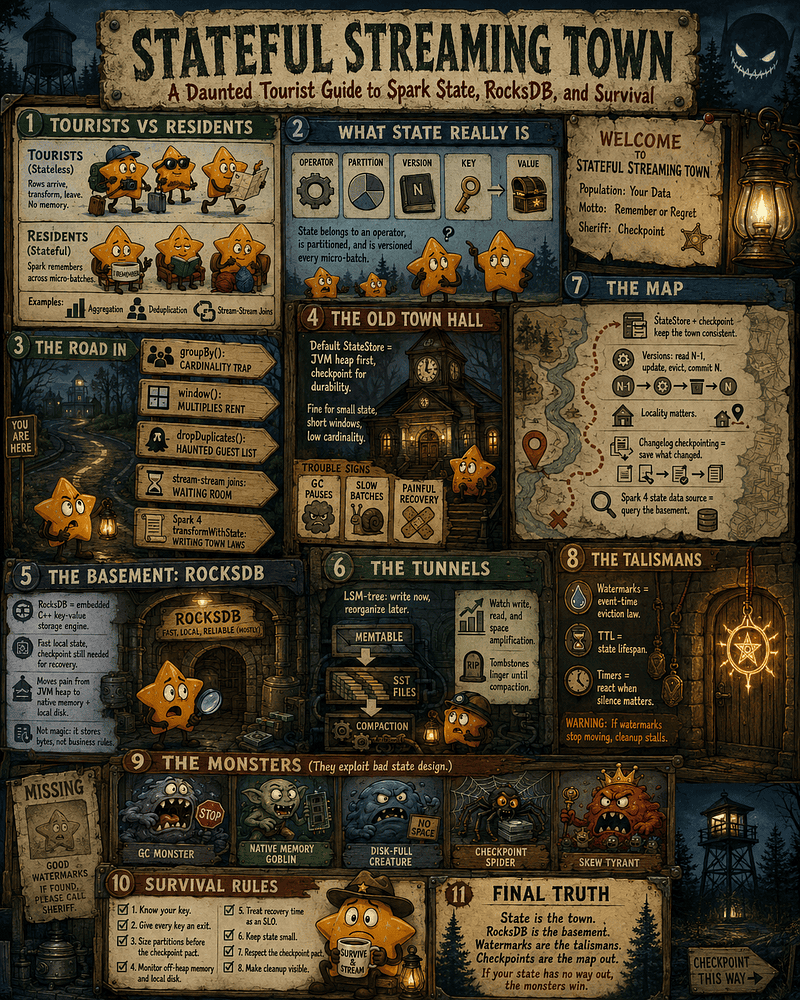
Stateful Streaming Town’s survival board: count the residents, watch the monsters, evict dead keys, and never trust a green JVM heap while RocksDB is whispering from the basement.