
Apache Spark WTF??? — Welcome To Hell! 👹🔥🤘
It started as a simple task — connect Spark to a kerberized Hive. But the moment you hit Enter, the ground cracks open beneath you…

“I’m on the highway to hell
Highway to hell
Don’t stop me”
(from “Highway to hell” by AC/DC)
The Sin-ister Case
Some months ago, I subscribed to the Spark developer and user mailing lists, hoping to stay updated on the latest news and tackle any intriguing issues that might pop up. That’s when an email caught my attention — it was about a problem connecting to a Hive service secured with both Kerberos and SSL. The sender had even opened a related Jira issue: SPARK-49910.
The crux of the issue lies in configuring Spark to securely connect to the Hive Metastore Service (HMS) using both TLS/SSL and Kerberos authentication. While both Hive and Spark can successfully connect to HMS using plain connections or SSL alone, enabling both SSL and Kerberos triggers problems. Specifically, when both security mechanisms are configured, Spark fails to connect and throws the error:
“Unsupported or unrecognized SSL message.”
This error suggests that, despite the configuration, the connection is being attempted in plain mode. As a result, Spark cannot establish a secure connection to HMS when both SSL and Kerberos are enabled, even though each works perfectly fine on its own.
Having worked with Spark and Hive in Kerberized environments with SSL before — though not with the exact versions referenced in the Jira ticket — I was pretty confident this should work. So, why wasn’t it? At that point, I had no clue. But I was determined to get to the bottom of it. Little did I know just how deeply I’d come to regret that brave, foolish resolve …
Armoring Up For The Infernal Journey
When embarking on this hellish quest to connect Spark to a kerberized and secured Hive, preparation is key. The versions of the components involved, as outlined in the ticket, are as follows:
- Spark: 3.5.2 (Scala 2.12, JDK 11)
- Hadoop: 3.3.6
- Hive: 4.0.0 (JDK 11)
The ticket also mentions Iceberg 1.6.0, but given the connection error at hand, the table format matters little — Spark never even makes it far enough to cross the threshold into the HMS***.***
At first, I began preparing the environment to reproduce and analyze the issue using Docker, spinning up instances of the services (Spark, Hive, and Kerberos). After wasting countless hours wrestling with it, I finally succeeded, but Docker is hardly a friendly realm when it comes to debugging errors. Was it really necessary to make my own torment this much worse? Was there no simpler way to face this damnable challenge?
Of course, there’s a way … What about simply spinning up the different services within the same IntelliJ SBT project — or your preferred IDE of torment?
Descending Into The Hellish Hive
After creating an empty project, the next step involves adding two modules to our build.sbt file:
HiveMetastore: This module includes the necessary dependencies and configuration required to initialize the Hive Metastore.HiveMetastoreClient: This module contains a simple connection test to verify the integration with our Metastore.
Since the HiveMetaStore class—the primary class in Hive responsible for starting the Metastore—is included in the hive-standalone-metastore-server dependency, we can configure and call this class using a run configuration.
Run Configuration for Hive Metastore
- Name: HiveMetastore
- Java Version: 11
- Module:
welcome-to-hell.HiveMetastore - Main Class:
org.apache.hadoop.hive.metastore.HiveMetaStore - Working Directory:
welcome-to-hell\HiveMetastore
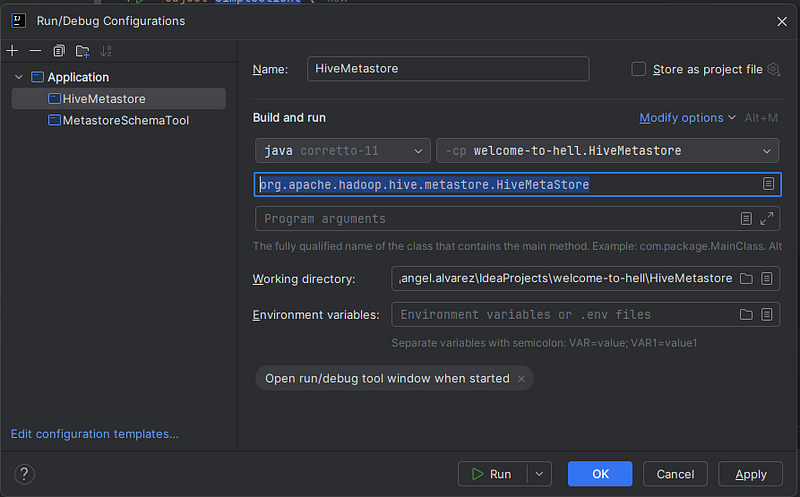
Configuration Setup to Launch the Hive Metastore Service
When running this configuration, we observe that although a new folder named metastore_db is created, the process fails with the following error:
“Exception in thread “main” MetaException(message:Version information not found in metastore.)”
This error occurs because, while the database files are created (using Apache Derby as the default database), they do not contain the metadata tables required for the Hive Metastore to function. To initialize these tables, we need to execute the schematool command or use its corresponding MetastoreSchemaTool class, but before we must delete the metastore_db folder created by the previous failed execution.
Run Configuration for MetastoreSchemaTool
- Name: MetastoreSchemaTool
- Java Version: 11
- Module:
welcome-to-hell.HiveMetastore - Main Class:
org.apache.hadoop.hive.metastore.tools.schematool.MetastoreSchemaTool - Program Arguments:
-initSchema -dbType derby --verbose - Working Directory:
welcome-to-hell\HiveMetastore - Environment Variables:
HIVE_HOME=.
After running the configuration, we encounter a new error:
“Unknown version specified for initialization: 4.0.0
The root of the issue lies in the tool’s reliance on SQL scripts to create metadata tables for supported databases. These scripts are typically included with a full Hive installation. However, since we’re running the service using only Hive jars, the necessary scripts are missing. To fix this, we need to manually copy the required SQL script for our database — hive-schema-4.0.0.derby.sql in the case of Derby—into the expected location. Then, after deleting any previously generated metastore_db folder, the tool will initialize the schema and create the required tables correctly.
Once the metadata tables are in place, we can successfully start the HMS. For clearer insights during startup, we can also include a log4j.properties file in src/main/resources/ with the desired logging settings.
If we want to store our tables inside the HiveMetastoremodule, we could set the hive.metastore.warehouse.dir property in src/main/resources/hive-site.xml; otherwise, Hive defaults to /user/hive/warehouse. Since it requires an absolute path, we can keep the file minimal if not needed.
Now, to confirm that the HMS is up and running smoothly, we’ll create a simple client to interact with it. In the HiveMetastoreClient module, add a new class named SimpleClientTest.scala under src/main/scala.
Run Configuration for SimpleClientTest
- Name: SimpleClientTest
- Java Version: 11
- Module:
welcome-to-hell.HiveMetastoreClient - Main Class:
SimpleClientTest - Working Directory:
welcome-to-hell\HiveMetastoreClient
When we execute this code, we encounter — once again — another error:
“MetaException(message:Got exception: java.lang.ClassNotFoundException org.apache.hadoop.hive.metastore.HiveMetaStore)”
This happens because our client is not configured to connect to the external HMS. Instead, it tries to start its own embedded instance. To address this, we simply need to copy the hive-site.xml file in the src/main/resources directory to this other module.
The Spark That Ignited Hell
Once we’ve been probed worthy of accesing our Metastore from a simple client, let’s do the same but using Spark. To do that, we must add a new SBT module:
Spark: This module contains a the Spark application that will test the access to Hive Metastore. Adding the following to thebuild.sbt:
Then, we copy the same hive-site.xml from the src/main/resources directory of the HiveMetastoreClient module to the same folder to the theSpark module, and add our test SparkHiveMetastoreTest.scala in src/main/scala:
This code initializes a Spark session with Hive support to interact with a Hive Metastore. It checks whether a specified table (test) exists in the default database (default). If the table exists, it displays its contents; otherwise, it creates the table using a sample DataFrame and inserts data into it. Finally, the Spark session is stopped to release resources.
Run Configuration SparkHiveMetastoreTest
- Name: SparkHiveMetastoreTest
- Java Version: 11
- Module:
welcome-to-hell.Spark - Main Class:
SparkHiveMetastoreTest - Working Directory:
welcome-to-hell\Spark
Let’s poke the data a bit to figure out who’s actually doing the writing — Hive Metastore or Spark.
If we want to control where Hive stores table data, we can set the hive.metastore.warehouse.dir property in the hive-site.xml file under src/main/resources. Otherwise, Hive defaults to storing everything in /user/hive/warehouse—which, in our case, is exactly where the data ends up.
Now for the test: we rename that warehouse folder to warehouse.old and rerun the Spark job. Spark immediately throws an exception, while the Metastore stays completely silent.
The verdict: Spark gets metadata (like schema and path) from the Metastore, but it’s Spark that reads the data directly from the warehouse location.
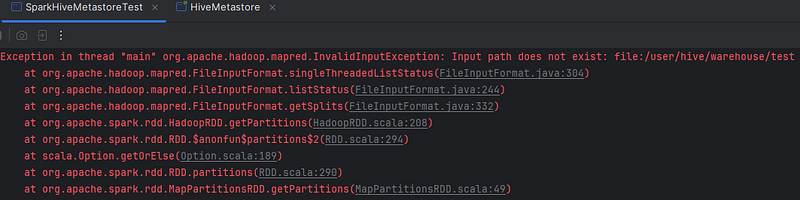
Input path does not exist
Okay, let’s rename the folder back to warehouse and brace ourselves — things are about to get a lot more complicated.
Venturing Into The Lair Of Kerberos
Imagine Kerberos as the infernal bouncer of Hell’s VIP club. Here’s how it works — well … more or less — :
- The Summoning: You (a wandering soul) want to enter a forbidden demon lair (the resource). You don’t just stroll in — you have to prove you’re worthy. So, you conjure up the all-seeing demon lord, the Key Distribution Center (KDC), and beg for access.
- The Pact: Kerberos inspects your soul (password) and, if you’re legit, forges you a Ticket Granting Tickets (TGT). This unholy token says, “Yep, this sinner belongs here.” But don’t lose it — it’s bound to you by demonic magic.
- The Bargain for Access: Now you want into a specific dungeon (service). You present your TGT to Kerberos again, saying, “Hey, I want into that pit of despair.” Kerberos considers, snarls a bit, and then hands you a Ticket-Granting Server (TGS)— a cursed pass specifically for that dungeon.
- The Final Gate (Double-Checking the Damnation): When you slam your TGS down at the dungeon’s gate (the service), the gatekeeper doesn’t just take it on faith. No, no — it silently whispers back to Kerberos, “Oi, is this ticket legit?” Kerberos confirms, “Yes, I forged that in the fires of despair,” and only then does the gatekeeper unchain the doors and let you enter.
- Hellish Efficiency: All of this happens without anyone stealing your secrets or pretending to be you, because Kerberos’ magic ensures no one can mess with your tickets or claim they’re you.
NOTE: If you really want to learn about Kerberos, this web looks like a good place to start.

This image doesn’t aim to represent anything specific, but ChatGPT made it look pretty cool.😅
In order to kerberize our Hive Metastore, we’ll need, thus, a KDC service. We could spin a Kerberos image on Docker, but … why complicate ourselves? why not make it simpler?
Apache Kerby is a — according to its own web — a Java Kerberos binding that provides a rich, intuitive and interoperable implementation, library, KDC and various facilities that integrates PKI, OTP and token (OAuth2) as desired in modern environments such as cloud, Hadoop and mobile. Because Hive and Spark both rely on Hadoop for many things, among them, security, it seems like this fits our needs perfectly fine.
Not only that, but because Kerby is a Java service, we can just simply include it in our project as a new module. For that, we only need to add the following to our build.sbt file:
Now, we’re going to add a class that starts the KDC service, creates the principal for the HMS and exports its credentials to a keytab. A keytab is a file that stores encrypted user credentials (like a password) used for Kerberos authentication — so you can log in without typing your password every time.
We put this class in the src/main/scala folder in our Kerby module.
Run Configuration KDCServer
- Name: KDCServer
- Java Version: 11
- Module:
welcome-to-hell.Kerby - Main Class:
KDCServer - Working Directory:
welcome-to-hell
NOTE: In this run configuration, the working directory is set to the root of our project. This is because when we start the KDC service, two files will be created, and they need to be placed in the root of the project (not in the module). This ensures that the files can be easily accessed by other modules. The files are:
krb5.conf: This is a configuration file used by Kerberos that specifies how to authenticate users and services. It defines the security realm, where to find the KDC service, encryption settings, and ticket expiration policies, ensuring secure access to network resources. Because we haven’t provided any configuration file or settings to the service, this file containing the default configuration is created.hive.keytab: The keytab containing the credentials for our HMS.
Now we need to configure the Metastore to start with Kerberos enabled and the appropriate principal. To do that, we add the following properties to the hive-site.xml file in theHiveMetastore, HiveMetastoreClientandSpark modules:
These properties enable the Simple Authentication and Security Layer (SASL) in the Hive Metastore, securing client connections and ensuring that only authorized users can access metadata.
When I try to start the Metastore— after having started the KDC server — now I’m getting the following error:
“Exception in thread “main” javax.security.auth.login.LoginException: Kerberos principal should have 3 parts: ANGEL.ALVAREZ”
This error occurs because the Metastore expects Kerberos authentication, but hadoop.security.authentication in core-site.xml is not set to "kerberos", causing it to default to "simple". In my case, I’m running the service on Windows, and the "simple" authentication method is using Windows login, that is, relying on the local OS user. That’s why my Windows username shows up in the login attempt.
To properly configure Hadoop to use "kerberos" authentication mechanism, we have to add a new core-site.xml file with this content in all the three modules:
Not only that, but we also need to ensure that our clients — both SimpleClientTest and SparkHiveMetastoreTest—have a valid ticket generated for the user principal. There are several ways to achieve this:
kinit/Kinit: A command-line tool used to authenticate with a Kerberos server and obtain a TGT for accessing secure services. It’s a standard Linux command but is also included in some Java distributions, allowing Java apps to handle Kerberos authentication. You could also call the classsun.security.krb5.internal.tools.Kinit.spark-submit/SparkSubmit: You can pass credentials to Spark usingspark-submitwith the--principaland--keytaboptions, e.g.,spark-submit --principal user@EXAMPLE.COM --keytab /path/to/file.keytab. Alternatively, you could callorg.apache.spark.deploy.SparkSubmit.UserGroupInformation.loginUserFromKeytab: To log in with Kerberos via Hadoop’s API, you can explictly call this method. This logs in the user and sets the credentials for accessing secured services.
Have you noticed? The third option is already implemented, but commented out, in both of our tests. We simply need to uncomment the "Login user from keytab" code block to activate it.
We also must add the following JVM property to our run configurations in order Java to be able to find our krb5.conf file:
-Djava.security.krb5.conf=../krb5.confThen, we start both our KDC and HMS, expecting everything to run smoothly — but surprise, surprise, it doesn’t! 😭
While the Hive Metastore starts up fine, and the SimpleClientTest successfully connects to it, Spark fails once again with the following exception:

Can’t get Master Kerberos principal for use as renewer
By the fiery pits of hell! WHY? Let’s shed some light on this dark error!
When we configure Kerberos as our authentication mechanism in the core-site.xml file, this setting also affects how Hadoop accesses the filesystem. Since Spark relies on Hadoop, we encounter this error because we haven’t configured the Kerberos principal for MapReduce.
To fix this, we just need to specify the principal in the new mapred-site.xml file located in the resources folder, along with the other Hadoop config files, but this time, only in the Sparkmodule.
NOTE: Ideally, the principal used for accessing the filesystem should differ from the one used for connecting to the Metastore service, but for simplicity, we’ll use the same one in this article.
Enabling SSL: Breaching The Firewall Of Damnation
Picture SSL (Secure Sockets Layer) as the demonic handshake ritual between two damned souls (a client and a server) who desperately want to talk but don’t trust each other in this fiery underworld of deception. Here’s how the infernal pact works:
- The Screaming Summons: You (the client) crawl to a shady demon lord (the server) and say, “Yo, I want to talk securely — no eavesdroppers in this hellhole!” But demons don’t just trust anyone, so it demands proof you’re serious.
- The Sigil of Trust: The server flashes its cursed certificate — a glowing talisman issued by an ancient, hell-approved overlord (a Certificate Authority — CA —). This sigil screams, “I’m legit, mortal!” You check the sigil to make sure it wasn’t forged by an imp in the back alleys of the underworld.
- The Fiery Ritual: Now begins the real magic. You and the demon server summon matching infernal keys (public and private). Think of these as hellish puzzle pieces. You exchange the public keys in plain sight, daring any nosy demons to try and understand their meaning (spoiler: they can’t without the private ones).
- The Pact is Sealed: Using these keys, you and the server conjure a shared secret: the session key. It’s like forging a flaming chain that binds your communication to each other — unbreakable, unhackable, and known only to you two.
- Whispering Through the Flames: Now, with the session key in hand, you both start speaking in tongues — encrypted hellspeak. Anyone spying on your conversation hears only gibberish, no matter how hard they try to decipher it.
- Eternal Vigilance: Throughout this dark communion, SSL ensures no demon dares impersonate either of you or corrupt your messages. If any mischief occurs, the pact breaks, and the ritual ends.
The same goes for this other ChatGPT-generated image — but hey, it’s pretty cool too!
To enable SSL for the Hive Metastore, we need to configure both the keystore (for server authentication) and truststore (for client verification). Here’s a step-by-step guide:
1. Generate a Keystore+Truststore
The keystore holds the server’s private key and public certificate. We can generate the keystore using Java’s keytool command-line utility or by invoking the sun.security.tools.keytool.Main class through a custom run configuration:
- Name: Keytool - hive_keystore.jks
- Java Version: 11
- Module:
welcome-to-hell.HiveMetastore(it doesn’t really matter) - Main Class:
sun.security.tools.keytool.Main - Program Arguments:
-genkey -keyalg RSA -alias hiveServer -keystore hive_keystore.jks -storepass changeit -dname "CN=localhost" - Working Directory:
welcome-to-hell
Since the keystore also contains the public certificate, there’s no need to create a separate store; we can use the same keystore as the truststore.
2. Configure SSL in Hive Metastore
To enable SSL in the Metastore, we must activate SSL support and configure the keystore to ensure encrypted communication between the client and the Metastore. Add the following properties to the hive-site.xml configuration file of the Metastore:
3. Configure SSL in Clients
For secure client connections to the Hive Metastore over SSL, the client must trust the server’s certificate by using the same store created earlier. In the client’s hive-site.xml configuration, add the following properties:
After making these changes, when we run our SimpleClientTest, the client successfully connects to the Metastore. However, when we apply the same configuration in the Spark module, an unexpected exception is thrown on the client side …

org.apache.thrift.transport.TTransportException: Invalid status 21
Hmmm… 🤔 The Hive logs are silent, but the client can’t connect to the Metastore. Could it be an SSL misconfiguration? How is that possible when the standalone test worked fine? Holy Hell! 😡 What dark magic is this?!
Escaping From The Inferno
If we dig into the stacktrace of the latest exception, we find the Java client org.apache.hadoop.hive.metastore.HiveMetaStoreClient—the one Spark uses to connect to the Hive Metastore. Looking into this class reveals some interesting tidbits:
- Retries Loop: The client retries failed connections up to the number set in
hive.metastore.connect.retries(default is 3). - Metastore URIs Loop: On each attempt, it tries all URIs listed in
hive.metastore.uris, and interestingly, it shuffles the list every time a new client is created. - SASL vs SSL: In the
openmethod, we see that an SSL socket is only created if SSL is enabled 👉AND👈SASL is disabled. Since SASL is handled first, enabling SSL has no effect—SSL is simply ignored if SASL is on. 😱
Hey, but wait a minute … how did our SimpleClientTestmanage to work with both SASL and SSL enabled? Ah, that one’s easy! It uses the client from hive-standalone-metastore-common-4.0.0.jar, which does support SSL alongside SASL. Spark 3.5.2, on the other hand, relies on the older hive-metastore-2.3.9, where SSL is silently bypassed if SASL is enabled.
Mystery solved—version matters! 🔍
Is this solved in Spark 4.x? Well … not quite. As of this writing, even the upcoming Spark 4.1 still uses Hive 2.3.10 — which hasn’t changed a bit in this regard. There is the PR 50213 aiming to upgrade Hive in Spark, but it’s still a work in progress. As one contributor put it: “+1 for 4.1. It won’t be ready for 4.0 and will require extensive testing.” Definitely no walk in the park!
So … is there a workaround? Absolutely! In the corresponding Jira issue (SPARK-49910), I shared a patched version of HiveMetaStoreClient that simply tweaks the logic to respect SSL settings even when SASL is enabled. Just drop that class into src/java/org/apache/hadoop/hive/metastore in the Spark module, and boom 💣—Spark can finally connect to a Kerberized, SSL-enabled Hive Metastore. As simple as that! 😎
Rising From The Ashes (aka Final Thoughts)
This might be one of the most time-consuming and effort-intensive articles I’ve ever put together — not because of the writing itself, but because of all the testing involved in the making. Every time I thought, “Okay, it’s done,” I’d uncover another sneaky misconfiguration or something I had completely overlooked. No joke. 😤
Here are some earlier versions of the test project for reference:

Oh, and about that _final project? Yeah … it definitely didn’t stay “final” for long. 😵💫😅
So yeah… thanks for sticking with me all the way to the burning gates of configuration hell 🔥😈 If you made it this far without summoning a dark ritual out of frustration, you deserve a medal — or at least a strong coffee. I hope you enjoyed the ride, learned a thing or two, and didn’t sell your soul to Kerberos in the process.
If you spot anything wrong and/or like the article, please drop a comment or contact me at Linkedin. But if you didn’t like it … well … then … NullPointerException! 😂👹
Until next time, brave config warrior … may your logs be verbose and your stacktraces mercifully short!
Sneak Peek To The Abyss
Do you dare to face the flames of your fate … and embrace your future as a damned soul? The full code and configurations that fueled this infernal struggle can be found in this GitHub repository. Proceed with caution, for the path ahead is treacherous.
Tributes From The Underworld
First and foremost, I’d like to extend my infernal gratitude to Stefano Bovina for tossing this fiendishly intriguing issue my way — something truly worthy to sink my teeth into.
When it comes to the arcane arts of Kerberos, the first soul that comes to mind is my former colleague — and almost friend 😉 — Juan Manuel Nieto. My unholy thanks go to him for imparting the tiny shred of Kerberos knowledge I possess, proving that even the damned can learn a thing … or two.
Finally, a big shoutout to the fearless warriors upgrading dependencies and bringing Spark into the future with Hive 4. May your builds be swift and your merges conflict-free! 🫡
“In the middle of the journey of our life, I found myself in a dark wood, for the straightforward path had been lost.”
(from Dante’s Inferno, Canto I)