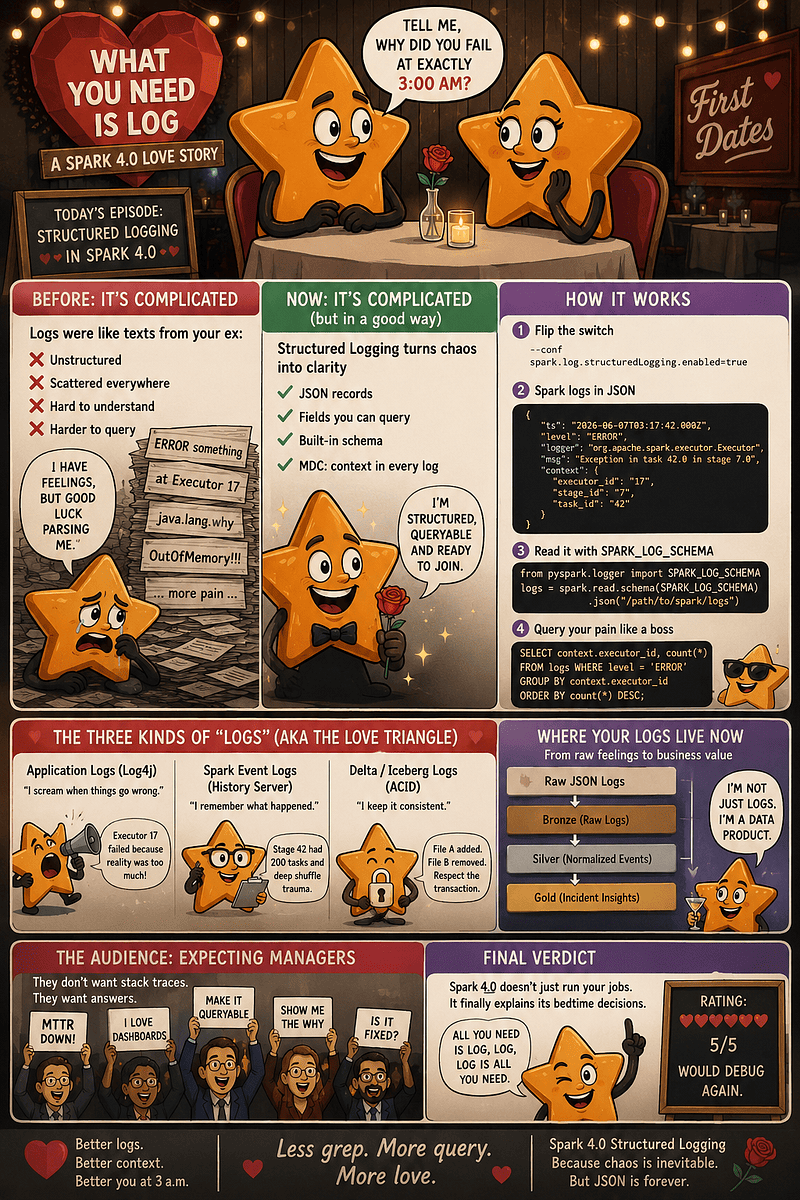
Apache Spark WTF??? ❤️ What You Need Is Log 🪵
Yesterday, all my troubles seemed so far away. Then Spark failed. Now it looks as though the logs are here to stay…

“All you need is log, log
Log is all you need”
(adapted from “All You Need Is Love” by The Beatles)
When Logs Were Archaeology
Before Spark 4, Spark’s runtime application logs were free-form poetry written by a nervous distributed system. They were scattered across drivers, executors, Kubernetes pods, and that one node that disappeared like it owed money to the scheduler.
The Plain-Text Grep Ritual
When a job failed, you began the traditional data engineering ritual:
grep ERROR driver.log
grep "OutOfMemory" executor-*.log
grep "why are you like this" *
Plain text is beautiful for humans but terrible for machines. A human reads Failed to remove executor 17 and thinks, “Classic 17.” A machine just sees a string. There is no guaranteed executor_id or task_id schema without writing fragile regex pipelines that break the moment someone changes a comma.
UI, Metrics, and the “Log Soup”
To debug, we juggled multiple tools. The Spark UI tells you what happened, and metrics tell you the body temperature (e.g., Executor memory: Angry). But logs tell you who screamed while it happened.
However, we first have to clear up someLog Confusion Syndromenot yet officially included in the DSM-5, but already diagnosed in 9 out of 10 incident reviews.
We constantly call three entirely different things “logs” while pretending it isn’t confusing:
- Application Logs (Log4j): “Executor 17 failed because reality was too much.”
- Spark Event Logs (History Server): “Stage 42 had 200 tasks and deep shuffle trauma.”
- Delta/Iceberg Logs (ACID): “File A added. File B removed. Respect the transaction.”
The Core Tragedy
The tragedy of pre-structured logging wasn’t a lack of information — it was a lack of shape. Spark is a world-class analytics engine. It thrives on columns, schemas, and structured data. Yet, its own operational output was mostly unstructured text.
🤔 Why run a massive data engine whose own diary can’t be processed as data?
💬 Spark Enters The Chat
Spark 4.0 brings the kind of update that sounds completely boring in a slide deck, right until production fails at 3:00 AM and Slack starts screaming for updates.
Say hello to Structured Logging. 👋
Historically, Spark logs have been a sprawling wall of unstructured text. That’s fine if you’re reading a fantasy novel, but terrible when you’re trying to figure out why Executor 17 threw itself into the cloud-provider void during a critical write. Spark 4 improves our toxic relationship with log formatting by transforming emotional graffiti into readable, queryable data.
The New Configuration Spell
In Spark 4.0, you flip the switch using a single property:
--conf spark.log.structuredLogging.enabled=true(Note: It is false by default, so you do have to explicitly opt-in).
Once active, a traditional, messy log entry shifts from a raw string into a clean JSON record:
{
  "ts": "2026-06-07T03:17:42.000Z",
  "level": "ERROR",
  "logger": "org.apache.spark.executor.Executor",
  "msg": "Exception in task 42.0 in stage 7.0",
  "context": {
    "executor_id": "17",
    "stage_id": "7",
    "task_id": "42"
  }
}
The magic here is simple: Records have fields. Fields can be queried. We are no longer parsing sentences via frantic regex patterns; we are filtering actual attributes.
Spark Can Now Query Its Own Screams
Because Spark logs are now clean JSON, and Spark excels at reading JSON, Spark can literally analyze itself. This is the distributed-systems equivalent of looking in the mirror and admitting, “Maybe I am the incident.”
Spark 4.0 even exposes a built-in schema helper specifically for this:
from pyspark.logger import SPARK_LOG_SCHEMA

# Turn your existential pain into a DataFrame
logs = spark.read.schema(SPARK_LOG_SCHEMA).json("/path/to/spark/logs")
Now your logs are a structured DataFrame. You can aggregate, group, and interrogate your infrastructure with normal PySpark code:
# Rank the most toxic loggers in your cluster
errors_by_logger = (
    logs
    .where("level = 'ERROR'")
    .groupBy("logger")
    .count()
    .orderBy("count", ascending=False)
)
MDC: The Context Backpack
Structured logging relies heavily on MDC (Mapped Diagnostic Context). Think of MDC as a tiny data backpack that every single log line wears.
Inside this backpack, Spark can attach crucial tracking variables such as executor_id, stage_id, task_id, or query_id when that context exists.
Distributed debugging is all about correlation. MDC gives you the join keys for chaos, allowing you to run surgical queries instead of reading text files like love letters from an emotionally unavailable cluster.
SELECT context.executor_id, count(*) AS error_count
FROM spark_logs
WHERE level = 'ERROR'
GROUP BY context.executor_id
ORDER BY error_count DESC;
Log4j2 is Still Running the Show
Under the hood, Spark isn’t inventing a new engine; it utilizes the Log4j2 JSON Template Layout.
This means your existing logging pipelines can usually keep collecting the output, although parsing and redaction rules may need checking. Spark just provides a standardized schema. If your logs are collected into an engineering lakehouse, they can effortlessly enter a clean medallion architecture:
Raw JSON Logs
 ⤷ Bronze (Raw Logs)
    ⤷ Silver (Normalized Events)
       ⤷ Gold (Incident Insights)
Suddenly, logs aren’t just an afterthought you grep after a crash. They become a data product.
💔 What Structured Logging Breaks
Before we all hold hands and sing All You Need Is Log around a clean JSON campfire, let’s talk about the heartbreak. Structured logging is the right direction, but when you change the shape of your logs, everything that relies on the old shape gets nervous. And by “nervous,” I mean broken.
Your Regexes Are Now Legacy Infrastructure
For years, your log collection relied on custom regex parsing lines like:
26/06/07 03:17:42 ERROR Executor: Exception in task 42
When Spark 4 flips to JSON, your old parser acts like a dumped lover reading a WhatsApp export — it panics because the exact toxic text layout it was trained on is missing.
The dangerous part is the silent failure. Your log collector keeps running, your alerting system stays completely quiet, and your dashboard reports “Zero Spark Errors Today” with the calm confidence of a haunted elevator. Meanwhile, in reality, Executor 17 has completely crashed.
Field Names Change, Contracts Break
Structured fields are contracts, and tiny contractual changes break massive systems. In Spark 4.0, the MDC key for Spark task names changed:
- Old Way (Spark 3.x):
mdc.taskName - New Way (Spark 4.0):
task_name
If your downstream pipelines expect the old camelCase format, your observability will develop a gaping hole. If you need a temporary escape hatch to fix your dashboards, use this scaffolding:
--conf spark.log.legacyTaskNameMdc.enabled=trueEvent Logs Are a Different Dragon
Do not mistake Application Logs (the JSON lines we’ve been talking about) for Event Logs (used by the Spark History Server). Spark 4.0 introduces two major defaults for event logs:
- They now roll incrementally
- They are compressed by default
If your platform tools expect old-school, raw, unrolled event logs, you’ll need to explicitly opt out:
--conf spark.eventLog.rolling.enabled=false
--conf spark.eventLog.compress=false
Same Snakes, New Suitcase
Don’t assume your multiline stack trace nightmare has vanished. JSON doesn’t fix exceptions; it just makes them portable. A suitcase full of snakes is easier to transport than loose snakes, but it’s still a suitcase of snakes.
Furthermore, structured data is verbose. Field names, timestamps, and nested objects cost storage bytes. If Executor 17 decides to write a tragic novel in DEBUG mode, your logging costs will skyrocket.
Security: Secrets are Easier to Index
Because JSON makes searching effortless, any accidental tokens, keys, or personal data leaked in your query text are now structured, indexable, and incredibly easy to find. Proper log redaction and masking rules should be validated before you roll this out to production.
🐴 The Four Horsemen Of Observability
There is a distinct moment in every major incident when someone blindly shouts in Slack: “Check the logs!” Great idea. Which ones? Driver logs? Executor logs? Kubernetes pod logs? YARN containers? Python workers? Delta transaction logs?
Before the word “log” completely loses its meaning, let’s separate the family members. They might all attend the same production funeral, but they are absolutely not the same person.
Application Logs: What Screamed?
These are the runtime messages emitted by Spark, the JVM, and your own code. It’s where you find the classic spiritual ballads like java.lang.OutOfMemoryError: Java heap space.
This is exactly where Spark 4.0’s structured logging shines. It gives your application logs clear attributes like timestamp, level, logger, message, and context.
The Takeaway: Application logs are the raw screams. Structured logs are the screams with metadata.
Metrics: How Sick Was The Beast?
Metrics are numbers, not stories. They give you the system’s vital signs so you can build dashboards to show leadership.
The Relationship: A metric says the patient has a high temperature (
executor.memory.used = 28 GB). A log tells you the patient swallowed a toxic Python UDF and is currently quoting Nietzsche. You always need both.
Spark Event Logs: The History Server’s Memory Palace
These are not your application logs. They are granular, historical execution records used by the Spark History Server and other tooling to replay what happened after the application has died.
The Spark 4 Catch: As mentioned, Spark 4.0 now rolls and compresses these by default.
Delta Logs: The Table Accountant
The files under _delta_log/ are not Spark runtime records or executor confessions. They are ACID transaction records tracking table versions, metadata changes, and files added or removed.
The Relationship: Application logs say the write failed. Event logs show the stage had many retries. Delta logs tell you exactly what committed to storage.
The Danger of “I Read the Logs as JSON”
In Spark 4, saying “I read the logs as JSON” can mean three entirely separate things:
spark.read.json("/path/to/spark/application/logs")➔ Analyzing the screams.spark.read.json("/path/to/spark/eventlog")➔ Execution archaeology.spark.read.json("/path/to/table/_delta_log/*.json")➔ Transaction inspection.
If you dump all three into the same raw table without a discriminator column, you haven’t built observability — you’ve built a blender, and the smoothie tastes like an incident review.
The Dream: One Timeline to Rule Them All
Instead of creating a single massive dashboard, use these four witnesses to reconstruct a precise incident timeline:
03:12:01 - Job started (Event Log)
03:13:44 - Stage 7 began (Event Log)
03:14:03 - Executor 17 memory spikes (Metrics)
03:15:10 - Task failures begin (Application Log)
03:15:48 - ERROR from Delta write path (Application Log)
03:16:02 - Aborted commit cleanup initiated (Delta Log)
03:16:20 - Job aborted (Reality)
A Quick Compatibility Reminder
As you move to Spark 4.x, remember that your Delta Lake version must match your Spark line. Check the Delta compatibility matrix before upgrading; leaving connectors behind is how logs learn to laugh at you.
If you upgrade Spark but leave your Delta connectors behind, your logs will quickly teach you humility.
💡 Rule of Thumb: If you want to know what the code said, look at Application Logs. How sick it was, check Metrics. How it executed, check Event Logs. What the table committed, check Delta Logs.
👻 Structured Streaming Observability
Batch jobs fail loudly. They leave a corpse, a clean stack trace, and an error log written by a JVM trapped in an elevator.
Streaming jobs are worse. They don’t always fail; sometimes they continue running forever… completely incorrectly. A batch job says, “I am dead.” A streaming job says, “I am technically alive, but batch 941 has been processing for 47 minutes and my state store now has the mass of a small moon.”
With streaming, the question changes from “Did it crash?” to “Is it still healthy?”
The Streaming Observability Triangle
Monitoring a production stream requires watching a three-headed beast:
- Progress (
lastProgress/StreamingQueryProgress): tells you what each micro-batch is doing (numInputRows,processedRowsPerSecond,watermark). - Metrics (Engine): Tell you how sick the infrastructure is (
executor memory,GC time,checkpoint I/O latency). - Logs (Events): Tell you who shouted right before the furniture caught fire (
ERROR MicroBatchExecution,Kafka authorization sadness).
If you only monitor one of these, you are looking through a single camera angle in a haunted house.
State Store Archaeology: The State Data Source
Stateful streaming (joins, watermarks, aggregations) transforms simple pipelines into tiny, distributed databases with deep trust issues.
Before Spark 4.0, inspecting a streaming checkpoint was impossible without raw guessing. Spark 4.0 changes this by bringing the State Data Source out of hiding. You can now read a live streaming checkpoint as a standard batch DataFrame:
state_df = (
    spark.read
    .format("statestore")
    .load("/path/to/checkpoint")
)
state_df.printSchema() # Inspect the key, value, and partition_id fields
1. State Time Travel. If your checkpoint data hasn’t been aggressively purged, you can inspect the exact state at a previous micro-batch to pinpoint the exact moment your data exploded:
state_at_batch_100 = (
    spark.read
    .format("statestore")
    .option("batchId", 100)
    .load("/path/to/checkpoint")
)
2. The State Change Feed. Instead of just grabbing a snapshot, you can query state changes like a database transaction log:
state_changes = (
    spark.read
    .format("statestore")
    .option("readChangeFeed", True)
    .option("changeStartBatchId", 2)
    .load("/path/to/checkpoint")
)
3. Slicing Symmetric Joins. Stream-stream joins are notoriously asymmetrical heavy lifters. One side might be completely clean while the other is hoarding events like a dragon with Kafka offsets. You can isolate them directly:
left_join_state = spark.read.format("statestore").option("joinSide", "left").load("/path/to/checkpoint")⚠️ Small warning label: the State Data Source is still marked experimental, so options and output may evolve.
Enter transformWithState (The Grown-Up API)
Spark 4.0 introduces transformWithState, the new arbitrary stateful processing API and spiritual successor to the older mapGroupsWithState / flatMapGroupsWithState style. It natively handles automatic Time-To-Live (TTL), schema evolution, and explicit timers.
Because a single transformWithState query can maintain multiple independent state variables, your debugging query must target them by name:
user_state = (
    spark.read
    .format("statestore")
    .option("stateVarName", "userSessionState")
    .load("/path/to/checkpoint")
)
You can even inspect registered background timers (option("readRegisteredTimers", True)) to see if your query has scheduled secret timeout appointments with itself.
🐍 PySpark Observability
PySpark lets Python engineers use Spark without feeling like they accidentally joined a strict type-theory book club with a Scala build tool. However, it introduces a legendary observability headache: the dreaded, generic PythonException.
That isn’t a diagnosis; it’s Spark pointing at a dark cave and saying, “The problem went in there.”
Historically, Spark’s internal optimizations end the moment a custom Python User-Defined Function (UDF) is invoked. To Spark, a Python UDF is an opaque black box. It might be lightning-fast, it might be slow, or it might be doing unauthorized network I/O because someone mistook a UDF for a distributed API client. Spark 4 doesn’t make the cave disappear, but it gives it a microphone and a flashlight.
Python Logs Get a Shape: PySparkLogger
Instead of falling back on the ancient, frantic debugging ritual of scattering print("HERE") and print("WHY IS THIS NULL") statements throughout your script, Spark 4.0 introduces pyspark.logger.PySparkLogger for structured client-side PySpark logging.
This wrapper naturally forces your Python driver-side logs into structured JSON:
from pyspark.logger import PySparkLogger

logger = PySparkLogger.getLogger("apache-wtf")
logger.info("Starting customer cleanup", table="customers", optimism="unjustified")
Now, your client exceptions and custom data-cleaning traces use standardized fields that can be indexed and mapped directly onto an incident timeline.
Giving the Cave Subtitles: Worker Logging (Spark 4.1+)
There is a massive architectural gulf between code running on your driver and code running deep inside Python worker processes on your executors. Historically, printing or logging inside a worker meant your log lines put on a fake passport and fled the country.
Spark 4.1 bridges this gap. By activating a simple configuration property, you can capture executor-side Python worker logs and query them directly as a table:
# Turn on the subtitles
spark.conf.set("spark.sql.pyspark.worker.logging.enabled", "true")

# Query worker logs directly with a Built-in Table-Valued Function (TVF)
spark.tvf.python_worker_logs().select("level", "msg", "logger", "context").show(truncate=False)
Spark looked at your distributed debugging trauma and said, “What if your existential pain had columns?” It’s a game-changer.
Moving Past “Python Is Slow”: UDF Profiling
When a pipeline stalls, the lazy root-cause analysis is almost always: “Python is slow.” Spark 4.0 adds unified UDF profiling via the spark.sql.pyspark.udf.profiler configuration so you can demand actual receipts.
1. Performance Profiling (=perf)
spark.conf.set("spark.sql.pyspark.udf.profiler", "perf")
# Run your UDF-heavy workload here...
spark.profile.show(type="perf")
If your UDF is parsing a complex date string 700 million times inside a hidden hot loop, the performance profiler will point to the exact code execution path.
2. Memory Profiling (=memory)
Python UDFs can be absolute memory goblins. If your code is secretly materializing massive iterators, converting millions of rows into dictionaries, or reloading heavy machine-learning models per row, it results in executor instability and sudden worker death.
spark.conf.set("spark.sql.pyspark.udf.profiler", "memory")
# Run your workload...
spark.profile.show(type="memory")
💡 Pro-Tip: Any variable named
all_customersorall_rowsinside distributed worker code should trigger an immediate architectural alarm.
⚠️ Small warning label: UDF profiling has limits. Iterator-style UDFs are not supported, and memory profiling may require the optional
memory-profilerpackage. In other words, Spark now gives you receipts, but some receipts still arrive handwritten on a napkin.
🔥 From Log Swamp To Incident Timeline
Every platform team eventually discovers the same disappointing truth: collecting metrics, dumping JSON blobs into a bucket, and spinning up a dashboard with twelve panels and one angry red number is not observability. That’s just expensive interior design.
Observability begins when your data answers a narrative. The ultimate goal of Spark 4.x’s observability improvements isn’t to create a data landfill — it’s to construct an Incident Timeline.
The Dream: A Courtroom Timeline
A proper incident timeline lets you instantly differentiate between a systemic disaster and an innocent bystander:
03:12:41 - Stage 7 started (Event Log)
03:13:05 - Executor 17 memory spikes (Metrics)
03:13:55 - GC time hits critical threshold (Metrics)
03:14:09 - Python worker logs a suspicious UDF warning (Python Worker Log)
03:14:18 - ERROR triggered in Delta write path (Application Log)
03:14:25 - Job aborted; zero Delta table versions committed (Delta Log)
Without this structured view, your team screams: Delta is broken!
With it, you diagnose reality: Upstream memory pressure caused executor loss during the commit phase; Delta was simply present at the crime scene.
Observability reduces blame and increases evidence.
Organizing the Observability Medallion Architecture
Don’t union all your logs into a single giant table. That way lies madness. Keep the streams conceptually separated as they travel through your data platform.
1. Bronze: The Evidence Locker. Bronze should preserve raw logs with zero aggressive normalization. If you throw away fields early because you think you won’t need them, you curse your future postmortems. Use the built-in schemas to ingest safely:
from pyspark.logger import SPARK_LOG_SCHEMA

# Ingesting raw structured application logs
raw_logs = spark.read.schema(SPARK_LOG_SCHEMA).json("/observability/raw/spark/app_logs/")
2. Silver: Standardizing the Chaos. Silver is where you extract stable fields and inject a shared vocabulary. This is where you clean timestamps and index your critical correlation keys: app_id, executor_id, stage_id, task_id, and query_id.
💡 Crucial Rule: For the love of distributed systems, standardize your time zones in Silver. Nothing kills incident response quite like half the team reading UTC while a dashboard uses local browser time.
3. Gold: Building Products, Not Mood Lighting. Gold tables should expose actionable leads, not raw text files. Humans are not distributed query optimizers. Build aggregated summary tables like gold.spark_executor_failure_hotspots or a gold.python_udf_suspicion_index.
CREATE OR REPLACE TABLE gold.spark_error_summary_by_app AS
SELECT
  app_id,
  date(event_ts) AS event_date,
  level,
  logger,
  count(*) AS event_count,
  collect_set(error_class) AS error_classes
FROM silver.spark_app_logs_normalized
WHERE level IN ('WARN', 'ERROR')
GROUP BY app_id, date(event_ts), level, logger;
Partitioning Like Someone Pays the Bill
Structured logs are verbose, and if a rogue executor starts writing a novel in DEBUG mode, your storage bill will arrive written in thunder.
- Partition by
event_date,environment, andapp_id. - Avoid over-partitioning by infinitely variable values like
executor_id. - Define explicit retention policies per layer. “Keep everything forever” is only an architectural strategy if your team is funded by a fantasy dragon. 🐉
The Anti-Patterns to Avoid
- The Log Blender: Dumping application logs, metrics, and Delta actions into one flat table.
- Logging inside a UDF loop: This is how you DDoS your own storage layer with sheer sincerity.
- Alerting on Gossip: Don’t configure Slack alerts to fire on every single
WARNorERRORstring. Alert on system symptoms using metrics (e.g., high failure rates, extreme latency), then use the structured logs as the clinical evidence to diagnose the patient.
🕵 The Final Incident️
Every production incident has a villain. Sometimes it’s a bad deployment, sometimes cloud storage is having an existential crisis, and sometimes it’s a Python UDF that looked totally innocent in code review because nobody noticed it imported requests.
But most of the time, it’s Executor 17. Again.
Imagine a normal Tuesday. The pipeline owner is calm, the dashboard is a beautiful green, and the target dataset has a reassuring name like customer_360_enriched_gold_vFinal_REAL. Suddenly, seven catastrophic words hit Slack: Job failed while writing to Delta.
Immediately, someone mutters the most dangerous phrase in data engineering: It was probably transient.
Usually, “transient” is just shorthand for: I have absolutely no evidence, but I would really like this conversation to end.
Spark 4.0 doesn’t eliminate infrastructure glitches, but it prevents vague explanations from escaping unquestioned.
The Old Way: Grep, Panic, Restart, Repeat
The traditional plain-text workflow starts with pure vibes:
grep ERROR driver.log

# Driver says: "Job aborted due to stage failure." Thank you, very brave.
grep -R "OutOfMemory" executor-*.log
After wading through 2,000 chaotic lines of mixed text, you manually restart the job. It succeeds. The room relaxes, and the incident ticket gets closed with a root cause that amounts to little more than a shrug in YAML.
Step 1: Query the Structured Evidence
With Spark 4.0’s structured logs flowing into your Silver lakehouse table, your first move is a targeted query, not a wild string search:
SELECT event_ts, level, logger, message, context.executor_id, context.stage_id
FROM silver.spark_app_logs_normalized
WHERE app_id = 'app-202606070312' AND level IN ('WARN', 'ERROR')
ORDER BY timestamp;
Instantly, you get a chronological courtroom transcript:
03:13:22 WARN ShuffleExternalSorter (executor=17, stage=42)
03:13:47 WARN TaskMemoryManager (executor=17, stage=42)
03:14:03 ERROR Executor (executor=17, stage=42, task=881)
03:14:09 ERROR DeltaWrite (executor=null, stage=42)
The Delta write absolutely failed — but Delta isn’t the villain here. Delta is just the person who walked in and found the body.
Step 2: Correlate with System Vital Signs
Logs show you who screamed; metrics reveal how sick the beast was right before it happened. Let’s isolate Executor 17’s performance metrics inside that exact 5-minute disaster window:
SELECT timestamp, metric_name, metric_value
FROM silver.spark_metrics_normalized
WHERE app_id = 'app-202606070312' AND executor_id = '17'
ORDER BY timestamp;
If the metrics reveal that memory usage, Garbage Collection (GC) time, and disk memory spill were all spiking sequentially between 03:12:50 and 03:13:50, the narrative completely changes. You are no longer blaming the Delta storage layer — you are investigating an unhealthy upstream execution path.
Step 3: Interrogate the Witnesses (Event & Python Logs)
Next, cross-reference Spark’s incremental event logs to verify task distributions:
SELECT stage_id, executor_id, count(*) AS failed_tasks
FROM silver.spark_execution_events
WHERE app_id = 'app-202606070312' AND failure_reason IS NOT NULL
GROUP BY stage_id, executor_id;
-- Result: stage_id=42, executor_id=17, failed_tasks=38
If you are on Spark 4.1+ and worker logging is enabled, pull up the worker log table-valued function:
SELECT ts, level, logger, msg FROM python_worker_logs() ORDER BY ts;
-- Result: "WARNING suspicious_udf: Loading ML model from S3 per row"
(assuming spark.sql.pyspark.worker.logging.enabled=true)
That isn’t a log warning; that’s an explicit confession.
Finally, ask the Delta transaction log if the version actually advanced:
SELECT version, operation FROM silver.delta_table_commits
WHERE table_path = '/data/tables/customer_360'
ORDER BY version DESC;
-- No commit recorded for the failure window.
-- Delta table state was not advanced.
The Ultimate Reward: An Accurate Postmortem
By blending these distinct, structured streams, your final incident report shifts from a lazy fairytale to a pristine, engineering-driven diagnosis.
Bad Postmortem: The job failed due to a transient Spark issue. Rerun succeeded.
Spark 4.0 Postmortem: The job failed during the Delta write phase, but Delta was not the root cause. Structured logs indicate critical memory warnings and 38 task failures isolated on Executor 17 during Stage 42. Metrics confirm Executor 17 suffered severe memory pressure and aggressive disk spilling prior to crashing. Python worker logs revealed the culprit: our custom UDF was hitting an unoptimized model-loading hot loop. Delta’s transaction logs confirm zero data corrupted or committed during the crash, making the Delta table rerun path safer to reason about.
👑 Before You Unleash JSON Upon The Kingdom
Structured logging sounds completely harmless. It’s just a single configuration boolean. What could possibly go wrong?
Well, your downstream log parsers could break, your alerts could go completely silent, and your runbooks could point to text paths that no longer exist. Meanwhile, deep in production, Executor 17 could fail dramatically while your monitoring tools cheerfully report “Zero errors detected.”
Observability migrations are still migrations — which means they are places where confidence goes to become a Jira ticket. To survive unleashing JSON on your data kingdom, follow this refined battle plan.
1. Trust the Output, Then Confirm the Docs
Don’t just write down “Spark 4-ish” on your architecture diagrams. Document your exact vendor runtime, container images, and Log4j2 configurations.
More importantly, trust the logs your cluster actually emits, not the documentation map. Run a microscopic test job, inspect the raw stdout or driver files, and verify if the runtime wraps the JSON payload or strips crucial nested fields before you modify anything in production.
2. Test Drivers and Executors Individually
Driver logs and executor logs rarely take the same journey. The driver might print to standard output, while executors route text through isolated container daemons or cloud-provider collectors.
- A log collector might parse the driver’s JSON flawlessly, yet treat an executor’s JSON as a sketchy string and pack the whole record into a flat message blob.
- Ensure that multi-line exceptions, timestamps, and application tracking IDs survive securely on both sides of the cluster boundary.
3. Hunt Down Forgotten Parsers
The most dangerous migration failure isn’t a loud crash — it’s when a legacy parser silently fails to extract fields and assumes everything is fine. Audit your entire stack for custom string-matching logic:
- Log aggregation engines (Splunk, Datadog, Elastic, CloudWatch).
- Rogue infrastructure pieces: old Fluent Bit pipelines, custom cron regex scripts, or that one bash tool from 2021 called
parse_err_final_v3.sh.
If your legacy parsers are looking at JSON formatting like a medieval monk staring at a toaster, fix the mapping rules before proceeding.
4. Bridge the MDC Field Names
Fields are tiny software contracts. When a contract breaks, dashboards lie. Spark 4.0 modified the MDC tracking variable for active task names:
- Old Key:
mdc.taskName - New Key:
task_name
If your alerting queries look for the old key, you will suddenly blind your observability stack. Use the temporary compatibility flag as a scaffolding bridge while you update your dashboards:
--conf spark.log.legacyTaskNameMdc.enabled=true5. Run Messy Production Workloads
Never validate a telemetry upgrade using a clean spark.range(10).count(). That isn’t a test; that’s just Spark clearing its throat.
Deploy your telemetry changes against workloads that represent actual platform chaos: memory-heavy jobs, data skew anomalies, custom Python UDFs, and active Structured Streaming tasks. You need to see how your logs behave when the infrastructure gets genuinely messy.
6. Mask Secrets Before Indexing Everything
Because structured logging makes text search incredibly efficient, it also makes leaked credentials dangerous. Any cloud tokens, connection strings, database passwords, or private customer identifiers mistakenly dumped into your query arguments are now cleanly structured, indexed, and completely searchable via API. Run rigorous redaction validation before exposing these logs to the wider team.
7. Maintain an Active Escape Hatch
A compatibility strategy that hasn’t been tested in pre-production is just fan fiction wrapped in a YAML file. Ensure your deployment pipelines can drop back to standard plain-text layouts instantly if your log indexing platform buckles under the sheer byte volume of verbose JSON strings.
# The Emergency Compatibility Blueprint
--conf spark.log.structuredLogging.enabled=false
--conf spark.eventLog.rolling.enabled=false
--conf spark.eventLog.compress=false
🤔 What Is Logged?
Spark 4 doesn’t fix distributed systems. It just makes them confess in JSON.
Skew will still happen. Memory will still suffer. Python UDFs will still enter production humming innocently while carrying a suitcase full of serialization crimes.
But now, when the job fails at 3 a.m. — and believe me, it always happens at 3 a.m. — you have a better answer than: Spark was weird.
You can say: Executor 17 was sweating, stage 42 was spilling, Delta did not commit, Python looked suspicious, and yes, all we needed was log… plus metrics, event logs, Delta history, state inspection, a profiler, and emotional support.
So maybe the final question is not only: What is logged?
Maybe the real production questions are: How is it logged? Why is it logged? And why does Executor 17 always look guilty?
“What is logged?
Oh, baby, don’t hurt me
Don’t hurt me no more”
(adapted from “What is love?” by Haddaway)