Apache Spark WTF??? — ⭐Written In PySpark ⭐
So you thought PySpark was just “Spark, but in Python”? Spoiler: it’s not. It’s more like a cosmic translator — your Python code gets…

“Oh, written in PySpark
A task stays awake
A message to the LLM (oh)
Seconds come and go,
but the task never ends,
I’ll fix it — I’m on my way (Let’s go!)”
(adapted from “Written in the Stars” by Tinie Tempah)
🔧 Under the Hood of PySpark
PySpark feels deceptively simple. You write some nice, clean Python code, hit run, and—boom—the cluster crunches through terabytes of data. Magic? Not quite. To understand its behavior (and debug it without losing your mind), you need to know how these two worlds talk and work together.
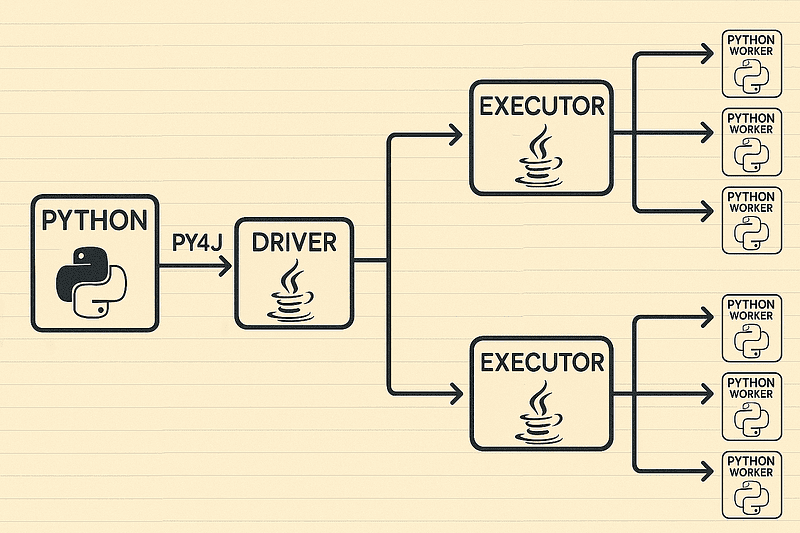
PySpark: inside the snake’s lair
Let’s break it down into two main communication channels:
🐍➜☕[From Python Driver ️to Spark JVM Driver]
When you write PySpark code in Python, you’re not directly manipulating the data. You’re sending instructions to the Spark JVM driver, which is the actual commander of the Spark cluster.
Here’s what happens step by step:
🧾 Step 1: The Python front-end builds a logical plan. When you do something like:
df = spark.read.csv("data.csv")
df = df.filter(df.age > 30)
df.show()
You’re not executing anything yet. You’re just building a plan (a sequence of transformations) in Python. Think of it as describing what you want done — not doing it.
🧭 Step 2: Py4J bridge — Python ➜ JVM. Every PySpark session runs a JVM process alongside your Python process. They talk using a library called Py4J, which opens a socket connection between them. Each method call you make in Python (like df.filter(...)) is translated into a command and sent through this bridge to the JVM driver.
🧠 Step 3: JVM Driver builds the actual DAG. The Spark JVM driver receives these commands and constructs the logical and physical plans using the Catalyst optimizer. This is where Spark does all the clever stuff: predicate pushdown, projection pruning, reordering joins, etc.
But remember: nothing is actually computed yet. Spark’s transformations are lazy — the driver just builds a DAG of operations.
🚦 Step 4: Action = Execution. When you call an action (like .show(), .count(), .collect()), Spark finally kicks into gear:
- The JVM driver takes the DAG,
- Schedules tasks across executors,
- And starts distributing data processing jobs.
The Python process at this point is more of a coordinator; the real work happens in the JVM. If something goes wrong here (e.g. planning errors, schema mismatches), the logs and stack traces you need are usually in the driver logs, not Python.
💡 Curious tip: Python stack traces are read from top to bottom, showing the most recent call last, while JVM stack traces are the opposite — they’re read from bottom to top, with the most recent call first.
☕➜🐍 [From Spark JVM Executors ️to Python Workers]
Once the driver decides what to do, it ships tasks to executors (Java processes) on different nodes in your cluster. These executors are responsible for running transformations on partitions of data.
Now, here’s where things get interesting — and where a lot of PySpark performance pitfalls come from.
🧰 Step 1: JVM executors need Python to run your code. Executors live in Java, your code lives in Python. For each partition, the JVM spins up (or reuses) a Python worker process that runs your UDFs. Each worker talks to its executor through a local socket — the bridge between the two worlds.
Note: On Databricks, each task may use two Python processes: a main Python worker that handles communication with the JVM, and a child process that runs Arrow-based or Pandas UDF logic. This setup improves isolation and performance for vectorized operations but adds slight overhead compared to regular PySpark tasks with a single process.
📦 Step 2: Data serialization (a.k.a. “boxing and unboxing”). Data has to constantly move between the JVM and the Python worker. The executor serializes data on the JVM side (using Pickle or Arrow), sends it through a local socket to the Python process, where it’s deserialized, processed by your Python logic, and then serialized again before being sent back to the executor. This back-and-forth across the JVM–Python boundary adds noticeable overhead — serialization and data transfer are expensive, which is a big reason why PySpark often runs slower than native Scala Spark.
💡 Tip: If your logic is mostly SQL-like (filters, joins, aggregates), Spark can run everything in the JVM faster. But if you use Python UDFs everywhere, you force data to jump between worlds repeatedly.
⚡ Step 3: Apache Arrow to the rescue. To reduce the cost of moving data, Spark can use Apache Arrow, a columnar memory format that allows zero-copy or minimal-copy data sharing between JVM and Python.
Enable it like this:
spark.conf.set("spark.sql.execution.arrow.pyspark.enabled", "true")What about Pickle? By default, PySpark uses Pickle, Python’s built-in serialization mechanism. Pickle converts Python objects into byte streams and back again. It’s flexible and universal, but also slow and CPU-heavy, since every row must be individually serialized and deserialized — not ideal for large datasets. It’s not a silver bullet, but it can make certain workloads (especially Pandas UDFs) much faster.
Note: Arrow-based optimizations are disabled by default. Even when enabled via spark.sql.execution.arrow.pyspark.enabled, Spark may automatically fall back to non-Arrow execution if an error occurs before computation begins. You can control this behavior with the spark.sql.execution.arrow.pyspark.fallback.enabled setting.
🔁 Step 4: Results return to JVM, then back to Python driver (if needed). After all tasks finish, the executors aggregate their results and send them back to the JVM driver, which may then pass the data through Py4J to your local Python process (for example, when you call .collect()). That means a .collect() call pulls all the data from the cluster into your local memory — great for small datasets, but dangerous for large ones, since your Python process can easily run out of memory trying to hold everything at once.
🌌The Case: Lost in Space
We had a PySpark job that ingested emails, unpacked attachments, and called a Large Language Model (LLM) to extract information. Everything ran smoothly — until one task decided to take an infinite coffee break, sitting there forever in the Spark UI. Not always, and not in every environment. Curious, right?
👨🏻🔬Preparing the Experiment
We don’t actually need to call any LLM to reproduce this case, but to make our test more realistic, we’ll create a small API server so that a few real HTTP requests are involved.
We’ll execute two Python scripts for this test (in this order):
tiny_api_server.py— sets up a minimal API server that listens onlocalhost (127.0.0.1)at port8080. The API accepts a wait parameter, sleeps for that duration, and then returns a response to the caller.test_udf_calls.py— starts a Spark session and creates a single-column DataFrame containing different wait times. Each of these values is passed to a UDF that calls our tiny API server and patiently waits for the response.
You can grab the repo here. Time to fire up the test! 🔥
Okay, in this test we already know why our server takes longer to respond — we’re explicitly telling it to wait! But let’s imagine we don’t know why the response times are increasing. Or better yet, let’s say our PySpark application is doing a lot more work — not just calling the API, but also performing extra processing inside the UDF (like preparing the data before sending it and parsing the response afterward). So how could we figure out what’s really happening inside our PySpark program?
🪐 Drifting Through the JVM Multithread Nebula
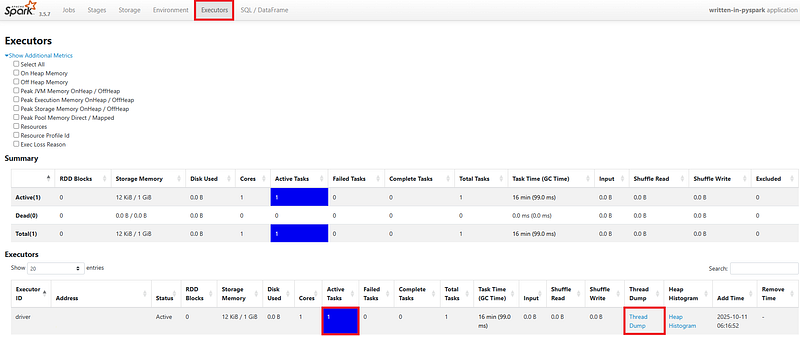
If we want to understand what’s really happening inside the executor’s JVM, we can start by heading to the Executors tab in the Spark UI and clicking the Thread Dump link for the node running active tasks.
Filtering by “executor task” and looking at threads in the RUNNABLE state often reveals a familiar story — the executor isn’t actually busy crunching data. It’s waiting on a Python worker to finish its work.
java.base@11.0.24/java.net.SocketInputStream.socketRead0(Native Method)
java.base@11.0.24/java.net.SocketInputStream.socketRead(SocketInputStream.java:115)
java.base@11.0.24/java.net.SocketInputStream.read(SocketInputStream.java:168)
java.base@11.0.24/java.net.SocketInputStream.read(SocketInputStream.java:140)
java.base@11.0.24/java.io.BufferedInputStream.fill(BufferedInputStream.java:252)
java.base@11.0.24/java.io.BufferedInputStream.read(BufferedInputStream.java:271) => holding Monitor(java.io.BufferedInputStream@1746096476)
java.base@11.0.24/java.io.DataInputStream.readInt(DataInputStream.java:392)
app//org.apache.spark.sql.execution.python.BasePythonUDFRunner$$anon$1.read(PythonUDFRunner.scala:83)
app//org.apache.spark.sql.execution.python.BasePythonUDFRunner$$anon$1.read(PythonUDFRunner.scala:75)
app//org.apache.spark.api.python.BasePythonRunner$ReaderIterator.hasNext(PythonRunner.scala:525)
Here we see the executor thread blocked on a socket read — patiently waiting for the Python worker to return results.
🚀 Exploring PySpark’s UDF Universe: From 3.5 to 4.1 and Beyond
At the heart of Spark’s SQL galaxy lies the BasePythonUDFRunner— the airlock between the JVM and the Python world. Built atop the lower-level PythonRunner, it’s the shuttle that ferries data, functions, and results across the language boundary.
When a query plan encounters a Python UDF, physical operators such as BatchEvalPythonExec or ArrowEvalPythonExecassemble an execution payload: which UDFs to run, how inputs map to columns, and which evaluation mode to use. This payload is handed off to BasePythonUDFRunner, which launches a dedicated Python worker — one per task — and streams across configuration data, serialized UDFs, and batched inputs over sockets, like mission control sending packets to a distant probe.
Inside the Python worker, data is unpacked and executed:
- Regular UDFs process rows sequentially under the GIL.
- pandas/Arrow UDFs perform vectorized computation in pandas or NumPy.
The results are serialized, transmitted back through the data channel, reconstituted into Spark’s internal format, and sent upward through the execution chain — completing one small orbit in Spark’s distributed compute system.
If we want to tune PySpark’s behavior, the constellation to look at is the spark.sql.pyspark.udf family in SQLConf.scala. But over time, this space has expanded significantly:
Spark 3.5 — Simplified Tracebacks. In Spark 3.5, PySpark’s configuration universe was small:
spark.sql.execution.pyspark.udf.simplifiedTraceback.enabled(introduced in 3.1.0). When enabled, it simplified Python UDF error messages by hiding PySpark internals — worker setup, serialization layers, and other cosmic noise — and revealed only the core exception from user code. It required CPython 3.7+ and was enabled in production but disabled in tests by default.
Spark 4.0 — Profiling, Fault Handling, and Traceback Control: Expanding Horizons. Spark 4.0 marked a big bang in PySpark’s SQL configuration space. Developers gained a set of tools to probe and control the worker layer more precisely:
spark.sql.pyspark.udf.profilerintroduced a built-in profiler for UDFs, allowing developers to select"perf"for performance metrics or"memory"for memory tracking. If left unset, profiling remained dormant — a sleeping satellite waiting for activation.spark.sql.execution.pyspark.udf.faulthandler.enabledactivated Python’sfaulthandler, capturing stack traces on fatal errors.spark.sql.execution.pyspark.udf.idleTimeoutSecondsdefined how long a worker could drift idle before being released.spark.sql.execution.pyspark.udf.hideTraceback.enabledhid entire stack traces and surfaced only the final error message. When this was enabled, the earlier simplified traceback became irrelevant.
Spark 4.1+ (Master). The master branch (to become Spark 4.1) adds final layers of control, stabilizing the Python execution environment like a well-tuned orbit.
spark.sql.execution.pyspark.udf.killOnIdleTimeoutensures that idle Python workers aren’t merely released but terminated outright, preventing resource drift and ghost processes.spark.sql.execution.pyspark.udf.tracebackDumpIntervalSecondsadds diagnostic telemetry — allowing Spark to periodically dump Python worker tracebacks, invaluable for investigating deadlocks or cosmic hangs in distributed UDF execution.
Together, these settings make PySpark’s worker ecosystem more self-correcting, observable, and resilient.
Okay, but what if we’re on an older planet? If our workloads still orbit an earlier Spark release, we won’t find these newer stars in our sky. In that case, we’ll need to build our own instruments — for instance, crafting a custom tracebackDumpIntervalSeconds mechanism to periodically inspect Python workers and keep an eye on what’s happening out there in the dark.
🐍 A Snake Peek into the Snake’s Lair
In a PySpark Python worker, taking a thread dump lets us see exactly where the code is stuck or busy — for example:
- Whether threads are waiting, blocked on I/O, or sleeping.
- Which functions or libraries the worker is currently executing.
It includes the name of each thread, optionally its state (running, waiting, blocked, etc.), and the stack trace — the exact sequence of function calls currently being executed.
To capture thread dumps, we just need to add the following code snippet to our program and call it from within our UDF function.
# Name of the dump logger thread
THREAD_NAME = "ThreadDumpLogger"


def thread_dump_periodic(interval_seconds=60):
    """
    Background thread that prints a thread dump to the console
    every `interval_seconds` seconds.
    """
    import os
    pid = os.getpid()
    print(f"The PID of the current process is: {pid}")

    # Infinite loop: periodically print a thread dump
    while True:
        # Wait before the next dump
        time.sleep(interval_seconds)

        timestamp = datetime.datetime.now().strftime("%Y%m%d_%H%M%S")
        print(f"\n=== Thread dump at {timestamp} (PID: {pid}) ===\n")

        # Print the stack traces of all threads to stdout
        faulthandler.dump_traceback()


def ensure_dump_thread(interval_seconds=60):
    """
    Checks if the dump thread is already running.
    If not, starts a new background thread that prints thread dumps.
    """
    for t in threading.enumerate():
        if t.name == THREAD_NAME and t.is_alive():
            # Already running — do nothing
            return

    # Start a new daemon thread for periodic dumps
    dump_thread = threading.Thread(
        target=thread_dump_periodic,
        args=(interval_seconds,),
        daemon=True,
        name=THREAD_NAME
    )
    dump_thread.start()
    print(f"Thread {THREAD_NAME} started")
This code defines two helper functions that work together to periodically print Python thread stack traces (“thread dumps”) to the console in the background.
- The
thread_dump_periodic(interval_seconds=60)function runs in the background and periodically prints Python thread stack traces (“thread dumps”) to the console. It loops forever, sleeping for the given interval, then logs the process ID, prints a timestamped header, and shows what every thread is doing. The output looks similar to aSIGQUIT(Ctrl+\) dump — a quick snapshot of all active threads, useful for spotting deadlocks or slowdowns in PySpark. - The
ensure_dump_thread(interval_seconds=60)function makes sure that background dump thread exists. It checks all active threads for one named"ThreadDumpLogger", and if none is running, it starts a new daemon thread runningthread_dump_periodic(). Because it’s a daemon, it automatically exits when the main program ends. In short, this function guarantees that only one thread is handling the periodic dumps.
Now, thanks to our ThreadDumpLogger utility, we can see what’s happening inside the Python worker in test_udf_calls_with_threadumps.py.
Thread 0x0000249c (most recent call first):
  File "Python311\Lib\socket.py", line 705 in readinto
  File "Python311\Lib\http\client.py", line 279 in _read_status
  File "Python311\Lib\http\client.py", line 318 in begin
  File "Python311\Lib\http\client.py", line 1374 in getresponse
  File ".venv\Lib\site-packages\urllib3\connection.py", line 565 in getresponse
  File ".venv\Lib\site-packages\urllib3\connectionpool.py", line 534 in _make_request
  File ".venv\Lib\site-packages\urllib3\connectionpool.py", line 787 in urlopen
  File ".venv\Lib\site-packages\requests\adapters.py", line 644 in send
  File ".venv\Lib\site-packages\requests\sessions.py", line 703 in send
  File ".venv\Lib\site-packages\requests\sessions.py", line 589 in request
  File ".venv\Lib\site-packages\requests\api.py", line 59 in request
  File ".venv\Lib\site-packages\requests\api.py", line 73 in get
  File "written-in-pyspark\src\test_udf_calls_with_threadumps.py", line 69 in call_api
🆘 Houston, we have a problem
When we call requests.get(), it feels like a simple “fetch that URL” call — but under the hood, Python travels through several layers before any data moves across the network. Each layer adds its own responsibility to the process:
requests.api.get()– The Entry Point. This is the high-level function we call. It delegates the work torequests.api.request(), which handles the general logic for all HTTP methods.requests.sessions– Managing State. This layer handles sessions, cookies, headers, and persistent connections, keeping multiple requests efficient and consistent. A session is an object that remembers settings and state across requests — things like cookies, headers, and TCP connections. Instead of opening a brand-new connection each time, it reuses existing ones, making repeated calls to the same server faster and more reliable.requests.adapters– Choosing the Transport. The adapter decides how to send the request — HTTP or HTTPS, direct or via proxy — and then passes control to urllib3.urllib3– Handling Connections.urllib3manages connection pooling, retries, and lower-level details like socket timeouts. It’s the layer that turns a high-level HTTP call into real network operations.http.clientandsocket– The Core Layers. At the bottom,http.clientformats the actual HTTP request, andsocketopens a network connection to the server. This is where the thread in the stack trace is sitting — insidesocket.readinto(), waiting for data to arrive from the remote host.
So, when we read a stack trace like this, we’re really looking through Python’s networking layers — from the friendly requests API at the surface down to the raw socket at the core. Each layer is distinct yet perfectly aligned, like Saturn’s rings — beautiful, structured, and quietly spinning beneath what looks like a simple call to requests.get().
Now that we understand what’s really going on, we might be tempted to lean on Spark’s retry mechanism or its speculation feature. In this case, though, they won’t save us — the sleep times are fixed — but in other cases they could soften the pain and shave off some waiting time.
The real issue is that our request task simply never ends. No error, no exception — just eternal silence. When we don’t specify a timeout, requests will wait indefinitely at the Python level, trusting the operating system to decide when enough is enough. The catch? Most OS socket timeouts are absurdly long or effectively infinite. So the program can just sit there forever, frozen in time and space, unless the network itself eventually gives up (say, via a TCP keepalive or some lower-level failure).
To avoid getting stuck waiting forever, we can simply configure a timeout in our request call. The timeout parameter tells requests how long to wait — both for the connection to be established and for the server to send back data. We can pass it as a single value (applied to both stages) or as a tuple (connect_timeout, read_timeout) for finer control:
import requests

# Wait up to 5 seconds to connect, and 10 seconds for a response
response = requests.get("https://example.com", timeout=(5, 10))

# Or use a single timeout for both
response = requests.get("https://example.com", timeout=10)
The connect timeout is how long we wait for the initial connection to the server to be established, while the read timeout is how long we wait for the server to send back data after the connection is made.
🐒 Monkey See, Monkey Don’t
What if you’re using a third-party library that makes HTTP calls internally and doesn’t expose a way to set timeouts? You’re not totally stuck — there are several practical workarounds, ordered from least to most invasive.
1] Put a proxy in front of it (network level). Use a proxy (mitmproxy, Squid, HAProxy, etc.) to enforce timeouts or cut off slow connections at the network layer.
✅ Pros: no code changes required, centralized control for many services.
⚠️ Cons: operational overhead and extra infrastructure to maintain.
2] Global socket timeout (use with caution). You can set a default timeout for all sockets:
import socket
socket.setdefaulttimeout(10)
✅ Pros: quick and works for code that never passes explicit timeouts.
⚠️ Cons: very broad — affects all sockets in the process (DNS lookups, logging, database drivers, other libraries). Use only if you understand the side effects.
3] Run the call in a separate thread/process with a watchdog. Wrap the library call so you can kill or recover if it hangs:
def call_library():
    # call into the stubborn library here
    return library_call()

with ThreadPoolExecutor() as ex:
    future = ex.submit(call_library)
    try:
        result = future.result(timeout=10)  # seconds
    except TimeoutError:
        print("Library call timed out — take recovery action")
        # optionally: restart a worker process, alert, etc.
✅ Pros: safe isolation, lets you enforce a hard-wall timeout.
⚠️ Cons: killing threads is limited (threads can’t be forcefully killed in CPython), so for full isolation use a separate process.
4] Monkey-patch requests (if the library uses requests). If the library calls requests directly and you can run code before it does, patch requests.request() to inject default timeouts:
import requests

_real_request = requests.request

def _patched_request(*args, **kwargs):
    if "timeout" not in kwargs:
        kwargs["timeout"] = (3, 10)  # connect=3s, read=10s
    return _real_request(*args, **kwargs)

requests.request = _patched_request
Now any requests.get() (yours or that library’s) will use your default timeout unless it passes its own.
✅ Pros: simple, effective, good for controlled runtimes (containers, worker processes).
⚠️ Cons: global side effect — it changes behavior for all callers in the process. Do it once at startup, document it, and only use it when you control the runtime.
🌍 Returning to Earth
And that’s PySpark in a nutshell. It all starts with a few innocent lines of Python and somehow ends with you debugging a JVM cluster with 500 sockets, three zombie workers, and one executor questioning its life choices. But once you understand the Py4J bridge, the Arrow teleportation, and the lazy DAG that refuses to move until you beg, those cosmic bugs stop feeling personal.
So the next time your job freezes in the Spark UI, take a deep breath — somewhere out there, a lonely Python worker is still staring at a socket, dreaming of better timeouts.
Keep your DAGs short, your UDFs pure, and your Arrow enabled — because in the PySpark galaxy, survival isn’t about speed. It’s about staying calm while everything else times out.
🛰 Mission Control Shout-Out
This article wouldn’t have reached orbit without Ramón Sieira Martínez — the steady force behind every retry. Through hours of frustration, tangled JVM mysteries, and Spark jobs that refused to die, Ramón never gave up. Thanks for turning chaos into lift-off and keeping the hope alive.
“Nobody cares how PySpark runs around,
’Til a task gets struck and they ask, “WTF — how?”
(adapted from “Written in the Stars” by Tinie Tempah)