Databricks 🤔 Are You Babysitting Me? 🍼
I picked a 16 GB Databricks node. The cluster metrics showed free memory, so I tried to give my Spark driver a little more heap. Databricks…
“Stand clear, config limits bark
You can’t tweak what I tweak, can’t touch where it’s locked
Watch out, we may run Spark
but Databricks keeps some mem conf sealed from the start”
(adapted from “Sound of da Police” by KRS-One)
👮 The Parking Ticket: Your Driver Heap Exceeds Local-Mode Regulations
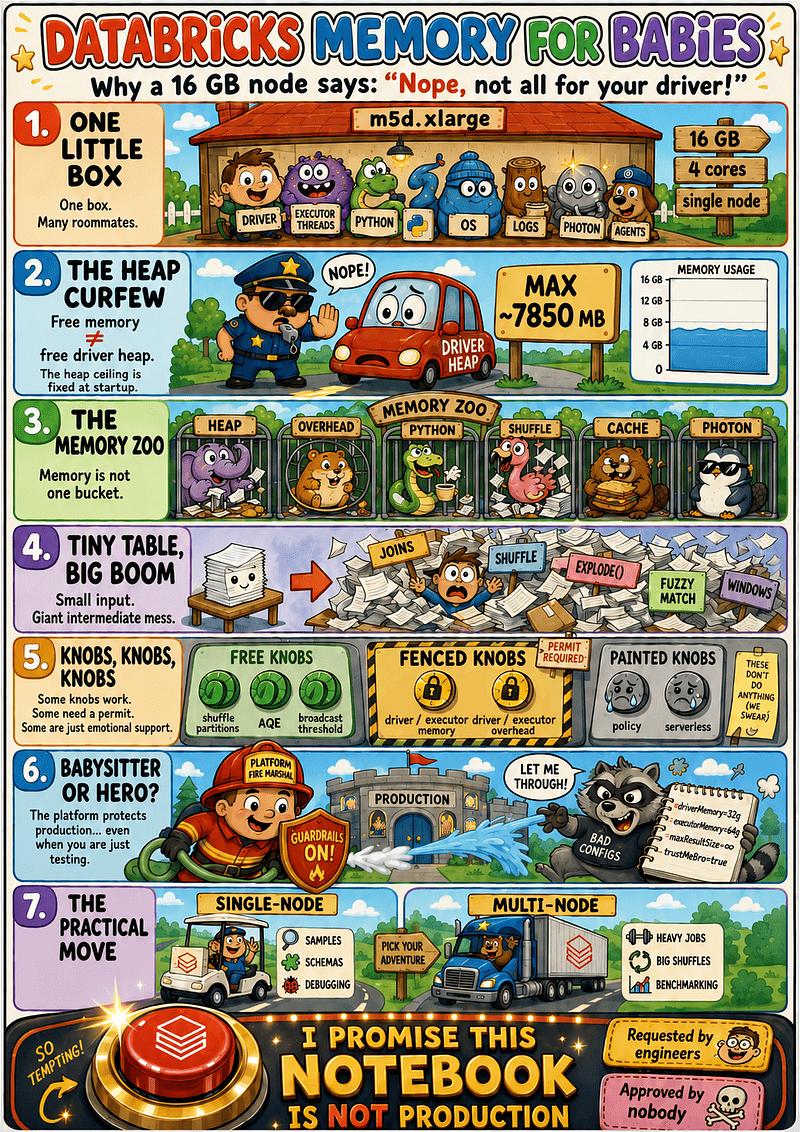
My cluster looked innocent enough: an m5d.xlarge with 16 GB of memory, 4 cores, and single-node mode. Nothing dramatic. Just one modest box, standing there politely, pretending it was not about to become a tiny Spark municipal office with zoning laws.
The metrics showed free memory. No smoke. No alarms. So I tried to give the driver a bit more heap. A mature engineering thought. Databricks rejected it with the energy of a clipboard-wielding parking inspector who had been waiting all morning for this exact violation.
The Violation Notice And The Emotional Damage
In single-node mode, Spark runs locally on one box. The driver is not alone in a throne room; it shares the machine with executor threads, notebook state, Python processes, logs, Databricks services, JVM overhead, native memory, and possibly Photon.
So when the driver heap says -Xmx7850m that’s not a suggestion. That’s the ceiling.
Spark memory is not one communal soup pot. It is a set of locked buckets: JVM heap, overhead, off-heap memory, Python memory, cached data, shuffle buffers, OS memory, and platform reserves.
That’s why container memory can still have headroom while the JVM heap is already suffocating.
Free container memory does not mean free driver heap.
The heap limit is fixed when the cluster starts. It will not expand mid-job like a happy balloon. It hits the ceiling, garbage-collects like a raccoon trapped in an office printer, and dies while you stare at a half-empty chart wondering why you’re locked out of your own RAM.
The Safety Helmet Problem
Databricks doesn’t know our workloads at cluster launch. Maybe we’re running clean SQL. Maybe we’re mostly JVM-safe. Maybe we’re about to summon pandas, Python UDFs, a monster shuffle, and a 4 GB dictionary named small_lookup.
The platform cannot tell yet, so it applies the enterprise safety rail: Please wear this helmet while operating Spark.
To be fair, my workload was not innocent. It was a complex data-matching job that expanded heavily under the hood. Some tasks have a gift for turning polite row counts into a paperwork avalanche.
So Databricks was not hallucinating the danger. It was just parenting me with the emotional subtlety of an airport security tray.
🏢 The Memory Permit Office: Node Memory Is Not Driver Heap
My mistake was simple: I assumed a 16 GB node meant the driver could use something close to 16 GB. It cannot.
In a managed platform, node memory is not driver heap. They are separate government offices, each blaming the other for project delays.
Node Memory: The Gross City Budget
When the cloud provider gives us a 16 GB instance, that is the gross municipal budget. It has to pay for everything living on the box: Operating system, Databricks runtime services, logging agents, notebook processes, the driver JVM, Spark local execution, off-heap buffers, native libraries, Python workers, thread stacks, and other tiny platform goblins with pension plans.
Container Memory vs. JVM Heap: Locked Drawers
The Databricks metrics can show container memory with headroom. But container memory is not a gift card. Some of that memory belongs to things outside the Java heap: off-heap buffers, Netty, thread stacks, metaspace, native libraries, Python workers, and platform processes.
Python & Spark Overhead: The Intern With a Flamethrower
Python workers live entirely outside the JVM heap, and Databricks has no idea at boot whether our notebook will run a polite .count() or attempt raw .toPandas() structural violence.
If you audit active machine processes during a run, you will see PySpark’s parent-child supervisor architecture in action: one master Parent Daemon (pyspark.daemon) plus one Child Worker process for every active concurrent task. The JVM doesn’t launch Python tasks directly; it boots the master daemon, which instantly forks a Child Worker process the split second a task needs to execute Python code.
To avoid a brutal library-import tax on subsequent tasks, Databricks defaults to spark.python.worker.reuse=true. Instead of terminating when a task ends, these child workers simply park in an idle pool. Between these lingering workers, supervisor daemons, native ML packages, and Arrow buffers, off-heap real estate gets crowded incredibly fast. Spark explicitly separates heap from overhead in its UI, but to the physical node, it remains a single, heavily contested bucket of RAM.
🐕🦺 Single-Node Mode: One Officer Doing Traffic, Payroll, and Dog Control
Single-node sounds harmless. But in Databricks, single-node is not just a smaller cluster. It changes the execution model. Spark runs locally. The driver acts as both master and worker. There are no separate worker nodes. Everyone lives in the same tiny municipal office.
Squeezed Into One Box
On a normal multi-node Spark cluster, the driver plans and coordinates while workers execute the heavy lifting.
In single-node mode, that map collapses into one physical machine:
[-------------------------- One Physical Node --------------------------]
   ├─ Driver process: planning, orchestration, SparkContext
   ├─ Local Spark execution / executor threads
   ├─ Python workers and notebook state
   ├─ Databricks logging and monitoring services
   └─ Your questionable engineering choices
So when we ask for more driver heap, we’re not just helping the driver. We’re taking memory from the same box that must also execute tasks, run Python workers, hold notebook state, write logs, and keep the operating system alive.
The Curfew Is Final
A common instinct is to assume the default memory settings are conservative and can be overwritten. In Databricks local mode, that may not be true.
The default driver heap can already be at, or very close to, the maximum Databricks allows for that node type and mode. In my case, on a 16 GB m5d.xlarge single-node setup, the visible ceiling was around 7.8 GB.
😎 Photon: The External Consultant With Sunglasses
Photon sounds like the ultimate jailbreak — native, vectorized, written in C++, and blazingly fast. In fact, I previously broke down its underlying architectural trade-offs and performance mechanics over at Apache Spark WTF — Suspicious Minds.
Naturally, you ask: If Photon is enabled, does the memory babysitter go away?
No. Photon is brilliant, but it does not abolish the Databricks municipality. We are still subject to the exact same zoning laws, cluster policies, and pre-launch validation rules.
No Heap Extensions Allowed
The most critical point: Photon does not grant you a heap expansion permit. If your single-node cluster hard-caps your driver heap at 7,850 MB in local mode, turning Photon on will not magically change that limit.
Photon modifies how physical data operators execute, but it does not alter the fundamental JVM startup parameters evaluated by Databricks.
The Dual-Memory Universe: Shifting the Pressure
While Photon significantly reduces JVM object churn and garbage collection pauses for supported operations, it doesn’t make memory demands vanish. It simply shifts the paperwork to a different room.
Because Photon operates inside a native engine, its footprint lives entirely in off-heap memory. When Photon is turned on, Databricks typically reduces your JVM heap size by default to carve out a massive off-heap playground for the C++ engine.
🕘 The Heap Curfew: Knobs, Permits, and the Practical Escape Route
First, I tried to increase the driver memory to 10 GB. Databricks blocked the UI before I could even save it: too high for an m5d.xlarge.
Fine. I became a responsible citizen and tried 9 GB instead. This time the UI accepted the paperwork. Then I started the cluster. Databricks stepped out with a clipboard and said: No.
This was not a runtime crash. The job did not explode halfway through a join. The cluster never got that far. This was a pre-flight rejection: Databricks reviewed the requested layout, decided it violated local-mode zoning laws, and refused to start.
That is when memory tuning stops being: What should I tune?
And becomes: Am I even allowed to tune this?
First: Check Which Spark Universe You Live In
Before shouting at configs, check the actual runtime shape:
print("Spark version:", spark.version)

try:
    print("Spark Master:", spark.sparkContext.master)
    print("Default Parallelism:", spark.sparkContext.defaultParallelism)

    runtime = spark._jvm.java.lang.Runtime.getRuntime()
    print("JVM Max Heap:", round(runtime.maxMemory() / 1024**3, 2), "GB")

except Exception as e:
    print("Low-level SparkContext/JVM access is not available here.")
    print("You may be on Spark Connect, standard access mode, or serverless.")
    print("Error:", type(e).__name__, str(e)[:250])
On classic single-user / dedicated clusters, this usually works: you can access spark.sparkContext, sc, and _jvm, because your notebook has the old-school Py4J door into the Spark driver.
On standard access mode clusters, especially Databricks Runtime 14.0+, Databricks uses Spark Connect-style isolation: sc, some RDD APIs, and direct JVM access are blocked. Databricks documents that sc is no longer available in notebooks or Databricks Connect on standard access mode, and the KB recommends switching to single-user compute if you need JVM/RDD access.
On Databricks Connect, serverless, and SQL Warehouse-style environments, assume the low-level JVM doors are locked. You are talking to Spark through a managed client/server layer, not sitting inside the driver with a backstage pass.
So if Spark Master says local[*] and the JVM heap is already near the Databricks cap, the lever is maxed out. More config shouting will not summon extra RAM.
And if the diagnostic itself gets rejected, congratulations: you found another babysitter.
The Free Knobs: Algorithmic Scaling
Some knobs are real and useful because they change how Spark plans work:
spark.sql.shuffle.partitions
spark.default.parallelism
spark.sql.adaptive.enabled
spark.sql.adaptive.coalescePartitions.enabled
spark.sql.autoBroadcastJoinThreshold
These can help on small compute, where thousands of tiny shuffle tasks become bureaucratic confetti.
But they are not magic. Setting shuffle partitions to 1 because “less is more” is how one sad thread ends up hauling the city archive in a wheelbarrow.
The Fenced Knobs: Infrastructure Boundaries
These are real Spark configs, but Databricks may guard them heavily:
spark.driver.memory
spark.driver.memoryOverhead
spark.executor.memory
spark.executor.memoryOverhead
On unmanaged Spark, you can set reckless numbers and let the JVM meet the kernel killer. On Databricks, the launch validator may block the cluster before it starts.
In single-node mode, the driver shares the box with local Spark execution, Python workers, notebook state, logs, monitoring, the OS, Databricks services, and platform reserves. So the driver heap cannot simply expand until it eats the node.
On my 16 GB m5d.xlarge single-node setup, the driver heap was effectively capped around 7.6–7.8 GB. Asking for more was not “advanced tuning.”
It was an illegal parking maneuver.
The Painted-On Knobs: Policies and Serverless
Sometimes Spark is not blocking you. Your workspace is.
Compute policies can fix, hide, forbid, or limit settings: node types, runtimes, worker counts, Photon, and Spark configs. So yes, open-source Spark may support a config. Your workspace may still reply: Spark allows it. City Hall does not.
In serverless, Databricks owns even more of the toolbox. You write SQL/DataFrames; the platform handles the plumbing.
The Algorithmic Pivot
Once the heap lever is already maxed out, stop shouting at the config file.
If combinatorial joins, huge arrays or cross-joins are multiplying your data under the hood, the problem is not a small filing cabinet. It is that your code is printing every document twice.
Before begging for a larger memory permit:
- Filter early.
- Drop unused columns.
- Deduplicate before heavy joins.
- Avoid accidental many-to-many explosions.
- Write intermediate states to Delta when lineage gets obese.
When the Knob Is Denied
When Databricks rejects a memory layout at launch, do not keep entering slightly smaller numbers like you are negotiating with a broken vending machine.
Your options are simple:
- Use a larger node.
- Move to multi-node compute.
- Reduce the sample size.
- Fix the expansion pattern.
Use single-node when the job is still a notebook with a backpack.
Use multi-node compute when the job starts moving furniture, breaking elevators, and requiring a loading dock.
You may own the cloud instance budget, but Databricks owns the zoning board.
👶 Is Databricks Babysitting or Protecting Production?
At this point, it’s tempting to conclude that Databricks has appointed itself Minister of Heap Affairs just to hide your RAM behind a velvet rope.
But the babysitter exists because production users are dangerous. Not stupid. Not malicious. Just dangerous in the way a smart engineer can still launch a 400 GB .toPandas(), a shuffle piñata, or a cloud bill with the emotional texture of a tax audit.
Managed platforms are not designed only for the person who knows what they are doing. They are designed to survive the person who says they know what they are doing.
Why the Guardrails Exist
Every restriction has an origin story, and that story usually contains a notebook, an urgent support ticket, and the phrase: The cluster randomly crashed. It was not random. It was a scheduled appointment with consequences.
Databricks cannot scan your brain at cluster launch to know whether you are a disciplined distributed-systems adult or a notebook-shaped raccoon with admin permissions. So it treats your careful memory experiment and Kevin’s final_latest_ok_notebook_v9.ipynb with the same suspicion.
The Managed Contract
With open-source Spark, you can drive the JVM into a wall and spend the evening reading logs like medieval scripture.
Databricks offers a different contract: managed clusters, governed access, safer defaults, cost controls, and someone helping keep the machinery from catching fire.
Naturally, the fire marshal has opinions. The platform narrows what you can configure because infinite JVM flags, rogue Python processes, and experimental cluster layouts are impossible to support safely.
City Hall can maintain the highway. It cannot certify the ramp you built over the river because it worked on your laptop.
Protection With a Clipboard
So, is Databricks babysitting us or protecting production?
Databricks is babysitting us to protect production. The problem is that its protection is blunt. At pre-flight validation time, it does not know whether our job is a throwaway test, a production pipeline, or a business-critical workload with a real deadline. It also doesn’t know whether our code avoids Python UDFs, skips giant shuffles, and genuinely needs more JVM heap.
It sees the requested cluster shape, the workspace policies, and the rulebook. That is reasonable. But it’s also annoying.
And here is the fairness paradox: if the platform says it’s protecting production, but cannot tell whether we’re running production or an innocent one-off notebook, is that protection fair? Or is it just a blanket rule wearing a security badge?
For standard enterprise workloads, this tradeoff is often worth it. But for edge-case memory tuning, it can feel like benchmarking a Formula 1 car inside a school zone.
The school zone exists for a reason. But if our pipeline really needs a racetrack, stop modifying the golf cart. Move to the right compute shape, use multi-node architecture, or file the proper platform forms.
The real failure is opacity. When Databricks says Invalid Parameter, it should show the ledger: node memory, runtime envelope, system reserve, local-mode cap, policy limits, and the exact reason our request was denied.
Databricks is not stealing our memory. It’s enforcing a managed-runtime contract written in invisible municipal ink.
🪶 Project Feather: Spark Goes to the Small-Data Permit Office
Just when the Databricks memory babysitter story starts feeling like a localized, vendor-specific sitcom, Apache Spark itself walks into the room carrying a significantly lighter clipboard.
The name on the badge: Project Feather.
The core philosophy of this SPIP (Spark Project Improvement Proposal) is beautifully simple: Spark is a masterpiece when our data is colossal, but it’s hilariously overdressed when our data can fit inside a lunchbox. Project Feather targets small, local data workflows — like running Spark on our laptop or inside an isolated single-node environment. Its goal isn’t to defeat specialized single-node engines like DuckDB or Polars at their own game, but to stop Spark from scaring away developers before they ever reach scale.
The Small-Data Tax: Why Industrial Machinery Fails on Local RAM
Spark’s core architecture is aggressively optimized for distributed, fault-tolerant processing across thousands of nodes. However, that heavy enterprise blueprint turns into a massive performance tax when our dataset is under 100 MB.
When we filter a tiny local CSV, a query can easily stall for several seconds. That delay isn’t the actual data processing; it’s the fixed structural overhead of the Spark machinery:
- Query analysis and logical optimization forms.
- Physical DAG planning and metadata access checks.
- Task serialization, deserialization, and stage distribution.
- Local shuffle setup and cluster scheduling logic.
On a petabyte-scale job, these planning costs are a drop in the bucket. On a tiny local workload, the planning becomes the meal, the dessert, the bill, and the suspicious service charge.
This is exactly why Project Feather belongs in a Databricks memory discussion. Databricks single-node clusters, laptop test sessions, and quick development notebooks all suffer from the same fundamental issue: Spark brings distributed-system bureaucracy to a single-machine neighborhood.
Project Feather won’t bypass our Databricks cluster launch caps, nor will it forge a permit for a larger driver heap. The babysitter still owns the building. But by drastically shrinking the data-processing furniture Spark brings into the local JVM, it makes the existing space feel far less cramped.
The Three Chores of Project Feather
To lighten the local-mode workload, the proposal breaks its engineering down into three major fronts.
1. Smart Query Compilation & Lightweight Scheduling. For tiny queries, Spark spends more time organizing the task than executing it. One major fix is making the planner explicitly aware of single-partition inputs.
If Spark recognizes that a file scan involves exactly one local file, it can dynamically assign the scan’s outputPartitioning to SinglePartition instead of defaulting to UnknownPartition. This minor paperwork change allows Spark to skip entirely unnecessary intermediate shuffles before downstream operators like aggregations or hash joins.
In early prototype testing, a basic filter-and-sort operation over a small in-memory table dropped from two full stages (330 ms) to a single execution stage (150 ms).
2. Arrow-Based df.cache. The open-source cache mechanism was built for long-term cluster reliability, not rapid local iteration. Feather introduces an Apache Arrow-based cache layer.
Because Arrow is natively columnar and utilizes optimized IPC compression, it radically shrinks the in-memory cache footprint within the JVM process. It doesn’t give you a larger physical heap, but it stops Spark from filling your limited drawer with giant, inflated filing cabinets.
3. Shuffle-Free Local Execution. Spark normally forces blocking shuffle operations between stages to ensure fault tolerance across different physical machines. In a local single-node context, writing those shuffles to local disk only to immediately read them back is pure structural madness.
Feather introduces direct, in-process data transfer between tasks using bounded FIFO channels and Java virtual threads (JDK 21+) for lightweight asynchronous messaging.
A Faster Clerk, but the Same Zoning Laws
When Project Feather-style enhancements land in production runtimes, auditing them requires moving past emotional metrics. Don’t rely on “it feels faster.” Load up your diagnostic notebook and run a direct check: df.explain("formatted").
Look directly at the physical plan. If the engine isn’t actively consolidating execution stages, bypassing exchanges, or displaying native single-partition structures, do not credit Project Feather. That isn’t data engineering; it’s infrastructure astrology.
Ultimately, Project Feather is a phenomenal evolutionary step. It means Apache Spark is finally conceding that the local clerk shouldn’t be obsessed with distributed documentation for trivial tasks.
But don’t confuse a faster clerk with a platform jailbreak. It will not dissolve your Databricks cluster policies, it will not expand your hardcoded local-mode driver caps, and it will not save you from a catastrophic, driver-side .toPandas() collection. Project Feather gives your local clerk a sleek, optimized, smaller clipboard—but the Databricks babysitter is still standing right outside the office door.
🧘♂️Surviving the Bureaucracy
The verdict is clear: the Databricks babysitter is not going anywhere. Whether we’re fighting local-mode driver curfews on a single node or navigating serverless restrictions, the guardrails remain firmly bolted to the floor.
The platform does not limit our heap because it hates our pipeline. It limits it because it has seen what happens when engineers are left alone in a dark room with a cluster config and an internet connection.
Managed platforms trade a little infrastructure freedom for massive operational safety, governance, and predictable invoicing. It can be annoying to wear a helmet while writing simple SQL, but that helmet is also why production survives while someone else experiments with the computing equivalent of removing the brakes.
Respect the local zoning laws, keep your development samples small, and please stay behind the yellow line.
And Databricks folks, if you are reading: a little “I promise this notebook is not production” knob would be emotionally very healing. Even if it does absolutely nothing.
“Woop-woop, that’s the sound of Databricks.
Woop-woop, that’s the knob that I miss. (yes indeed)”
(adapted from “Sound of da Police” by KRS-One)