Databricks Lakeflow ✨ Spark This Way 🛣️
Custom Python script, we need to talk. You paginated APIs, swallowed broken CSVs, pretended timestamps were CDC, and failed heroically at 3…
“’Cause Lakeflow knew where it was going
When it told me how to Spark this way!”
(adapted from “Walk This Way” by Run DMC ft. Aerosmith)
🔀 Why Lakeflow Exists
For years, the modern data stack has often resembled a messy group project where nobody opened the same configuration file:
- Ingestion handled by one tool.
- Orchestration managed by a disconnected scheduling engine.
- Transformations scattered across notebooks, scripts, and jobs.
- Dependencies tied to custom code, drop folders, or fragile scheduling assumptions.
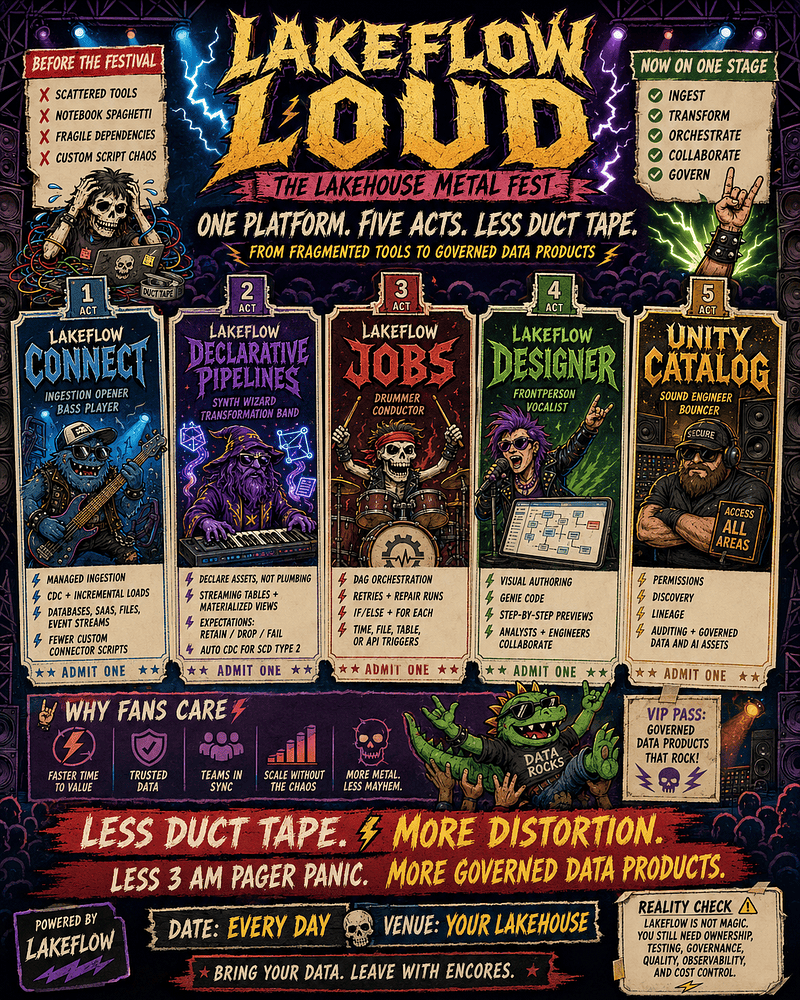
Databricks Lakeflow brings these pieces closer together as a native family of capabilities designed to help teams ingest, transform, and orchestrate data within the lakehouse.
The Lakeflow Architecture Ecosystem
[Lakeflow Connect]    [Lakeflow Declarative Pipelines]    [Lakeflow Jobs]
      (Ingestion)            (Transformations)            (Orchestration)
           \                         |                           /
            \________________________|__________________________/
                                     |
                              [Unity Catalog]
                         (Governance & Lineage)
Lakeflow Connect helps bring structured and unstructured data into the lakehouse using managed ingestion patterns. For supported sources, it can use incremental ingestion and change data capture patterns to keep destination tables fresh while reducing custom ingestion code.
Lakeflow Declarative Pipelines provides declarative batch and streaming transformations. Instead of hand-coding every execution step, teams define the data assets they want to create and maintain.
Lakeflow Jobs orchestrates workflows close to the data, coordinating schedules, task dependencies, retries, conditional logic, and monitoring.
Lakeflow Designer provides a visual authoring experience for building and previewing data logic inside Databricks, helping analysts and engineers collaborate more directly.
Unity Catalog provides centralized governance, permissions, discovery, auditing, and lineage across data and AI assets.
The Analyst-Engineer Duet Nobody Rehearsed
Analytics projects frequently stall because of the cultural divide between business analysts and data engineers.
Business analysts hold the critical domain knowledge. They understand the weird business rules, the exception cases, the “this only applies after Q3 unless the account is enterprise” logic. But that logic often begins life inside spreadsheets, local files, or detached no-code environments.
Data engineers understand production realities: scalability, testing, checkpoints, permissions, lineage, cost, and performance. But they are often asked to productionize business logic that was never written down clearly in the first place.
This disconnect creates a familiar loop: analyst prototype, manual rewrite, engineering patch, dashboard validation argument, repeat.
This is where the vocalist steps forward. Lakeflow Designer helps narrow the gap by giving teams a visual way to build and inspect data transformations inside Databricks. Analysts can express logic more directly, while engineers can review, govern, version, and harden the resulting pipeline work before it becomes production-critical.
Evaluating the House Band
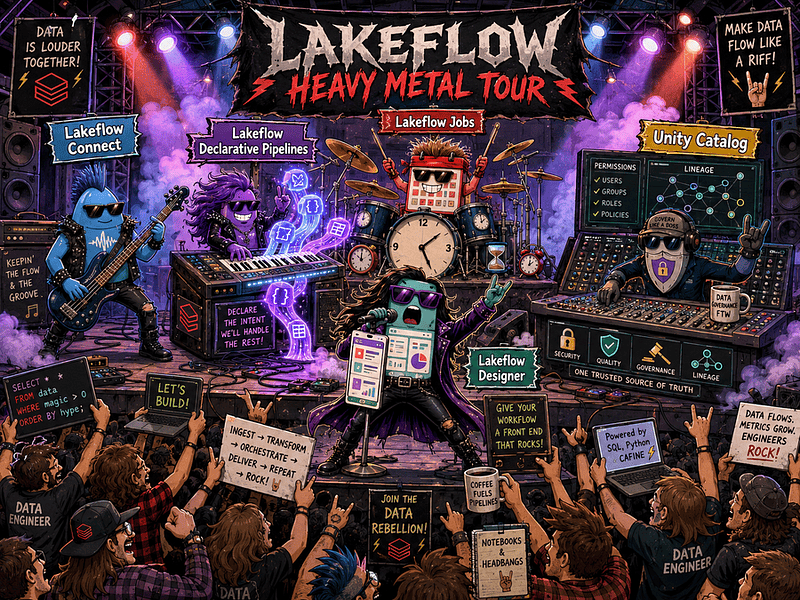
The Lakeflow components act like a tightly synchronized live band where every member has a dedicated role.
- Lakeflow Connect is the bass player. It sets the operational rhythm.
- Lakeflow Declarative Pipelines is the keyboard player. It turns declared intent into managed transformations.
- Lakeflow Jobs is the drummer. It keeps workflows on schedule and in sync.
- Lakeflow Designer is the vocalist. It gives the workflow a visible front end.
- Unity Catalog is the sound engineer. It keeps governance, permissions, and lineage consistent across the performance.
The Real Shift: From Dependencies to Value
The true shift of Lakeflow is not just a prettier interface. It’s a move from managing scattered dependencies toward managing reliable data products.
Data teams can spend less time stitching together ingestion scripts, orchestration engines, retry logic, and manual handoffs. They still need to think carefully about business rules, data contracts, quality expectations, permissions, observability, and cost.
But when more of the repetitive engineering plumbing is handled by the platform, engineers get more time for the work that actually scales an organization: precise business logic, strong data quality, clear lineage, trustworthy tables and reliable insights.
That is the real promise of Lakeflow: not that pipelines become effortless, but that the effort moves closer to the value.
🔌 Don’t Go Chasing Custom Python Scripts
Every data engineer knows the trauma of a “simple” ingestion script that inevitably snowballs into a brittle distributed monstrosity of custom glue code, broken API changes, pagination loops, schema surprises, and manual rate-limit retries.
Databricks Lakeflow Connect reduces that fragile infrastructure plumbing with managed connectors and ingestion frameworks governed through Unity Catalog. It supports ingestion from sources such as relational databases, enterprise SaaS applications, cloud storage, local files, and message buses.
For supported connectors, Lakeflow Connect can use incremental ingestion and change data capture patterns to keep lakehouse tables fresh without forcing teams to hand-roll every connector, retry loop, and checkpoint mechanism themselves.
That does not mean every custom script disappears overnight. Some edge cases, niche APIs, authentication patterns, and unsupported sources may still require engineering work. But for supported ingestion paths, Lakeflow Connect gives teams a cleaner way to retire a lot of homegrown connector code.
The Mechanical Split: Ingestion Gateway vs. Ingestion Pipeline
For database CDC connectors, Lakeflow Connect does not rely on a single monolithic “copy” process. It uses a split architecture that separates source extraction from target table loading.
The Ingestion Gateway: The Stateful Brain. The ingestion gateway connects to the source database, extracts snapshots and change data, and tracks CDC state as source records change over time.
- The Compute Catch: For database CDC connectors, the ingestion gateway requires classic compute. This supports the long-running gateway process needed for database change capture. As a result, architects should account for classic compute used by the gateway in addition to the serverless compute used by the ingestion pipeline.
- The Architecture Planning Catch: Gateway configuration should be planned carefully as part of the ingestion architecture. Rather than assuming gateways are universally reusable or universally one-to-one, teams should validate the current connector requirements and deployment model for the specific database source they are using.
The Ingestion Pipeline: The Serverless Muscle. After the gateway extracts snapshot and change data, it stages that data in a Unity Catalog volume. From there, the ingestion pipeline takes over.
Running on managed serverless compute, the ingestion pipeline reads the staged data, handles connector-specific schema evolution where supported, and applies updates to target Delta tables. It can scale with workload demand, reducing the need to manage idle ingestion infrastructure manually.
[Source Database]
       ↓
(Classic Compute) ➜ Ingestion Gateway
       ↓
[Unity Catalog Staging Volume]
       ↓
(Serverless Compute) ➜ Ingestion Pipeline
       ↓
[Target Delta Tables]
Native CDC: Stop Full-Refreshing the Planet
Traditional ingestion approaches often rely on the brute-force pattern of daily or hourly full table refreshes. Attacking your production transactional database with a heavy query shovel every hour is not exactly a love letter to source system performance.
For supported database sources, Lakeflow Connect managed connectors use change data capture to track inserts, updates, and deletes since the previous checkpoint. Instead of repeatedly re-copying entire tables, CDC-based ingestion applies source changes incrementally to Delta tables.
Managed Source Reality Check
Lakeflow Connect is an ingestion umbrella, not a magic portal that instantly supports every source system on Earth.
Managed connectors include database connectors, such as Microsoft SQL Server and PostgreSQL, and SaaS connectors, such as Salesforce and ServiceNow. Additional connectors and capabilities vary by cloud, region, and preview status.
Other ingestion paths, including local files, object storage, and message buses, can be handled through ingestion tools and customizable frameworks within the same Lakeflow ecosystem.
Zerobus Ingest: Bypassing the Expensive Hallway
When teams build high-volume event ingestion pipelines for IoT telemetry, clickstreams, or device events, they often deploy a heavy architecture:
[App Events]➔[Kafka / Kinesis Broker]➔[Spark Consumer]➔[Delta Tables]If you need event replay, multiple downstream consumer groups, complex stream routing, or strong decoupling between producers and consumers, a dedicated message broker still makes sense. But if your event bus exists mostly to pass data from an application into Databricks, it can become an expensive hallway.
Zerobus Ingest addresses that pattern by providing a push-based ingestion API in Lakeflow Connect that writes directly into Unity Catalog Delta tables. It’s designed for scalable event-style ingestion workloads, such as telemetry and clickstream data, without requiring teams to manage separate broker infrastructure just to land events in the lakehouse.
The point is not that brokers are obsolete. They are not.
The point is that when the broker is only acting as a pass-through into Databricks, Zerobus Ingest gives architects another option: fewer moving parts, less infrastructure to operate, and a more direct path from event producers to governed Delta tables.
👨🍳 The Chef vs. The Menu
Traditional Spark pipelines often start elegantly, then slowly morph into logistical nightmares of file-state tracking, task loops, race conditions, retry logic, and operational glue code.
Lakeflow Spark Declarative Pipelines reduces much of that infrastructure babysitting by shifting the developer experience from imperative plumbing to declarative outcomes.
Instead of hand-wiring every execution step, you define the data assets that should exist and the rules they must follow. The pipeline engine can then infer dependencies, manage execution, and apply managed compute capabilities depending on the pipeline configuration.
The Rebrand: From DLT to Lakeflow Spark Declarative Pipelines
Delta Live Tables has evolved into Lakeflow Spark Declarative Pipelines. The rebrand is not just cosmetic: it aligns Databricks pipeline development more closely with Apache Spark Declarative Pipelines while Databricks continues to add managed production features on top.
The newer Python API uses the pyspark.pipelines module, typically aliased as dp. Existing dlt code can continue to work, but the newer API is the path forward for teams that want better alignment with Spark Declarative Pipelines.
from pyspark import pipelines as dpInstead of hand-wiring DAG execution paths, developers use decorators to define datasets. Databricks can infer dependencies from table references, plan pipeline execution, and process supported datasets incrementally when the source, query pattern, and refresh mode allow it.
The Trinity of Pipeline Objects
Lakeflow Spark Declarative Pipelines offers three primary dataset types, each serving a distinct role in the data lifecycle.
Streaming Tables: The Live Stream. Streaming tables are designed for incremental streaming workloads. They are commonly used to continuously ingest new data from supported streaming inputs such as Auto Loader, CDC flows, or other streaming sources.
Rather than repeatedly reprocessing historical archives, streaming tables help pipelines process new records as they arrive and maintain state across updates.
Materialized Views: The Maintained Ledger. Materialized views store the results of a query and refresh them on trigger or schedule. Where supported, Databricks can process upstream changes incrementally instead of recomputing the full result every time.
They are useful for analytical joins, business logic transformations, and curated datasets that downstream BI users need to query reliably and efficiently.
Temporary Views: The Scratchpad. Temporary views are intermediate pipeline datasets. They help isolate formatting logic, business calculations, staging joins, or reusable query steps inside the pipeline.
They are not published as persistent target tables. Think of them as the mise en place of the pipeline kitchen: essential while cooking, but not plated as the final dish.
Inline Quality Rules: Expectations. Data quality validations no longer need to live as ad-hoc notebook patches or comments that everyone promises to enforce later.
In Lakeflow Spark Declarative Pipelines, expectations let developers apply Boolean quality checks to records as they pass through a query. Each expectation defines a condition and a behavior when records violate it.
- Retain. The pipeline records data quality metrics but allows invalid records to pass into the target dataset. This is useful when teams want visibility into quality degradation without interrupting the pipeline.
- Drop. The pipeline excludes records that violate the specified expectation. This is useful when invalid records should not enter a curated table, but the pipeline should continue processing valid data.
- Fail. The pipeline update fails when records violate the specified expectation. This is useful for critical datasets where loading invalid data would be worse than stopping the pipeline.
Overhauling CDC and SCD Type 2
Writing manual Type 2 Slowly Changing Dimensions or handling multi-batch upserts in traditional Spark often requires complex merges, state tracking, window functions, sequencing logic, and heavy error-handling boilerplate.
Lakeflow Spark Declarative Pipelines provides AUTO CDC APIs to simplify this pattern.
The newer dp.create_auto_cdc_flow() API replaces the previous apply_changes() name, and Databricks recommends using the updated API for new pipeline code.
By declaring business keys, sequencing columns, and delete-handling behavior, developers can let the pipeline manage much of the CDC application logic. For SCD Type 2 use cases, AUTO CDC can maintain historical versions according to the configured keys, sequencing, and SCD settings.
The important caveat: AUTO CDC is not mind reading. Correct results still depend on choosing stable business keys, reliable sequencing columns, appropriate delete handling, and source data that represents changes consistently. The API removes a lot of boilerplate, but it does not remove the need for good data modeling.
The chef still matters. Lakeflow just gives them a better menu.
🎨 Vibe Coding on Rails
Data engineers know the trauma of legacy no-code tools that isolate analyst workflows and turn “self-service data prep” into an endless cycle of local logic, manual rewrites, and production handoffs.
Lakeflow Designer helps reduce that gap by providing an AI-assisted visual data preparation experience inside the Databricks Data Intelligence Platform. Instead of creating a disconnected visual island, Designer lets teams build visual transformation workflows that can be reviewed, governed, and operationalized through Databricks.
The goal is not to pretend analysts and engineers suddenly have the same job. The goal is to give them a shared surface.
What Lakeflow Designer Actually Is
Lakeflow Designer is a visual, no-code data preparation surface for analysts, domain experts, and business users who need to transform data without hand-coding complex Spark or PySpark transformations.
It’s designed for the people who understand the business rules intimately but don’t want to spend their day writing procedural data engineering code.
Lakeflow Designer provides several practical building blocks:
- A drag-and-drop transformation canvas where steps are represented as connected operators.
- Natural-language transformation generation and refinement using Genie Code.
- Side-by-side intermediate data previews.
- Output writing into governed Unity Catalog tables.
- Scheduling or adding visual data prep as a task in a Databricks Job.
Because Designer is still evolving, teams should treat its capabilities according to the current workspace, cloud, and preview availability in their Databricks environment.
The Analyst-Engineer Peace Treaty
Designer acts less like an isolation barrier and more like a collaboration treaty between business context and production engineering.
Analysts can express business rules visually closer to the data itself, instead of exporting logic into disconnected spreadsheets or no-code islands. Engineers can then inspect the generated logic, review assumptions, apply governance, and operationalize the workflow through Jobs when it’s ready.
This does not eliminate every rewrite forever. Complex logic, performance-sensitive workloads, unclear requirements, and production edge cases still need engineering judgment.
But it does reduce the worst version of the old loop:
- Analyst prototype
- Manual engineering rewrite
- Dashboard mismatch
- Another meeting
- Another rewrite
- Another mysterious spreadsheet called
final_v7_really_final.xlsx
The Canvas, Primitives, and Operators
The workspace operates as an interactive visual canvas where data moves through chained operator blocks.
A pipeline can start from sources such as existing Unity Catalog tables, cloud storage paths, Google Drive, SharePoint, or uploaded local CSV and Excel files, depending on what is enabled in the workspace.
Operators cover common transformation tasks such as filtering, joining, reshaping, aggregating, and writing output data.
The operator search experience also supports intent-based discovery. Instead of hunting through icons, a user can type a phrase like “average by month” and Designer can suggest the appropriate aggregation operator.
The Retail Inventory Blueprint
Imagine an analyst working with a raw store inventory table.
They add a rule to flag products where inventory_level > inventory_threshold, producing an is_overstocked Boolean column. Then they connect that result into an aggregation step, grouping by store name to calculate metrics such as overstock_product_count and overstock_rate.
The output becomes a cleaner reporting table that can be written to Unity Catalog and reviewed before being scheduled as part of a production workflow.
No brackets were harmed in the making of this Gold table.
Genie Code & Step-by-Step Previews
Genie Code helps make AI-assisted transformations more reviewable by grounding natural-language prompts in Databricks platform context.
Users can ask for transformations in plain language, refine generated expressions, and inspect the result instead of treating the AI output as a sealed black box.
At the bottom of the canvas, the preview pane helps users understand what each operator is doing. Selecting an operator can show the input sample on one side and the transformed output on the other, making each step easier to validate before moving forward.
The Unbounded Data Trap
By default, Designer evaluates quick samples so the UI remains responsive.
That sample-first behavior is useful, but it can also hide expensive surprises. When users switch the rows scanned setting to Max, Designer reruns upstream operators on the complete, unbounded dataset.
That is powerful when validating final logic. It’s also a very creative way to discover that “just previewing one more step” can become an expensive afternoon.
The Production Path: No-Code, But Still Code
The fatal flaw of many historical visual data prep tools is that they generate logic nobody wants to maintain.
Designer takes a different route by backing visual workflows with generated PySpark logic that can be inspected and operationalized.
Visual data prep files live in the workspace and can be placed in Git folders. In Git, these assets appear as notebook-style files, which supports branch management and code review workflows.
Generated PySpark can also be reviewed through version history, Git, or Job run details, depending on how the workflow is managed.
Scheduling is handled through the Schedule button, which can create or add the visual prep as a task in a Databricks Job.
That matters because the artifact does not have to die as a demo. It can become part of the same governed operational fabric as the rest of the lakehouse workflow.
AI-Assisted Prototyping: Useful, Not Magical
One of the most promising parts of Designer is the ability to use Genie Code to accelerate transformation design.
Users can describe the transformation they want, reference Databricks objects, and in some contexts include additional prompt context such as uploaded images or examples. This makes it easier to move from business intent to transformation logic without starting from a blank canvas.
But this should be treated as cooperative prototyping, not autonomous production engineering. AI-generated expressions still need review.
Data engineers should audit generated logic for deterministic data types, null handling, join behavior, filters, constraints, and performance before promoting a visual workflow to production.
The magic is not that Designer removes engineering discipline.
The magic is that it moves analyst intent, generated code, governance, and production scheduling closer together.
That is the real promise of vibe coding on rails: fast enough for business users to express what they mean, structured enough for engineers to make it safe, and governed enough for the platform to keep the whole thing from turning into spreadsheet jazz.
🎤 The Master of Ceremonies
Every data platform “discovers” orchestration when # run everything in order stops being cute and starts becoming a production risk.
That is where Lakeflow Jobs comes in: Databricks’ native way to coordinate ingestion, validation, transformations, retries, branches, schedules, and monitoring inside the lakehouse.
Orchestration Beyond Basic Schedules
Traditional automation tools often treat orchestration as simply running a script every night at exactly 2:00 AM.
Modern production data engineering needs something richer.
Lakeflow Jobs lets teams define tasks and dependencies as a Directed Acyclic Graph, giving workflows an explicit execution order instead of a pile of scripts hoping the previous one finished on time.
It also lets tasks run sequentially or in parallel, with each task using the compute configuration appropriate for that workload. That means notebooks, SQL queries, pipelines, Python code, dbt transformations, ML workloads, and dashboard refreshes can be coordinated inside the same operational framework.
The point is not that every external scheduler disappears.
The point is that more of the data workflow can live close to the data assets, permissions, lineage, and platform observability that already exist in Databricks.
Task Types: Unifying the Instrumental Lineup
A robust enterprise data pipeline is rarely uniform. It usually mixes different execution styles, tools, and frameworks.
Lakeflow Jobs lets teams combine multiple task types inside a single managed workflow:
- Notebook tasks for PySpark, exploratory logic, data science workflows, and platform-native notebooks.
- Python script tasks for executing Python files or packaged application logic.
- SQL tasks for warehouse queries, analytical checks, and SQL-based transformations.
- Pipeline tasks for triggering and monitoring Lakeflow Spark Declarative Pipelines.
- dbt tasks for orchestrating dbt transformation models.
- ML tasks for model training, batch inference, or MLflow-related workflows.
- Dashboard tasks for refreshing Databricks dashboards after upstream tables are updated.
External integrations, such as Power BI refresh workflows, should be treated separately according to the supported connector, API, or task pattern available in the workspace.
Advanced Control Flow Primitives
To scale data products, teams need to move beyond the amateur anti-pattern of copy-pasting dozens of nearly identical jobs with slightly different parameters.
Lakeflow Jobs provides control flow primitives that help turn repeated workflow logic into reusable orchestration patterns.
If/Else Branching. If/else tasks route execution based on a Boolean condition. That condition can come from parameters, dynamic references, or results produced by an upstream task.
For example, a validation task can publish a pass/fail status, and the workflow can use that value to send clean data down the success path or route failed validations into a remediation branch.
The branch does not magically know whether the data is clean. You still have to define the signal. But once the signal exists, Jobs can route the workflow accordingly.
For Each Loops. For each tasks run a nested task repeatedly, passing different parameter values to each iteration.
Instead of creating one task per region, store, country, or business unit, teams can provide a list of values and let the job fan out the same logic under a configured concurrency limit.
That reduces copy-paste orchestration and makes parameterized workflows easier to maintain.
Task Values. dbutils.jobs.taskValues provides lightweight key-value outputs that downstream tasks can reference later in the same job run.
This is useful for passing small parameters, status flags, counts, IDs, or validation results between tasks without writing those tiny signals into temporary tables.
It’s not a replacement for proper data exchange. If the payload is a dataset, write it to a governed table, file, or model artifact. Task values are for small control signals, not for sneaking a dataframe through the side door.
Data-Centric Triggers: Reacting to the Lakehouse
Time-based cron schedules still have their place. Sometimes “run at 2:00 AM” is exactly what you need. But blindly trusting the clock can cause jobs to start before upstream data is ready.
Lakeflow Jobs supports multiple trigger patterns, including time-based schedules, file-arrival triggers, table-update triggers, continuous runs, and manual or API-triggered execution.
Table Update Triggers. Table update triggers can start a job when a specified source table is updated.
This helps workflows react to data readiness instead of relying only on fixed schedules. The exact timing depends on configuration, supported table behavior, and platform detection latency, so it’s better to think of it as data-aware triggering rather than magic instant reaction.
File Arrival Triggers. File arrival triggers can start a job when new files arrive in configured cloud storage locations such as S3, Azure Storage, or Google Cloud Storage.
They are useful when upstream systems deliver payloads to object storage and the downstream workflow should begin only after those files land. They can reduce the need for custom polling jobs and can be configured to wait for batched file arrivals.
Continuous Runs. Continuous mode is designed to keep a job run active, restarting according to configured behavior when needed.
It can be useful for always-on workloads, but teams should check compute-mode limitations before using it. In particular, serverless jobs compute may not support every continuous scheduling pattern, so the compute choice matters.
Serverless Compute Primitives & Strict Boundaries
Deploying infrastructure for orchestration is a balancing act between freshness, startup latency, and cost.
Lakeflow Jobs supports serverless jobs compute for supported task types, reducing the need to manually select, configure, and operate clusters for every workflow.
- Performance-Optimized Mode. Performance-optimized serverless mode prioritizes faster startup and execution for latency-sensitive tasks. It’s useful when workflow responsiveness matters more than squeezing every last cent out of the run.
- Standard Mode. Standard serverless mode is better suited for less urgent batch runs. It generally trades higher startup latency for lower-cost serverless execution, making it a better fit for workloads that can tolerate a slower start.
The important boundary: serverless is powerful, but it’s not universal. Supported task types, scheduling modes, libraries, networking, and runtime requirements should all be validated before assuming every job can move to serverless unchanged.
Operational Resiliency & Error Recovery
Production environments are inherently messy. APIs throttle. Networks drop. Firewalls change. A “harmless” upstream column rename blows up your dashboard ten minutes before the executive meeting.
Lakeflow Jobs provides built-in mechanisms to make those failures less dramatic.
Task-Level Queuing. When concurrency limits are reached, Jobs can queue runs instead of starting unlimited concurrent executions. That helps prevent workflow storms from overwhelming configured limits and gives teams a more controlled way to handle bursts of scheduled or triggered work.
Granular Task Retries. Retries can be configured at the task level, allowing transient failures to be retried before the entire workflow is treated as failed. This is useful for flaky APIs, temporary network issues, or short-lived infrastructure problems.
It’s not a license to hide bad logic under infinite retries. Retries are seasoning. Not the whole soup.
Repair Runs. When a multi-stage workflow fails, repair runs can rerun failed or skipped tasks without rerunning successful upstream tasks when dependencies allow.
That is especially useful when task 17 out of 40 fails because of a temporary issue or a fixable bug.
Instead of reprocessing every successful parent task, teams can repair the failed section of the graph and reduce recovery time and unnecessary compute usage.
Enterprise Governance & Infrastructure-as-Code
Operating an enterprise-scale data platform requires centralized visibility and disciplined change management across hundreds of daily workflows.
Unified Observability. Lakeflow Jobs provides run history, task status, task logs, retry details, timing information, and monitoring data to help teams understand what ran, what failed, and where time was spent.
For SQL-heavy workflows, query history and SQL profile information can help diagnose bottlenecks in downstream warehouse tasks.
Meta-Observability via System Tables. Job activity is available through Databricks system tables in the system.lakeflow schema, formerly known as system.workflow.
Teams can query this metadata to analyze job runs, task runs, failures, durations, owners, and operational trends. Depending on account and region configuration, this can support visibility across multiple workspaces in the same account and cloud region.
The GitOps Paradigm
Building workflows through the visual UI is useful for prototyping and iteration. For mission-critical production jobs, teams often benefit from managing workflows as infrastructure-as-code.
Using Databricks Asset Bundles, teams can define jobs, tasks, permissions, deployment targets, variables, and compute settings in version-controlled configuration. Those assets can live in Git, go through code review, and be promoted across environments through CI/CD workflows.
The goal is not YAML for the sake of YAML. The goal is repeatability.
A production job should not depend on someone remembering which checkbox they clicked three months ago while debugging a pipeline at 3:07 AM.
That is why Lakeflow Jobs matters: it gives the lakehouse a conductor, a schedule, a recovery plan, and a paper trail.
🪪 The Bouncer at the Data Nightclub
Every data platform eventually outgrows its ad-hoc phase and faces the forbidden question: Where did this specific number come from?
Without unified control, a data architecture can quickly devolve into a chaotic collection of orphan dashboards, abandoned notebooks, duplicated tables, and unmanaged production scripts.
In the Lakeflow architecture, governance is not an afterthought. Lakeflow works best when ingestion outputs, declarative pipelines, visual data prep, and production workflows are built around Unity Catalog-governed assets.
Unity Catalog provides the central governance layer for data and AI assets, while Lakeflow Connect, Lakeflow Declarative Pipelines, Lakeflow Designer, and Lakeflow Jobs operate against those governed assets inside the Databricks platform.
The Centralized Governance Plane
Real data platform governance requires reliable visibility into what data assets exist, where they reside, who owns them, who can access them, and how they change over time.
Databricks addresses these requirements through Unity Catalog and system-level observability.
Eradicating Shadow Pipelines
Business logic historically escaped managed environments through fragile spreadsheets, local files, and detached desktop ETL tools.
Because Lakeflow Designer works inside Databricks and can write governed outputs to Unity Catalog, visual transformation workflows can stay closer to governed lakehouse assets from the beginning.
That does not mean every analyst workflow becomes magically production-ready. It means analyst logic has a clearer path into a governed environment where engineers can inspect, review, version, and operationalize it.
Asset-Driven Namespaces
Persistent Lakeflow pipeline outputs, such as streaming tables and materialized views, can be registered in Unity Catalog schemas.
That matters because data products should not live as mystery artifacts inside someone’s workspace folder.
When outputs are published as governed Unity Catalog objects, they become discoverable, permissioned, auditable, and queryable corporate assets.
Temporary views still have their place inside pipelines, but they are intermediate logic, not persistent data products. They help prepare the meal. They are not what gets served to the business.
End-to-End Lineage Tracking
As data engineering shifts from manual plumbing to managed, declarative, AI-assisted, and visual workflows, traceability becomes even more important.
Unity Catalog supports lineage capture across many Databricks workloads, including supported queries, tables, columns, dashboards, notebooks, and pipeline transformations.
That lineage helps teams understand how data moves from upstream sources through refinement layers and into downstream assets.
The keyword is “helps.”
Lineage is powerful, but it’s not omniscient. Coverage depends on supported workloads, Unity Catalog-governed assets, external integrations, and documented platform limitations.
Table vs. Column Granularity
Unity Catalog supports both table-level and column-level lineage for supported workloads.
- Table-level lineage shows how datasets relate to one another across transformations and queries.
- Column-level lineage goes deeper, helping teams inspect which upstream columns contribute to downstream fields.
That is essential when someone asks why net_revenue_adjusted changed after last night’s refresh and nobody wants to answer, “The spreadsheet said so.”
Lineage Boundaries
Automated lineage works best for Unity Catalog-governed assets and supported Databricks workloads.
Temporary views, external tools, private local workflows, unsupported query patterns, and systems outside the governed environment may not produce complete lineage.
That’s not a failure of the bouncer. That’s the bouncer refusing to vouch for people who snuck in through the alley.
Programmatic Observability & System Tables
Governance is not only about who can query a table. It’s also about understanding what is running, what failed, what changed, and what is costing money.
Databricks system tables expose operational metadata for jobs, pipelines, lineage, billing, access, and usage. These tables give platform teams a programmatic way to analyze the health and behavior of the lakehouse.
The Analytical Store
The system.lakeflow schema records Lakeflow Jobs activity, including job and task metadata, runs, and task runs.
Teams can query this metadata to analyze execution trends, recurring failures, long-running tasks, ownership patterns, and operational bottlenecks.
For cost attribution, teams can join Lakeflow job metadata with billing and usage system tables. This supports more detailed infrastructure spend analysis, although precision depends on tags, usage records, workspace structure, cloud region, and how jobs are configured.
Pipeline Event Logs
Lakeflow Declarative Pipelines expose event logs that capture operational details about pipeline execution. These logs can include pipeline events, update progress, execution milestones, and data quality expectation metrics.
Think of them less as a magical compliance black box and more as a flight recorder for pipeline operations. When a pipeline fails, slows down, drops records because of an expectation, or behaves unexpectedly, the event log gives engineers a place to investigate what happened.
Unified Access Control & AI Grounding
Lineage helps explain where an operational metric came from. Access control determines who is allowed to interact with it.
Permission Management. Unity Catalog provides centralized access control through privileges on securable objects such as catalogs, schemas, tables, views, volumes, functions, and models.
Privileges can be managed at catalog, schema, and object levels. Persistent pipeline outputs, including materialized views and streaming tables, should be permissioned as governed Unity Catalog objects according to their intended audience.
That distinction matters. Changing permissions on a source table does not mean every dependent dashboard, materialized view, or streaming table automatically becomes correctly governed for the right users.
Derived assets still need deliberate access design. The bouncer checks the guest list. Someone still has to write the guest list correctly.
Context for Generative AI. Centralized metadata also matters for AI-assisted development. Tools such as Genie Code can use Databricks platform context and metadata to help generate and refine transformations. That context can make AI-assisted authoring more relevant than prompting over raw column names in isolation.
But AI grounding is not a permission slip to stop reviewing code. Generated transformations still need human validation for semantics, joins, filters, null handling, data types, privacy constraints, and performance.
The real benefit is not that AI suddenly becomes clairvoyant.
The benefit is that AI-assisted development can happen closer to governed data, governed metadata, and governed workflows.
That is the bouncer’s job in the Lakeflow nightclub: not to kill the party, but to make sure the right people, tables, pipelines, and transformations are allowed through the right doors.
🤘 Encore… For Now
We met the Lakeflow lineup, kicked down the custom-script stage doors, shredded notebook spaghetti, and watched Unity Catalog run security at the venue.
Lakeflow is not a magic guitar solo. You still need ownership, testing, governance, cost control, and someone brave enough to ask why that join multiplied revenue by 47.
But it changes the setlist. Connect brings raw data in. Declarative Pipelines turn noise into structure. Jobs keep the drums on time. Designer puts analysts and engineers on the same visual stage. Unity Catalog keeps governance, lineage, and permissions from blowing out the speakers.
Less duct tape. More distortion.
Less 3 AM pager panic. More governed data products.
Tune the guitars. Raise the horns. Let the pipelines roar.
Now we go live. 🤘
“Load this way
Build this way
Let the pipeline throb
Oooh, like this!”
(adapted from “Walk This Way” by Run DMC ft. Aerosmith)