
Apache Spark WTF??? — I Love It When A Plan Comes Together (Part III)
Plans, plans, plans… I definitely love this topic! And, without a doubt, it’s one of the biggest headaches I’ve had while working with…

“M-E-T-H-O-D Man
M-E-T-H-O-D Man
M-E-T-H-O-D Man
M-E-T-H-O-D Man
Hey, you, get off my plan
You don’t know I don’t need your verbose style”
(adapted from “Method Man” by Wu Tang Clan)
Previously, On Apache Spark WTF …
In our Spark-tastic feast, we started with an aperitif— a light yet thought-provoking discussion on fixing derailed execution plans. We sampled checkpoints or Save+Read for a quick but performance-heavy fix, disabling AQE for a straightforward yet costly workaround, and strategic caching, the trickiest but most rewarding bite.
For the main course, we dug into the GraphFrames library, slicing through the myth that open source always means clean, efficient, and flawless code. Along the way, we picked up some juicy performance tricks to spice things up.
Don’t put down your fork just yet — dessert is on its way… 🍰. But this time, the bite is going to be a little less sweet and a whole lot more bitter … 😝
The King of The Heap📈
Well, let’s revisit Test1.scala from our test project in the first part of this article series.
As you may recall, Spark gradually increases its memory demand from the heap, slowing down relentlessly with each iteration until it eventually runs out of memory — in my case, when it reaches 8GB. This behavior may vary depending on the JVM used, but typically, heap dump generation is disabled by default when the JVM crashes due to insufficient memory.
To enable automatic heap dump generation, we only need to add -XX:+HeapDumpOnOutOfMemoryError to the Java process execution. The dump will be saved in the working directory by default, usually the project’s root folder when running tests from an IDE, but we could also specify the path using -XX:HeapDumpPath=/path/to/heapdump.hprof. Alternatively, we can manually generate a heap dump using VisualVM. However, enabling automatic dumps on OOM guarantees a snapshot right after the crash, giving us some peace of mind… until it inevitably happens again!
Once the dump is generated, we can open it with the Memory Analyzer Tool (MAT) and select the “Leak Suspect Report”, where we will encounter the following insights (reorganized):
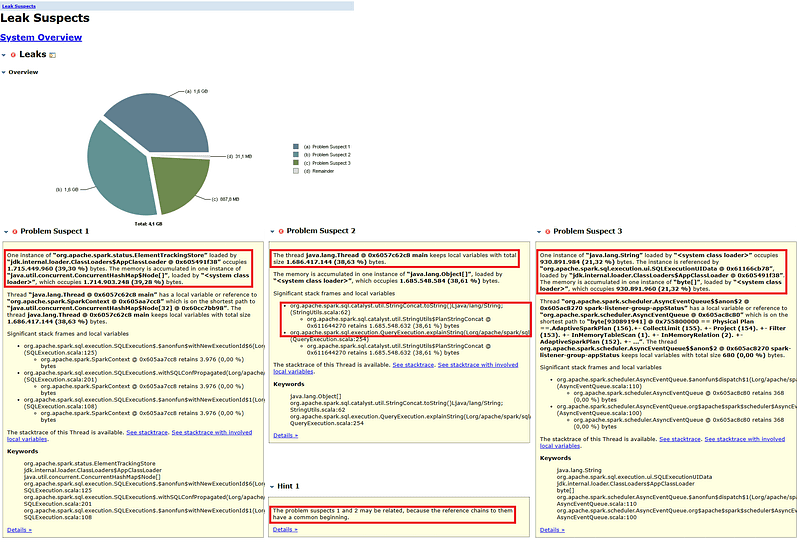
The most important information has been highlighted for easy identification.
Problem Suspect 1
One instance of org.apache.spark.status.ElementTrackingStore occupies 1.715.449.960 (39,30 %) bytes, which is a significant portion of memory.
The ElementTrackingStore class is a specialized tracking mechanism in Spark’s status API, responsible for managing job, stage, task, and executor data in Spark UI. It also handles this data when sent to a history server. However, in our case, as we’re running the test locally without a history server, this should not be the problem.
Disabling the Spark UI with the spark.ui.enable property doesn’t stop Spark from creating increasingly larger instances of that class.
On the other hand, as you may know, a Spark application consists of one or more jobs, triggered by an action. Each job is divided into stages, representing sequential computations separated by shuffle boundaries. Each stage contains multiple tasks, which are the smallest units of execution running in parallel on different data partitions. The ElementTrackingStore helps manage these elements in memory by tracking active and completed jobs, stages, and tasks.
The properties spark.ui.retainedJobs , spark.ui.retainedStages and spark.ui.retainedTasks are provided by Spark to control how many completed stages, tasks, and jobs are retained in memory before eviction. Their default values are:
spark.ui.retainedJobs=1000
spark.ui.retainedStages=1000
spark.ui.retainedTasks=100000
This means the Spark UI retains up to 100 jobs, 1000 stages, and 100,000 tasks before evicting old entries. Setting these values to zero seems like a good solution, right? But still… the heap keeps growing! OMG! 😱
Problem Suspect 2
One thread is holding local variables that total 1,686,417,144 bytes (38.63%) of memory.
At first, this might seem like a minor issue, but if we take a closer look at the corresponding stack trace, we can identify two key methods:
org.apache.spark.sql.catalyst.util.StringConcat.toString()org.apache.spark.sql.execution.QueryExecution.explainString()
This suggests that a significant amount of memory is being consumed while generating the string representation of a query execution plan. Is this expected behavior? 🤔
NOTE: This is the first time the explainString method appears in this article, and I can assure you … it won’t be the last!
Problem Suspect 3
One instance of java.lang.String occupies 930,891,984 bytes (21.32%) of memory.
Given that the previous issue was related to string concatenation, it’s not surprising to find a large string here. In fact, the report itself highlights part of the string being held, and surprise, surprise … it’s the explain of a query plan! 😉
Hint 1
The report suggests that problem suspects 1 and 2 may be related, and given that suspects 2 and 3 also seem connected, it’s highly likely that all three suspects are, in fact, intertwined! 😫
Unweaving The Threads 🧵
If you remember, this test was quite simple: it creates an empty DataFrame (with no columns or rows), adds a null column, caches the DataFrame, applies an isNotNull filter, and then explains and shows the result—all in a loop, repeated 25 times. Initially, Spark runs really fast, but as the number of columns increases, it takes longer and longer to process, consuming more and more memory. However, CPU usage stays consistently below 20%. Whatever is causing Spark to slow down dramatically doesn’t seem to be CPU-bound, affecting just one core of my laptop.
When a process takes longer than expected, a thread dump can be incredibly useful to shed some light on the issue. Taking several thread dumps with VisualVM is pretty straightforward and can provide valuable insights.
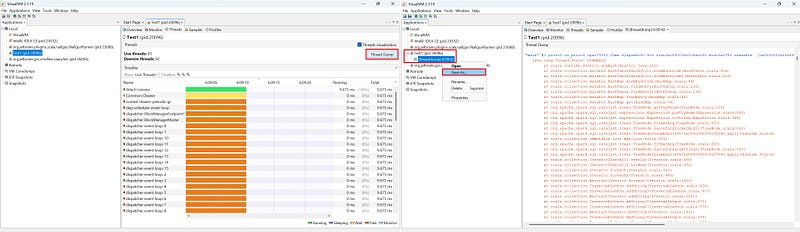
- Go to the Threads tab and click on the “Thread Dump” button. 2. Select the dump generated in the tree panel at the left side, and “Save As ..” to export it to a file. That’s all!
Thread dumps are plain text files that capture the stack traces of various threads in different states within the JVM. Spark operates with multiple threads — some for executors, others for the Spark UI, and so on. However, the Catalyst Analyzer/Optimizer runs on the main thread that initiated the Spark session.
By taking several thread dumps and closely examining the main thread, we can see that Spark is wasting time explaining the physical plan. Whenever an action is triggered, Spark materializes the logical plan and calculates its physical plan to determine what will execute and how. That makes sense. But why does Spark need to explain it? How does constantly generating the string representation of the physical plan help Spark complete its task? That’s definitely odd.
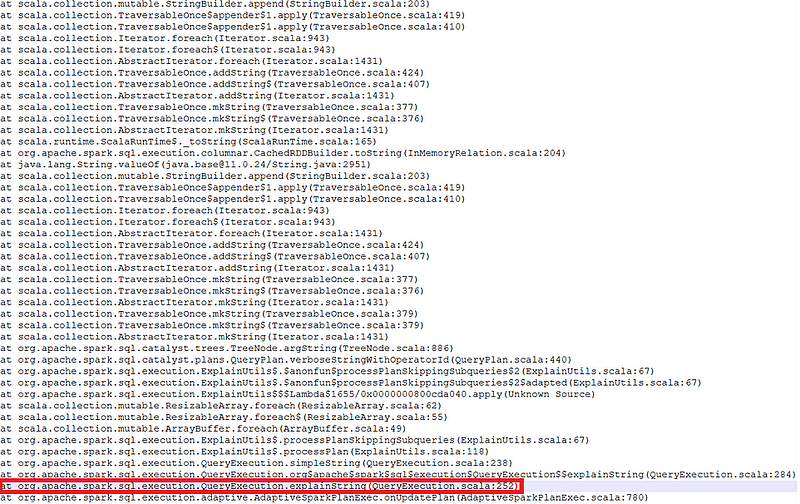
Didn’t I warn you that we’d be seeing the “explainString” method again?
I love the Occam’s Razor principle. It states that the simplest explanation, with the fewest assumptions, is usually the best one. So, if the method explainString keeps appearing in the heap dump, and every time we take a thread dump, the JVM is executing this method, it’s safe to assume all this issue likely revolves around it. Elementary, my dear Watson! 🕵️
The question now is … Why? To answer, we need to focus on the line right below the previous one in the stack trace — specifically, the AQE method AdaptiveSparkPlanExec.onUpdatePlan. This method plays a key role in AQE by dynamically updating the execution plan based on runtime statistics.
When a stage completes, Spark collects metrics like partition sizes, data skew, and shuffle statistics, and evaluates whether a better execution plan can be applied. If optimizations are identified, onUpdatePlan updates the execution tree accordingly.
But why is the explainString method called every time the plan is updated? It’s because Spark needs to regenerate the execution plan’s string representation for logging, UI updates, and debugging. As AQE refines the plan iteratively, each update triggers another execution of explainString, which can result in frequent and resource-intensive executions, leading to increased memory consumption.
Every time onUpdatePlan is called, it triggers an event sent to Spark’s internal event bus, which posts information about the updated execution plan. The bus allows components like the UI or monitoring tools to listen for and process these events, enabling real-time updates and management of Spark applications.
The event generated by onUpdatePlan is stored and tracked by the ElementTrackingStore, the same store we saw during the heap dump analysis, which helps maintain the state of execution components such as jobs, stages, and tasks in memory.
As shown below, this event specifically includes the explain string of the updated plan, providing insights into the latest query changes.
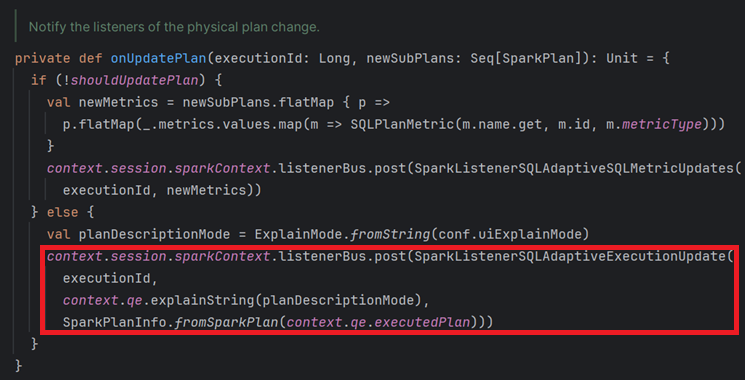
The “explainString” method is called every time the execution plan is updated.
Alright, let’s try disabling the listener bus then. After all, we don’t need the Spark UI or performance logging, right? But here’s the real question: What matters more to us — logging or the overall performance of our application? For me, the answer is crystal clear. How about you? 🫵
Unfortunately, disabling the listener bus isn’t as straightforward as it seems — I haven’t figured out how to do it. This mechanism is tightly integrated into Spark’s codebase. As you saw in the previous code, there’s no check to decide if events should be created and sent to the bus. So, even if we managed to disable the bus, it would only stop events from being stored, not from being generated — meaning the explainString call would still take place.
Criminal (Method) Profiling 🔎
Now that we understand the what and the why, let’s tackle two crucial questions related to explainString calls:
- How long does it take for these calls to execute?
- How many calls occur per iteration in our test loop?
This is where method profiling comes in. VisualVM offers a basic profiling feature that allows us to analyze the performance and frequency of these method invocations.
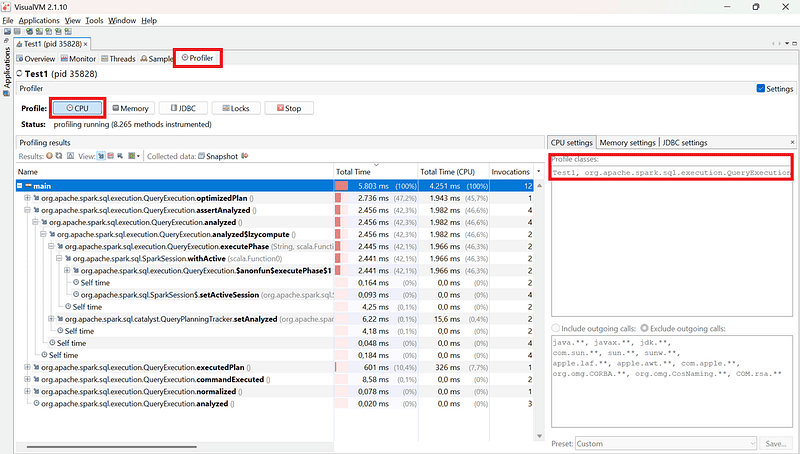
To profile, go to the “Profiler” tab, select the classes to analyze, and click “CPU”.
Using VisualVM as a method profiler has several drawbacks: it introduces performance overhead, slows down the application, and lacks flexibility — it can’t capture method parameters, limiting its usefulness. Wouldn’t it be great if we could add our own traces and modifications directly in the Spark codebase? Well, not only is it possible, but it’s also surprisingly easy!
By simply copying the necessary Spark scala classes into our project, the JVM classloader will prioritize them over dependencies — no need to recreate package structures like in Java! Just place them in src/scala, and we’re good to go.
Let’s copy and modify QueryExecution.scala to trace method calls:
  def explainString(mode: ExplainMode): String = {
    val concat = new PlanStringConcat()
    explainString(mode, SQLConf.get.maxToStringFields, concat.append)
    withRedaction {
      concat.toString
    }
  }
Commenting out the explicit explain call in Test1.scala (line 31) and running tests with an 8GB heap results in an OOM on the 20th iteration—after 58 calls to this method (19 x 3 + 1 = 58).

Interestingly, query explanation time starts in milliseconds but gradually increases as columns are added. By the 13th column, execution time spikes dramatically, with the last call taking over 33 seconds!
1, 2, 3, … And Counting 🧮
Why is explainString called three times every time show is executed on a DataFrame? That one is easy … to explain. 😉
When an action is performed on a DataFrame, Spark internally calls SQLExecution.withNewExecutionId, assigning a unique execution id to track the query. During this, explainString generates the physical query plan, which is sent to the event bus. This first call to the method always runs, regardless of AQE being enabled, but if AQE is disabled, it may be the only call since no additional plan adjustments are made.
The second and third calls to explainString occur inside the method AdaptiveSparkPlanExec.getFinalPhysicalPlan. This method continuously materializes query stages, collects runtime statistics, and attempts to re-optimize the plan until all stages are finalized, meaning this process only occurs when AQE is enabled.
Each time a new optimized plan is created, onUpdatePlan is called, internally triggering an explainString call to log and send the updated plan to the Spark event bus. This ensures that every significant plan change during adaptive execution is recorded for debugging and monitoring in the Spark UI. In our test case, this happens only once, but in scenarios with multiple iterations in the optimization loop, there would be even more explains.
The third and final explainString call happens once the final physical plan is determined. At this stage, all query stages are materialized, and no further re-optimization is needed. The method then applies final physical rules, marks the plan as final (_isFinalPlan = true), and calls onUpdatePlan again to log the final execution plan.
All this explains why we see three explains in each test iteration, but it still doesn’t explain why those explains are so unexplainably expensive! Have I explained myself clearly? 😆
To uncover the mystery, we’ll need to dive deeper into how the explain of a plan actually works.
The explainString method begins by initializing a PlanStringConcat to efficiently accumulate the output string representation of the plan. This class extends StringConcat, which allows for cheap string appends and minimizes memory allocation by only allocating space for the final string after all concatenations. Additionally, PlanStringConcat imposes a limit on the maximum length of the output string, ensuring that the explanation is manageable. If the plan exceeds this length, further output is truncated. The maximum length is determined by the spark.sql.maxPlanStringLength property, with the default value being Integer.MAX_VALUE - 15, meaning the plan string can grow quite large before truncation occurs!
Now, you’re probably thinking: “If the plan string can be truncated, why not just set the property to a low value and call it a day?” Well, it’s trickier than it seems. While setting this property to a low value — say, 0 — prevents OOM errors and keeps heap usage under 1GB, our test remains painfully slow as new fields are added. Plus, Spark floods the logs with warnings about truncating the plan’s string representation. But if we’re not creating massive strings, why is it still so slow?
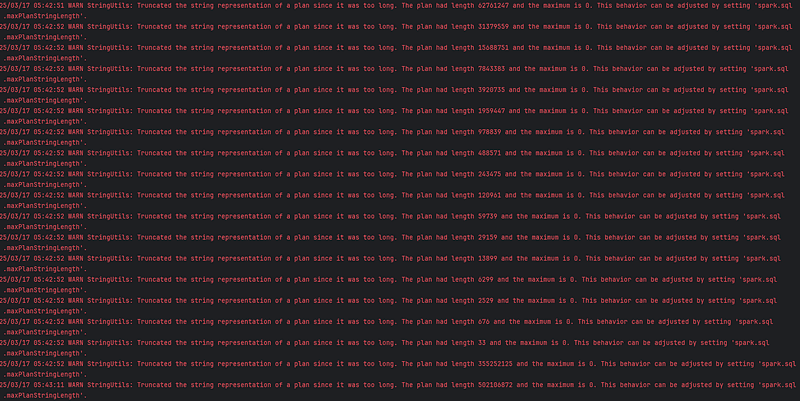
WARN StringUtils: Truncated the string representation of a plan since it was too long.
There are two other Spark properties we could tweak:
spark.sql.ui.explainMode: Oddly named with .ui., since it controls how explain is performed internally, not just for the UI. Spark’s explainString method supports five modes:
simple:Prints only the physical plan (used when callingexplainexplicitly on a DataFrame and unaffected by this property).extended:Includes both logical and physical plans.codegen:Displays generated Java code for whole-stage codegen.cost:Shows cost-based optimizer (CBO) statistics.formatted:Provides a structured, user-friendly output (default).
Ranging from quite verbose to extremely verbose to painfully verbose, none of these modes solve the issue.
spark.sql.debug.maxToStringFields: Limits the number of fields printed when converting a DataFrame to a string. It applies to all explain modes except cost, but even setting it to zero doesn’t fix the problem.
To understand why none of these properties fully resolve the issue, we need to get deeper into the core of where our string explains originate — the TreeNode class.
In Spark, the explainString method relies on the TreeNode class to generate a structured string representation of a query plan. The process works as follows:
- Tree Traversal: The plan is represented as a tree of nodes (
TreeNode[T]), where each node corresponds to an operation in the logical or physical plan. - Recursive String Generation: The
TreeNodeclass provides thetreeStringmethod, which recursively traverses the plan tree and constructs a hierarchical string representation. - Indentation & Formatting: Each node is formatted with indentation to reflect its depth in the tree. This makes the plan easier to read.
- Appending Metadata: Depending on the
ExplainMode, additional information (e.g., statistics, cost estimates, or generated code) is included at each node. - Efficient Concatenation: The final string is built using
StringConcatto minimize memory allocations, reducing performance overhead.
For our analysis, the key method to focus on is generateTreeString. It is called fromtreeString and recursively processes each node, applying indentation to represent the hierarchy.
This is the first line of code of this method:
(0 until indent).foreach(_ => append(" "))This line inefficiently recreates the indentation string for each node, causing unnecessary memory allocations due to Scala’s immutable strings. A better approach is using repeat for efficiency or caching the indentation to avoid redundant creation. However, while inefficient, this isn’t the root cause of our performance issue.
The real problem is that generateTreeString fully traverses the tree of nodes, regardless of the settings. The method doesn’t stop its recursive traversal because it’s designed to visit every node to create a complete query plan representation. Properties like maxToStringFields or maxPlanStringLength only affect the formatting or truncation of output, not the traversal itself. Similarly, the explain mode only changes how each node is printed, not how the tree is traversed.
That’s not all, folks! Let’s create a modifiable version of this class and add tracing to print each method call, the TreeNode object, and the method parameters. We’ll insert the following print statement as the first line in the method—right before the nefarious indent loop.
println(s"TreeNode.generateTreeString($depth,$lastChildren,lambda,$verbose,$prefix,$addSuffix,$maxFields,$printNodeId,$indent) This=${this.hashCode()}")Next, by splitting the traces for each iteration of our test loop and performing some basic counts, we derive the following striking table:

Remember that each iteration includes three calls to the "generateTreeString" method, except in the 20th column, where there’s only one.
Row meanings:
Num. TreeNodes:The number of uniqueTreeNodeobjects used.Num. Calls:The total number of method calls.Max. Num. Same Calls:The highest count of repeated calls (sameTreeNodeobject with identical method parameters).
WTF??? 🫢 While the number of TreeNode objects increases by 7 with every iteration, the total number of calls and the frequency of the most repeated call grow exponentially, approaching O(2ⁿ) complexity — meaning the number of calls roughly doubles with each iteration.
To put it simply: in every iteration of our test, Spark keeps printing — among other s— the exact same TreeNode object with the same parameters over and over again.
The Fix? 🤔
Initially, I experimented with applying the Memoizationpattern to cache already printed TreeNode objects, using the object’s hashCode and the received parameters as the key. However, this approach didn’t stop Spark from repeatedly calling the generateTreeString method and checking for key occurrences—thousands upon thousands of times. On top of that, I needed a data structure with automatic eviction, like LinkedHashMap for LRU caching, WeakHashMap for garbage collection-based eviction, or CacheBuilder from Guava (already included as a dependency) for size-based or time-based eviction policies. But adding all this caching just to prevent redundant calls that should never have been made in the first place? Far too messy!
The entire method practically screams for a refactor, but that’s no small feat, and I’d prefer not to introduce a ton of important changes all at once.
How about introducing a new spark.sql.ui.explainMode setting? An "off" value that disables all these unnecessarily redundant calls. Would this interfere with the explicit DataFrame.explain()? No, because as you may recall, the explicit explain always uses the "simple" explain mode.
With some minor adjustments, we can introduce this new"off" explain mode that essentially does nothing when Spark attempts to explain a plan. This mode can be set as the default, as Spark shouldn’t generate such an expensive, verbose overload by default — only when someone explicitly wants to see it in the Spark UI.
After the changes, the damn generateTreeString calls still persist. WTF??? Well, that’s because of another hall-of-shame-worthy line of code, this time in the org.apache.spark.sql.execution.columnar.InMemoryRelation.scala file, specifically within the CachedRDDBuilder class:
  val cachedName = tableName.map(n => s"In-memory table $n")
    .getOrElse(StringUtils.abbreviate(cachedPlan.toString, 1024))
Despite not allowing users to name a cached DataFrame, Spark “wisely” uses the internal tableName—always None—as an id. And since it’s unset, it “brilliantly” decides to explain the plan (in verbose mode, of course) before abbreviating the costly string to just 1024 characters. Genius! 🏅
Although it’s not straightforward, we could name the DataFrames when persisting — but to do that, we’d need to do something like this:
spark.sharedState.cacheManager.cacheQuery(df, Option("MyName"), StorageLevel.MEMORY_AND_DISK)NOTE: If you’d like to see the changes I’ve proposed to the Spark codebase, check out PR #49724.
Internal Verbosity⚡Performance
The first two adjectives that Spark proudly boasts on its official website are ‘Simple’ and ‘Fast.’ But is Spark really simple? Not in the slightest. Would you dare call Spark fast after everything that’s just been exposed? Not in a thousand lifetimes! 😖
Spark is, hands down, the most complex and internally verbose framework I’ve ever encountered. It comes as no surprise that so many new, trendy frameworks — like Polars, Dask, Daft or Snowpark— are popping up, claiming to be faster. It’s not that Spark is slow; Spark is fast… it’s just that it adds a ton of internal overhead to pretty much everything it does. But is all that buzz and fuss really necessary? More often than not, it’s not.
Here’s the thing: I’ve noticed that new, flashy features like Spark Connect are getting a lot of attention and support. But maybe… it’s time to clean up and tidy our SPARK_HOME before inviting new guests, don’t you think? 😉
“I am the one and only Method Man
The master of the plan, tuning Spark — that’s the jam”
(adapted from “Method Man” by Wu Tang Clan)